00196658-01 - IM SIPLACE Pro 7.1_en.pdf - 第10页
Installation Manual 1 Introduction SIPLACE Pro 7.1 Edition 11/2009 US 8 Note: Windows Server 200 0/W2K is not longer su pported. This m eans that SIPLACE Pr o 5.x and higher versions ar e not compatible to Window s 2000/…

1 Introduction Installation Manual
Edition 11/2009 US SIPLACE Pro 7.1
7
Note:
If you plan to install SQL Server manually, please read before the appropriate installation docu-
mentation. This documentation is part of the Support Media Navigation Guide. It describes the re-
quired settings for compatibility with SIPLACE Products. 1
1.3.3 SIPLACE Stand Alone Configuration
The following Hardware is recommended for the SIPLACE Pro Server: 1
– Pentium 4 with 3.0GHz or higher
– 2 x 160 GB hard disk
– 2048 MB memory (1024 MB min.)
– Backup drive (e.g. DAT, DVD)
– 21” screen (19’’ min.)
– optional SR-UPS
1
The following Software is required: 1
– Windows XP Professional with SP3 and MSDE 2000 with SP4 /
SQL 2005 (Server/Express) SP2/SP3 / SQL 2008 (Server/Express) SP1, or
– Windows Vista with SP2 and Windows Server 2008 with SQL 2005 (Server/Express) SP2/SP3
/ SQL 2008 (Server/Express) SP1
Note:
Microsoft .NET Framework 3.5 Servicepack 1 is absolutely necessary. If the setup program does
not find a appropriate Microsoft
®
.NET Framework, the user is asked to install the framework right
from the Support Media DVD delivered with the product. You should carefully test other applica-
tions on your computer for compatibility with this version of the Framework. 1

Installation Manual 1 Introduction
SIPLACE Pro 7.1 Edition 11/2009 US
8
Note:
Windows Server 2000/W2K is not longer supported. This means that SIPLACE Pro 5.x and higher
versions are not compatible to Windows 2000/W2K. Therefore please make sure that you up-
grade your Windows Server 2000/W2K system to Windows 2003, Windows XP or Windows Vista.
SIPLACE Pro 5.2 is compatible with Windows Vista SP2. 1
Note:
If you plan to install SQL Server manually, please read before the appropriate installation docu-
mentation. This documentation is part of the Support Media Navigation Guide. It describes the re-
quired settings for compatibility with SIPLACE Products. 1
1
1
2 System components and configurations Installation Manual
Edition 11/2009 US SIPLACE Pro 7.1
9
2 System components and configurations
2.1 Overview of system components
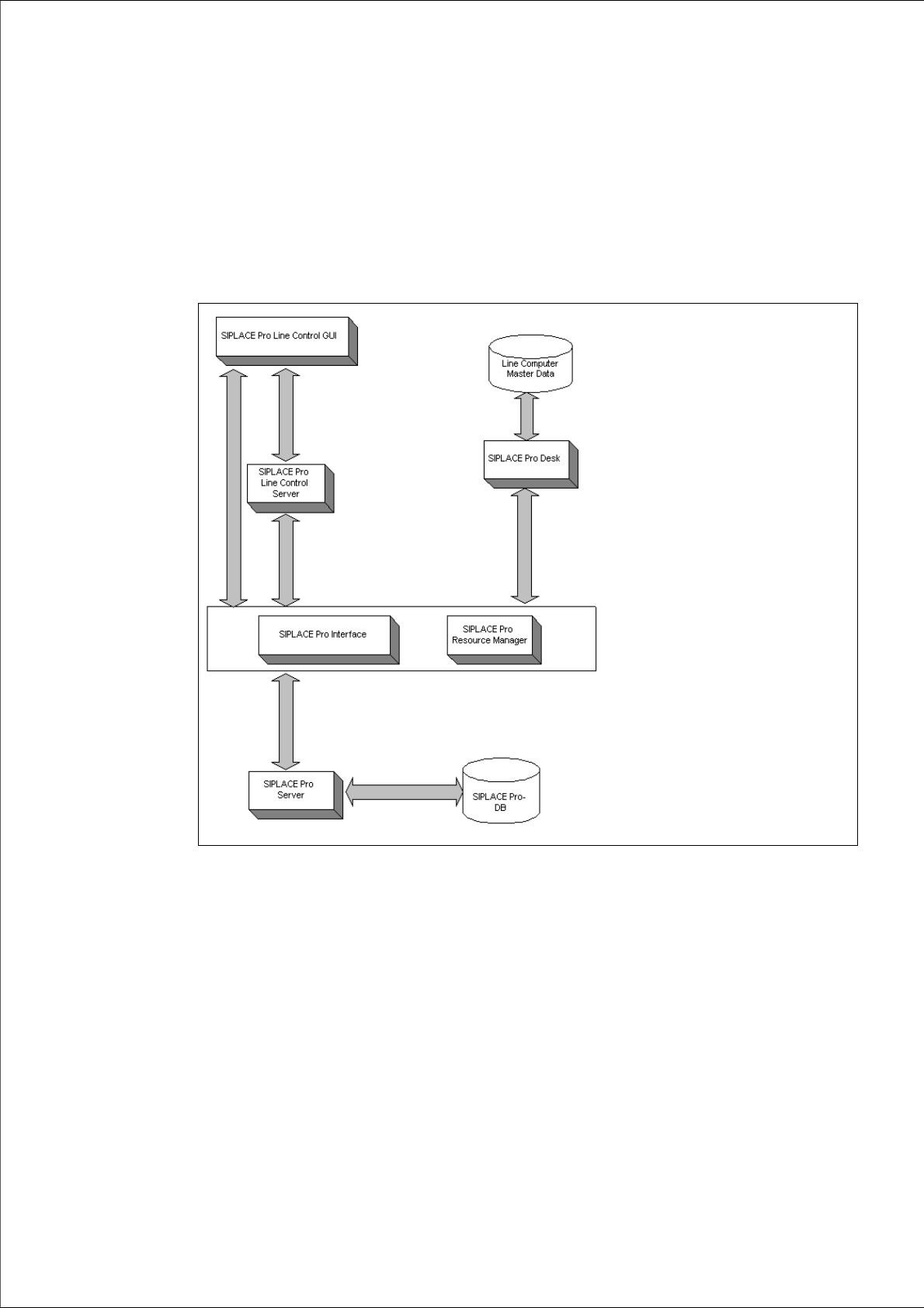
A complete installation of SIPLACE Pro consists of the following components. 2
2
Fig. 2 - 1 Overview of SIPLACE Pro system components
Æ Please read the documents "Configurations for SIPLACE Pro" and "Navigation Guide for the
Installation Procedure of SIPLACE Software Systems". You will find the documents on the
Installation CD for SIPLACE Pro (Folder "Documentation") and the Support Media DVD (Art.
No. 00383100-xx) that is added to any software product.