00196658-01 - IM SIPLACE Pro 7.1_en.pdf - 第38页
Installation Manual 4 Installation of SIPLACE Pro and possible Setup Types SIPLACE Pro 7.1 Edition 11/2009 US 36 Ste p 2 – Y ou are prompted to ente r the name of the co mputer which is running SIPLACE Pro Server . Æ Y o…
4 Installation of SIPLACE Pro and possible Setup Types Installation Manual
Edition 11/2009 US SIPLACE Pro 7.1
35
4.2.5 Setup Type – SIPLACE Pro Line Control Server
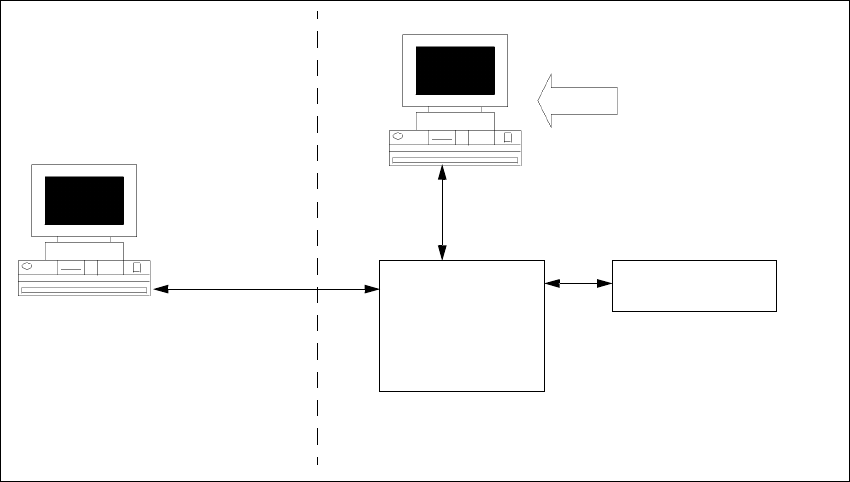
This setup type contains all components of the SIPLACE Pro Line Control Server. This setup type
is designed to be used if a separate computer is used as Line Control Server in order to increase
performance. 4
4
Fig. 4 - 21 Components – SIPLACE Pro Line Control Server
Step 1
Æ Run through the steps in ”Starting installation – first steps” from page 13.
Æ Select the SIPLACE Pro Line Control Server setup type.
Æ Click Next.
Line Control
Server
SIPLACE Pro
Interface
MS SQL Server with
SIPLACE Pro Server and
Database pre-installed
Setup
Resource
Manager
COM+
COM+
Installation Manual 4 Installation of SIPLACE Pro and possible Setup Types
SIPLACE Pro 7.1 Edition 11/2009 US
36
Step 2
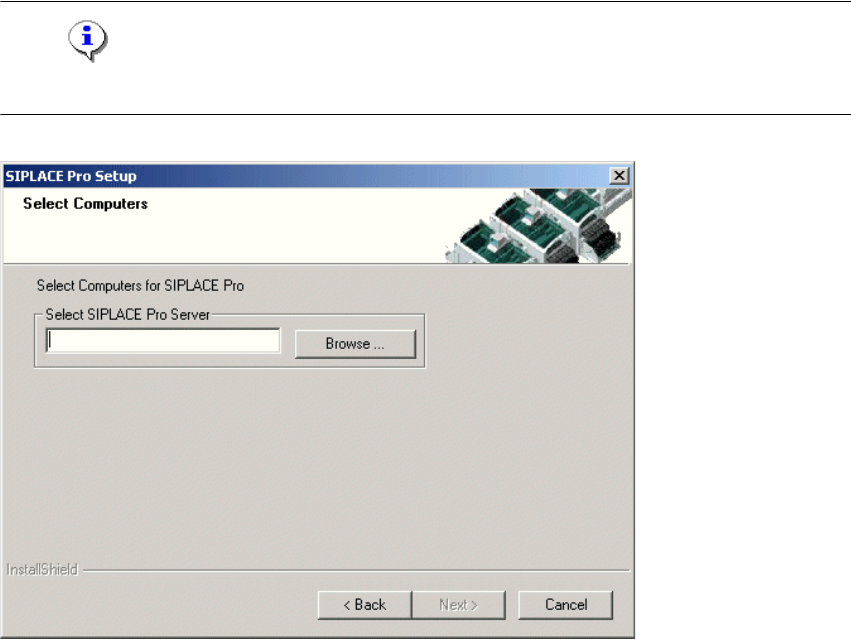
– You are prompted to enter the name of the computer which is running SIPLACE Pro Server.
Æ You can type in a name or click the Browse button to open a dialog box in which you can select
another computer name.
Note
SIPLACE Pro Server must already be installed on the remote computer! 4
4
Fig. 4 - 22 "Select Computers" dialog box
Step 3
The "Start Copying Files" dialog box gives you a last chance to check the information you have
entered during the previous steps. 4
Æ Click Next if you accept all the information entered so far.
Æ If you want to alter one or more details, click the Back button until you get to the dialog box in
question.
Æ There, input your changes and click Next to continue as usual
– The installation routine is now started.
– The "Setup Complete" window confirms that the installation has been completed successfully.
4 Installation of SIPLACE Pro and possible Setup Types Installation Manual
Edition 11/2009 US SIPLACE Pro 7.1
37
4.2.6 Setup Type – SIPLACE Pro Programming System
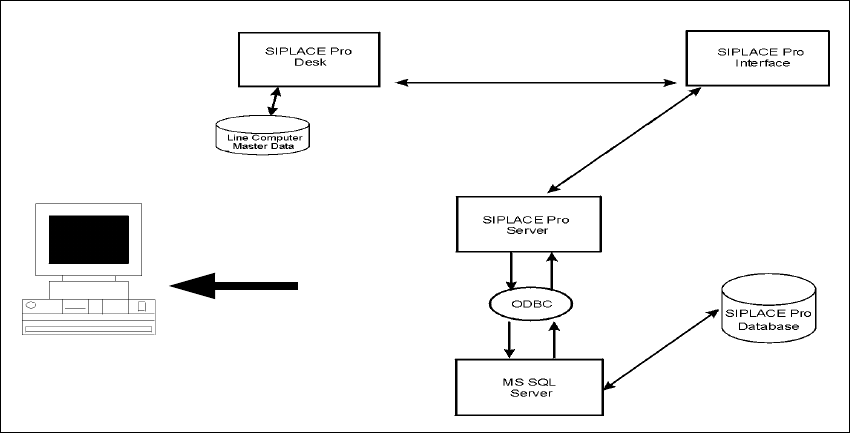
This setup type contains all the components of SIPLACE Pro except for the Line Control System,
and enables the programming system to be operated on a single computer (SIPLACE Pro Desk,
Server and Database). It is designed to be used only for programming without download function
on that computer. 4
4
Fig. 4 - 23 Components – SIPLACE Pro Programming System
Step 1
Æ Run through the steps in ”Starting installation – first steps” from page 13.
Æ Select the SIPLACE Pro Programming System setup type.
Æ Click Next.
The subsequent steps are identical to the SIPLACE Pro complete system. Only the components
for Line Control are not installed. 4
Step 2
Æ Continue by running through the steps described in ”Setup Type – SIPLACE Pro Complete
System” from page 21.
Setup