00196658-01 - IM SIPLACE Pro 7.1_en.pdf - 第54页
Installation Manual 7 Troubleshooting SIPLACE Pro 7.1 Edition 11/2009 US 52 Error description: The error messages 1 316 and 1603 from the Micr osoft Inst aller Service could occu r under dif fer- ent conditions. 7 Cause:…

7 Troubleshooting Installation Manual
Edition 11/2009 US SIPLACE Pro 7.1
51
7 Troubleshooting
7.1 During installation
If it is not possible to solve a problem during installation of SIPLACE Pro, please send the file
SIPLACEProSetupLog.html and all similarly named files to SIEMENS Service (see 7.1.1). 7
7.1.1 Relevant files to analyze setup problems
Error description: 7
Whenever problems arise during setup, please inspect the file SIPLACEProSetupLog.html, which
is written anew by each installation. 7
Cause: 7
Setup problems. 7
Solution: 7
The log file is found either in %temp% or in the unified Installation Log folder defined in the registry
value HKLM\SOFTWARE\Siemens SIPLACE\SIPLACE Discovery\LogFilesDirectory
(default: %ProgramFiles%\Siemens SIPLACE\Installation\Log). 7
Old versions of the log file can be found in the same folder or the program folder, too. They have
a timestamp added to the filename. 7
Hint
If you need Siemens support regarding installation problems, please provide all installation log
files. If you already have a SIPLACE Pro installation on your computer, the SIPLACE Pro Error
Reporting Tool is available and can be used from the start menu (Start/Programs/
Siplace Pro/Error Reporting Tool). 7
7.1.2 Error code 1316 and 1603
7
Fig. 7 - 1 "Error " dialog box
Installation Manual 7 Troubleshooting
SIPLACE Pro 7.1 Edition 11/2009 US
52
Error description:
The error messages 1316 and 1603 from the Microsoft Installer Service could occur under differ-
ent conditions. 7
Cause:
See InstallShield knowledgebase articles Q107390 and Q107182. 7
Workaround:
Æ Copy the files "SIPLACE Pro.msi" and "Data1.cab" from the setup CD in the directory men-
tioned in the error message e.g. c:/Windows/Installer/SIPLACE Pro.msi.
Æ Retry the setup:
a) The error message offers to cancel the setup or
b) confirm the error message with OK. The setup is cancelled. Then restart the setup.
Æ After a successful setup, remove the copied files.
If the copied files are not removed, the installer could access these outdated files during the
next setup which might cause further problems.
Note
It has not been proven if this workaround helps in all possible situations. In case of any further
problems please contact your SIPLACE service technician. 7
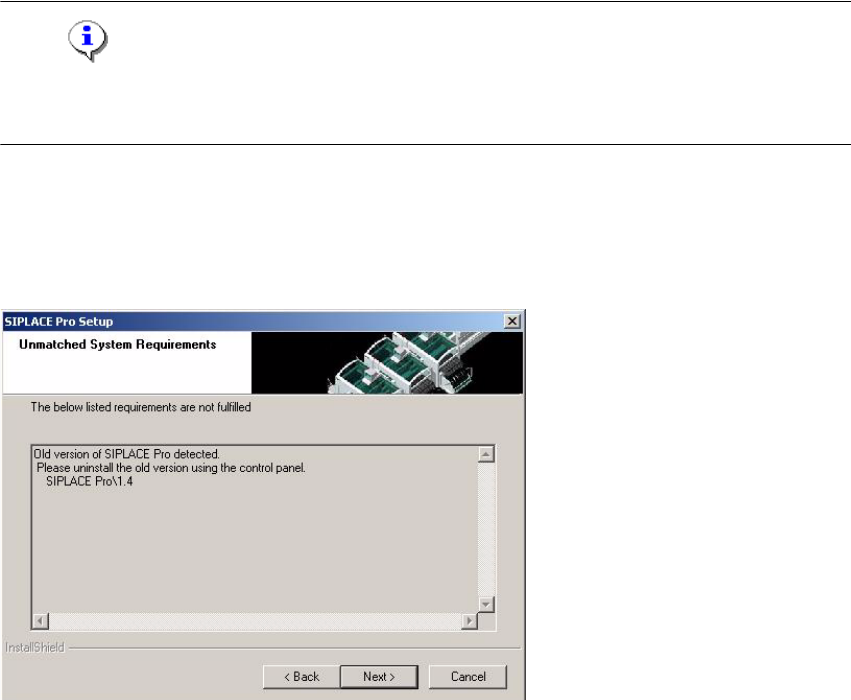
7.1.3 Conflicting old SIPLACE Pro installations
Error Description 7
7
Fig. 7 - 2 Unmatched System Requirements - dialog box
7 Troubleshooting Installation Manual
Edition 11/2009 US SIPLACE Pro 7.1
53
Cause: 7
The new SIPLACE Pro installation conflicts with old SIPLACE Pro installations. 7
Solution: 7
The SIPLACE Pro setup may not be installed in parallel with SIPLACE Pro V1.4 or earlier ver-
sions. This check is performed by looking in the registry. 7
If SIPLACE Pro setup detects old installations and if you are absolutely sure you have uninstalled
the old version of SIPLACE Pro and SIPLACE C Pro, please proceed as follows: 7
Æ Make sure that you have manually removed any remnants of this old installation from the pro-
gram folder except for the database!
Æ Delete the registry entries under HKEY_LOCAL_MACHINE\SOFTWARE\Siemens
SIPLACE which relate to the error message of the current setup (like that shown above).
7.1.4 Remote installation with Windows XP clients
Error description: 7
If you are logged on to the server via remote desktop connection and start the installation following
message will be shown. 7
1607: Installation of Install Shield Scripting not possible 7
Solution: 7
Æ Copy the complete content from the Setup CD to the server to be able to start the installation.
7.1.5 Conflicting applications
Error description: 7
The installation displays in the dialog "Conflicting applications" the file LCSVR.exe which does not
dissapear even after pressing the Next button 7