00196658-01 - IM SIPLACE Pro 7.1_en.pdf - 第59页
7 Troubleshooting Installation Manual Edition 11/2009 US SIPLACE Pro 7.1 57 7.1.8 Error - 16xx... Error description: 7 Message with unspeci fic error message "Error -16xx ..." is displayed during setup. 7 Cause…
Installation Manual 7 Troubleshooting
SIPLACE Pro 7.1 Edition 11/2009 US
56
Solution: 7
Click on Next. Setup will return the database to its state at the beginning of the Installation. The
database administrator should start the Query Analyser (or equivalent) and run the script
RepairSecurity.tsq, which can be found in the SIPLACE Pro Installation directory in the folder
DBSkripts. Now restart Setup.exe. The database should now be processed correctly. 7
7.1.7 Users connected to the database SIPLACEPro
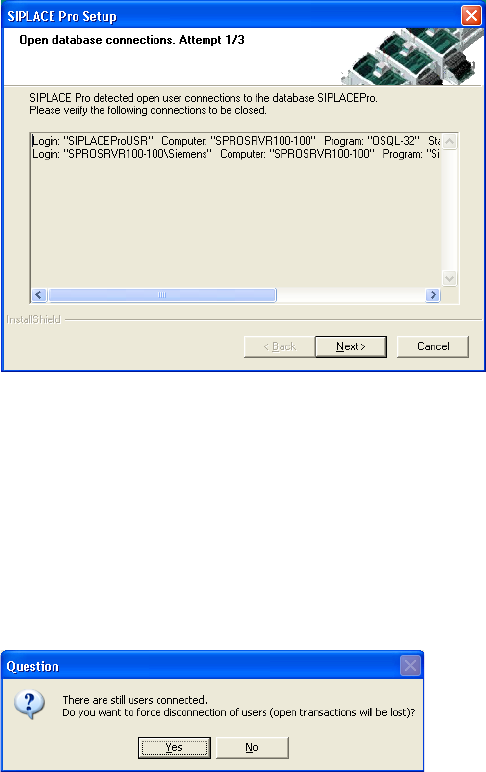
During upgrade, if users are connected to the database SIPLACEPro, a message similar to the
following will be displayed: 7
7
Fig. 7 - 5 Open Database Connections
In this case, you have to examine the list of connections,identify and close the appropriate appli-
cation(s) manually. Loginname, computername and program name will be displayed to help iden-
tification of the application(s) which need to be closed. 7
Æ Click Next to check for remaining connections, again.
If you have problems identifying and closing the connections to the database, SIPLACE Pro Setup
will assist you after three times of check, the following message will be displayed: 7
7
Fig. 7 - 6 Open Database Connections - Message
Æ Click Yes if you want to force a disconnection of all open user connections automatically.
If you click No, you will start over with the connection check. After three times of check the discon-
nection question will be displayed again, and so on. 7
7 Troubleshooting Installation Manual
Edition 11/2009 US SIPLACE Pro 7.1
57
7.1.8 Error - 16xx...
Error description: 7
Message with unspecific error message "Error -16xx ..." is displayed during setup. 7
Cause: 7
SIPLACE Pro's installation program is made up of several programs running simultaneously, and
in this case, the runtime system of the installation may detect errors, which cannot be caught or
handled by the installation program. Therefore the native error messages as provided by the
runtime system are displayed. Examples for such errors are: 7
– Error -1601 The Windows InstallerService could not be accessed.
– Error -1603: Fatal Error During Installation
– Error -1607: Unable to Install InstallShield Scripting Runtime
– Error -1608: Unable to create InstallDriver instance
– Error -1628: Failed to complete script based install
– Solution:
If these or other generic error messages are displayed during installation of SIPLACE Pro, please
refer to the InstallShield Customer Central (http://consumer.installshield.com/common.asp
) for in-
formation on how to handle this case. 7
7.1.9 Access problems of SIPLACE Pro share after client installation
Error Description: 7
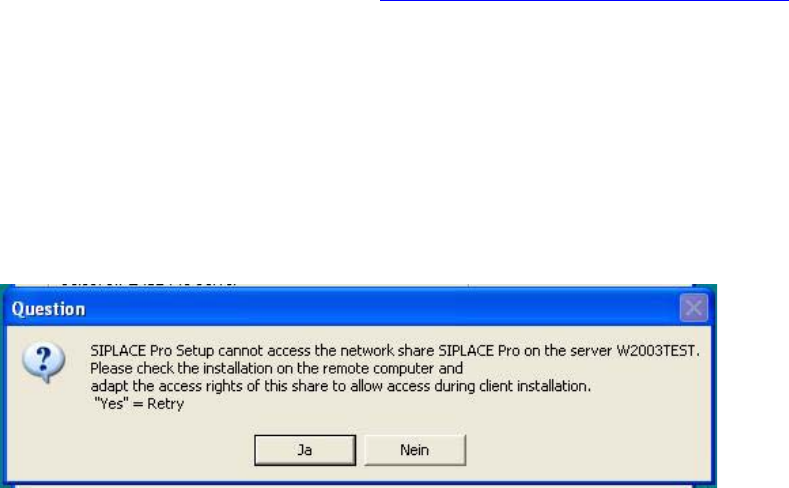
After the first client installation of SIPLACE Pro you can not access the SIPLACE Pro share ...
share on a remote server (may be true for either a SIPLACE Pro server or a Line Control Server
or a pure database server) and following error message is displayed. 7
7
Fig. 7 - 7 Error message during client installlation
Solution: 7
In order to solve the share problem you have to modify the access rights for this share of the
reomote computer as follows: 7
Installation Manual 7 Troubleshooting
SIPLACE Pro 7.1 Edition 11/2009 US
58
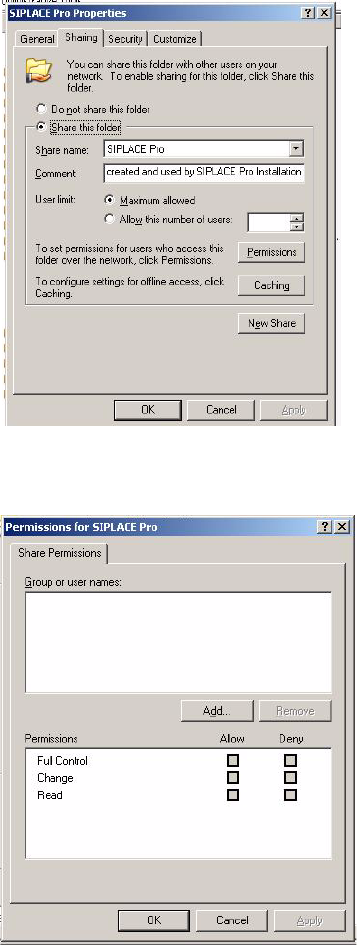
Æ In Explorer go to Properties of the SIPLACE Pro folder.
Æ Click on Sharing
7
Fig. 7 - 8 SIPLACE Pro folder properties
Æ Click on permissions.
7
Fig. 7 - 9 Permissions for SIPLACE Pro
Æ Now you can modify permission rights by adding user groups or names and permissions as
required to access the share from client systems during installation. Please note that the share
is ONLY used during installation of SIPLACE Pro clients which implies that access to the share
is required for users which perform the client installations. If the share permissions are config-
ured once the share won’t need to be changed any more except for SIPLACE Pro is deinstalled
(which will remove the share) and reinstalled again.