00196658-01 - IM SIPLACE Pro 7.1_en.pdf - 第67页
8 Uninstalling Installation Manual Edition 11/2009 US SIPLACE Pro 7.1 65 Ste p 3 Clean up the disk and make sure that there are no more program files. 8 Æ Check the path Program Files\Siemens SIPLACE\SIPLACE Pro . Æ If y…
Installation Manual 8 Uninstalling
SIPLACE Pro 7.1 Edition 11/2009 US
64
8
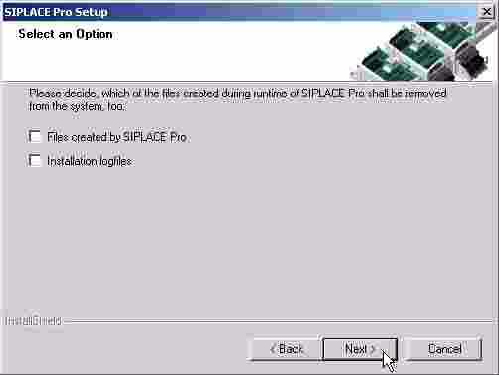
Abb. 8 - 1 Saving options
Æ Choose Files created by SIPLACE Pro to be removed if you want to free up disk space on
this computer.
Choose Installation logfiles to be removed if you never plan to install SIPLACE Pro again on
this computer. If you want to keep the installation logfiles including the log from the uninstalla-
tion, make sure to leave the option Installation logfiles unchecked.
If you do not plan to install SIPLACE Pro again on this computer, we recommend to choose all
options.
Æ Click Next and you get a summary of all components to be deleted.
Æ Click Next if you accept all the information entered so far.
Æ Click Finish
Step 2
Clean up the registry. 8
Æ Go to the "registry editor"
via Start - Run - then type in "regedit".
Æ Select HKEY_LOCAL_MACHINE\SOFTWARE\Siemens SIPLACE
Æ Delete the following entries:
Line Control GUI 2.0
LineControlServer 1.0
SIPLACE Pro 1.0
SIPLACE Pro 2.0
SIPLACE Pro SetupLog
SIPLACE Pro
SIPLACE Licensing
SIPLACE NET

8 Uninstalling Installation Manual
Edition 11/2009 US SIPLACE Pro 7.1
65
Step 3
Clean up the disk and make sure that there are no more program files. 8
Æ Check the path Program Files\Siemens SIPLACE\SIPLACE Pro.
Æ If you will find additional files, please delete them (except for the database).
8.2 Uninstalling the database
8.2.1 On installations of SQL Server 2000, 2005, 2005 Express
Warning
All data for SIPLACE Pro will be deleted. This step is only for database administrators. 8
Æ On SQL Server: Go to Enterprise Manager".
On SQL Server 2005: Go to SQL Server Management Studio.
Æ Select the database "SIPLACEPro".
Æ With the right-mouse button select "delete".
All database files of SIPLACE Pro will be deleted. 8
8.2.2 On MSDE installations
Æ Uninstall the MSDE instance used for SIPLACE Pro.
Æ Remove the database files
Note
This applies to SQL 2005 Express without SQL Server Management too. 8
8
Installation Manual 8 Uninstalling
SIPLACE Pro 7.1 Edition 11/2009 US
66