cp45头部故障判断.pdf - 第36页
1. Head Module Ver. Date CP45 CP45NEO 00 2004/11 O O 1-1 1-18. Z-axis Height Check *T o o l s a) Calibr ation Plate *P a r t a) 1) R e t u r nt h eN o z z l eo fE a c hH e a dt oA N CP o c k e t - In Case Uninstalling No…
1. Head Module
Ver. Date CP45
CP45NEO
00 2004/11 O O
1-1
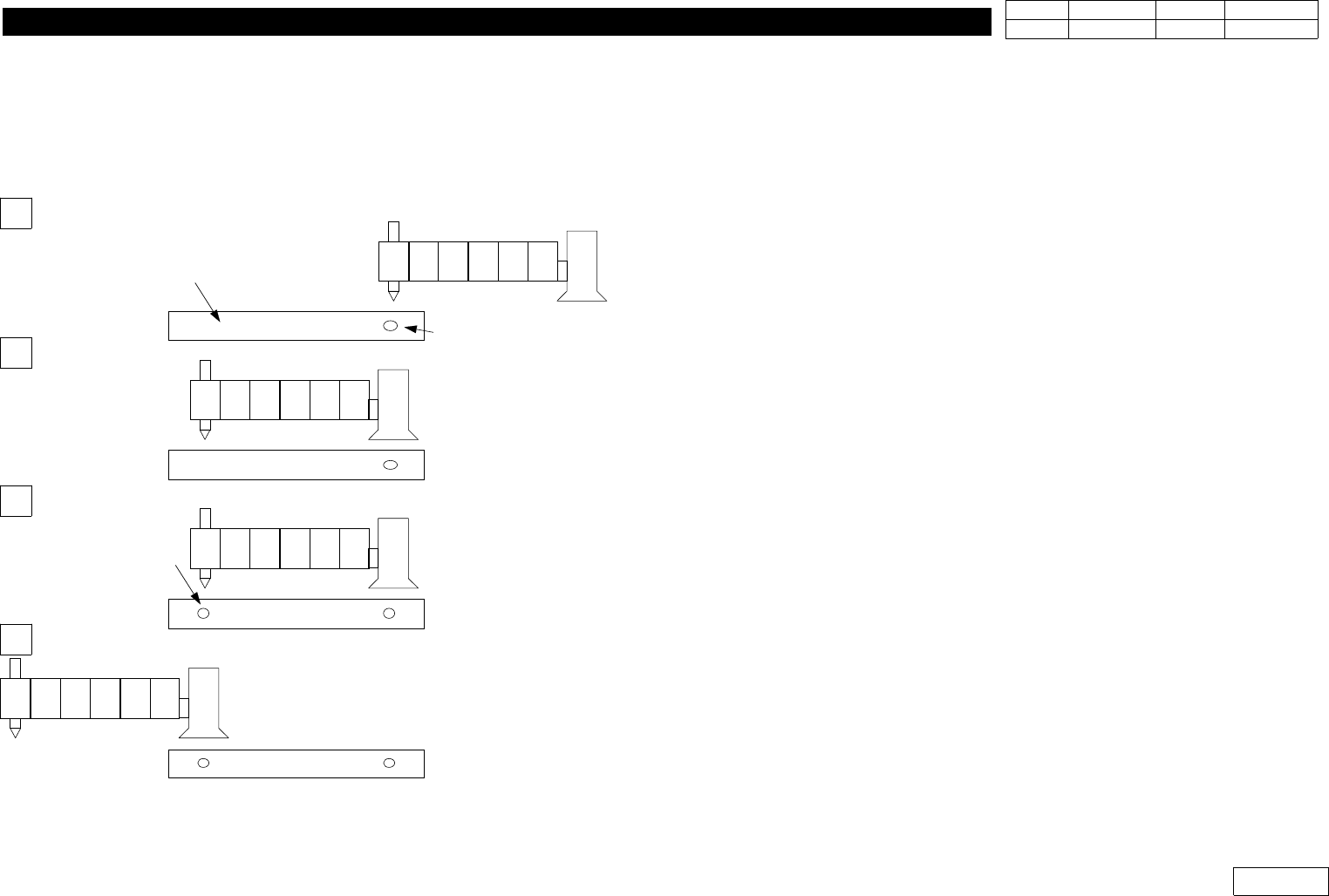
2) Move Camera Offset of CP45F or CP45FNEO Setting Procedure
2-1) If Fixed Camera is Available, Install this and Proceed 1) above
2-2) If Upward Vision of CP40 is Available, Install this and Proceed 1) above
2-3)IfFixedCameraorUpwardVisionisnotAvailable
=> Input the Calculated Value in Sys.Setup => Offset(F4) =>Other Device (Camera *1)
2-3-1) -Install the Nozzle of the Minimum Diameter(TN040 or CN040)
at Head 1
-Attach Tape at the Center of Upper Conveyor Frame
(300mm,Teflon Tape is Proper)
-SetthePositionofHead1ontheTapeCenterandMove
Z-axis Down to Mark the Position of Head1 on the Tape
with Teaching Box
2-3-2) -Read the Center of Marked Position by Move Camera
-Set this Position for Placement Origin, and Save in Step
Program
2-3-3) -Mark the Position of Head1 Once Again w/o Moving Position
2-3-3-1) - Move Move Camera to Save the Center of the Secondly
Marked Position in Step Program
- The Distance btw. these Two Position Becomes the Offset
of Move Camera
- Note that X-axis Position can be '+' or '-' Depending on
Coordinate. If '-' Direction, Convert in '+' to Input
(Y-axis is Unnecessary)
H1 H2 H3 H4 H5 H6
H1 H2 H3 H4 H5 H6
H1 H2 H3 H4 H5 H6
H1 H2 H3 H4 H5 H6
Head *1
Move Camera
Tape on the
conveyor Frame
Second Marking Point
: Head 1
First Marking Point
: Head 1
1
2
3
4
1. Head Module
Ver. Date CP45
CP45NEO
00 2004/11 O O
1-1
1-18. Z-axis Height Check
*Tools
a) Calibration Plate
*Part
a)
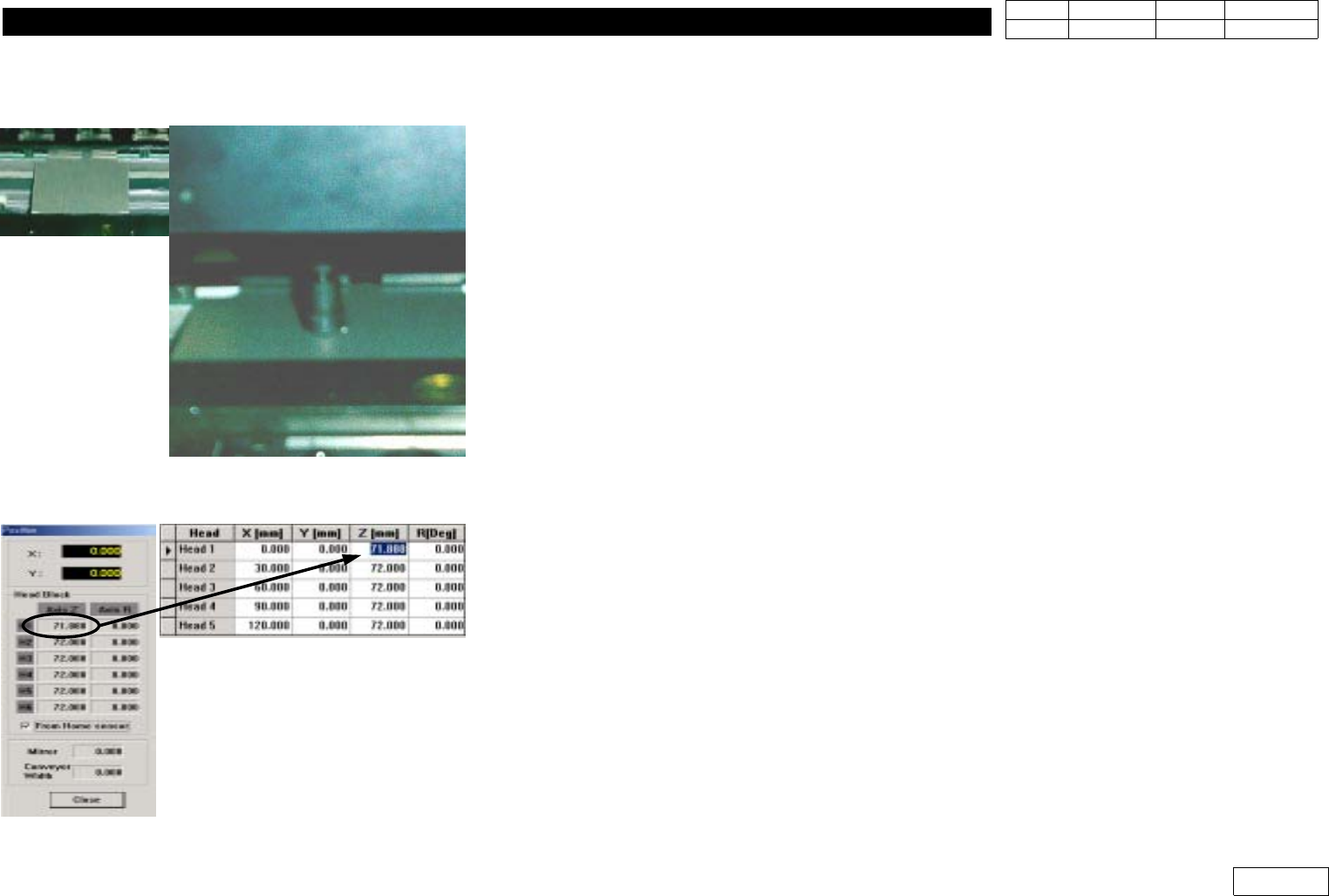
1)
ReturntheNozzleofEachHeadtoANCPocket
- In Case Uninstalling Nozzle from Head Manually, Return it with ANC Menu as Mistake
canbeMadeinMMI
2) Adjust Conveyor to Vision Calibration Plate, Load the Plate to the Install Position
3) With Teach box, Make Z1-axis Contact the Face of the Plate like the Figure
-With Teach Box, Set to Make it Face the Exactly Straight Plate in the Minimum Speed
4) Open View - Current Position in MMI.
5) Select From Home Sensor like the Figure
6) At thie Time, Input the Displayed Value in Offset
7) Proceed from Head1 to Head6 in the same way
1. Head Module
Ver. Date CP45
CP45NEO
00 2004/11 O O
1-1
1-19. Swing Mirror Limit & Home Offset Adjustment
*Tools
a) Calibration Plate
*Part
a)
Used When Aligning Home Position of Swing Mirror
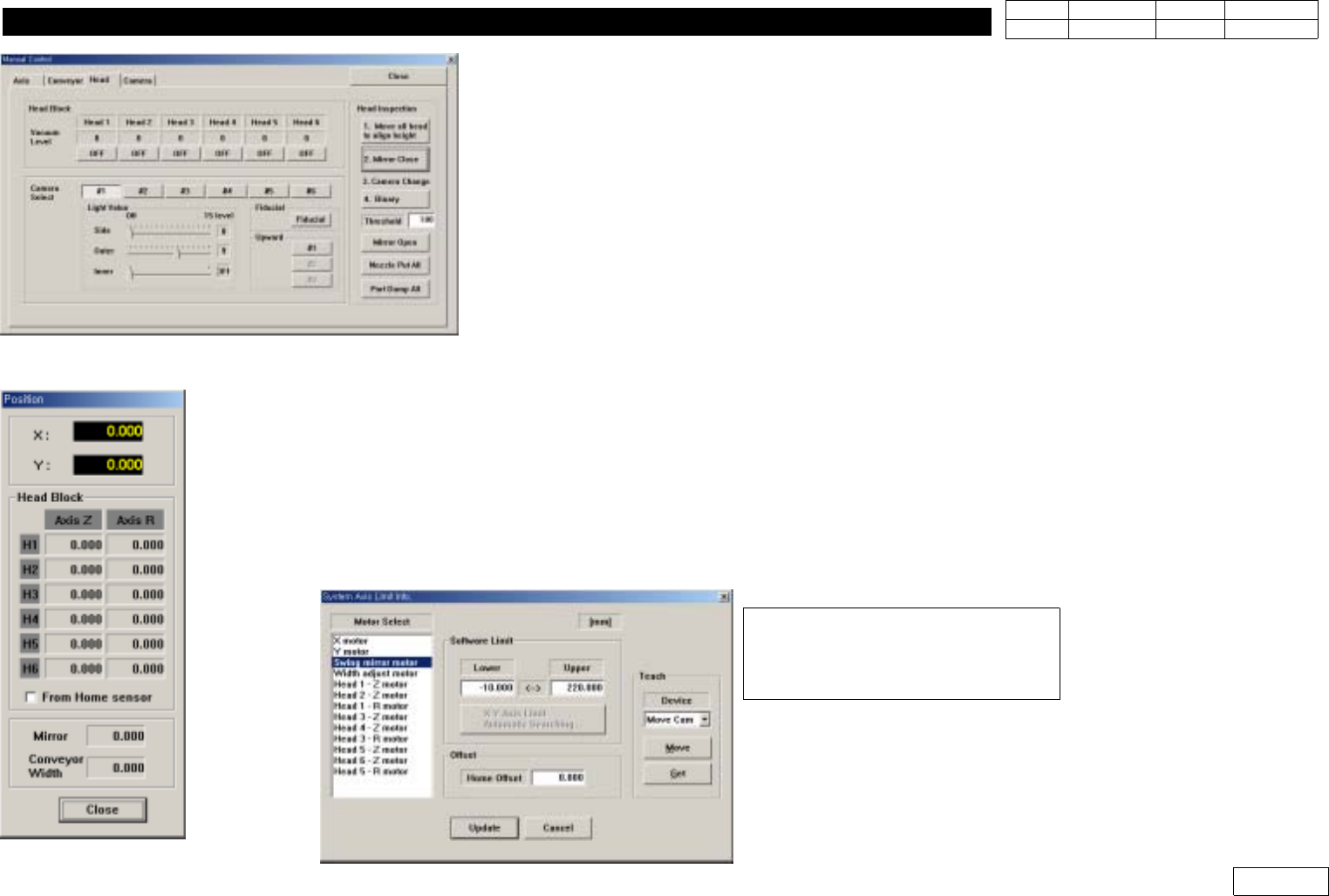
1) Install Calibration Tool (ANC *1 Pocket) at Head1
Close the Position of Mirror Manually(Sensing Position)
Select View - Manual Tool - Head(Ref. Fig1-19-1)
Select '1.Move all Head to align Height' (Move Z-axis to Stable Position) and Select '2.
Mirror Close' to Move Mirror to Sensing Position
2) As Watching Vision Monitor, Slowly Adjust Swing axis with Teaching Box so that Image
of Monitor Comes Out Right(Image Sensing when Angle btw. Camera and Calibration
Tool is 90)
3) Check the Position of Mirror that the Image of Monitor Comes Out Right in 'Current
Position(Fig1-19-2) => If this Value Exceeds +- 3degree, Input it in Swing Mirror Motor
Home offset(Fig 1-19-3) for Compensation.(Input the Checked Value from Current
Position for Compensation Added with '-')
Fig 1-19-1 Manual Tool window
Fig 1-19-2 current positionl window
Fig 1-19-3 Swing Mirror Motor Home offset window
(Sys.Setup => Limit
=> Select Swing Mirror Motor
=> Input in Offset Item