192277 - Micron Technical Reference Volume 3.pdf - 第111页
CYCLONE UNDER STENCIL CLEANER MODULE OVERVIEW Chapter Issue 11, Feb 18 Technical Reference Manual 26.1 CHAPTER 26 CYCLONE UNDER STENCIL CLEANER MODULE OVERVIEW NOTE V acuum Filtration Units VF35i is located a t the rear …

INTERCHANGEABLE UNDER SCREEN CLEANER MODULE
CALIBRATIONS
25.16 Technical Reference Manual Chapter Issue 6, Jan 17
7. Replace the empty 5 litre container with a 5 litre container full of the solvent
to be used.
8. Select Set Solv Full.
9. Confirm by selecting Yes.
10. Select Exit.
11. Select Exit.
12. Select Back.
Paper If paper counting is enabled, the software needs to know the paper roll length
when first fitted to the under screen cleaner.
NOTE
The length of the paper roll is printed on the paper roll wrapping.
To calibrate the software carry out the following procedure:
1. Select Open Cover Commands.
2. Select Unload Screen.
3. Open the front printhead cover.
4. Remove the screen from the machine.
5. Change the paper roll as detailed in the consumable replenishment.
6. Select Change Paper.
7. Ensure the paper length parameter matches that stated on the paper roll
wrapper.
8. Select Continue.
9. Select Prime Paper and when prompted press the two button control
switches simultaneously ensuring that the paper feeds correctly.
10. Select Back.
11. Refit the screen.
12. Close the front printhead cover and press the System button when
prompted.
13. Select Load Screen.
14. Select Back.
CYCLONE UNDER STENCIL CLEANER MODULE
OVERVIEW
Chapter Issue 11, Feb 18 Technical Reference Manual 26.1
CHAPTER 26 CYCLONE UNDER STENCIL CLEANER MODULE
OVERVIEW
NOTE
Vacuum Filtration Units VF35i is located at the rear of Style 4 machines and
accessed by removing the rear panel.
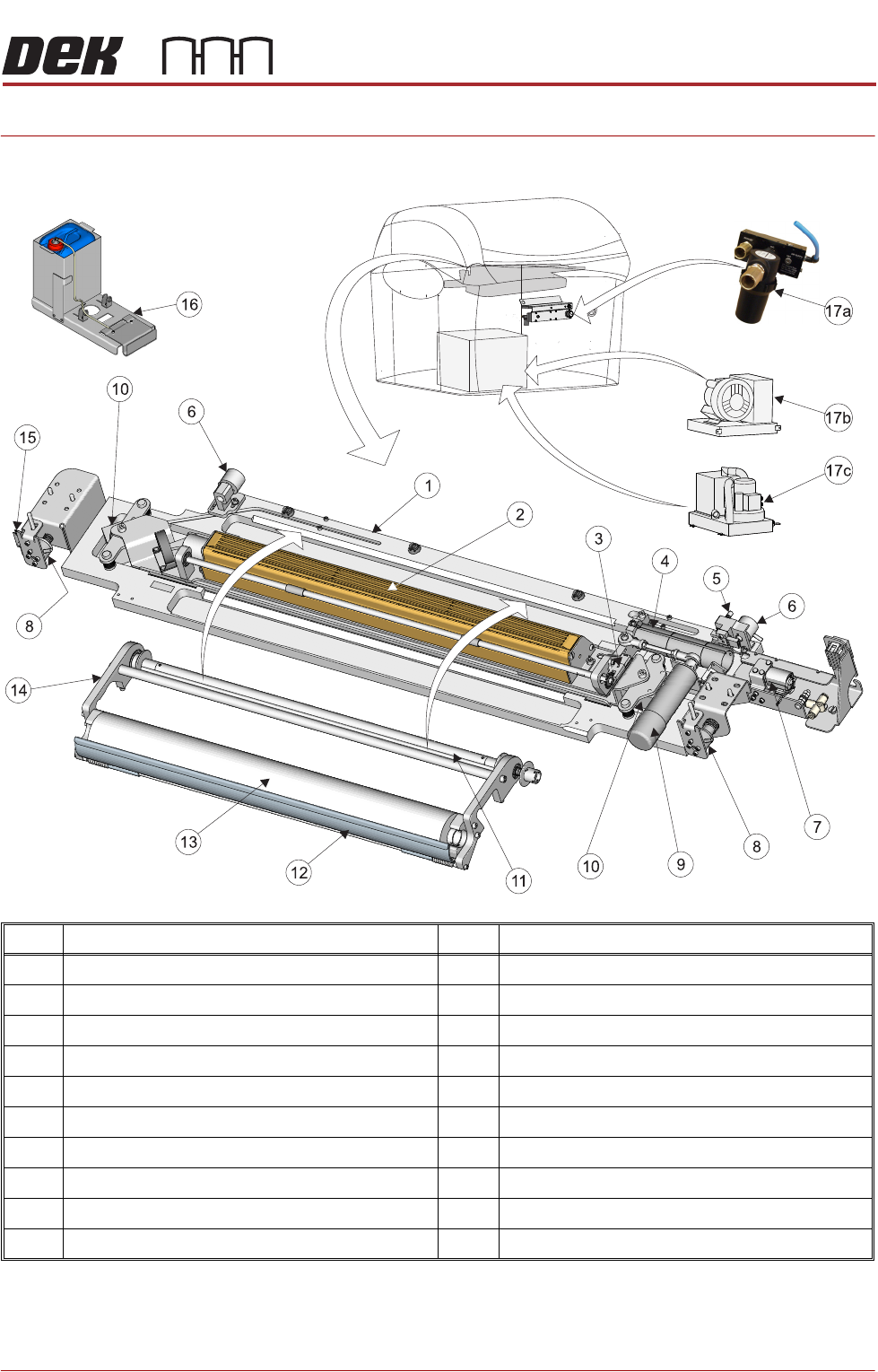
Item Description Item Description
1 Cyclone Cleaner Tray 11 Take Up Spindle
2 Vacuum Chamber 12 Fabric Braking Mechanism
3 Fabric Usage Sensor 13 Clean Fabric Roll
4 Fabric Feed Motor 14 Fabric Cassette
5 Cleaner Dropped Sensor 15 Home Sensor
6 Cleaner Pickup Magnet (2 positions) 16 External Solvent Tank
7 Solvent Pump 17a VF10 Venturi Vacuum Filtration Unit
8 Cleaner Home Magnet (2 positions) 17b VF35i Vacuum Filtration Unit
9 Oscillating Motor 17c VF25 Vacuum Filtration Unit
10 Cleaner Lift Solenoid (2 positions)
CYCLONE UNDER STENCIL CLEANER MODULE
OVERVIEW
26.2 Technical Reference Manual Chapter Issue 11, Feb 18
The cyclone under screen cleaner wipes lint free fabric, dry or wet across the
underside of the stencil to minimize paste build up. The frequency and mode
(wet/dry/vac) are programmable in the product file. The under screen cleaner is
available in four widths, 300, 400, 460 and 515mm and is supplied with an extra
fabric cassette for a quick change-over when replenishment is required. The
fabric cassette can be programmed to oscillate in the X direction creating a
scrub action as the cleaner traverses in the Y direction.
When a stencil cleaner operation is required, the camera carriage approaches
the cleaner and attaches to the two cleaner pickup magnets. The two cleaner
home magnets holding the stencil cleaner unit in the home position are de-
energized, the cleaner pickup magnets are energized securing the cleaner to
the camera beam, allowing the pickup carriage to pull the cleaner across the
stencil. The cleaner dropped sensor alerts the operator if the cleaner becomes
disengaged from the camera carriage during cleaning.
A fabric usage sensor enables the software to monitor the clean fabric roll. The
fabric feed motor supplies a clean section of fabric across the vacuum chamber.
Solvent The solvent pump supplies solvent to the fabric roll from the external solvent
tank, mounted on the rear or either side of the machine. The external solvent
tank container is capable of accommodating a 5 litre container of solvent. For
Style 1 - 4 machines a load cell in the base of the external solvent tank enables
the software to calculate the percentage level of solvent within the container.
Style 5 machines also utilize an external solvent tank container capable of
accommodating a 5 litre container of solvent. For this type of solvent tank, a
solvent low level float switch fitted to the solvent container enables the software
to calculate the solvent level.
Solvent Advice The plastic tubing that transports the solvent from the solvent tank to the
underscreen cleaner head is designed to withstand most types of solvent.
However, mixing of two different solvents can cause a chemical reaction and
seriously damage the plastic tubing. When changing to a different type of
solvent, the tubing must be replaced completely to prevent solvent leaks. To
obtain new tubing and replacement instructions, order Machine Performance
Upgrade (MPU) 601187*2.
ASM only recommend the DEK-PRO and the DEK-PRO XF (Environmentally
Friendly) USC solutions to be used with the under screen cleaner. The following
are available from ASM:
NOTE
The following solvents MUST NOT be used in the under screen cleaner unit,
however, this list is not complete and does not mean that any solvent not
mentioned is compatible, with DEK machines.
• Rosstech 106 FE
• Rosstech 162 ND
• Acetone
• Iso-Propyl Alcohol (IPA)
Description 1 Litre 5 Litre 20 Litre
DEK-PRO 173483 173485 431093
DEK-PRO XF 431513 431514 -