192277 - Micron Technical Reference Volume 3.pdf - 第117页
CYCLONE UNDER STENCIL CLEANER MODULE ADJUSTMENTS AND SETTINGS Chapter Issue 11, Feb 18 Technical Reference Manual 26.7 ADJUSTMENTS AND SETTINGS W ARN ING STRONG MAGNET FIELD. A STRONG MAGNETIC FIELD EXISTS IN THE VICINIT…
CYCLONE UNDER STENCIL CLEANER MODULE
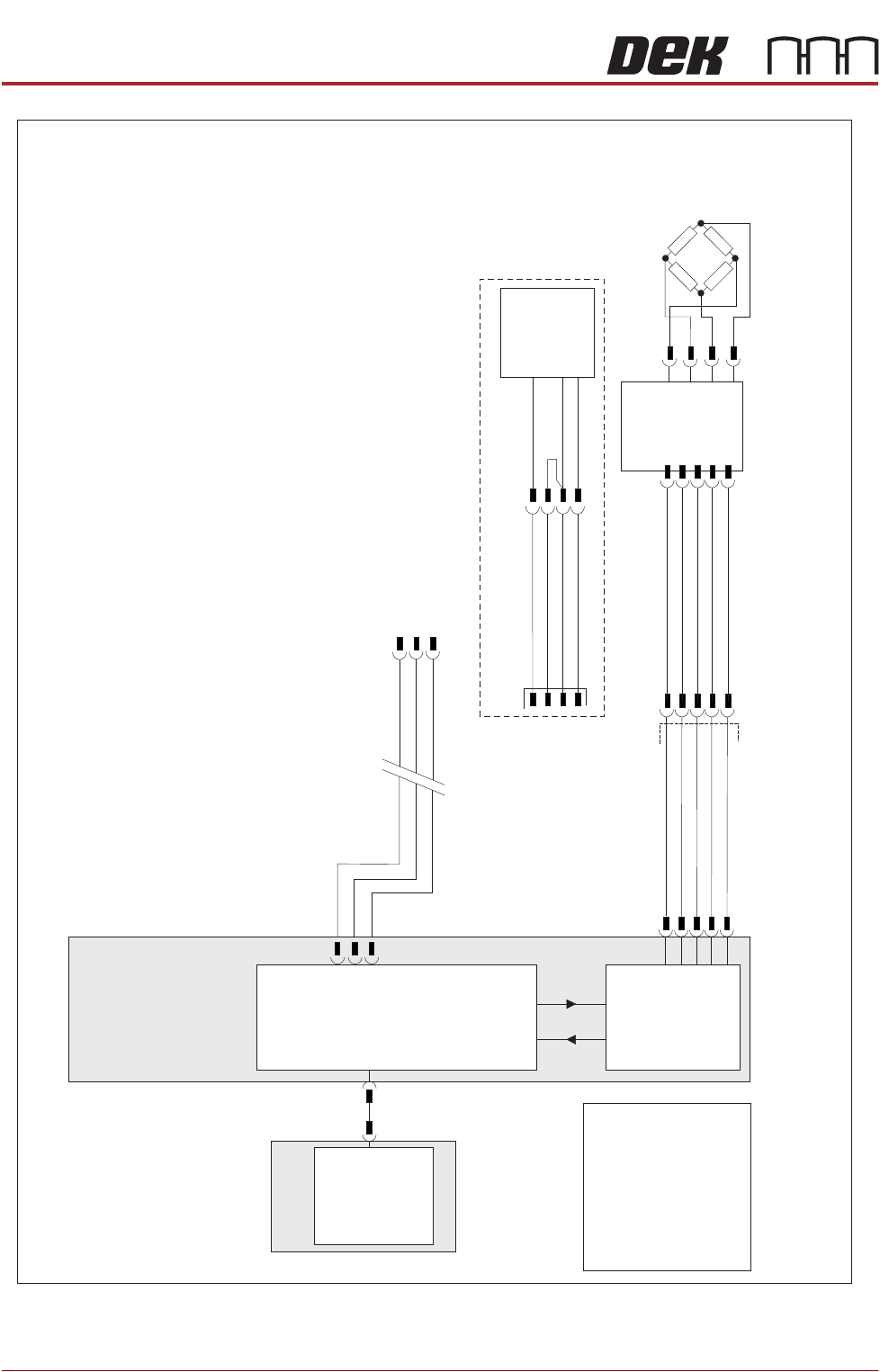
ELECTRICAL SCHEMATIC
26.6 Technical Reference Manual Chapter Issue 11, Feb 18
Figure 26-3 Cyclone Schematic - Page 2
M36 Machine
Control Enclosure
PC
Motherboard
USB
NextMove ES
(I/O Node 1)
CAN_H
CAN_L
CAN GND
M36PL35
I/Ps
CAN Bus
O/Ps
9SK63
9PL64
Solvent
Load Cell
9SE26
NextMove
Interface
M36PL09
AN IN0 -
AN IN0 +
0V USR
+12V
-12V
Solvent
Level Amp
-V
+V
-IN
+IN
N2SK2
CAN
In
9SK69
Level +
Ext Service Panel
AGND
0V USR
+12V
-12V
NOTE
The breaks in the CAN
Bus chain reflect that
additional I/O Nodes
may be fitted, refer to the
Machine Control chapter
of the Technical
Reference manual for
the complete CAN Bus
chain.
9SE69
Solvent
Float
Sensor
969PL
9PL130
+V
0V
Output
E BY DEK Variation
CYCLONE UNDER STENCIL CLEANER MODULE
ADJUSTMENTS AND SETTINGS
Chapter Issue 11, Feb 18 Technical Reference Manual 26.7
ADJUSTMENTS AND SETTINGS
WARNING
STRONG MAGNET FIELD. A STRONG MAGNETIC FIELD EXISTS IN THE
VICINITY OF THIS LABEL. THIS MAY PRESENT A HAZARD TO PERSONNEL OR
EQUIPMENT.
))
((
PROHIBITION
ELECTROMAGNETIC FIELD. AN ELECTROMAGNETIC FIELD EXISTS WITHIN
THE MACHINE FROM THE LINEAR MOTORS. THESE MAY PRESENT A HAZARD
TO PEOPLE FITTED WITH AN IMPLANTED CARDIAC DEVICE. THE MOTOR
MANUFACTURER RECOMMENDS A SAFE DISTANCE OF AT LEAST 15MM.
PROHIBITION
ELECTROMAGNETIC FIELD. AN ELECTROMAGNETIC FIELD EXISTS WITHIN
THE MACHINE FROM THE LINEAR MOTORS. THESE MAY PRESENT A HAZARD
TO PEOPLE FITTED WITH AN IMPLANTED CARDIAC DEVICE. THE MOTOR
MANUFACTURER RECOMMENDS A SAFE DISTANCE OF AT LEAST 15MM.
PROHIBITION
STRONG MAGNETIC FIELD. A STRONG MAGNETIC FIELD EXISTS IN THE
VICINITY OF THE LINEAR MOTORS THAT REPRESENT A SERIOUS HAZARD TO
PEOPLE FITTED WITH METALLIC IMPLANTS.
PROHIBITION
STRONG MAGNETIC FIELD. A STRONG MAGNETIC FIELD EXISTS IN THE
VICINITY OF THE LINEAR MOTORS THAT MAY ACT UPON FERROUS OBJECTS
WHOSE MOVEMENTS COULD LEAD TO PERSONAL INJURY AND/OR DAMAGE
TO THE MACHINE.
CAUTION
PRINT MEDIUM AND SOLVENTS. WHEN USING OR HANDLING ANY PRINT
MEDIUM OR SOLVENT FORMULATION THE MANUFACTURERS’ SAFETY DATA
SHEETS MUST BE STRICTLY ADHERED TO.
MANDATORY
TOXIC CHEMICALS MAY BE PRESENT. SAFETY GLOVES MUST BE WORN.
MANDATORY
TOXIC CHEMICALS MAY BE PRESENT. EYE PROTECTION MUST BE WORN.
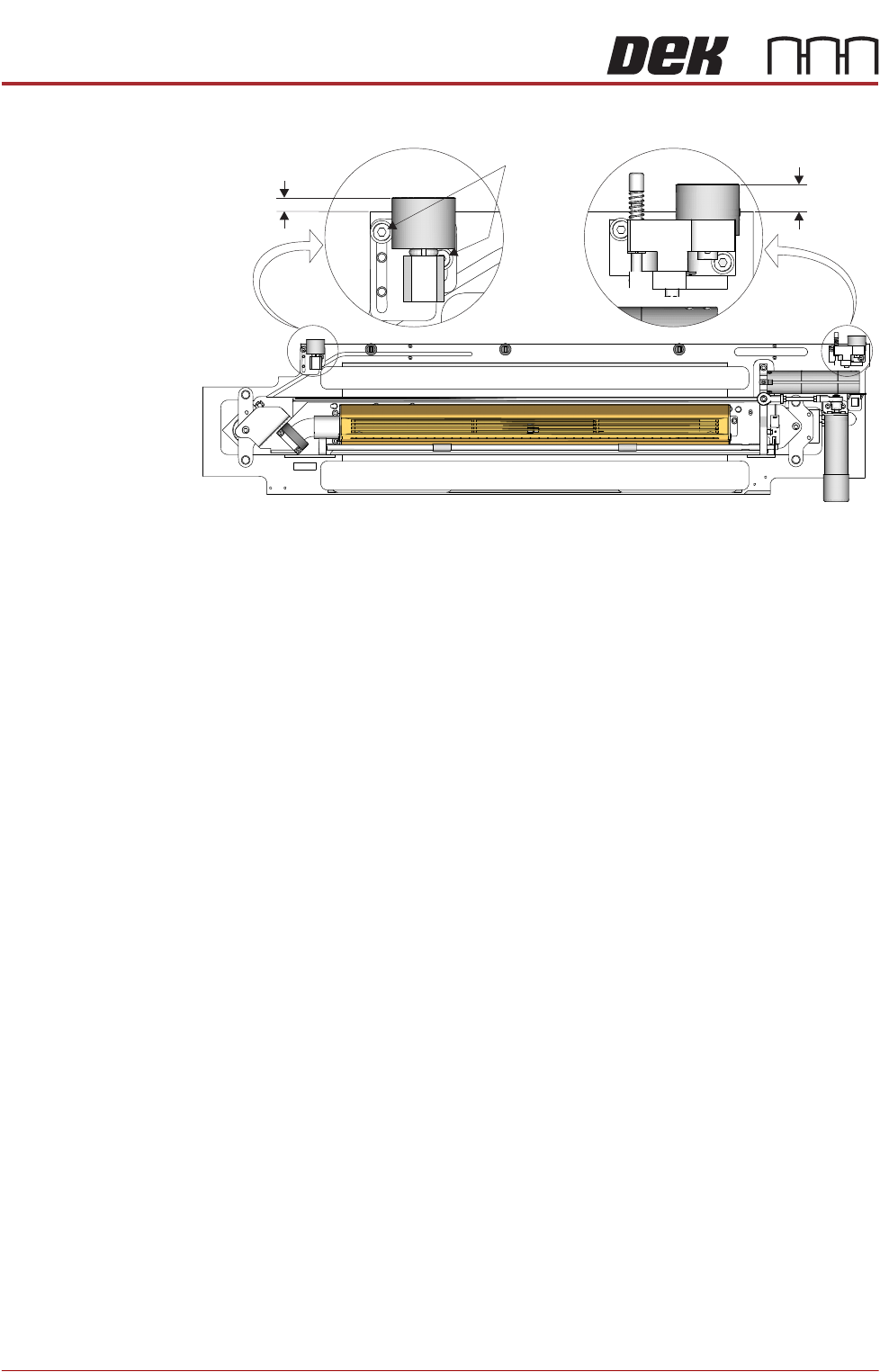
Cleaner Pickup
Magnet
The right hand cleaner pickup magnet is positionally fixed. The left hand cleaner
pickup magnet is adjustable and must be set to the same dimension as the right
hand side magnet.
NOTE
The left hand side cleaner pickup magnet is factory set and should not need
adjustment unless replaced due to a fault.
To check and adjust the left hand cleaner pickup magnet, use the following
procedure:
1. Measure from the rear face of the cleaner tray to the rear face of the right
CYCLONE UNDER STENCIL CLEANER MODULE
ADJUSTMENTS AND SETTINGS
26.8 Technical Reference Manual Chapter Issue 11, Feb 18
hand cleaner pickup magnet (A).
2. Measure from the rear face of the cleaner tray to the rear face of the left
hand cleaner pickup magnet (B).
3. Ensure that B is 5.2mm (±0.5mm) less than A.
4. If adjustment is required, loosen the two left hand cleaner pickup magnet
securing screws using a 3mm Allen key.
5. Adjust the magnet to achieve the dimension in Step 3.
6. Tighten the two securing screws loosened in Step 4.
7. Recheck the measurement.
Stencil Cleaner
To Camera
Parallelism
The stencil cleaner to camera parallelism adjustment ensures that the two
cleaner pickup magnets and the cleaner tray are aligned to the camera beam.
NOTE
The cleaner pickup magnets must be parallel to the camera beam.
1. Remove the printer front cover and side safety covers.
NOTE
Engineers should be aware of the implications of operating the printer when
covers have been removed.
2. Open the printhead front cover.
3. Remove the stencil (if fitted).
4. Ensure that the stencil cleaner is pulled toward the front of the printer.
5. Close the printhead front cover.
6. Power up the printer.
7. Select Diagnostics.
8. Press the System button.
9. Use Next or Previous to highlight Screen Cleaner.
10. Select Select Module.
11. Use Next or Previous to highlight Toggle Cleaner Camera Clamp.
Plan View on Cyclone Cleaner
Securing
Screws
A
B