192277 - Micron Technical Reference Volume 3.pdf - 第174页
PASTE ROLL HEIGHT MONITOR DRIVES & SENSORS 30.6 Technical Reference Manual Chapter Issue 3, Aug 14 DRIVES & SENSORS Drives There are no drives associated with this option. Sensors Name T ype Control Card Function…
PASTE ROLL HEIGHT MONITOR
MECHANICAL DETAIL
Chapter Issue 3, Aug 14 Technical Reference Manual 30.5
MECHANICAL DETAIL
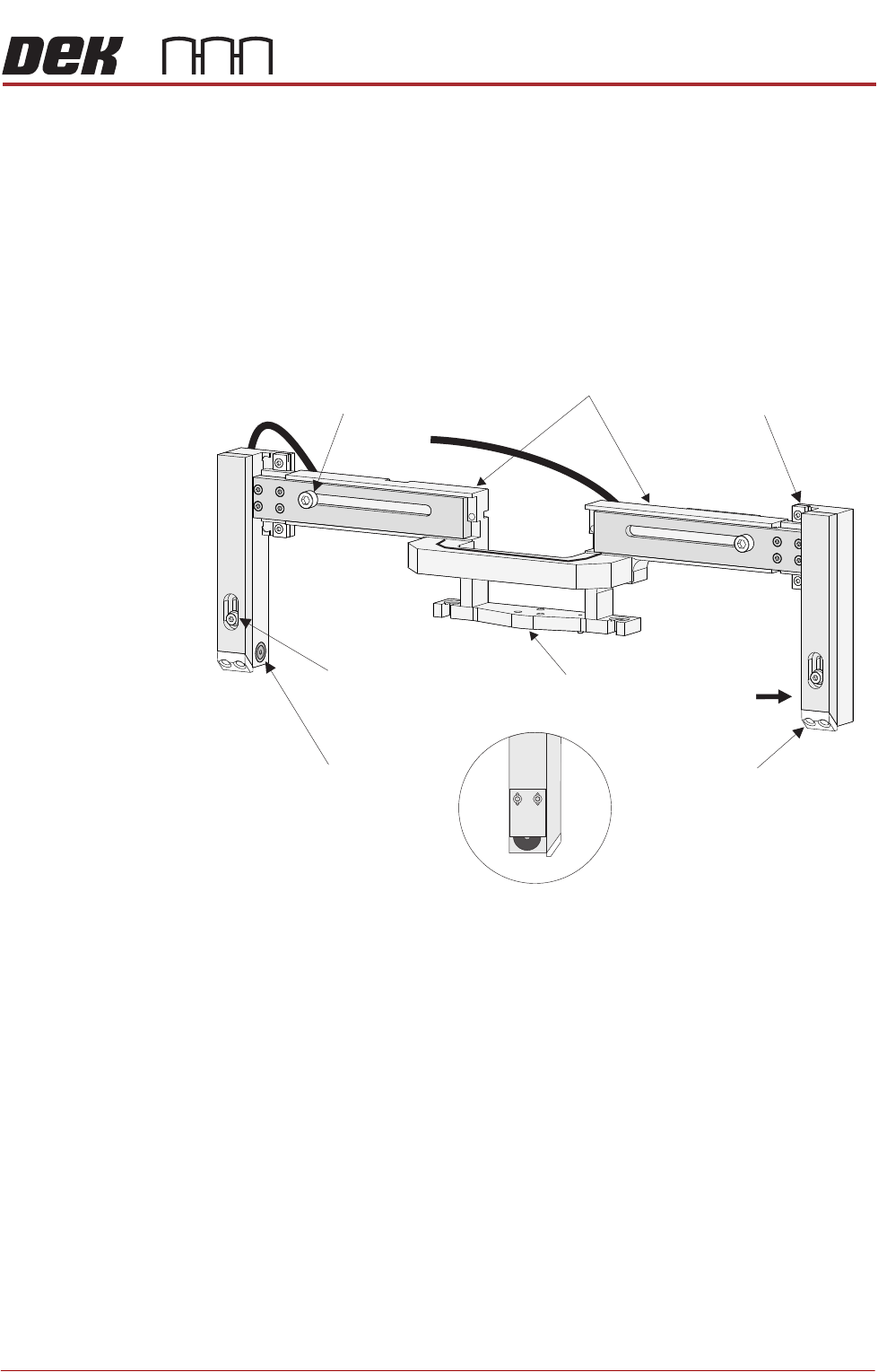
Roll Height Monitor
Assembly
The Roll Height Monitor assembly consists a horizontal beam which is secured
to the machine in place of the front squeegee ‘I’ beam. Two legs attached at
either end of the beam via THK linear bearings, house the laser light source and
receiver. Plastic wedges at the foot of each leg prevent damage to the stencil
whilst the print stroke is being carried out. The horizontal beam houses beam
extensions which can vary the beam’s length from 421mm to 575mm to
accommodate different size squeegees. Each extension is secured within the
beam by a cap headed bolt.
Figure 30-1 Roll Height Monitor Assembly
NOTE
The paste drip tray must be removed before fitting the paste roll height monitor.
Voltage Regulator The voltage regulator situated within the looms at the right rear corner of the
machine. The regulator provides the correct voltage to the roll height sensor.
View on Arrow A
Showing Light Receiver
A
Paste Height Adjustment
Securing Screw
(in 2 positions)
Nylon Screen Protector
(in 2 positions)
Laser Transmitter
THK Linear Bearing
(in 2 positions)
Width Adjustment Securing Screw
(in 2 positions)
Front Squeegee
Mount
Horizontal Beam

PASTE ROLL HEIGHT MONITOR
DRIVES & SENSORS
30.6 Technical Reference Manual Chapter Issue 3, Aug 14
DRIVES & SENSORS
Drives There are no drives associated with this option.
Sensors
Name Type Control Card Functional Description
Roll Height
Sensor
9SE24 MultiMove X11 Detects the laser light when the print
medium is insufficient.

PASTE ROLL HEIGHT MONITOR
ADJUSTMENTS & SETTINGS
Chapter Issue 3, Aug 14 Technical Reference Manual 30.7
ADJUSTMENTS & SETTINGS
CAUTION
RADIATION. RISK OF INJURY TO THE EYES DUE TO LASER LIGHT BEING
PRESENT IN THE VICINITY OF THE LABEL. DO NOT LOOK AT THE LIGHT
SOURCE OR REFLECTIONS FROM A SURFACE.
CAUTION
PRINT MEDIUM AND SOLVENTS. WHEN USING OR HANDLING ANY PRINT
MEDIUM OR SOLVENT FORMULATION THE MANUFACTURERS’ SAFETY DATA
SHEETS MUST BE STRICTLY ADHERED TO.
Setup Roll Height
Monitor
To enable the Roll Height Monitor carry out the following:
1. Select Maintenance.
2. Select Machine Setup.
3. Select Options.
4. Change Roll Height Hardware to Fitted.
5. Change Roll Height Monitor to Enabled.
6. Select Back.
7. Select Back.
8. Select Back.
Sensor Height Adjusting the height of the sensor above the tip of squeegee varies the amount
of paste on the stencil prior to an automatic paste replenishment. This can be
set to maintain a paste height of between 10 - 16mm. To adjust the height, carry
out the following:
1. Ensure that a stencil is loaded and that the transport rails and auxiliary
conveyors are free of boards.
2. Select Maintenance.
3. Select Machine Setup.
4. Select Options.
5. Select Roll Height Hardware and set to Enabled.
6. Select Roll Height Monitor and set to Enabled.
7. Select Back.
8. Select Back.
9. Select Diagnostics.
10. Using the Next or Previous buttons; select Print Carriage.
11. Select Home Print Carriage.
12. Select Drive Carriage to Front Position.
13. Select Exit.
14. Using the Next or Previous buttons; select Squeegee.
15. Select Home Front Squeegee.
16. Select Home Rear Squeegee.