192277 - Micron Technical Reference Volume 3.pdf - 第265页
MAN MACHINE INTERFACE CALIBRATIONS Chapter Issue 11, Jan 17 Technical Reference Manual 34.21 CALIBRA TIONS T ouchscreen Calibration T o Recalibrate the touchscreen carry out the following proced ure: 1. T o access the St…
MAN MACHINE INTERFACE
REPLACEMENT PROCEDURES
34.20 Technical Reference Manual Chapter Issue 11, Jan 17
REPLACEMENT PROCEDURES
IR Keyboard/
Mouse Battery
(Type 1 Cover)
The hand-held IR keyboard/mouse is powered by two AA type (or equivalent)
1.5 volt batteries.
For replacement of the IR keyboard/mouse batteries carry out the following
procedure:
1. Invert the keyboard/mouse to access the unit battery compartment panel.
2. Unclip the battery panel and remove.
3. Remove the used AA batteries and dispose of in accordance with national,
federal or local legislation.
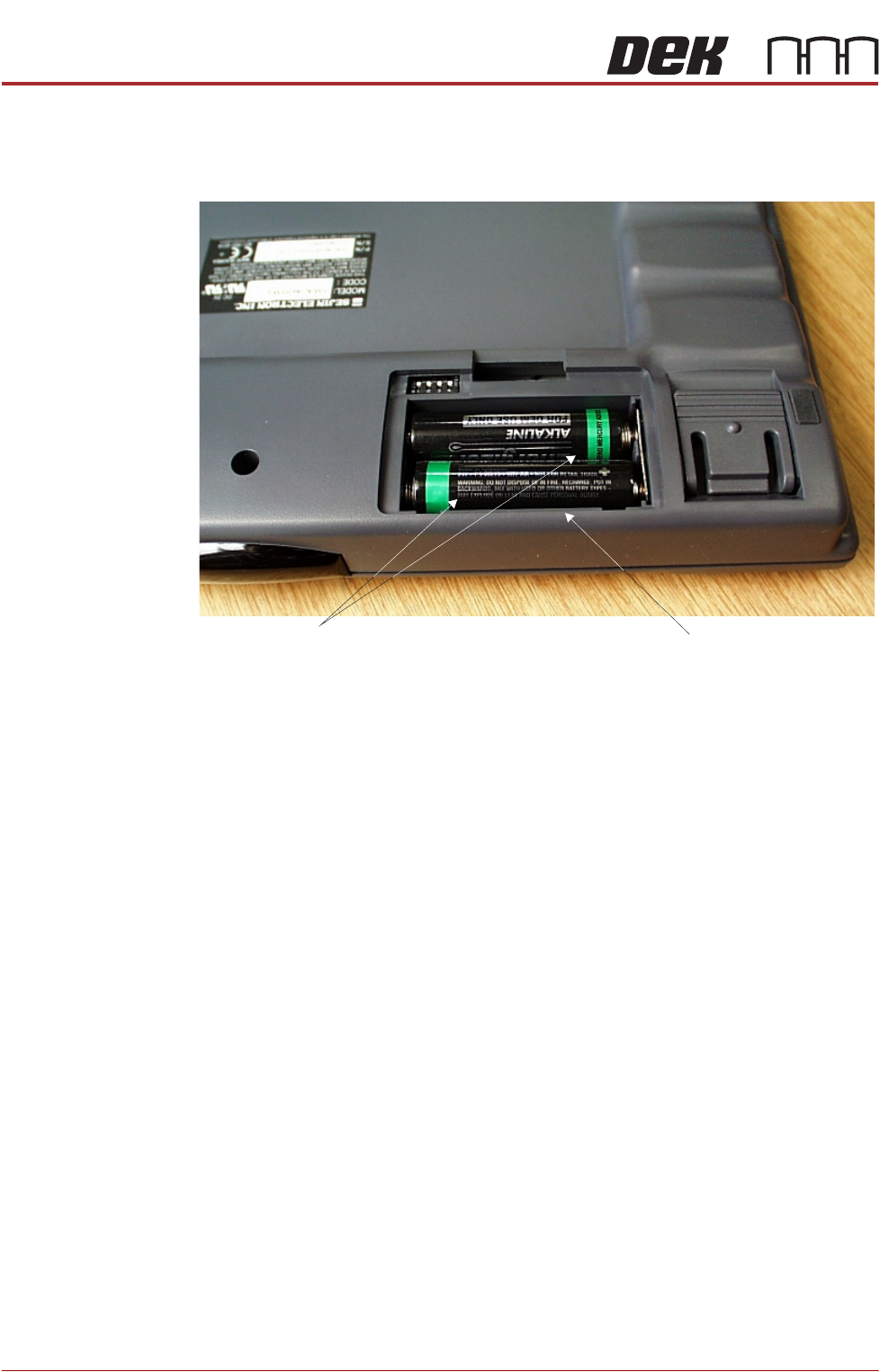
4. Fit two replacement AA 1.5V (or equivalent) batteries in the correct config-
uration, figure above refers.
5. Refit the battery compartment panel.
6. When new batteries are fitted, the keyboard/mouse resets to default settings
and does not communicate with the IR receiver unit. Follow Steps 5 to 7 of
the IR Keyboard/Mouse Frequency Setting - Adjustments and Settings
section of this chapter.
The battery replacement procedure is now complete.
Underside of IR Keyboard/Mouse Unit
1.5V AA Batteries
(two in number)
Battery Compartment
(Panel Removed)

MAN MACHINE INTERFACE
CALIBRATIONS
Chapter Issue 11, Jan 17 Technical Reference Manual 34.21
CALIBRATIONS
Touchscreen
Calibration
To Recalibrate the touchscreen carry out the following procedure:
1. To access the Start button on the Windows task bar, press the Windows
key.
2. Select All Programs.
3. Select the Touchscreen Calibration folder.
4. Double click on the J2 725 Calibration file to open it.
5. Select Align from the General tab.
6. Select the three targets as they appear on the monitor.
7. Select the green tick.
8. Select OK. Touchscreen calibration is now complete.
9. Close the folder and return to the DEK program.

MAN MACHINE INTERFACE
CALIBRATIONS
34.22 Technical Reference Manual Chapter Issue 11, Jan 17