192277 - Micron Technical Reference Volume 3.pdf - 第37页
RAPID TRANSIT CONVEYOR (R TC) MODULE REPLACEMENT PROCEDURES Chapter Issue 4, Aug 14 Technical Reference Manual 22.25 REPLACEMENT PROCE DURES Board Clamp Replacement W ARNING BOARD CLAMPS. EXTREME CA RE MUST BE EXERCIS ED…
RAPID TRANSIT CONVEYOR (RTC) MODULE
ADJUSTMENTS AND SETTINGS
22.24 Technical Reference Manual Chapter Issue 4, Aug 14
Sensitivity
Adjustment
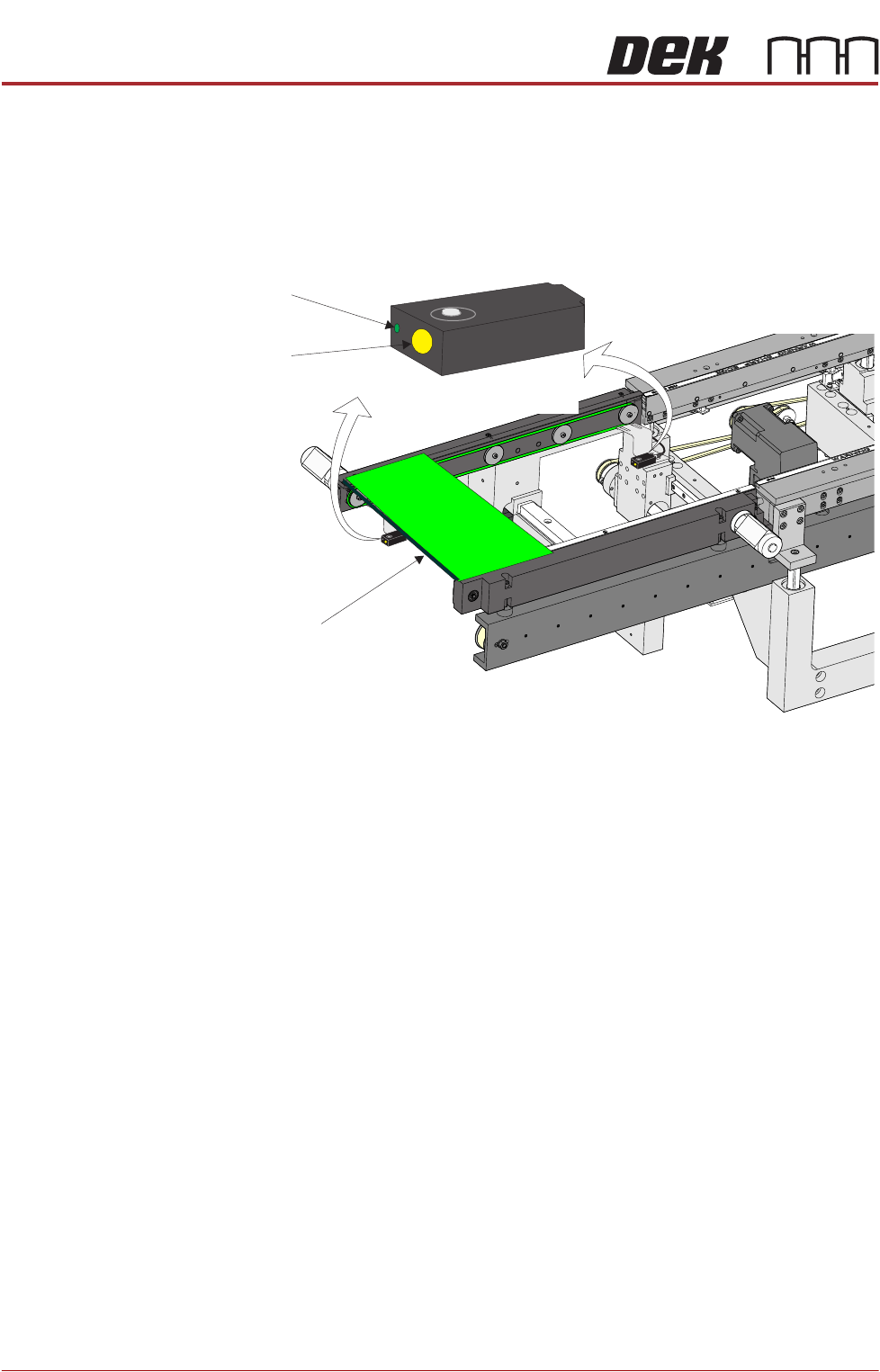
The sensitivity setting of the sensors is critical as it is important that the sensor
is only activated by the board and not machine parts.
To achieve an optimum setting carry out the following procedure:
1. Press the yellow Set button on the sensor for approximately two seconds.
The green LED comes On.
2. Place a board on the rails above the belts.
3. Press the yellow Set button again. The green LED comes On again.
4. Remove the board from the rails and confirm that the green LED is Off.
5. Place the board on the belts and above the sensor. The green LED should
be On. Remove the board and place it back on top of the rail as in Step 2.
The green LED should be Off. This confirms that the sensor is correctly set.
NOTE
If the sensor fails to set correctly it may need to be reset. Disconnect the power
from the sensor by unscrewing the plug at the back. Reconnect the plug and
press Set for approximately ten seconds; the LED flashes rapidly. The sensor
is now reset and the procedure above can be followed to set the sensitivity.
View on Inroad Conveyor of RTC System
Set Button
LED
Board
Set
Sensor
(also at outroad conveyor)
RAPID TRANSIT CONVEYOR (RTC) MODULE
REPLACEMENT PROCEDURES
Chapter Issue 4, Aug 14 Technical Reference Manual 22.25
REPLACEMENT PROCEDURES
Board Clamp Replacement
WARNING
BOARD CLAMPS. EXTREME CARE MUST BE EXERCISED WHEN WORKING IN
THE TOOLING AREA OF THE MACHINE TO AVOID INJURY. THE FOILS ON THE
FRONT AND REAR BOARD CLAMPS ARE VERY SHARP.
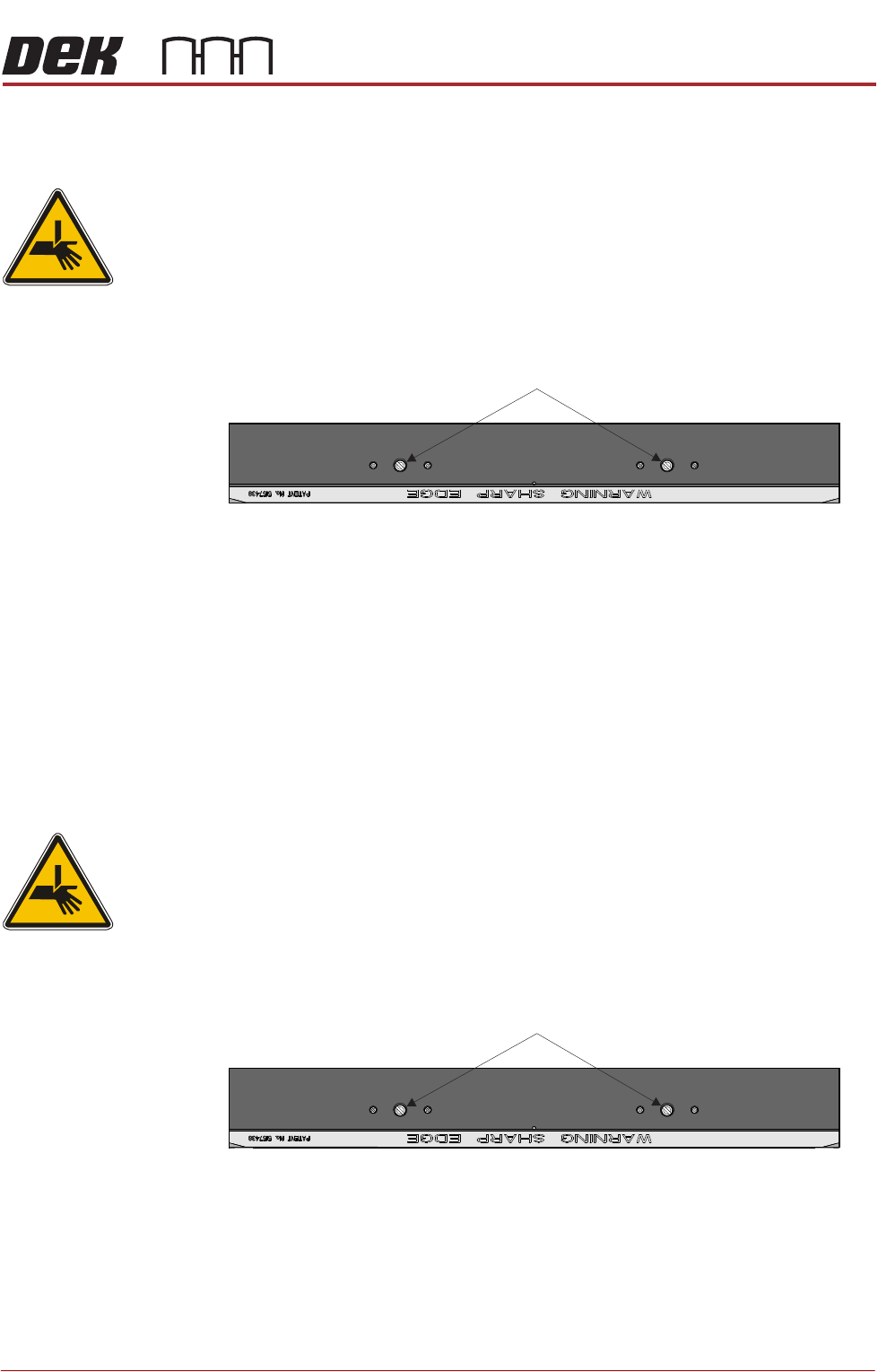
1. Remove the two board clamp securing screws using a flat bladed screw-
driver.
2. Lift the board clamp off the rail.
3. Fit the new board clamp to the print station rail.
4. Pushing the board clamp towards the other rail, refit the screws removed in
Step 1.
NOTE
The Board Clamp Setting procedure is not required after board clamp
replacement.
Board Clamp Foil Replacement
WARNING
BOARD CLAMPS. EXTREME CARE MUST BE EXERCISED WHEN WORKING IN
THE TOOLING AREA OF THE MACHINE TO AVOID INJURY. THE FOILS ON THE
FRONT AND REAR BOARD CLAMPS ARE VERY SHARP.
1. Remove the two board clamp securing screws using a flat bladed screw-
driver.
2. Lift the board clamp off the rail and turn upside down on a solid surface.
3. Using a 2mm Allen key, remove the 6 cap head screws that secure the foil
to the board clamp.
4. Fit the new foil with the screws removed in Step 3.
Plan View of Print Station Rail
Board Clamp Securing Screws
Plan View of Print Station Rail
Board Clamp Securing Screws
RAPID TRANSIT CONVEYOR (RTC) MODULE
REPLACEMENT PROCEDURES
22.26 Technical Reference Manual Chapter Issue 4, Aug 14
5. Fit the board clamp to the print station rail.
6. Pushing the board clamp towards the other rail, refit the screws removed in
Step 1.
NOTE
The Board Clamp Setting procedure is not required after board clamp
replacement.
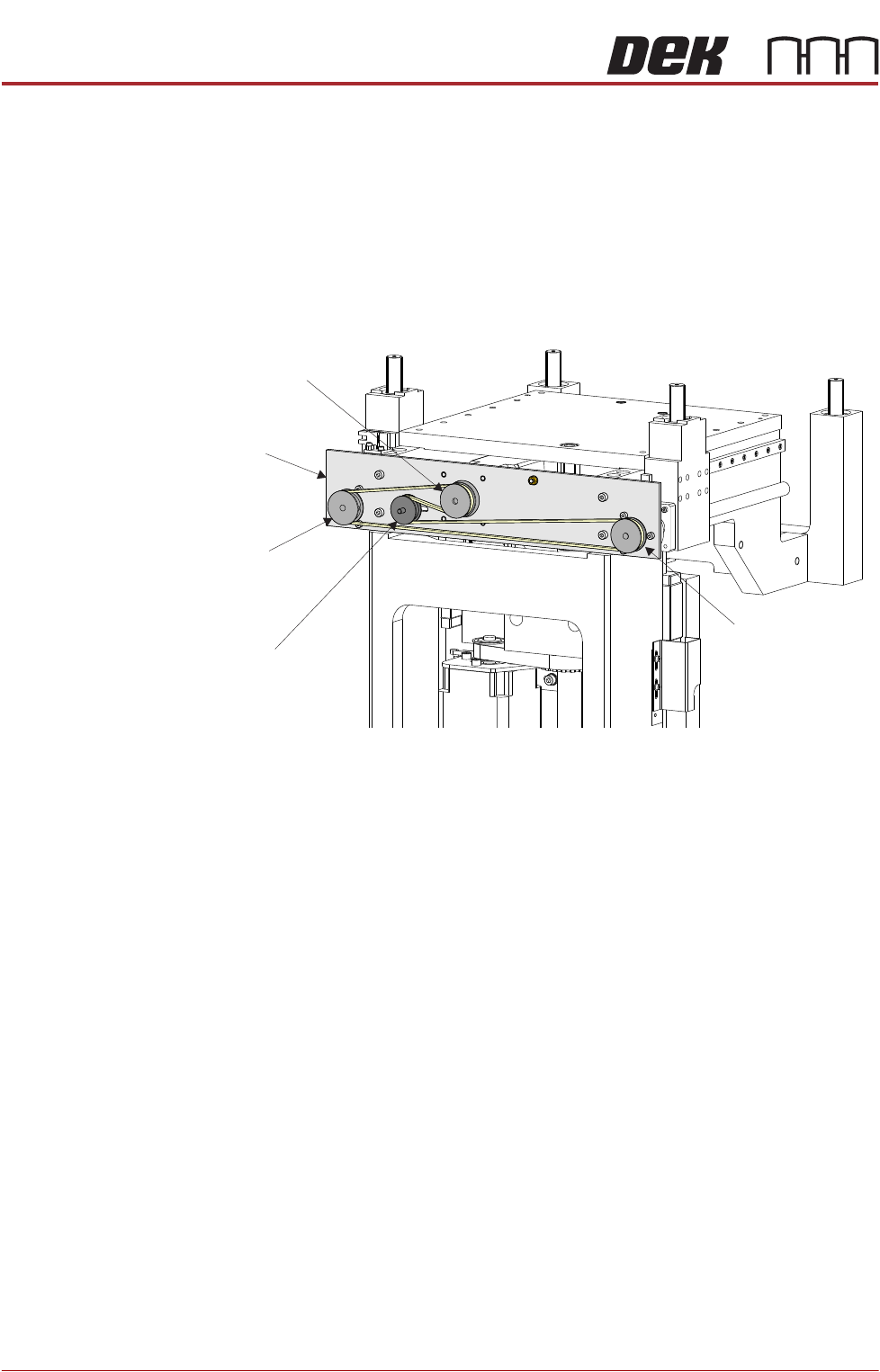
Rear Rail Drive Belt 1. At the rear of the rising table, slacken the adjustable idler pulley using two
8mm spanners (one either side of the drive mechanism support plate).
2. Slide the adjustable idler pulley to slacken the drive belt.
3. Remove the drive belt and discard.
NOTE
If the drive belt has snapped, the left and right drive shafts may be out of
synchronization with each other. Turn the left and right hand drive shaft
pulleys (together) fully counter-clockwise.
4. Fit the replacement drive belt without moving the right or left hand drive shaft
pulley.
5. Using a suitable cable tie, engage a forcemeter with the adjustable idler
pulley. Apply a horizontal force of 6kg.
6. Maintaining this force, tighten the adjustable idler pulley securing nut.
7. Using a tension meter on the bottom of the drive belt, check the tension is
between 40Hz to 45Hz.
8. Adjust the drive belt tension as necessary to achieve the reading in Step 7.
9. In Diagnostics select Rapid Transit Conveyor module.
10. Select Cycle Rail Width to even out the tension in the belt.
NOTE
Ensure there is no tooling on the table.
11. Stop after one complete cycle and repeat Steps 7 to 8.
12. Select Home Rail Width.
Adjustable Idler
Pulley
Moving Rail Stepper
Motor Pulley
Left Hand Drive
Shaft Pulley
Right Hand Drive
Shaft Pulley
Drive Mechanism
Support Plate