192277 - Micron Technical Reference Volume 3.pdf - 第63页
CAMERA SYSTE M MODULE REPLACEMENT PROCEDURES Chapter Issue 9, Feb 18 Technical Reference Manual 23.21 16. Engage the two ends of the replacement timing belt equally into the timing belt clamp. T ighten the timing belt cl…
CAMERA SYSTEM MODULE
REPLACEMENT PROCEDURES
23.20 Technical Reference Manual Chapter Issue 9, Feb 18
Camera X Axis Timing Belt (Rotary Servo Motor Systems Only)
WARNING
BOARD CLAMPS. EXTREME CARE MUST BE EXERCISED WHEN WORKING IN
THE TOOLING AREA OF THE MACHINE TO AVOID INJURY. THE FOILS ON THE
FRONT AND REAR BOARD CLAMPS ARE VERY SHARP.
1. Select Maintenance.
2. Select Diagnostics.
3. Select Exit.
NOTE
Exiting diagnostics initialises the machine, homing the camera axes.
4. Select Back.
5. Select Shut Down.
6. Select Continue.
7. Switch the mains isolator to OFF.
8. Open the front printhead cover.
9. Remove the stencil from the machine.
10. Remove the left and right side panels.
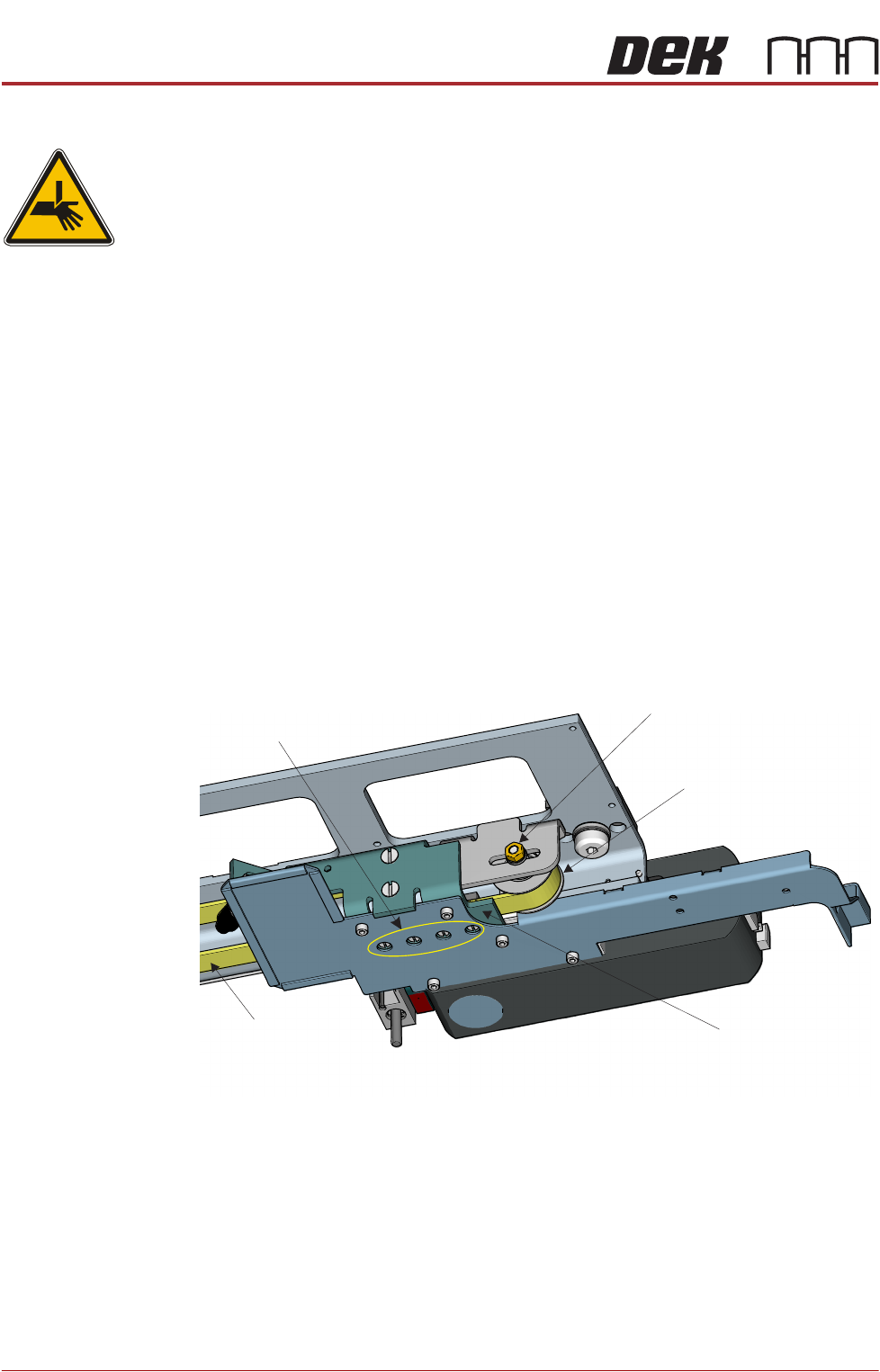
11. Slacken the idle pulley locknut at the left hand end of the camera carriage.
12. Slide the pulley inwards to release tension on the timing belt.
13. Slacken the four timing belt clamp securing screws sufficiently to remove the
timing belt from the clamp.
NOTE
Take note of the routing of the timing belt before removing it.
14. Remove the timing belt and discard.
15. Route the replacement timing belt around the camera X motor pulley and
the idle pulley.
View From Beneath Camera Carriage
Idle Pulley
Securing Screws
(in 4 positions)
Locknut
Timing Belt
Timing Belt Clamp
CAMERA SYSTEM MODULE
REPLACEMENT PROCEDURES
Chapter Issue 9, Feb 18 Technical Reference Manual 23.21
16. Engage the two ends of the replacement timing belt equally into the timing
belt clamp. Tighten the timing belt clamp screws sufficiently to allow belt
movement. Ensure the timing belt is straight between the two pulleys and
the timing belt clamp.
17. Fully tighten the timing belt clamp screws.
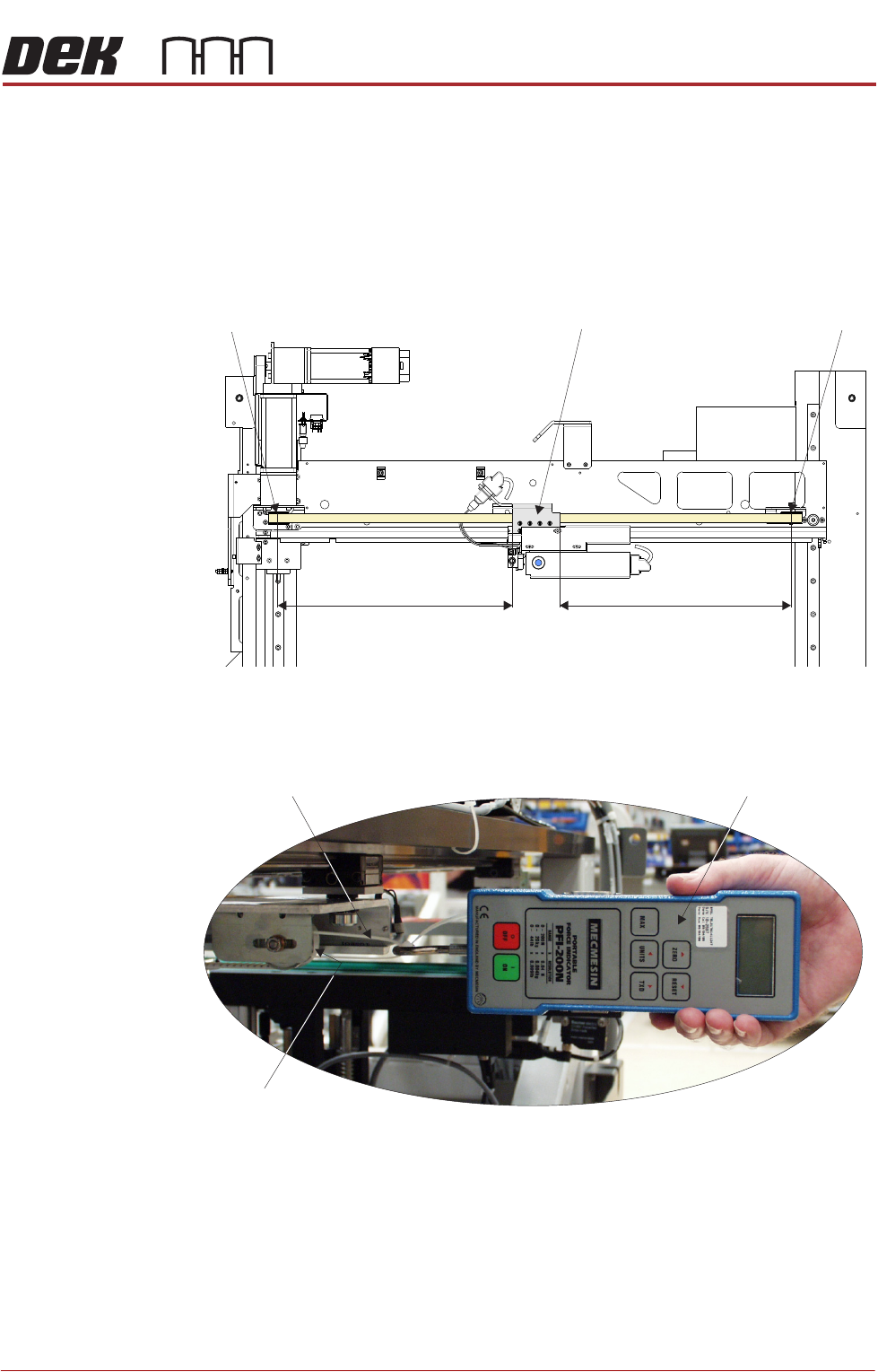
18. Manually position the timing belt clamp on the camera X axis timing belt so
that the distance X1 is equal to the distance X2.
19. Using a suitable cable tie, engage a forcemeter across the idle pulley. Apply
a horizontal force of 24kg to the belt. Maintaining this force, tighten the
locknut.
20. Remove the forcemeter. Do not remove the cable tie as further adjustment
may be necessary.
View on Underneath of Camera X Axis Support Platform
Timing Belt Clamp Idle Pulley (LHS)Camera X Motor Pulley (RHS)
X1 X2
View on Left Hand Side of Machine
Forcemeter
Cable Tie
Idle Pulley
24.0 kg
CAMERA SYSTEM MODULE
REPLACEMENT PROCEDURES
23.22 Technical Reference Manual Chapter Issue 9, Feb 18
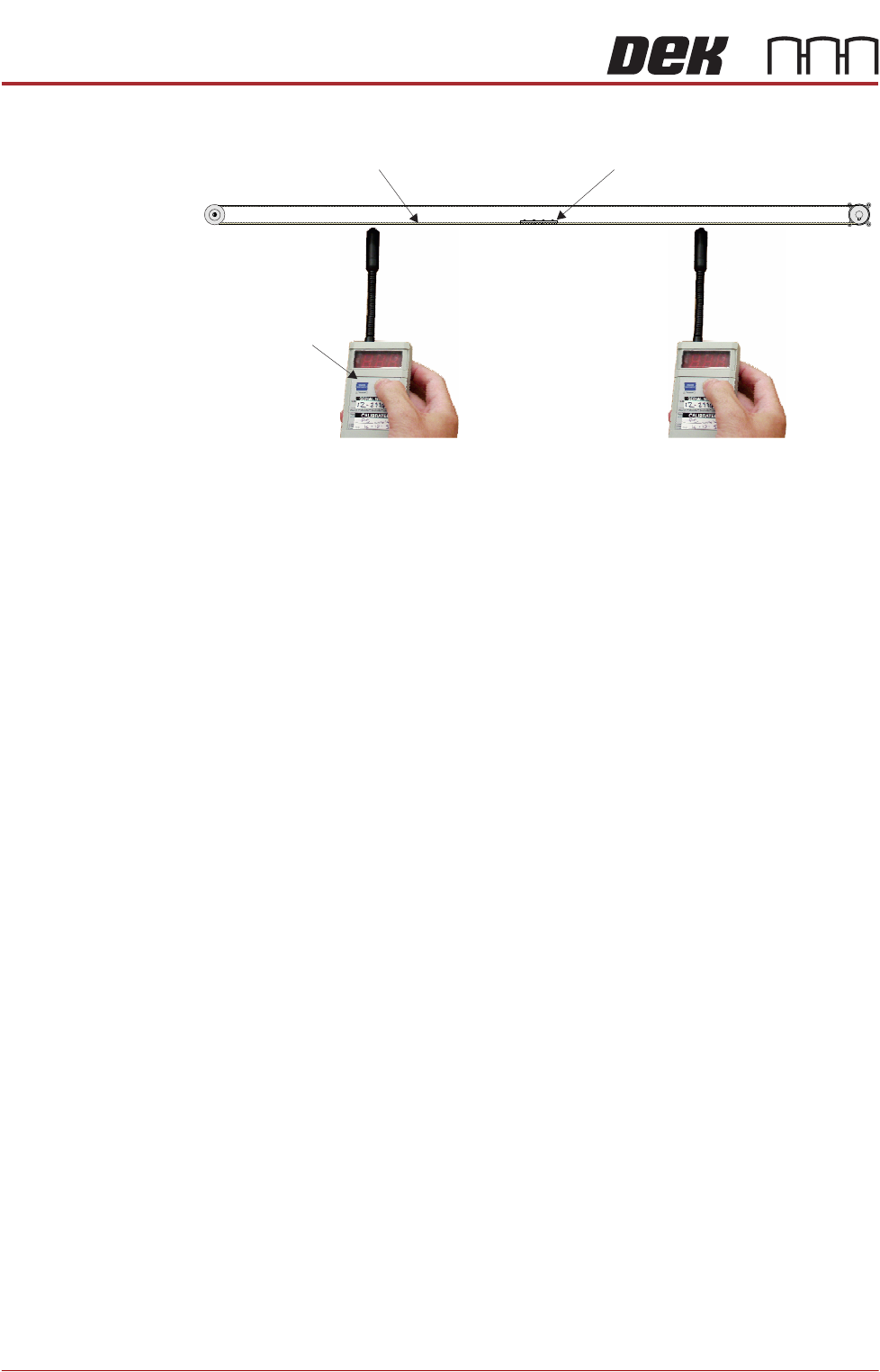
21. Ensure that the belt clamp is midway between the two pulleys.
22. Using a tension meter (Part No. 190279), check the timing belt tension either
side of the cable clamp is between 52Hz and 58Hz. Check the two readings
are within 1Hz of each other.
NOTE
Adjust the position (between the two pulleys) of the belt clamp to achieve
the 1Hz deviation.
23. If adjustment is not required, go to Step 28.
24. If adjustment is required, slacken the idle pulley locknut as detailed in
Step 11.
25. Adjust the timing belt tension using the cable tie.
26. Tighten the locknut.
27. Repeat Steps 22 to 26 until the correct tension is achieved.
28. Remove the timing belt clamp securing screws one at a time, apply a
suitable locking compound and fully tighten.
29. Remove the cable tie.
30. Refit the panels removed in Step 10.
31. Power up the machine and press the System button to initialise.
32. Select Maintenance.
33. Select Diagnostics.
34. Use Next or Previous to highlight Camera Axes.
35. Select Select Module.
36. Use Next or Previous to highlight Home Camera X Axis.
37. Select Run Diagnost.
38. Use Next or Previous to highlight Home Camera Y Axis.
39. Select Run Diagnost.
Timing Belt ClampTiming Belt
Tension Meter
Position A (mid span) Position B (mid span)