00193732-02.pdf - 第69页
SIPLACE HS-50/HS-60 2 Retrofit Instructions for PCB Camera Mult icolor, HS-50 / HS-60 11/2004 Edition 2.9 SITEST: Con figuration and Illumination Check of all PCB Cameras Multicolor 69 : In the configur ation menu of gan…
2 Retrofit Instructions for PCB Camera Multicolor, HS-50 / HS-60 SIPLACE HS-50/HS-60
2.9 SITEST: Configuration and Illumination Check of all PCB Cameras Multicolor 11/2004 Edition
68
2.9 SITEST: Configuration and Illumination Check of
all PCB Cameras Multicolor
The configuration of the PCB Camera Multicolor can be performed before or after the configura-
tion in the station configurator of the UNIX line computer. 2
DANGER
Pay attention to the DANGER text regarding work with the SITEST program in Section 2.2. 2
The requirement for the configuration is that the 4 PCB cameras Multicolor are retrofitted and the
safety hoods and safety doors are closed.
All component changeover tables must be moved into the machined and docked. 2
: Change over into the SITEST program.
: Select "Settings" -> "Machine configuration".
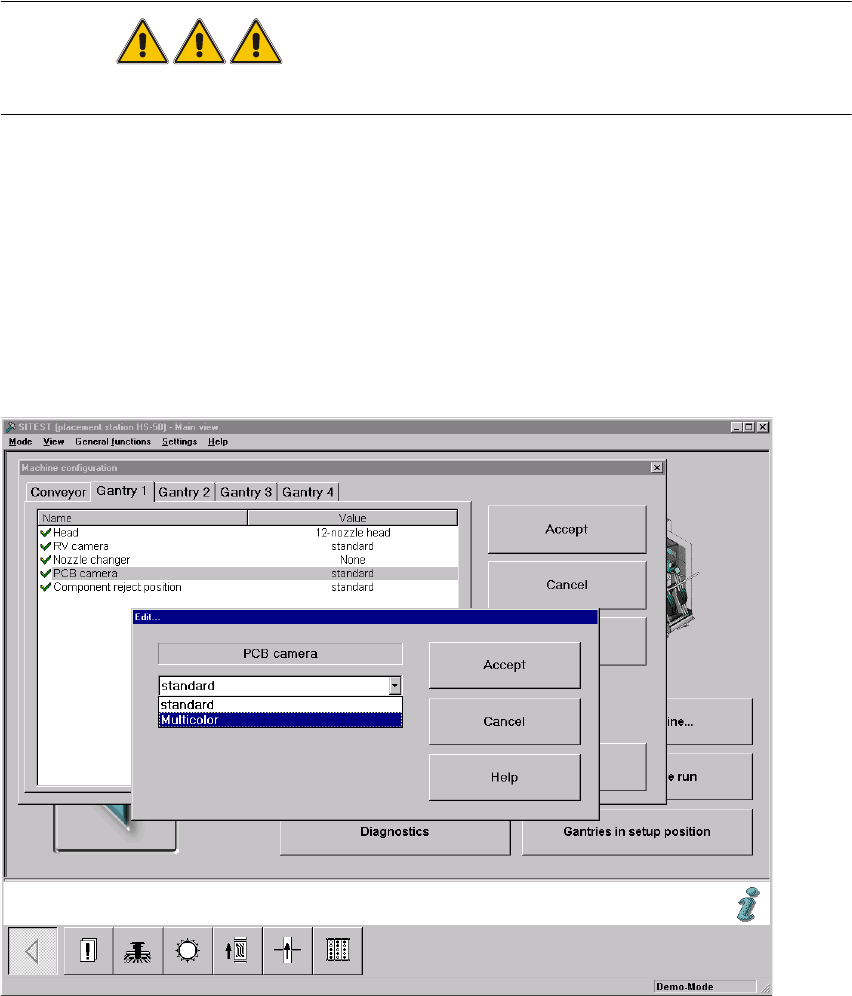
: Select: "Gantry 1" -> "PCB camera" -> "Edit" (button). The "Edit" window is displayed:
Fig. 2.90.1 "Edit" Window: Selecting the PCB Camera Multicolor

SIPLACE HS-50/HS-60 2 Retrofit Instructions for PCB Camera Multicolor, HS-50 / HS-60
11/2004 Edition 2.9 SITEST: Configuration and Illumination Check of all PCB Cameras Multicolor
69
: In the configuration menu of gantry 1, mark the option "Multicolor" and select "Accept" (button).
: One after the other, select the remaining gantries 2, 3 and 4 as described above.
: Conduct the illumination check for the PCB cameras Multicolor as described below in Abschn.
2.10.2.
: Exit the menu "Machine configuration" by pressing "Accept".
: Restart the machine so that the configuration will be accepted.
: Return to the SITEST.
: In the main view, press the button "Total reference run".
: Afterwards do the calibration.
Calibrate all placement heads and cameras.
2.9.1 Illumination Check
NOTE:
We recommend you the illumination check after installation of the PCB camera Multicolor. By ap-
propriately switching over the vision screen (see User Manual) it is possible to precisely check the
function of the pertinent light level and, for example, the change from full to one-half brightness.2
2
2
2
2
2
2
2
2
2
2
2
2
2
2
2 Retrofit Instructions for PCB Camera Multicolor, HS-50 / HS-60 SIPLACE HS-50/HS-60
2.9 SITEST: Configuration and Illumination Check of all PCB Cameras Multicolor 11/2004 Edition
70
2
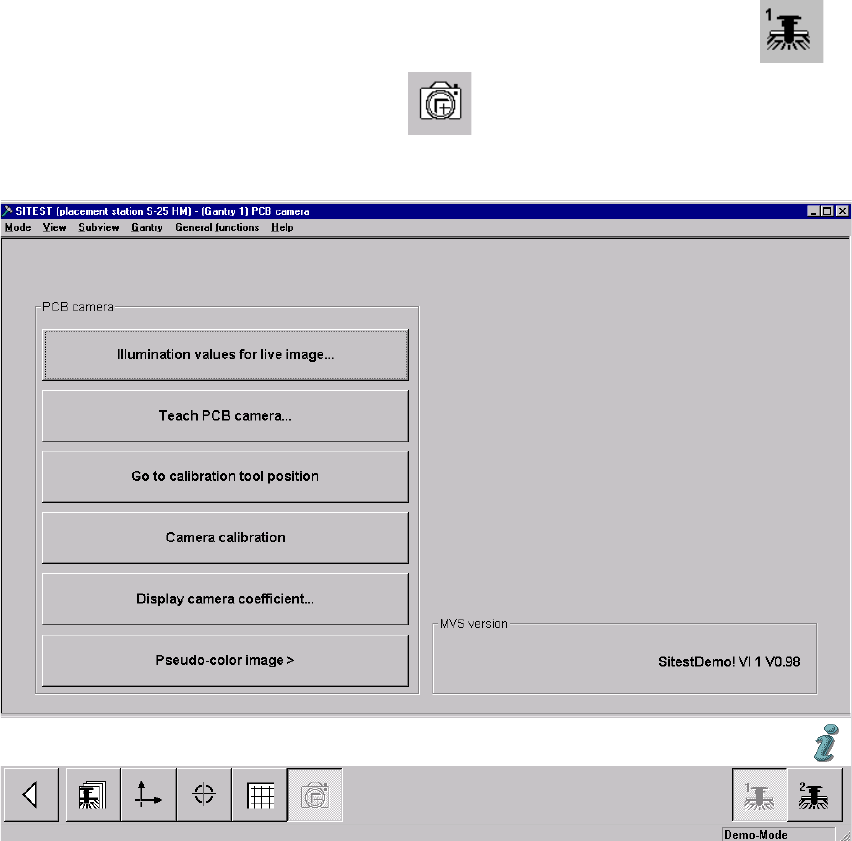
: In the SITEST program 502.xx select the ICON "Gantries" and then the "Gantry 1" .
: Click on the CON "PCB camera functions" .
The following screen is displayed (using S-25 HM as an example):
Fig. 2.91.2 Menu "Setting of Illumination" for PCB Camera"
2
: Click on the button "Illumination values for live image".
In principle, you can use this function to test whether the illumination of the PCB camera Mul-
ticolor is activated. The illumination levels "White" and "Blue" are visible; "IR" is not.
2
2
2
2
2
2