00198521-01_UM_LDU_E_EN.pdf - 第38页
4 Operation 4.1 Settings in the line software 38 User Manual SIPLACE Linear Dipping Unit E 12/2018 4.1.9 Setting the cicatrization time of the flux If longer standstill (inactive) times during the production run can be e…
4 Operation
4.1 Settings in the line software
User Manual SIPLACE Linear Dipping Unit E 12/2018 37
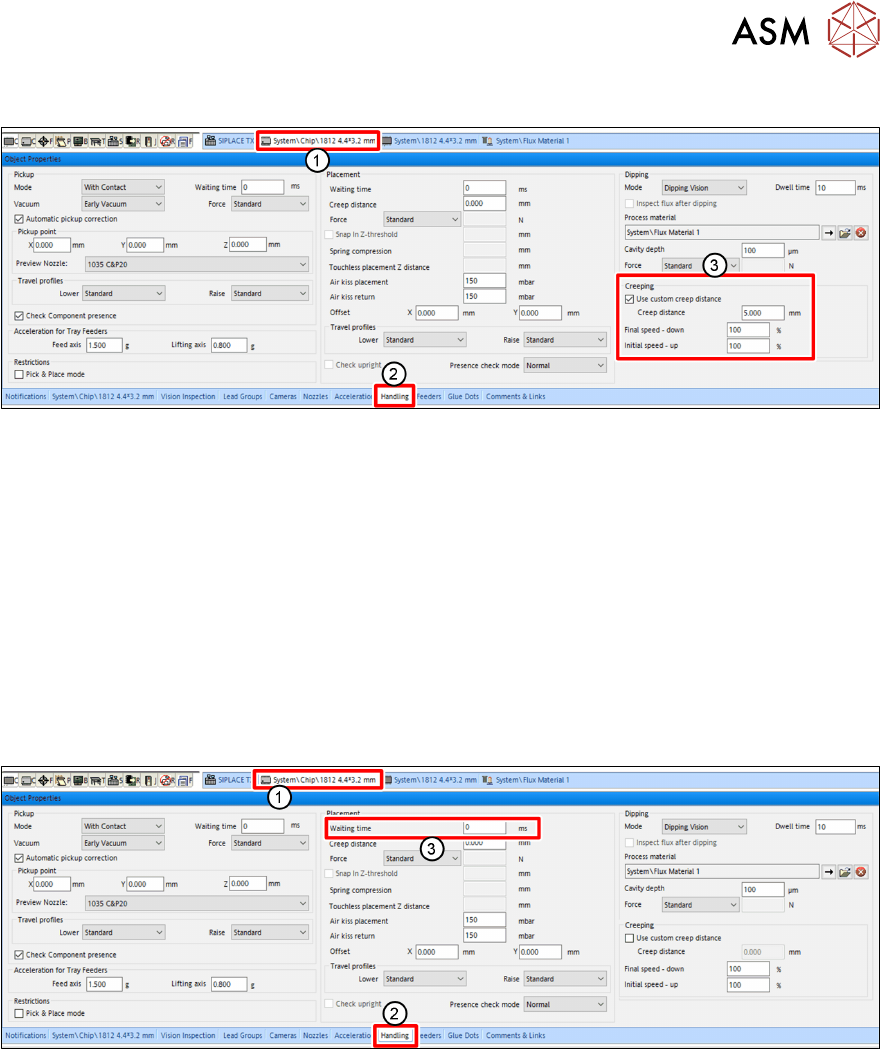
4.1.7 Setting the creep distance
► In the line software, click on the tab of the component shape of the desired component(1).
► Click on the Handling tab(2) in the Object Properties view.
► Enable the Use custom creep distance option(3) under Creeping(3) in the Dipping area.
► Enter the desired length of the creep distance in the Creep Distance entry field.
► In the Speed down end entry field, enter the desired speed down.
► In the Speed up start entry field, enter the desired speed up.
For more information to creep distance, speed down and speed up, see chapter 3.3.7 "Creep dis-
tance" [}32].
4.1.8 Setting the waiting time
Depending on the component and the flux used, it can be advantageous to hold the component on
the PCB for a short waiting time during the placement process.
► In the line software, click on the tab of the component shape of the desired component(1).
► Click on the Handling tab(2) in the Object Properties view.
► Enter the Waiting time in milliseconds [ms] in the Waiting Time entry field (3) in the Place-
ment area.
4 Operation
4.1 Settings in the line software
38 User Manual SIPLACE Linear Dipping Unit E 12/2018
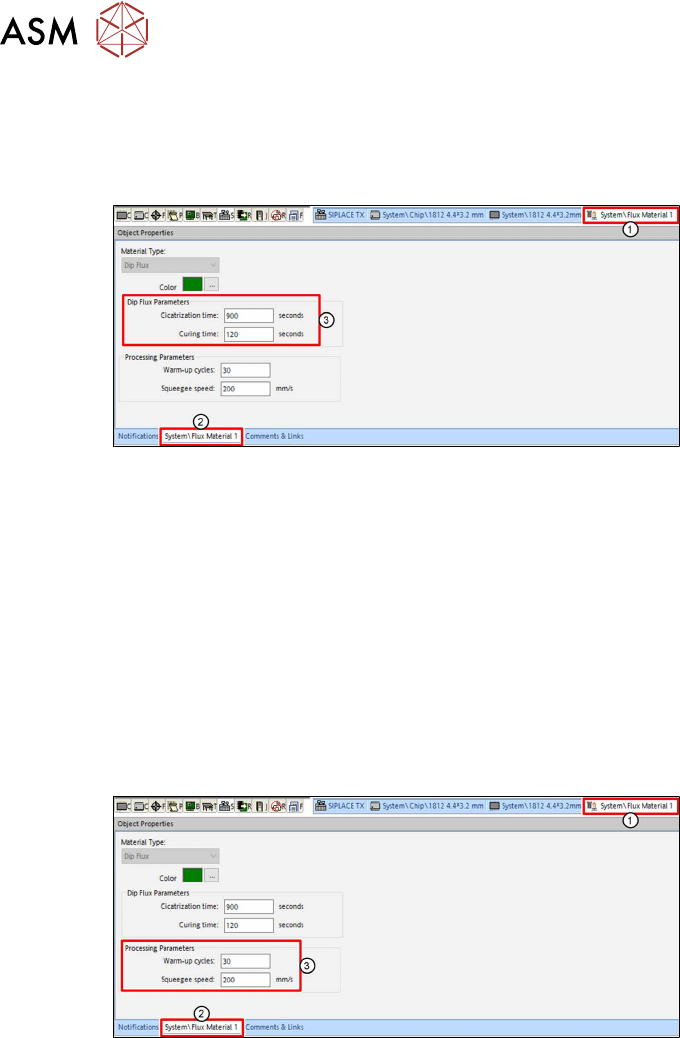
4.1.9 Setting the cicatrization time of the flux
If longer standstill (inactive) times during the production run can be expected, you should set the ci-
catrization time of the flux used. The LDU will then perform an application run after this period has
expired.
► In the line software, click on the tab of the relevant flux(1).
► Click on the tab of the flux(2) in the Object Properties view.
► Enter the cicatrization time of the flux used in seconds [s] in the Cicatrization time entry field
in the Dip Flux Parameters area(3).
► Enter the curing time of the flux used in seconds[s] in the Curing time entry field in the Dip
Flux Parameters area(3).
For more information on the cicatrization time of fluxes, see chapter 3.3.3 "Cicatrization time" [}30].
4.1.10 Setting the warm-up cycle and the squeegee speed
During the warm-up cycle, the LDU performs a set number of squeegee processes to prepare the
flux.
The squeegee speed is the speed with which the squeegee axis applies the flux in the cavity.
► In the line software, click on the tab of the relevant flux(1).
► Click on the tab of the flux(2) in the Object Properties view.
► Enter the number of squeegee processes which are to be performed during the warm-up
cycle in the Warm-up cycles entry field in the Processing Parameters area (3).
► Enter the squeegee speed in millimeter per second [mm/s] in the Squeegee speed entry field
in the Processing Parameters area (3).
4 Operation
4.2 Handling
User Manual SIPLACE Linear Dipping Unit E 12/2018 39
4.2 Handling
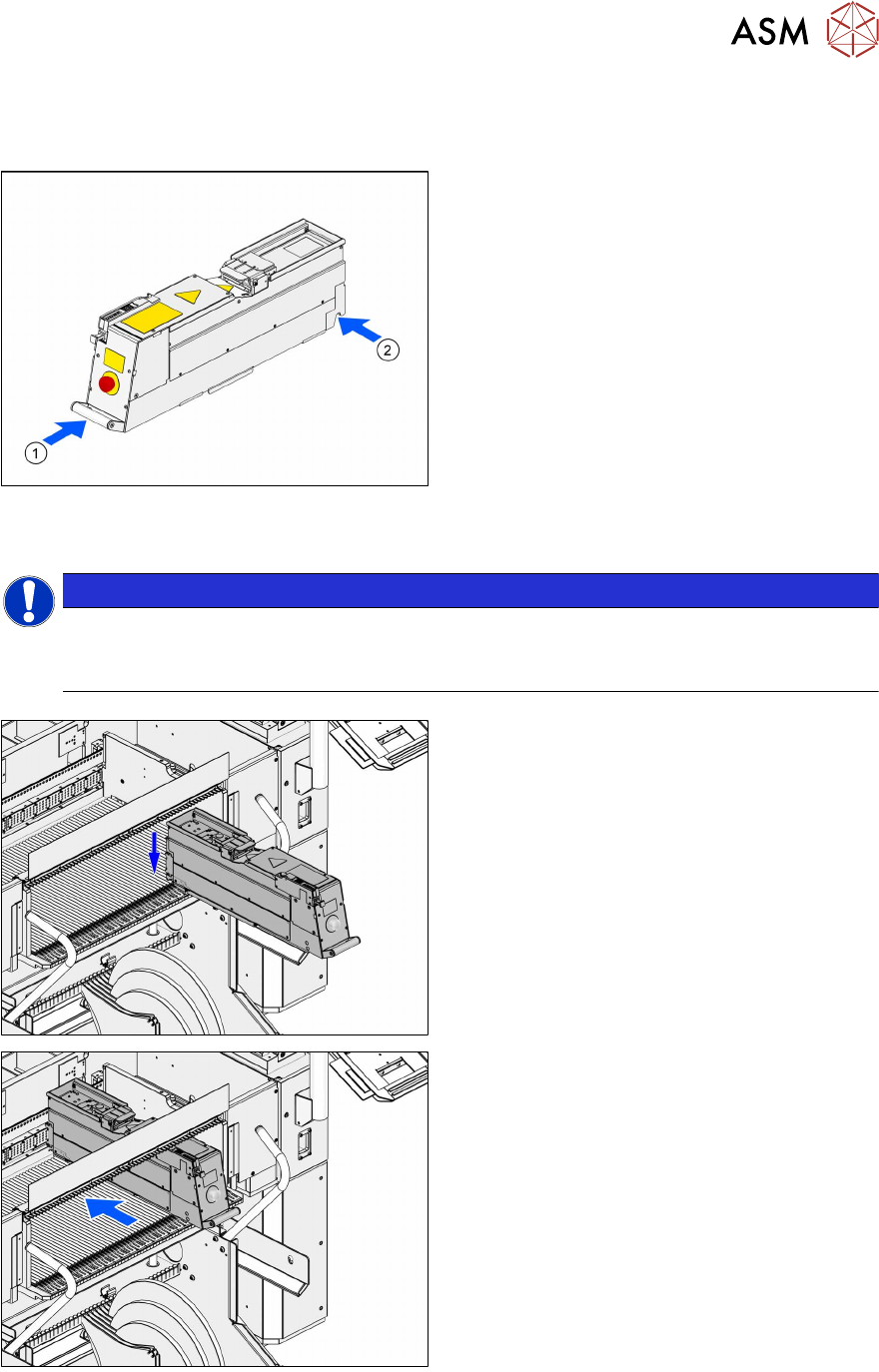
Always carry the LDUE with both hands holding it as upright and horizontal as possible.
► Take the handle(1) of the LDU E with one
hand and support the housing with the
other hand(2).
4.3 Positioning the LDU and logging on
NOTICE
Positioning the LDU on the correct track
► Position the LDU on the track of the changeover table which you defined during setup
(see chapter 4.1.1 "Setting up the LDU" [}33]).
► Place the LDU E horizontally in the track of
the changeover table.
.
► Push the LDU E forward against the fixed
stop of the track.
The LDU E will be automatically locked,
switched on and logged on at the machine.