SG_FSE_SiplaceHF_HF3_00193901-05_eng.pdf - 第255页
1 - 55 S tudent Guide SIPLACE HF/HF3 Edition 09/2005 6 Colle ct &Place-Head / DLM2 55 6.4.1.7 Switch position on the head board 6 Fig. 6.4 - 7 T able: DIP-Switches The wiring of the switch depends on the placemen t m…
1 - 54
Student Guide SIPLACE HF/HF3
6 Collect &Place-Head / DLM2 Edition 09/2005
54
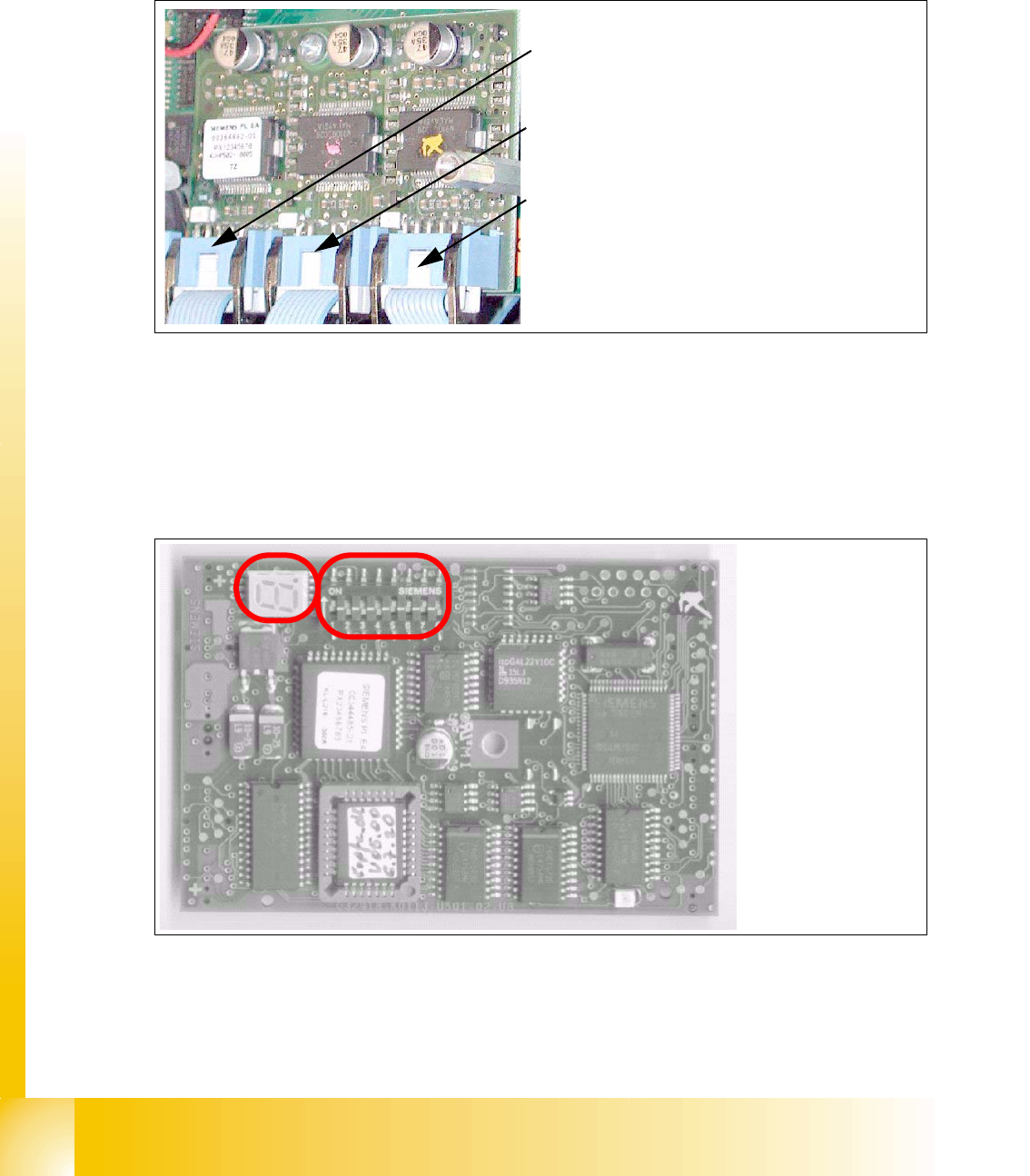
6.4.1.5 Stepping motor board
The stepping motor board for the valve drivers and the swivel function on the DP station is moun-
ted onto the head adapter below the CAN processor board 80C515C. Is the board missing the
LSM LED at the head adapter is ON. In this case the CAN-Bus-Processor board can not fixed.
Fig. 6.4 - 5 Stepping motor board
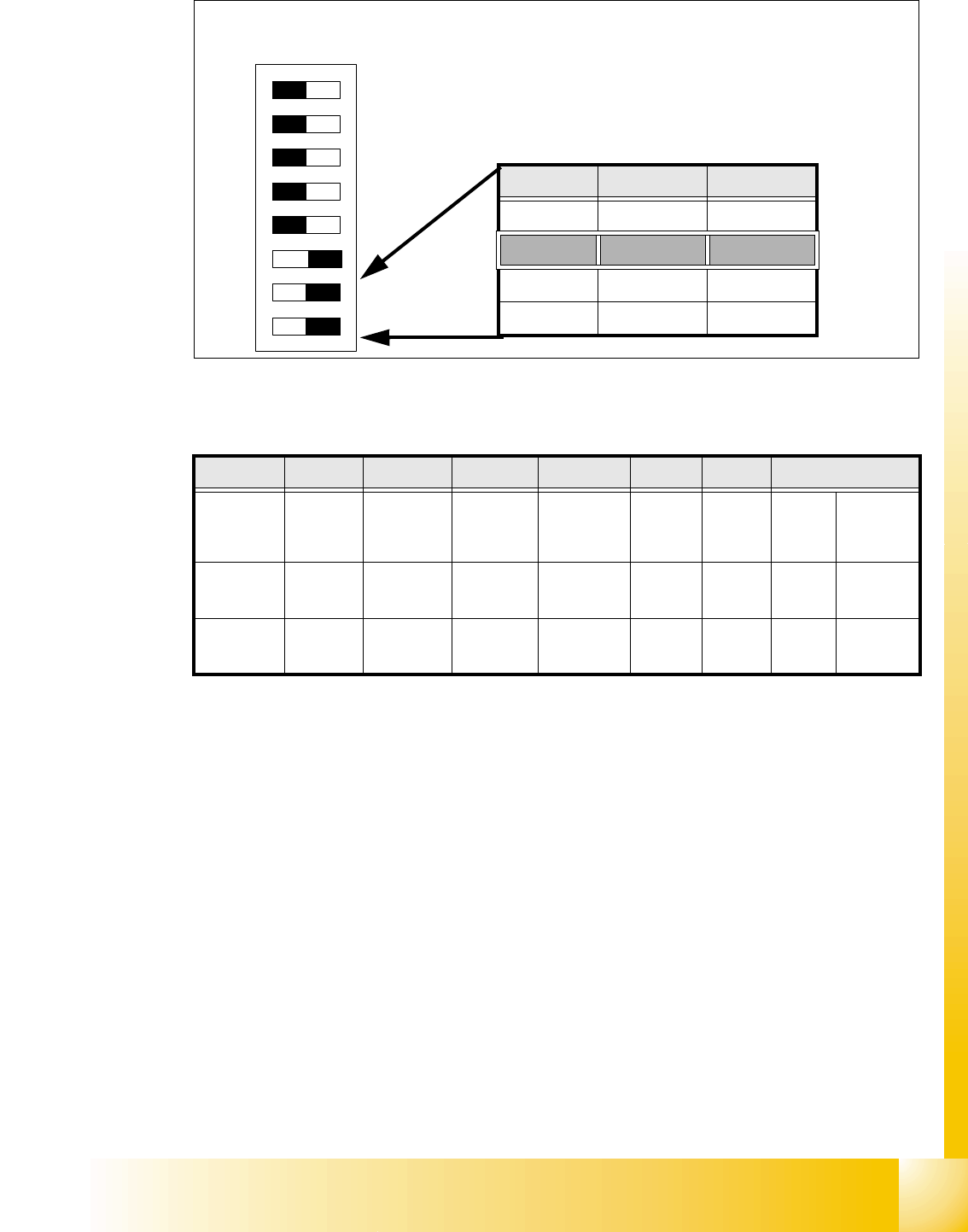
6.4.1.6 CAN Processor board 8 Bit 80C515C on the head adapter C&P
Fig. 6.4 - 6 CAN Processor board
2
3
1
Stepping motor rejectposition
(for S/F. HS and HF-machine)
Stepping motor pick up-, placement-
(and reject position HF/HF3)
Stepping motor DP-axis
Description
DIP-Switches and
7 Segment display
see below.
1 - 55
Student Guide SIPLACE HF/HF3
Edition 09/2005 6 Collect &Place-Head / DLM2
55
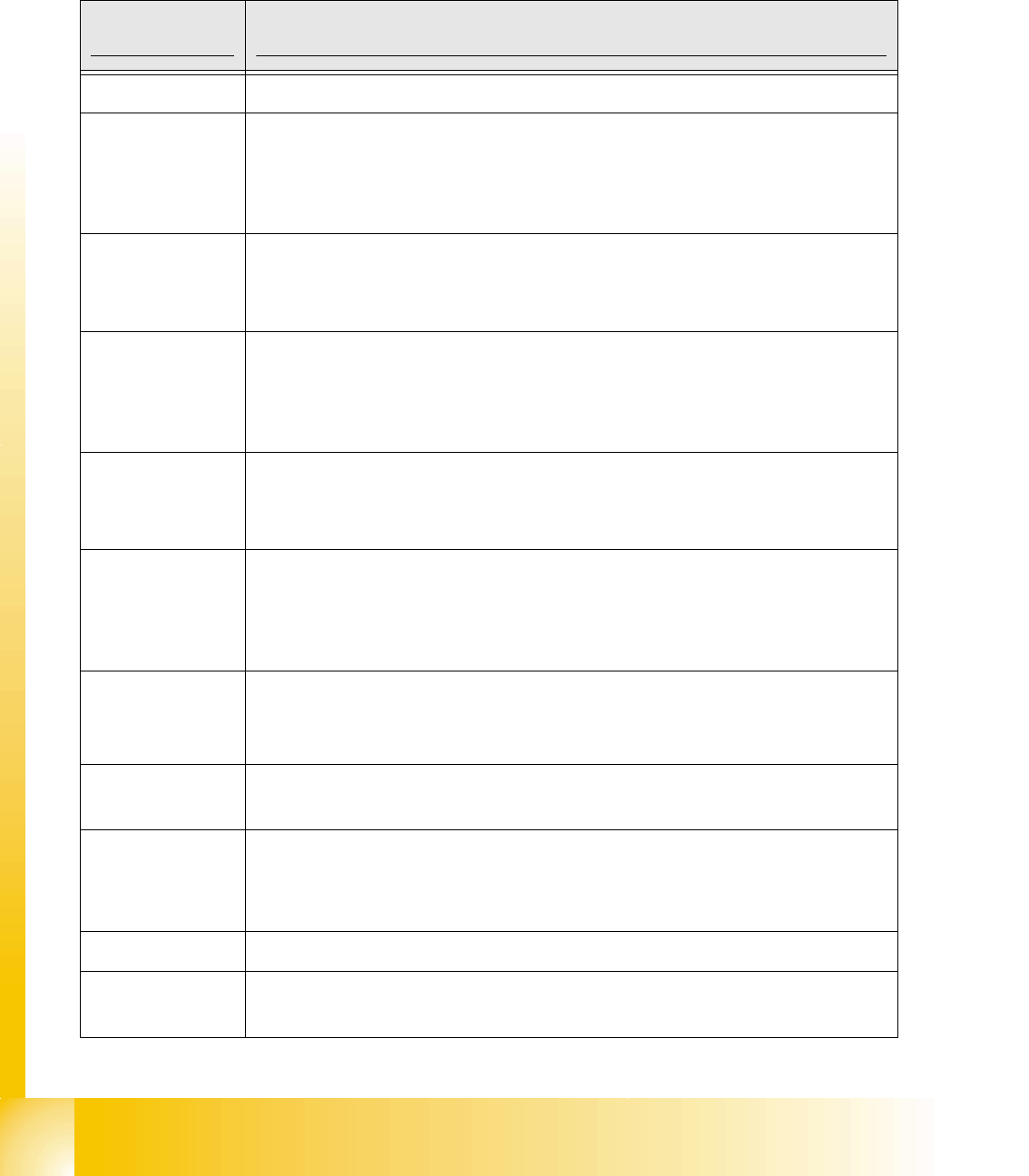
6.4.1.7 Switch position on the head board
6
Fig. 6.4 - 7 Table: DIP-Switches
The wiring of the switch depends on the placement machine involved: 6
Jumper 1: ON -> CAN matching resistor on the placement head is set
(S-20, F4, F5), S-23,
S-25 HM, F5 HM.
OFF ->CAN_matching resistor is not wired on the head (
HS/HF default)
Jumper 2: ON -> Setting during the download
OFF -> Default status
Jumper 3: ON -> Test mode
OFF -> Default status
Jumper 4: ON -> Test mode (setting of CAN ID)
OFF -> Default status
Jumper 5: ON -> Default status
OFF -> Switch off CAN_Objects component-,LP-Vision und IC-head on the
modulare Head-FW (only for SIPLACE_HF)
Jumper 6: ON -> Default status
Jumper 7, 8: CAN_ID:
DIP Switch
ON
78123456
Gantries Switch 7 Switch 8
Gantry 1 ON ON
Gantry 2 ON OFF
Gantry 3 OFF ON
Gantry 4 OFF OFF
Standard OFF OFF OFF OFF ON ON CAN_Addresse
Switch
position
1
CAN_R120
2
EPROM_WE
3
Test_Mode
4
CAN_ERR_
SWITCH
5
Jumper 5
6
Jumper 6
7
CAN_ID1
8
CAN_ID0
ON X
see
above
see above
OFF X X X X X
see
above
see above
1 - 56
Student Guide SIPLACE HF/HF3
6 Collect &Place-Head / DLM2 Edition 09/2005
56
6.4.1.8 Status "7 Segment display"
The status of the PROCESSOR BOARD 80C515C FW is indicated on the 7-segment display.
Normal status on the diplay is: Display shows " 0 " and the " . " flashed slowly.
7 Segment
Display Description status prozessor board
display 0 The FW has the status OK.
display 1
CAN telegram cannot be sent. This status occurs if the 80C515C PROCES-
SOR BOARD cannot issue its start telegram after the station is switched on.
What to do: There is an error in the CAN-BUS wiring or
on the COM module in the control unit.
display 2
FW error: CAN-BUS receive buffer overflow. Command for 80C515C PRO-
CESSOR BOARD is lost.
What to do: HW reset of the 80C515C PROCESSOR BOARD
display 3
The CAN-BUS controller has the status ERROR PASSIVE.
CAN-BUS transmission errors have occurred.
What to do: After a number of successful transmissions,
this error disappears automatically.t
display 4
The CAN-BUS controller has the status BUS-OFF. CAN-BUS transmission
errors have occurred that have led to the shutdown of the CAN controller.
What to do: HW reset of the 80C515C PROCESSOR BOARD
display 5
The 80C515C PROCESSOR BOARD has received a message instead of a
command. This occurs with the SIPLACE HS50 when two 80C515C PROCES-
SOR BOARDS have the same HW address.
What to do: Use jumper to correct gantry address.
display 6
The power-fail signal is activated. This occurs if the power-fail signal is active
when the station starts up.
What to do: Check the power-fail wiring.
display F
Other status (occurs only in the event of a firmware error) For example: no
valid command in BIOS
display any
C0005 HW problem
– Check the RESET signal for the 80C515C PROCESSOR BOARD.
– uP not running, HW fault (possibly a cold soldered joint)
display A
At initialization: Transition from BIOS to the application module
display b
At startup: Head processor remains in the BIOS (ready to receive BIOS com-
mands, e.g. download)