SG_FSE_SiplaceHF_HF3_00193901-05_eng.pdf - 第587页
Edition 09/2005 SIPLACE HF/HF3 Appendix 12 Display text component s Samples scans often ’51 1’ (independent of the scan period setting at ’T ime’) (Closure) T ime is the smallest time unit for re presentat ion of oversho…
SIPLACE HF/HF3 Edition 09/2005
Appendix
11
– The deviation of position signal of the respective Axes are (without any further action) dis-
played and analysed on the SAT LCD-Display.
The
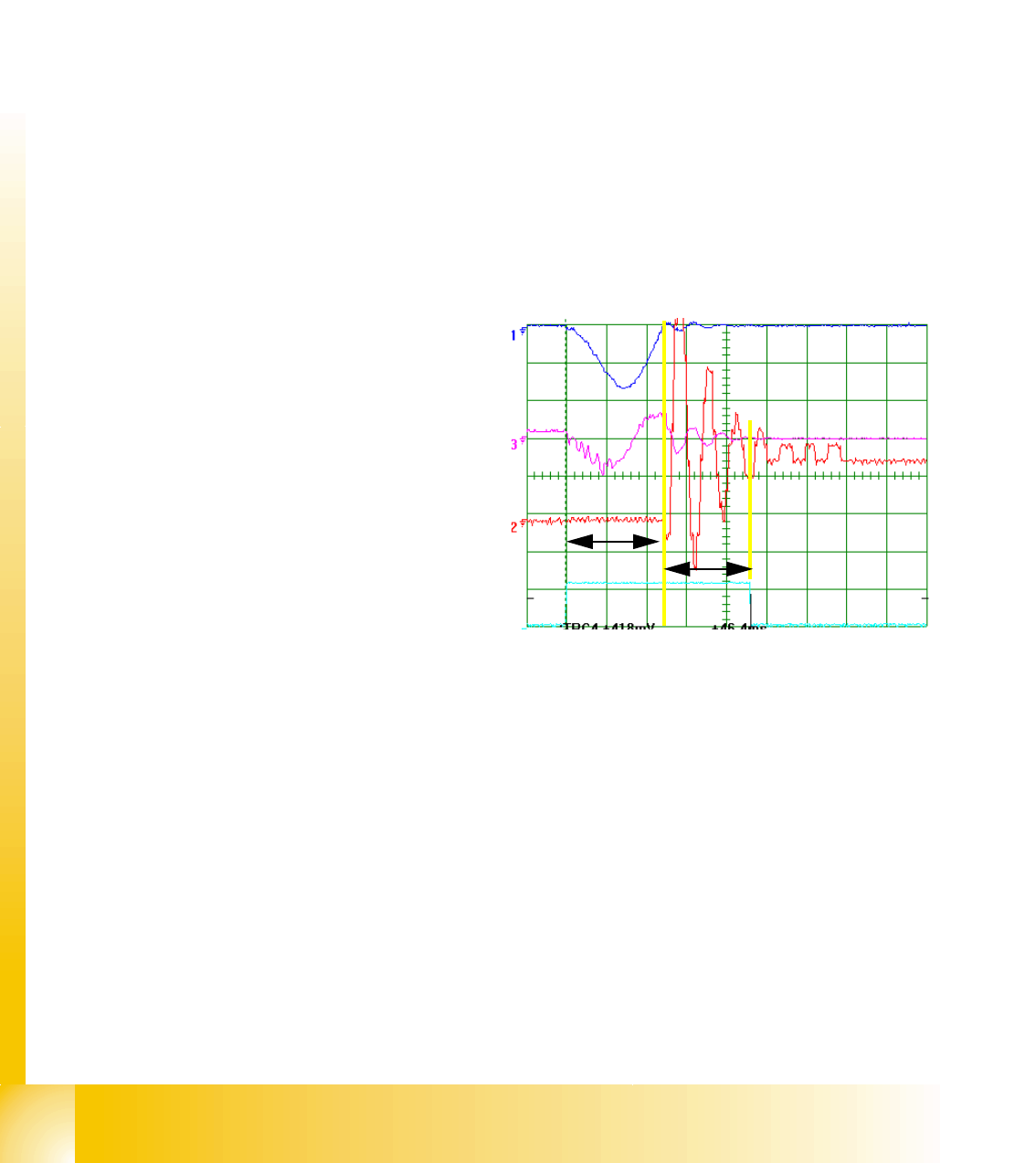
Positioning time is the ’whole travel time of a positioning’ (Start signal to End signal).
The
Control time is the time from start to the first arrival at the target position.
The
Pull off Time is the time to control the generated overshoots down to limits.
Positioning time = Control time + Pull OFF time
– With ’Return’ <
_|
, ’Oscilloscope-Mode’, and ’Signal line (2 or) 3’ we connect the deviation of
position signal of the respective Axis to the SAT BNC output. We can measure with the free
Osci-input CH2 (CH3) the deviation of position signal synchronous to the other dynamic sig-
nals.
20.3.3.2 SIPLACE Axis Tester ’SAT’ Display
The diagram in the SAT display
shows a typical overshoot (as in
Fig. 20.3 - 7 at the top) and the
corresponding analysis
times.The delays between posi-
tionings should be set long
enough to allow the values to be
read and assessed.
Confirm with <
_|
and select ’PWM
mode’ and ’dynamic’ to display
the position deviation signal on
the oscilloscope. If no overshoot
occurs during the positioning pro-
cess (see Fig. 20.3 - 7 at the bot-
tom) (asymptotic approach), the
positioning time (pos) and the
control time (CTRL) will be
switched simultaneously. There
is therefore no
’pull off time’
(pull off)
during which the over-
shoot is corrected.
PLEASE NOTE:
The display is automatically
scaled to the overshoot size and
time!
Fig. 20.3 - 7 Times and position devia-
tions for a positioning process with/with-
out overshoot
B1 B2 B3 B4 B5
Edition 09/2005 SIPLACE HF/HF3
Appendix
12
Display text components
Samples
scans often ’511’ (independent of the scan period setting at ’Time’)
(Closure) Time is the smallest time unit for representation of overshoots (scan period) on the dis-
play. Can be reduced with B1 (display is prolonged and details are enlarged) or increased with B2
(display is shortened and whole picture is visible). Adjustment range 0.1 ms to 5 ms.
Axis type at the display
(Grain) Scale
is the pixel grouping of a sample (scan period) or digit on the display. 3 / 14 means
that scanning - the time unit entered at Time - will always appear on the screen with a length of 3
(fixed) pixels. A digit position deviation is 14 (dynamic) pixels in this case.
Scope the extent of a maximum positive or negative overshoot
(Time) Range is the signal duration as seen on the screen (alters in line with the ’Time’ setting).
Overshoot!! This is the Position of the axis at the moment of the End signal!
This show you how many Digit has the axis to move after End signal to get really
in target position.
Below the signal you will see a combination of numbers from which one can see at which part
of the overshoot scan the display begins
)
(e.g.
250/511 250th scan overshoot of 511
total scans (pos. 511 = pos.0)
Pull off time is the time measured for the
axis controller to correct the overshoot(s).
(2
Ctrl. Control time is the time needed by
the axis to reach the target position for the
first time. (1)
Pos. Positioning time is the time from axis
start to issuance of the end signal at target
position achievement with reliable position
deviation. Add (1) and (2).
20.3.3.3 Positioning Time Submenus
More specific analyses of the positioning sequence can be performed with the aid of these menus.
After recording a positioning procedure, press <-
|
Return to open the submenu.
(PWM mode version 1.0) Oscilloscope mode:
The version 1 designation stems from the pulse amplitude modulation used for the representation
of overshoots. It is switched synchronously to the other position deviation signals for the SAT over-
shoot counter, on the oscilloscope.
Start FFT:
The swivel-in process for a particular position can be analyzed with the aid of a frequency spec-
trum. After a positioning procedure, select ’FFT’ (Fast FourierTransformation) to display the
swivel-in spectrum on the screen.
Start Plot:
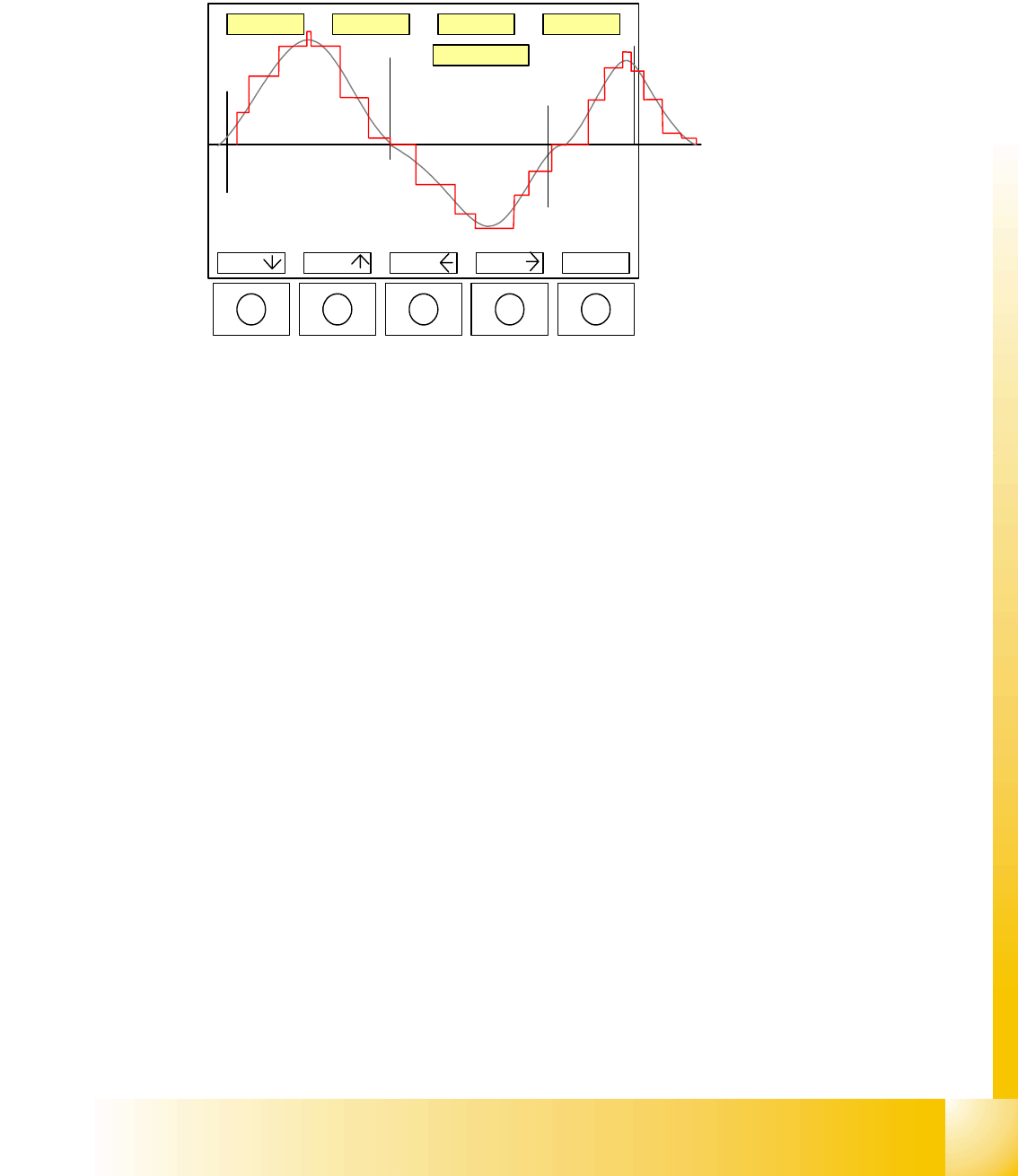
This menu facilitates measurement of the position deviation signal on the SAT screen, similar to
a
s
SIPLACE HF/HF3 Edition 09/2005
Appendix
13
that performed by the oscilloscope. The full size image is displayed again on the screen and the
operator can scroll with the -> B4 (<- B3) keys. Press <-
|
Return again to call up a measurement
menu. Mark 1 is at the position of the trigger signal (standard state) but can be displaced with <-
|
Return, Mark T1 and then B1 or B2. Mark 2 can be positioned at the point to be measured with <-
|
Return, Mark T2, then B1 and B2.
To print the overshoot control
process for documentation pur-
poses, the signal - as seen on
the screen - can be sent via the
CAN BUS output to a LAPTOP.
The B1/ B2 keys are used to
move the selected mark, while
keys B3/B4 move the image to
the left or right. The ’real’ over-
shoot (gray) is represented in
digital format (red)
20.3.3.4 Overspeed Menu for Assessment of Axis Dynamic
In this menu, the SAT tests the traversing axis for excess nominal speed (maximum speed must
be selected) and shows this positioning procedure as positioning quality. ... Positioning quality ==>
overspeed ==> confirm with <
_|
"Waiting for trigger" ==> SAT waits for ’occurance of overspeed’.
20.3.3.5 System Control
A number of system control submenus could be useful for you, as user, while others should be left
at their default settings.
For example, you should know which menus to use when setting the ’Language’ or ’User level’
(see menu path in following diagram Fig. 20.3 - 8).
The menu point "Save Settings" performs the same backup function as Exit (shutdown proce-
dure).
BNC1 BNC2 BNC3 BNC4
B1 B2 B3 B4 <-
|
T
E
T2
T1
12,25ms
25/317