SG_FSE_SiplaceHF_HF3_00193901-05_eng.pdf - 第74页
1 - 4 S tudent Guide SIPLACE HF/HF3 3 Communication and Control Edition 09/2005 4 3.1.2 Networking Overview Fig. 3.1 - 2 Networking overview on SIPLACE HF/HF3 Check the network address at the st ation computer: – S tart …
1 - 3
Student Guide SIPLACE HF/HF3
Edition 09/2005 3 Communication and Control
3
3 Communication and Control
3.1 Networking
3.1.1 Communication Overview
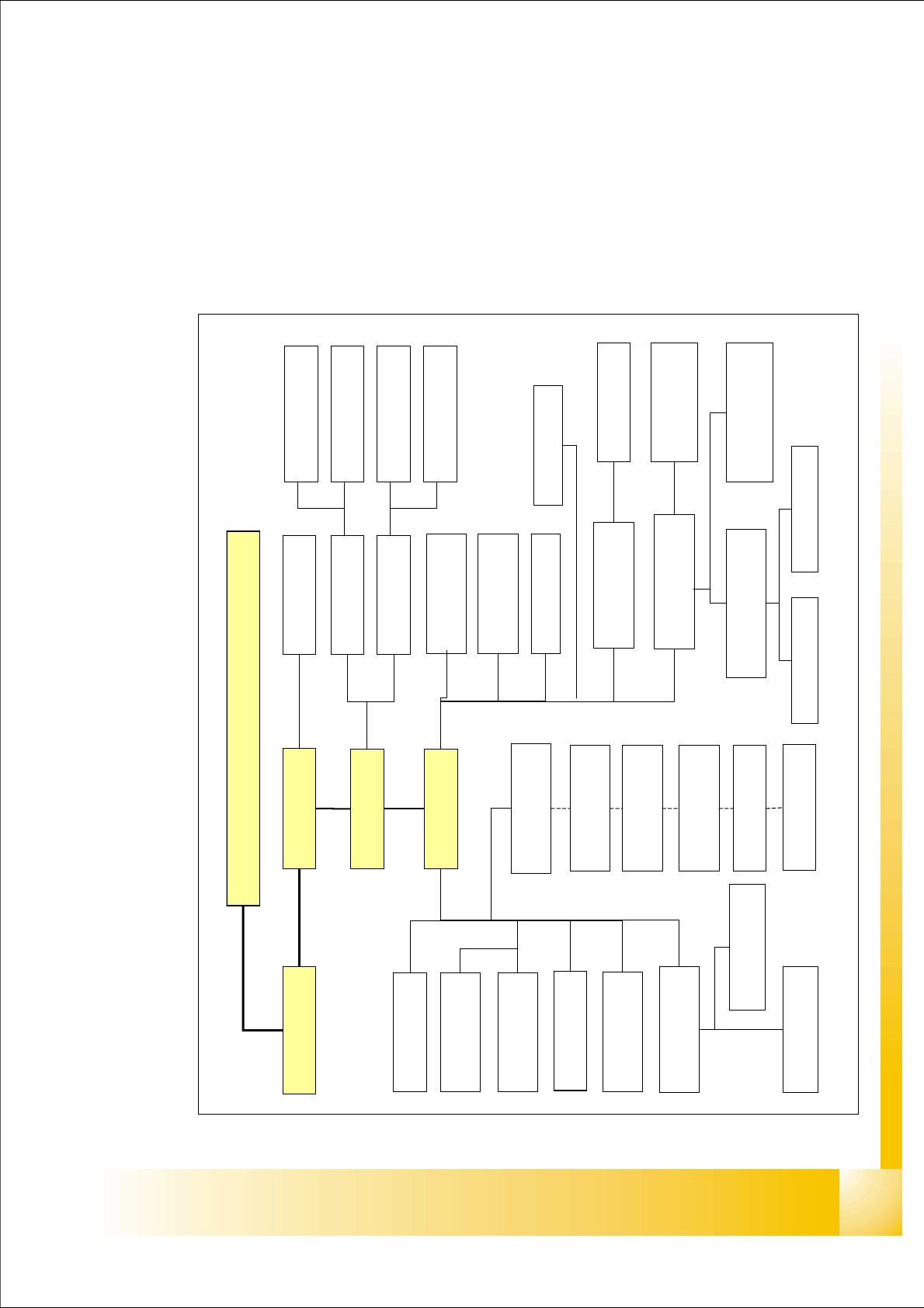
Fig. 3.1 - 1 Communication overview HF
Station Computer
SIPLACE Pro
table 1
table 4/ MTC
vision control unit
section 4
CAN I/O module
section 4
Conveyor
control board
axis unit (PA2)
CAN I/O module
section 2
vision control unit
section 2
table 2/ MTC
table 3
collect & place head
Can processor board
solenioid valve
PCB illumination
stepper motor
vacuum/air kiss 3
stepper motor
Dp station
stepper motor
vacuum/air kiss 1
touch screen
ICOS 1
ICOS 2
PCB camera 1
component camera 1
PCB camera 2
stationary cameras
S
i
p
l
a
c
e
L
A
N
V 24
HS3L
SMP bus
C
A
N
c
a
b
l
e
1
CAN cable 2
Machine Controller
PCB barcode
V 24
PCB camera
illumination
Can processor
head interface
component camera
illumination
PCB camera
illumination
force data
Twin head CAN
processor main board
vacuum values
Twin head Can
processor main board
CAN processor
vision board
Dual LAN Unit
Twisted Pair
COM board
1 - 4
Student Guide SIPLACE HF/HF3
3 Communication and Control Edition 09/2005
4
3.1.2 Networking Overview
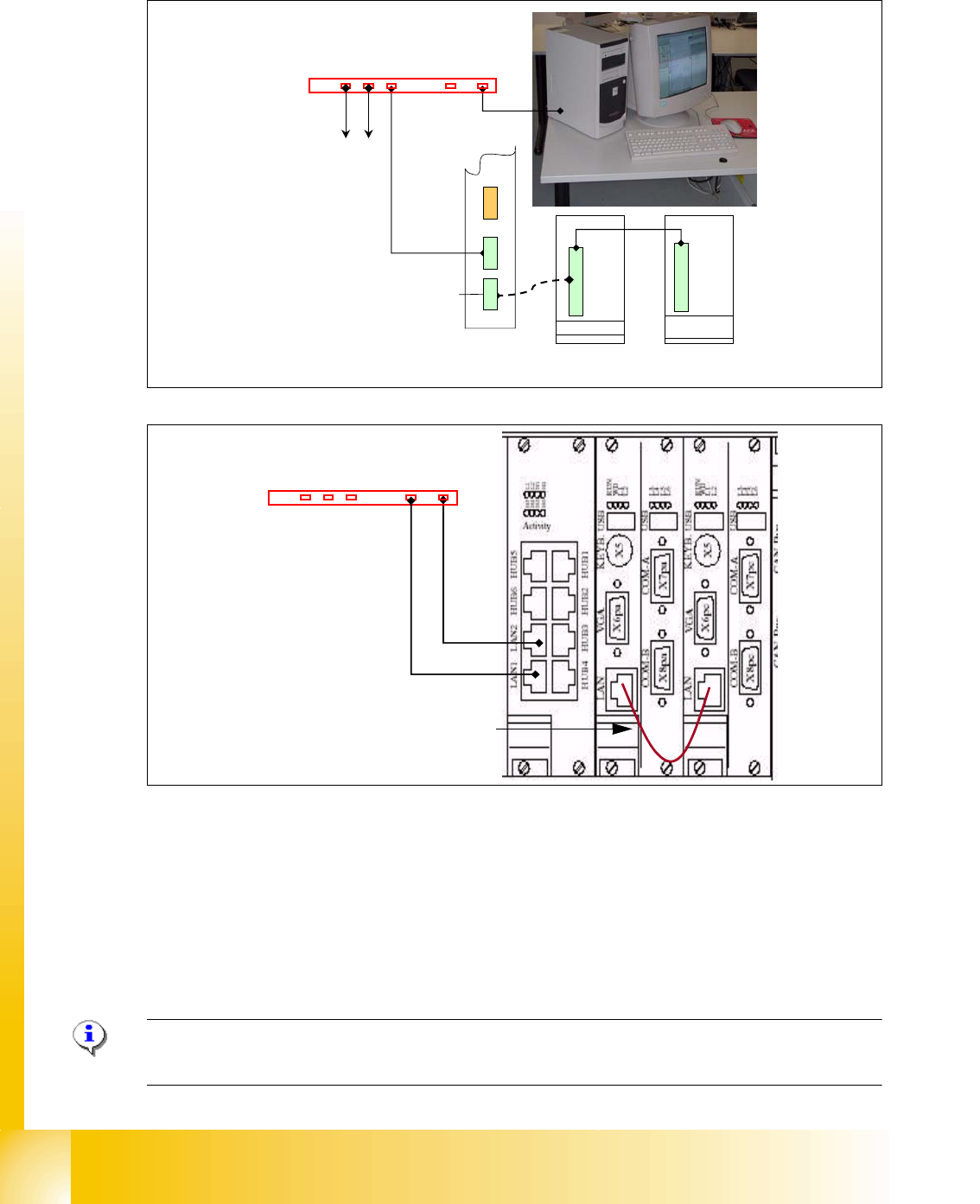
Fig. 3.1 - 2 Networking overview on SIPLACE HF/HF3
Check the network address at the station computer:
– Start --> Control settings -->Network and Dial up connections --> Local Area Connection
--> Properties
– Choose one of the three network cards
– Choose TCP/IP and --> Properties
Please Note: Fixed LAN Address for SC 192.168.255.249 , MC 192.168.255.250. never change!!
Network card 3 (LAN connector 2) customized network address.
Machine
Controller
Hub or Switch
Station Computer
Ethernet board MC with fixed
address for all HF machines
Ethernet board SC with fixed
address for all HF machines
Ethernet board LAN 1
For GEM-Computer
to other stations
Dual LAN Unit
E
t
h
e
r
n
e
t
b
o
a
r
d
L
A
N
2
Ethernet board
LAN 2
Hub or Switch
T
w
i
s
t
e
d
P
a
i
r
f
o
r
G
E
M
T
w
i
s
t
e
d
P
a
i
r
f
o
r
S
i
p
l
a
c
e
P
r
o
Communication machine controller
with station computer
1 - 5
Student Guide SIPLACE HF/HF3
Edition 09/2005 3 Communication and Control
5
3.2 Networking Address
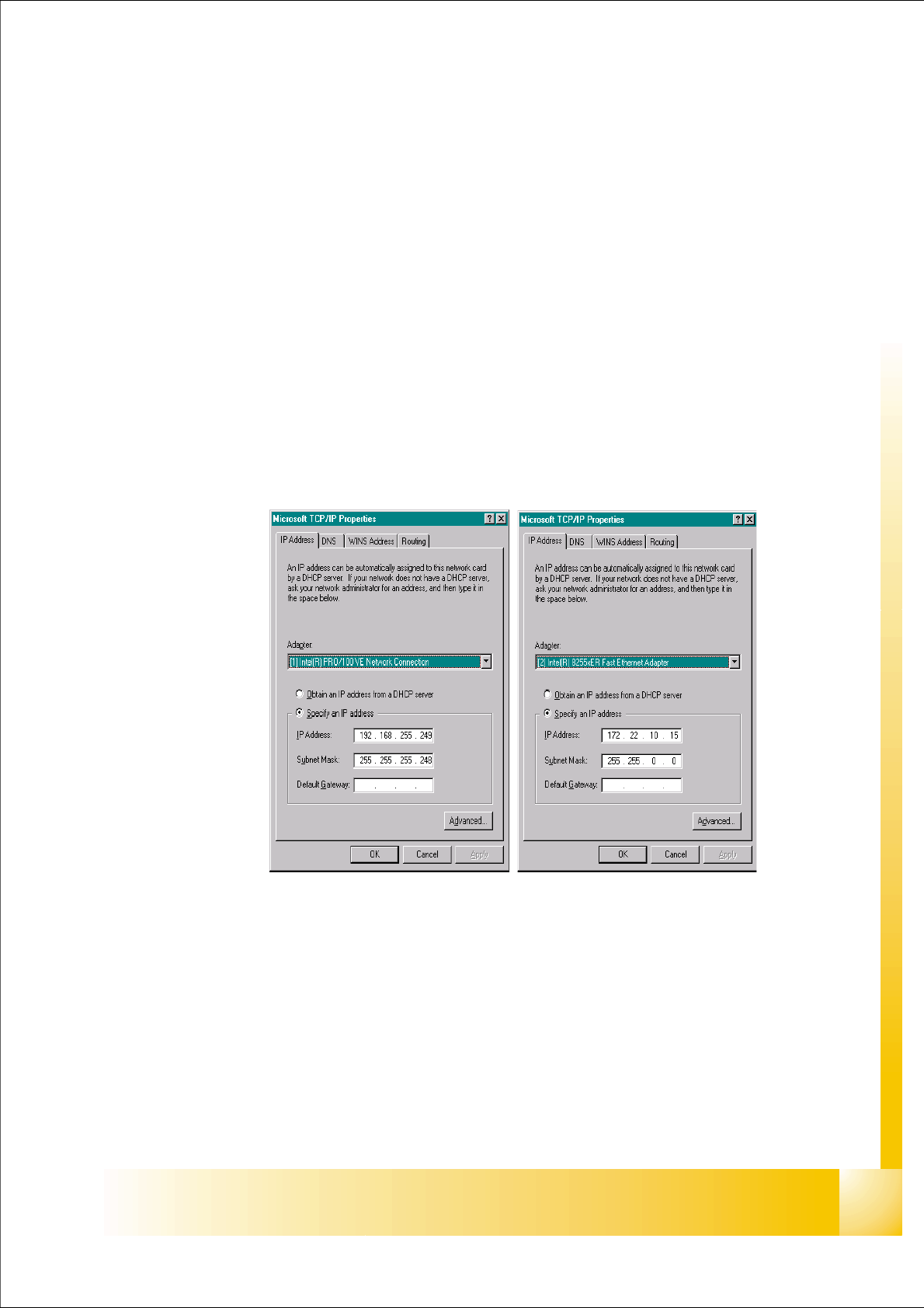
Network Card 1:
The network address for the SC and MC is a fixed address, for 100Mbit/sec net.
– Station computer: 192.168.255.249
– Machine controller: 192.168.255.250
Network Card 2:
The networking between station computer and Siplace Pro is using the ’Dual LAN Unit’ connector
LAN 2. The networking address is not fixed.
IP address LAN example: 172.22.10.xx
Network Card 3:
At the ’Dual LAN Unit’ connector LAN 1 you can connect a GEM Computer via network.
Fig. 3.2 - 1 network card 1 station computer(left) network card 2 customized IP address