SG_FSE_SiplaceHF_HF3_00193901-05_eng.pdf - 第88页
1 - 18 S tudent Guide SIPLACE HF/HF3 3 Communication and Control Edition 09/2005 18 3.3.6 CAN-Bus Concept with One Wire Bus e.g. HF3-Machine The placement mach ine SIPLACE HF/HF3 uses with the Softwa re 505 an additional…
1 - 17
Student Guide SIPLACE HF/HF3
Edition 09/2005 3 Communication and Control
17
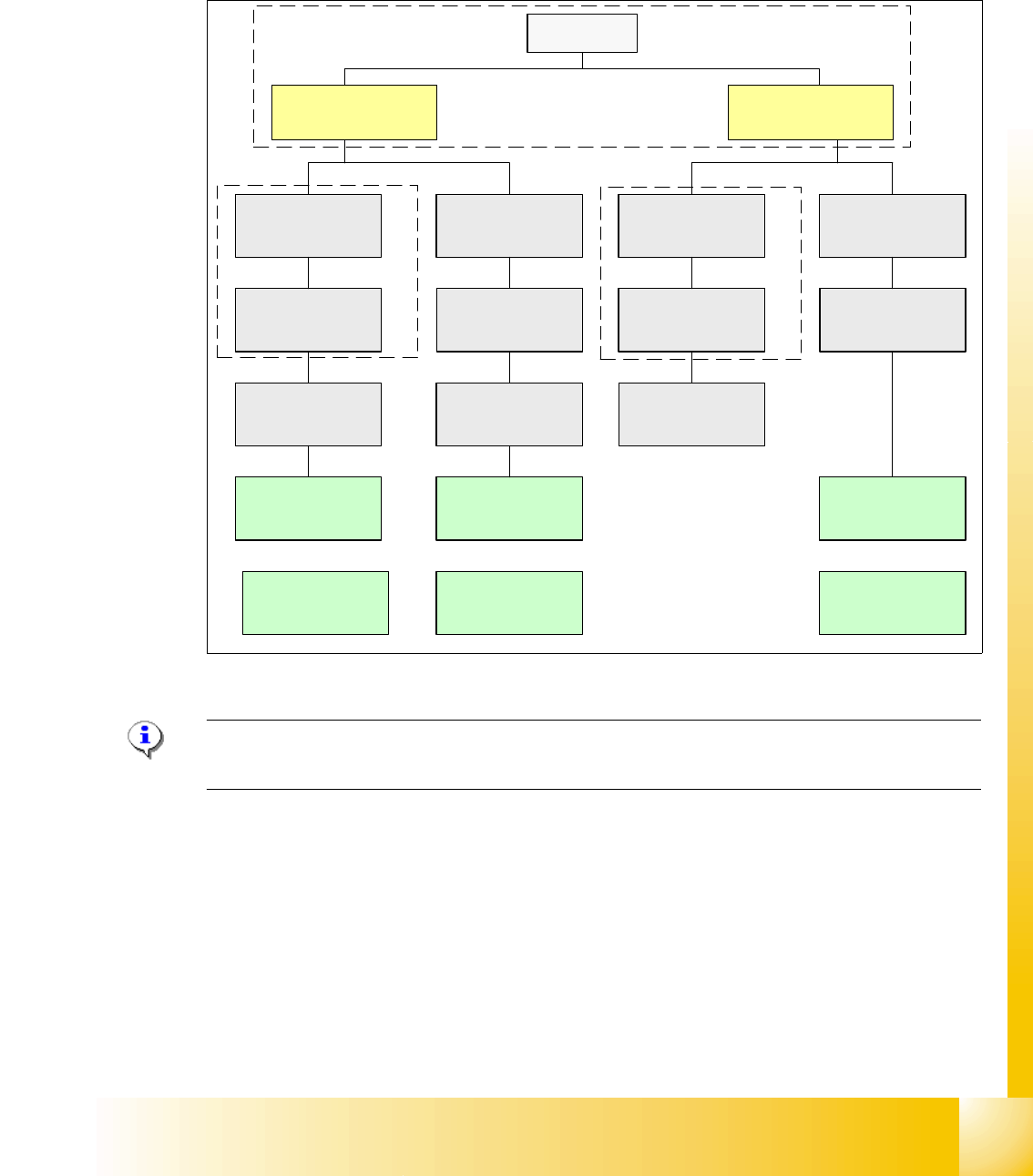
3.3.5 CAN Bus Concept on HF3 machine
The placement machine SIPLACE HF3 uses a bus system with 1 Mbit/s transmission rate.The
CAN: Bus system begin at the Communication board and is split in 2 path. Every path is termi-
nated by a 120 ohm terminator on the CAN Bus board at the individual placement head.
Fig. 3.3 - 13 CAN Bus overall overview HF3
Please Note: CAN: Bus Cable with "One wire Bus". The connector from the CAN: Bus cable,
that‘s connected on the COM Board, the wire on PIN 8/9 must not connected.
For datailed Connectors at the CAN-Bus system see actual circuit diagrams.
SMP BUS
COM Unit
(Left)
MC
MC
Axis unit
BB 1
Trailing cable-
Interface
Gantry 1
CAN Bus cable
COT 3
Tape cutter
Computer Unit
Transport
Control unit
COT 2 / MTC
Tape cutter
CAN E/A
Modul
Sektor 4
CAN E/A
Modul
Sektor 4
CAN E/A
Modul
Sektor 4
CAN I/O
SUB Module
Section 4
Vision
Control unit
COT 1
Tape cutter
COT 4
Tape cutter
SUB Distributer Section 4
Vision
Section 2
CAN I/O
Main Module
Sektor 2
Main Distributer Section 4
COM Unit
(Right)
Axis unit
BB 2
Section 4
Control unit
Trailing cable-
Interface
Gantry 3
Trailing cable-
Interface
Gantry 4
Head-Interface/
Visionboard
Gantry 4
Head-Interface/
Visionboard
Gantry 1
Head-Interface/
Visionboard
Gantry 3
1 - 18
Student Guide SIPLACE HF/HF3
3 Communication and Control Edition 09/2005
18
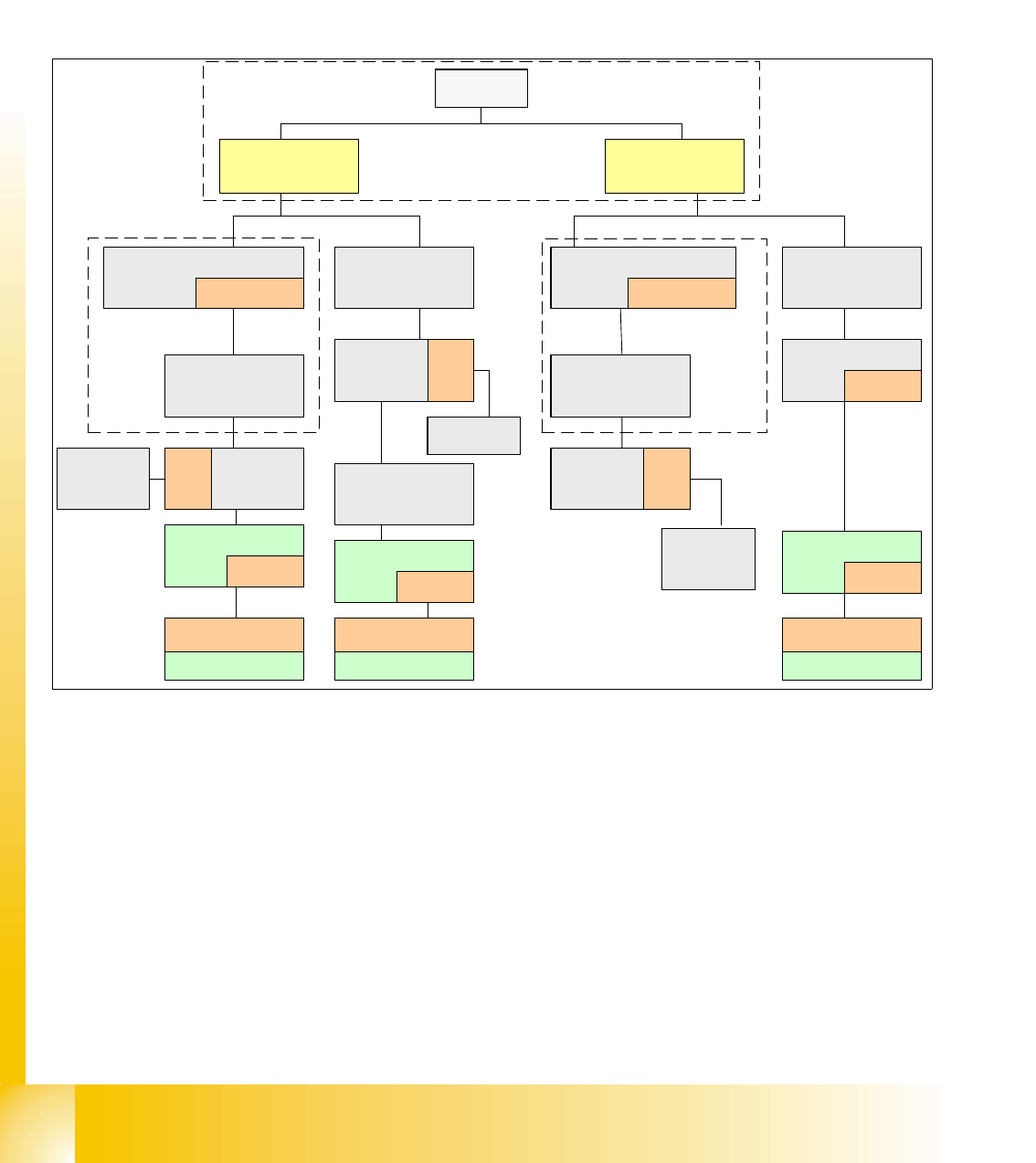
3.3.6 CAN-Bus Concept with One Wire Bus e.g. HF3-Machine
The placement machine SIPLACE HF/HF3 uses with the Software 505 an additional bus system
which are integrated into the CAN Bus cable --> One Wire Bus. On the Main- and Subdistributor
are installed the control unit of the one wire system. A kind of switch are located on the other units
which required the one wire system (see figure below). This switch open and close the communi-
cation path.
Fig. 3.3 - 14 General overview CAN-Bus with One Wire HF3
SMP BUS
COM Unit
(Left)
MC
MC
Axis unit
PA 1
CAN Bus cable
Computer Unit
CAN E/A
Modul
Sektor 4
CAN E/A
Modul
Sektor 4
CAN E/A
CAN E/A
SUB Modul
Sektor 4
COT 1
Tape cutter
SUB Distributor Sector 4
Main Distributor Sector 4
COM Unit
(Right)
CAN Bus cable
One Wire
"Control unit"
One Wire
"Switch"
CAN Bus cable
with One Wire
COT 4
Tape cutter
Vision
Control unit
Sector 4
Trailing
cable-
Interface
Gantry 4
One Wire
"Switch"
Temperature sensor
One Wire
"Head interface"
Temperature sensor
One Wire
"Head interface"
Axis unit
PA 2
COT 3
Tape cutter
One Wire
"Switch"
One Wire
"Switch"
Temperature sensor
One Wire
"Head interface"
CAN E/A
Main Modul
Sector 2
One Wire
"Control unit"
CAN Bus cable
with One Wire
Transport
Control
unit
Nozzle
changer A/B
COT 2 / MTC
Tape cutter
Vision
Control unit
Sector 2
Nozzle
changer A/B
One Wire
Switch
One Wire
Switch
Nozzle
changer A/B
One Wire
Switch
Trailing
cable-
Interface
Gantry 1
Trailing
cable-
Interface
Gantry 3
1 - 19
Student Guide SIPLACE HF/HF3
Edition 09/2005 3 Communication and Control
19
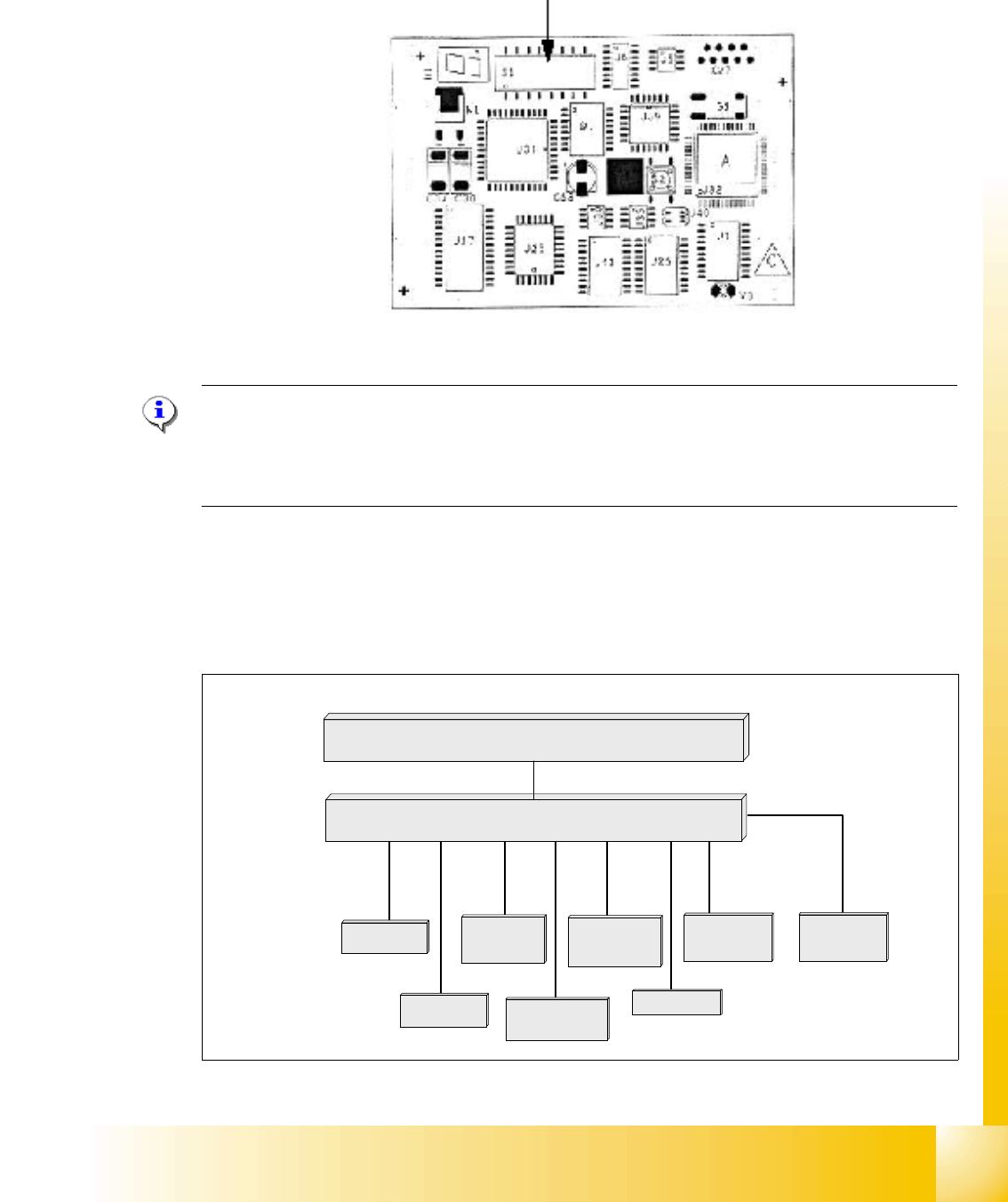
3.3.7 CAN Bus Processor Board C&P Head
CAN: bus processor board is using a 8 bit microcontroller
Fig. 3.3 - 15 8 bit Processor Board C&P Head
NOTE:
The status of the PROCESSOR BOARD 80C515C FW is indicated on the 7-segment display.
Normal status on the diplay is: Display shows " 0 " and the " . " flashed slowly
(Description of the 7-segment display see chapter C&P Head).
3.3.7.1 CAN Bus controlled function on C&P Head
The following overview shows various head functions, controlled by the CAN system. Thus, the
CAN bus controls the actuators and sensors of the C&P Head.
Fig. 3.3 - 16 CAN function on C&P Head
Co-sensor
CAN Bus 8 bit Processor Board
stepper motor
reject
:
LS top
LS bottom solenoid valve
air kiss
:
CAN bus
stepper motor
swivel in Dp
stepper motor
pick up / place
Vacuum values
Communication Board