00197727-12_IM_SE3.11_DE.pdf - 第18页
2 Systemkomponenten und -Konfigurationen Installations- und Konf igurationsanleitung SIPLACE Explorer 2.3 Standard-Installations-Varianten des SIPLACE Explorer Ausgab e 11/2020 DE 18 2 Abb. 2.3 - 2 Installations-V aria n…

Installations- und Konfigurationsanleitung SIPLACE Explorer 2 Systemkomponenten und -Konfigurationen
Ausgabe 11/2020 DE 2.3 Standard-Installations-Varianten des SIPLACE Explorer
17
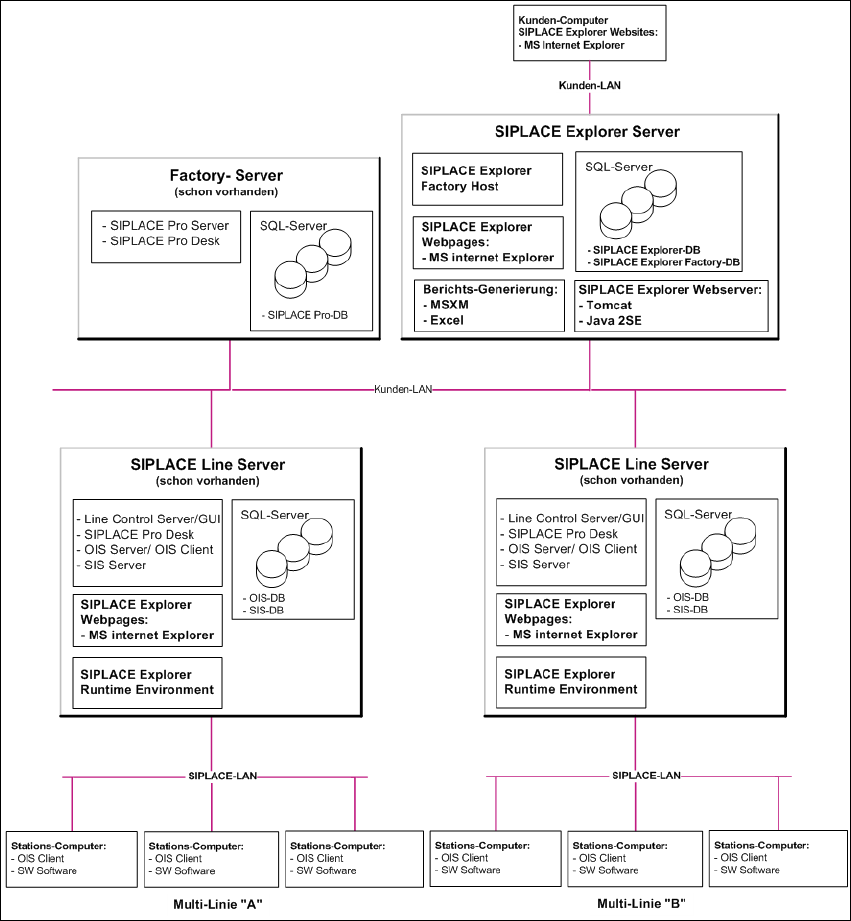
2.3.2 Factory Layout Distributed Installation (DI)
Mit dem Factory-Layout-Dl werden sog. "Multi Lines" unterstützt, d.h. innerhalb einer Fertigungs-
linie werden verschiedene Plattformen der Stations-Software unterstützt. Der gesamte Betrieb der
Fertigungslinien wird über ein zentrales SIPLACE Pro mit den entsprechenden OIS-/SIS-Installa-
tionen gesteuert. 2
SIPLACE Pro ist auf dem SIPLACE Linien-Server und auf dem Factory-Server installiert und OIS/
SIS auf dem SIPLACE Linien-Server. 2
Bei dieser Installations-Variante wird SIPLACE Explorer auf mehreren Computern installiert. Da-
bei wird SIPLACE Explorer Runtime Environment auf dem SIPLACE Linien-Server installiert. Alle
übrigen Komponenten von SIPLACE Explorer werden auf dem SIPLACE Explorer Server instal-
liert. 2
Auf dem SIPLACE Explorer Server werden die zu überwachenden Daten von allen dazugehöri-
gen Fertigungslinien gesammelt. 2
HINWEIS
Mit dem SIPLACE Linien-Server (der Computer auf welchem SIPLACE Explorer Runtime
Environment installiert ist) kann eine Fertigungslinie mit bis zu 7 Stationen überwacht werden. 2
Die folgende Übersicht stellt ein Beispiel für die Installations-Variante "Factory-Layout Dl" dar: 2
2 Systemkomponenten und -Konfigurationen Installations- und Konfigurationsanleitung SIPLACE Explorer
2.3 Standard-Installations-Varianten des SIPLACE Explorer Ausgabe 11/2020 DE
18
2
Abb. 2.3 - 2 Installations-Variante: Factory-Layout Dl
Installations- und Konfigurationsanleitung SIPLACE Explorer 2 Systemkomponenten und -Konfigurationen
Ausgabe 11/2020 DE 2.3 Standard-Installations-Varianten des SIPLACE Explorer
19
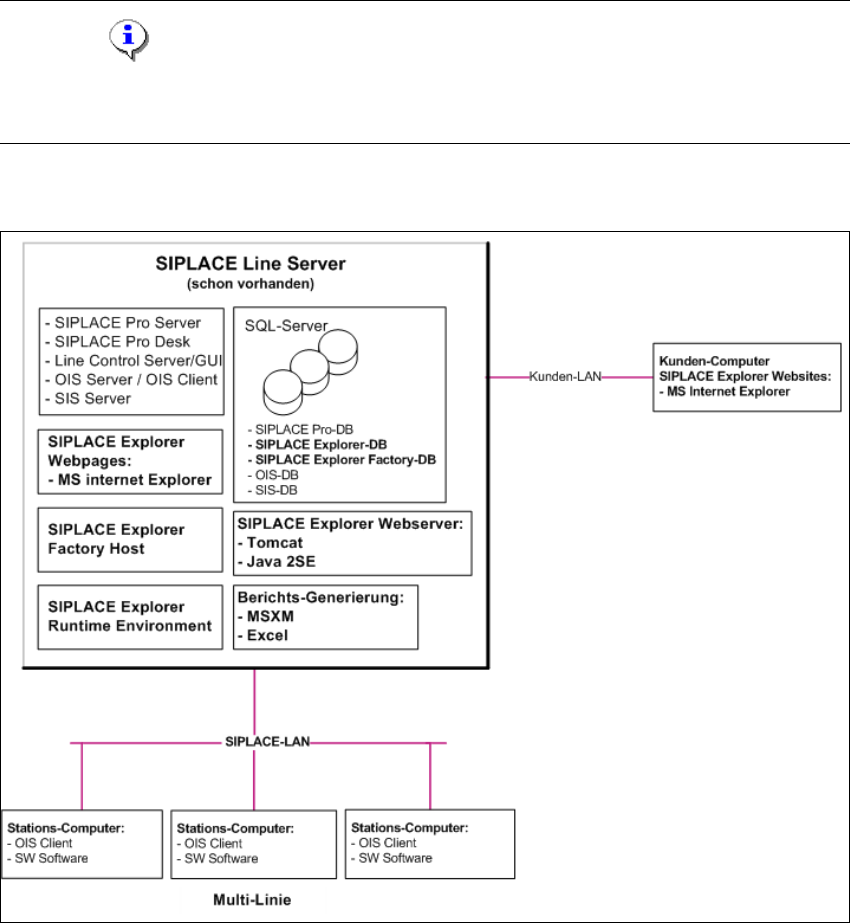
2.3.3 Single-Line-Layout
Die Installations-Variante Single-Line-Layout unterstützt genau eine Multi Line. 2
Dabei wird SIPLACE Explorer komplett mit allen Systemkomponenten auf dem vorhandenenden
SIPLACE Linien-Server installiert. SIPLACE Pro und OIS/SIS sind ebenfalls auf diesem SIPLACE
Linien-Server installiert. 2
HINWEIS
Achten Sie darauf, dass mit dieser Installations-Variante nur eine Applikation mit bis zu 7
Maschinen überwacht werden kann. 2
Die folgende Übersicht stellt ein Beispiel für die Installations-Variante "Single-Line-Layout" dar: 2
2
Abb. 2.3 - 3 Installations-Variante: Single-Line-Layout
2