ET8383-說明書(英文).pdf - 第26页
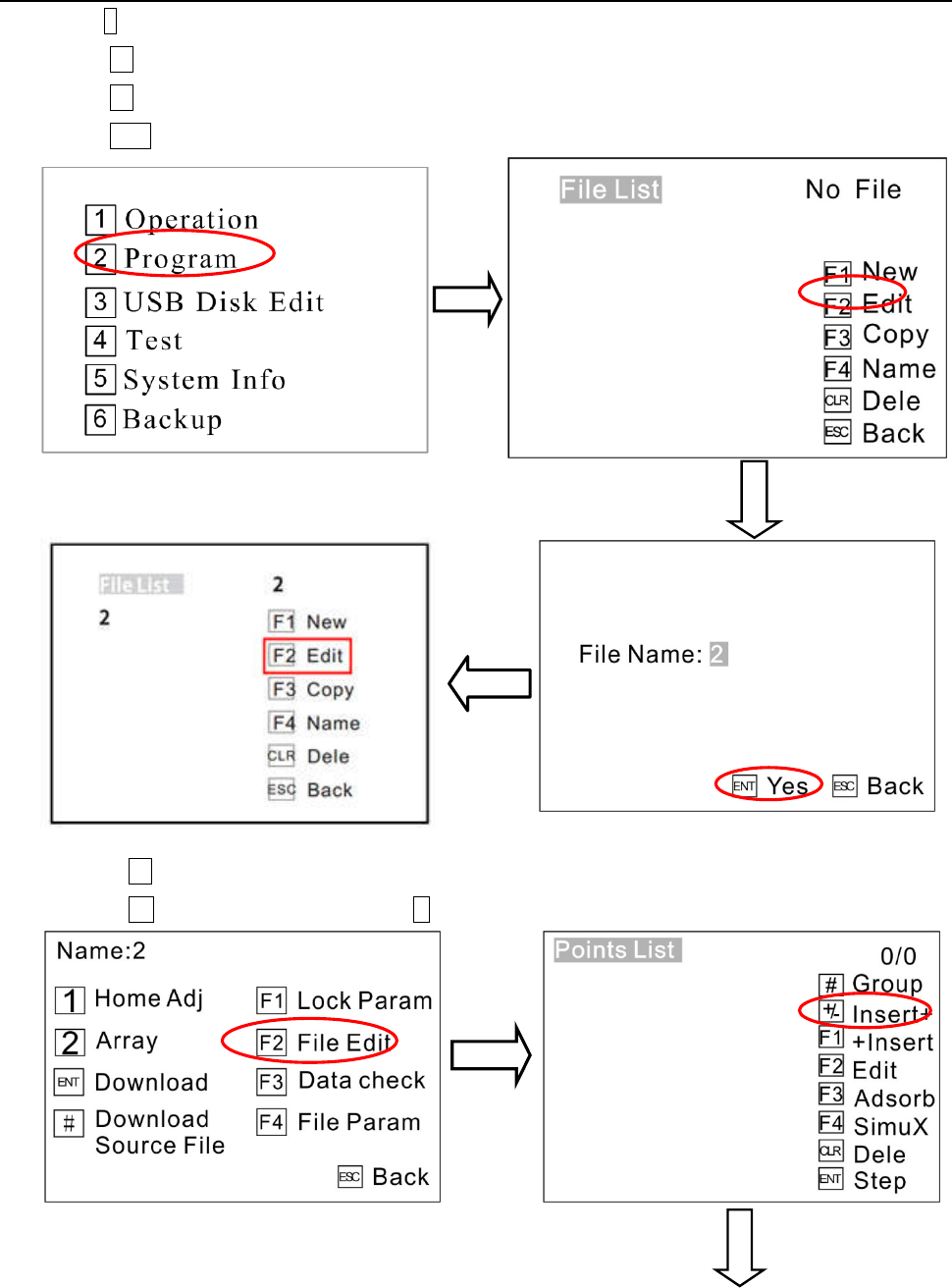
22 1) P ress 2 to ente r File List menu . 2) Press F1 to create a new file. 3) Pres s F2 to edit the new file, 4) Press ENT to save it, see picture. 5) Pres s F2 to enter Points L ist menu. 6) Press +/- to e nter I nsert…

21
1. I
nspect if the power supply is standard requirements or n
ot.
2. Inspect if the device is grounding standard or not.
3. Make sure there is no person or obstacle in the robots working area.
4. Inspect if the moving parts was fixed.
5. Inspect if the emergency stop switch was pushed or not.
6. Inspect if the power switch was OFF or not.
7. Attach and detach the moving parts to make sure it is smooth.
8. Inspect if the socket and pipe is well-connected, make sure there is no leak.
3.6.2 Operation of First Time
I
f using the unit for the first time, user should test the basic functionalities at first.
Step1: Install and Test
Before us
ing, user should properly install and connect the system.
At first, user should test the basic functionalities of the system with the ‘Test’ function of the teaching pendant.
Test including: Check if there is any problem with the axes movements towards positive or negative direction
Step2: Parameters Setting
P
roperly set the global parameters and other parameters using in the processing.
Remark: Failure to properly set the parameters will cause difficulties in using the system.
Step3: Teaching Program
P
rogram a graphic with teaching pendant. Refer to the instruction manual of the teaching pendant.
Step4: Origin Calibration & Set the Parameters of the Teaching Pendant
1. Origi
n calibration: User should adjust the start point when a teaching file is created for the first time.
2. Set file parameters.
Step5: Download & Process
1. Dow
nload: please refer to instruction manual of the teaching pendant “Teaching File Download”.
2. Process: please refer to instruction manual of the teaching pendant “File Processing”.
3.6.3 Debugging steps (take a point for example)
Do
NOT touch or put your hands on the moving parts when the device is working!
1. Connect all the sockets, power cord and the main air input pipe.
2. Turn the pressure regulating valve for appropriate air pressure.
3. Turn off the Dispensing controller.
4. Entering File Edit interface, insert a POINT and moving the nozzles to the place you need dispensing by
teach pendant. Details are as follow:
22
1) P
ress2to enter File List menu
.
2) Press F1to create a new file.
3) Pres
s F2 to edit the new file,
4)
Press ENT to save it, see picture.
5) Pres
s F2 to enter Points List menu.
6) Press +/- to e
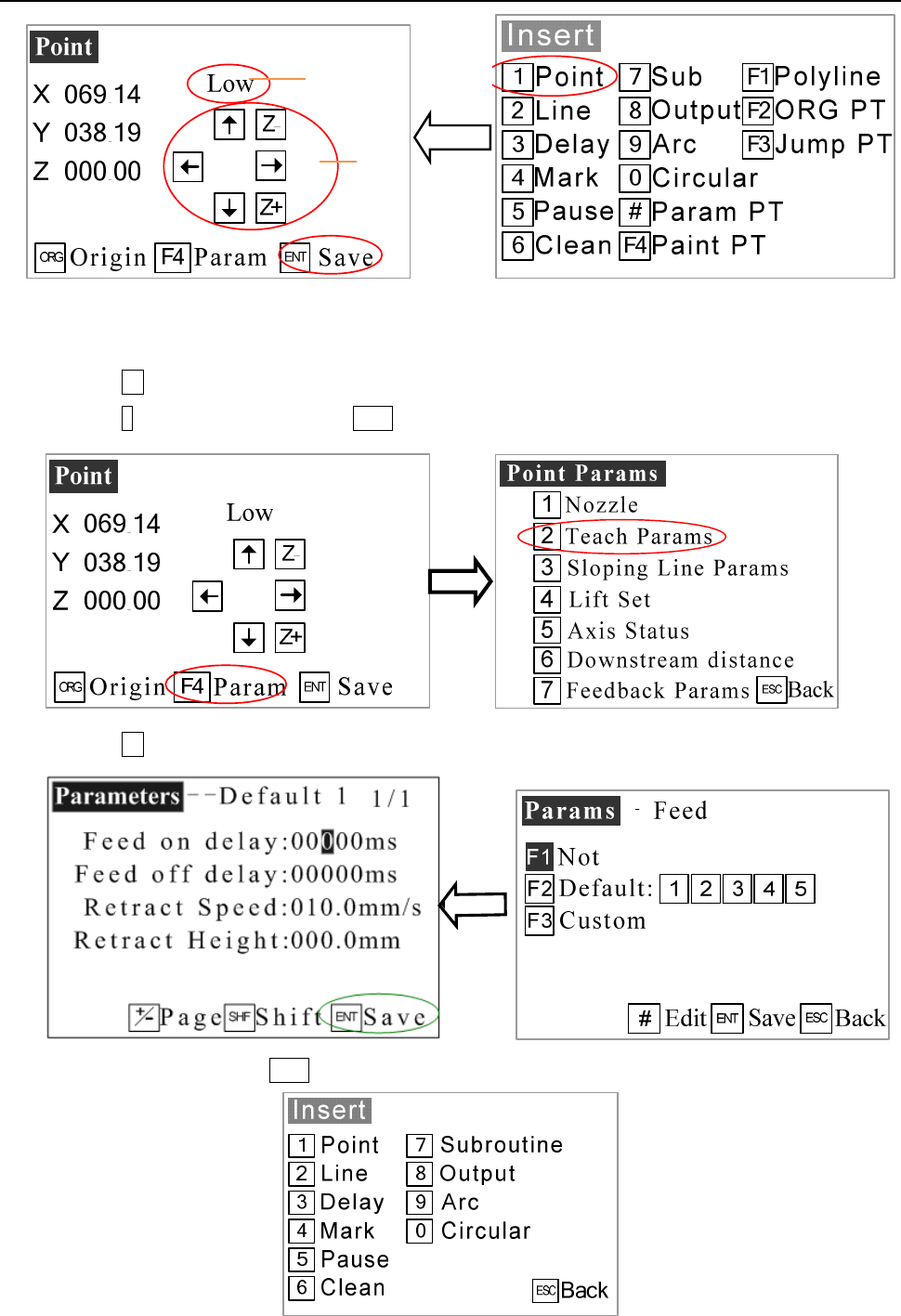
nter Insert menu and press 1 to enter Point menu.
23
1 The speed (machine steps) can be adjusted by changing it.
2 All axis can be moved manually by clicking “X-“, “X+” or “Y-“, “Y+” or “Z-“, “Z+”.
7) Press F4 to enter Point parameter menu.
8) Pres
s 2 to set parameters and press ENT to enter.
9) Pres
s F2 to enter into parameters menu.
10) Set
parameters and press ENT to save it.
1
2