CM602all_EJM8AESM_Service Manual.pdf - 第1076页
EJ M8A-E- 090101-A01- 00 Page 9- 1- 1-1 Sof twar e Sof twar e Inst allation 9-1-1 Inst al lati on Pr ocedures for Upgr ading the CM 602-L V er sion W hen upg radi ng the CM602- L s ystem f r om ear li er than V6. 35-016E…
EJM8A-E-090101-A01-00
Page 9-1-1-1
Software Software Installation
9-1-1 Installation
Procedures for Upgrading the CM602-L Version
When upgrading the CM602-L system from earlier than V6.35-016E to V6.35-016E or later,
follow the procedures below:
* When the version is upgraded, the FROM is cleared. Be sure to backup
the following data.
* Machine parameters
* Network configuration
* Refer to page 16 “CM602 Supplementary Procedures for Upgrading the
System”
* The engineer mode password is also cleared; re-set the password.
<Apology>
The screens shown in this instruction manual are CM402-M ones. Although some portions of
the screens are different from the CM602-L ones, the upgrade portions are the same. We are
sorry for the inconvenience caused by the different screens, but please refer to them.
9-1 Software Installation
EJM8A-E-090101-A01-00
Page 9-1-1-2
Software Software Installation
1. Procedures for Saving the CM602-L Machine Parameters & Network
Configuration
1.1
With the CM602-L operated, select [File management] from the main menu.
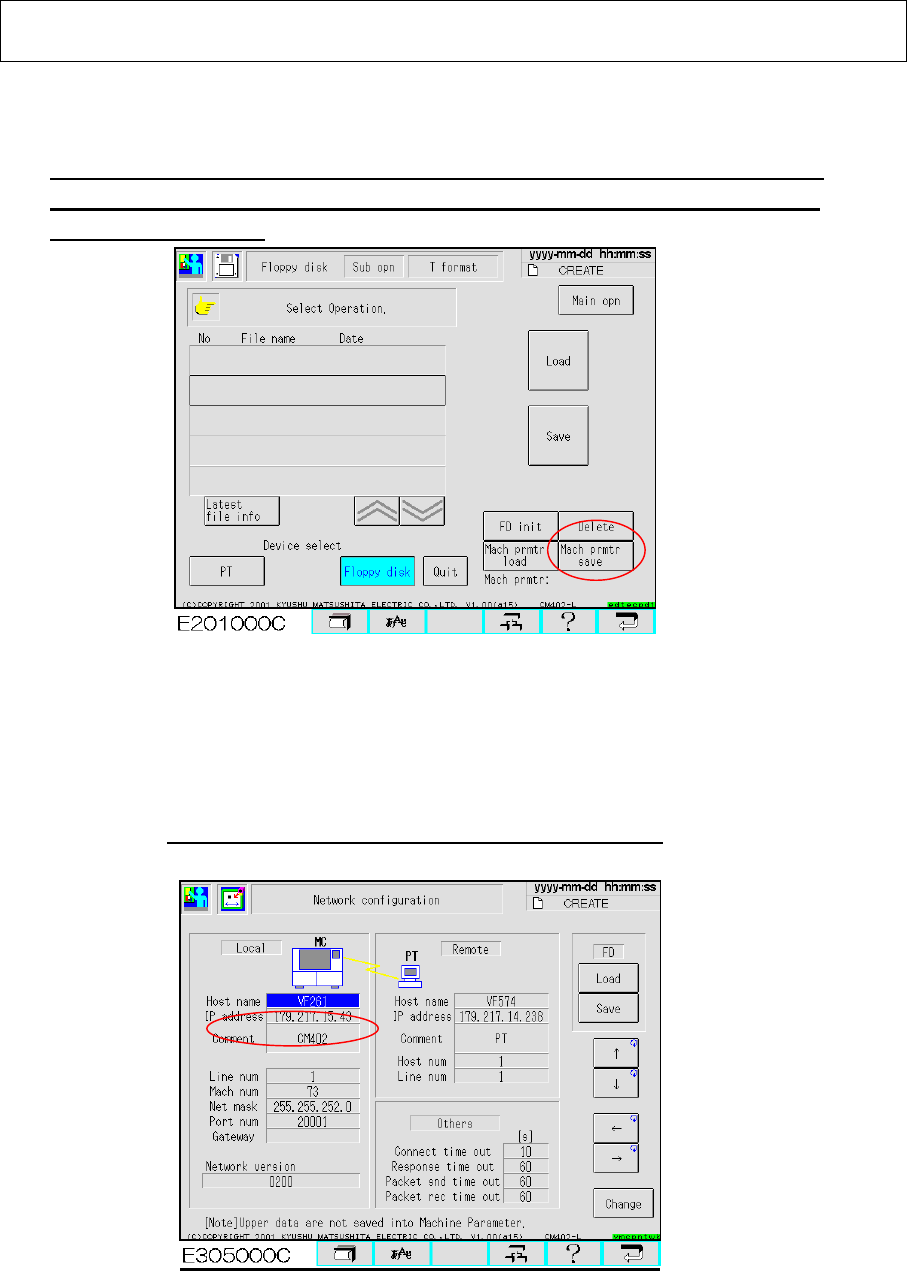
Select [Floppy Disk] and [Sub operation] so that the “Mach prmtr save” button is
displayed. (Fig. 1.1). Press that button so that the machine parameters are saved
into a floppy disk (FD). 【Time: 10 sec. Approx.】
Fig. 1.1 “File management” screen CM602-L
1.2 Select [Machine Parameter] from the main menu and [Network configuration] so that the
“Network configuration” screen is displayed. (Fig. 1.2) Press the “Save” button so
that the network parameters are saved into a floppy disk. (The floppy disk containing
the machine parameters can be used.) 【Time: 3 sec. Approx.】
Remember the CM602-L IP address; it may be required later.
Fig. 1.2 Network Configuration screen CM602-L
1.3 Upgrading the version clears the password to enter the “Engineer” mode. After
the version is upgraded, it is necessary to set the password.