CM602all_EJM8AESM_Service Manual.pdf - 第195页
Maintenance Adjustment Main Body Beam Be sure to ti g hten the hexa g on screws. Hexa g on screws 5 Ti g hten the hexa g on screws onto the side A llen ke y 3 mm of the line-camera cover. 6 Tighten the four (4) Phillips …
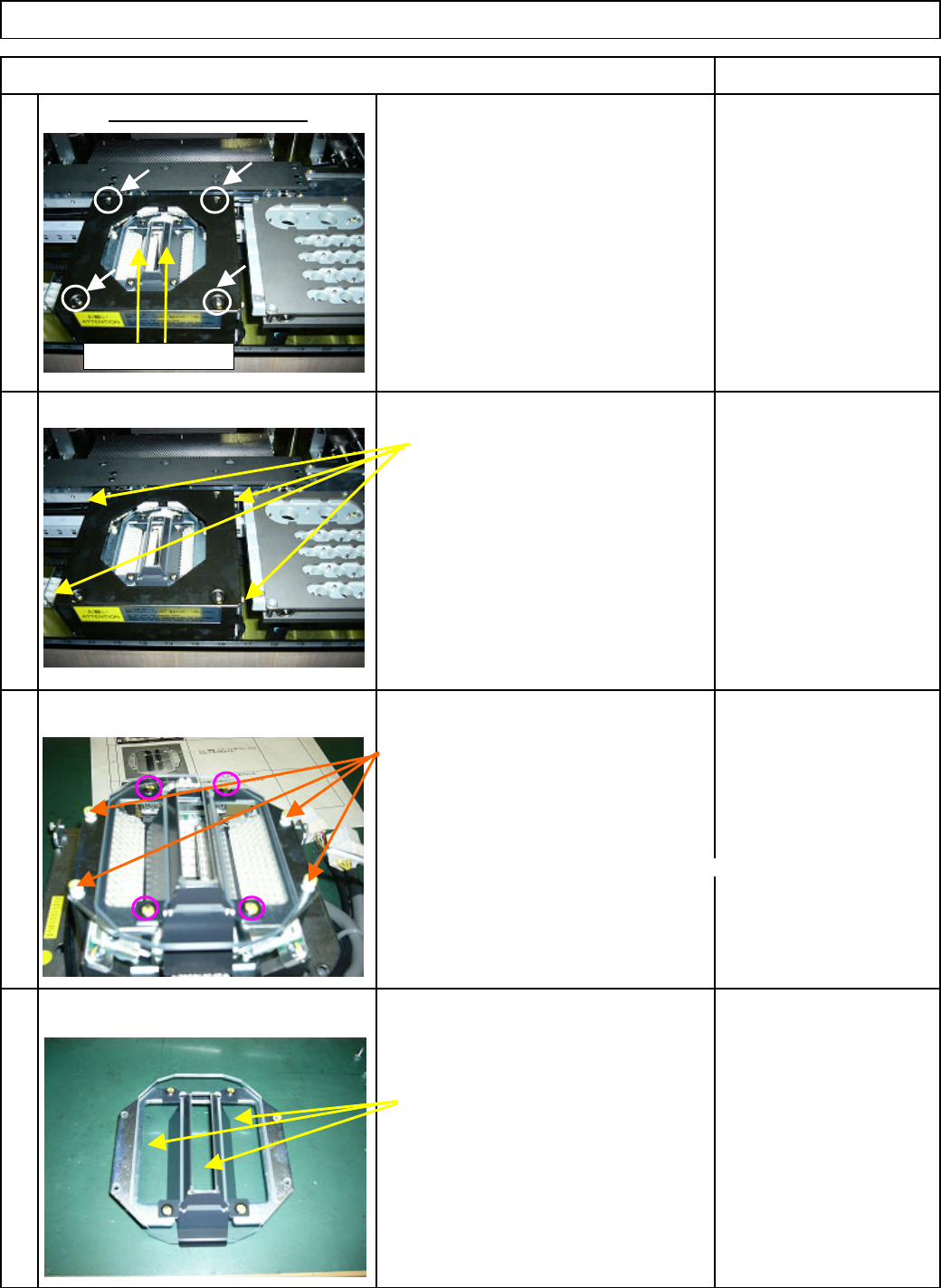
1. Turn OFF the power.
Phillips screwdriver
2. Remove the four
(
4
)
Philli
p
s screws
1 from the line camera cover.
Remove the hexa
g
on screws from th
e
A
llen ke
y
3 mm
sides of the line-camera cover.
2
A
llen ke
y
3 mm
Remove the four
(
4
)
hexa
g
on screws.
3
* Do not remove the Philli
p
s
screws circled at left!
Otherwise ad
j
ustment is re
q
uired.
Cloth
A
lcohol
Remove dust dirt
,
etc. from the
cover
g
lass with cloth
,
a cotton
4 bud
,
brush or an e
q
uivalent tool.
Remove the black cover.
Remove the cover glass.
Item Remark
Maintenance Adjustment Main Body Beam
Shading plates
EJM8A-E-SMA040115-A01-00
Page 4-1-15-2
Maintenance Adjustment Main Body Beam
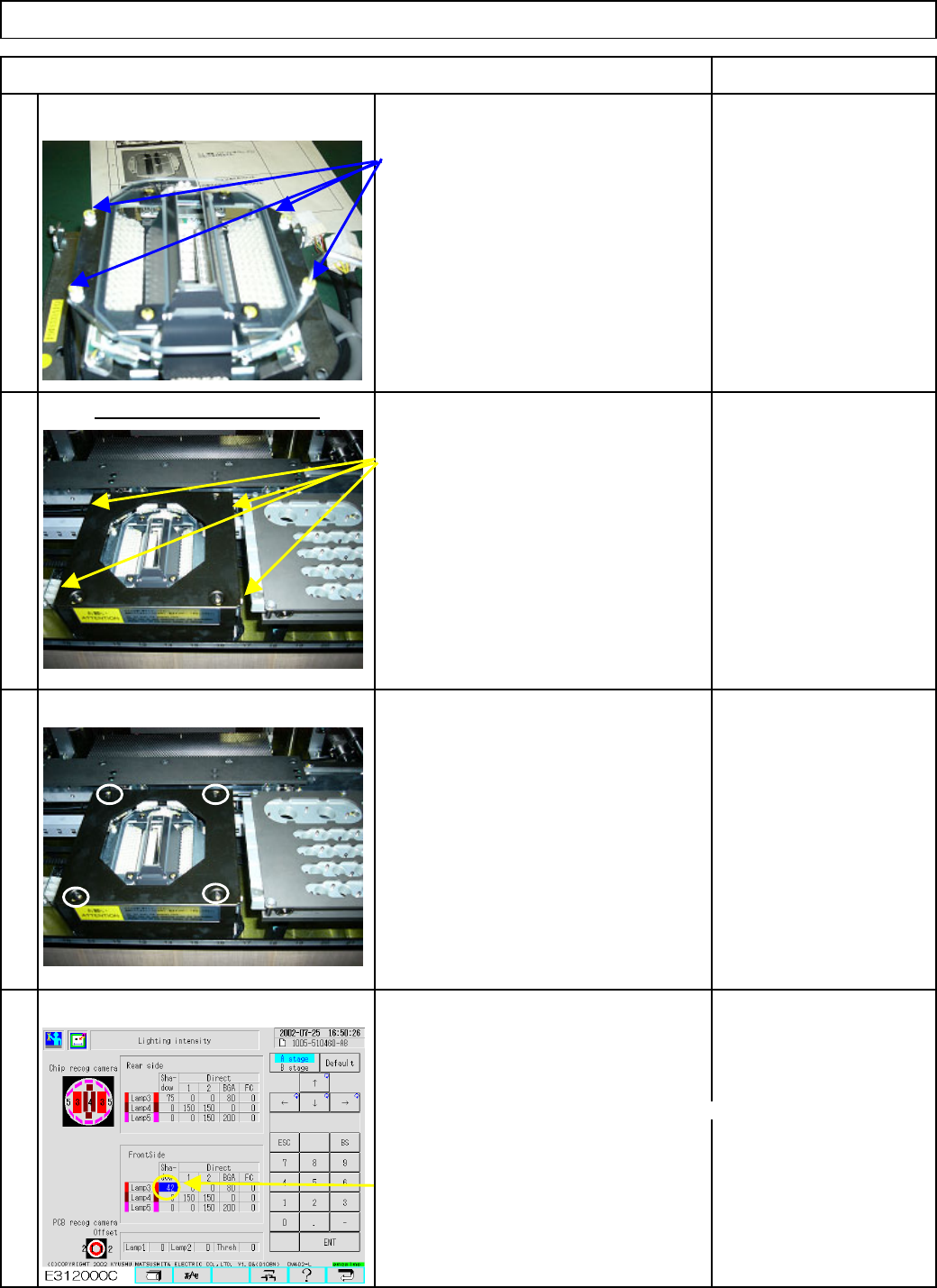
Be sure to ti
g
hten the hexa
g
on screws.
Hexa
g
on screws
5
Ti
g
hten the hexa
g
on screws onto the side
A
llen ke
y
3 mm
of the line-camera cover.
6
Tighten the four (4) Phillips screws on Phillips screwdriver
the line camera cover.
7
To check the
p
osition of the shadin
g
p
lates,
which are
p
laced on the
g
lass cover holdin
g
p
late, carr
y
out nozzle reco
g
nition.
(
The
p
lates were removed before cleanin
g
.
)
* Set the nozzles on the head to be checked.
Select
[
Machine Parameter
]
from the main menu.
8
Select
[
Li
g
htin
g
intensit
y]
.
Select the head to be checked.
Set Lam
p
3 Shadow of the Li
g
htin
g
intensit
y
to 50.
* Once reco
g
nition has been checked,
return the lam
p
value to the ori
g
inal one.
Item Remark
Put the black cover back on.
Put the cover glass back on.
EJM8A-E-SMA040115-A01-00
Page 4-1-15-3
Maintenance Adjustment Main Body Beam
Select
[
Product Confi
g
uration
]
from the
main menu.
Select
[
Nozzle Arran
g
ement
]
.
9
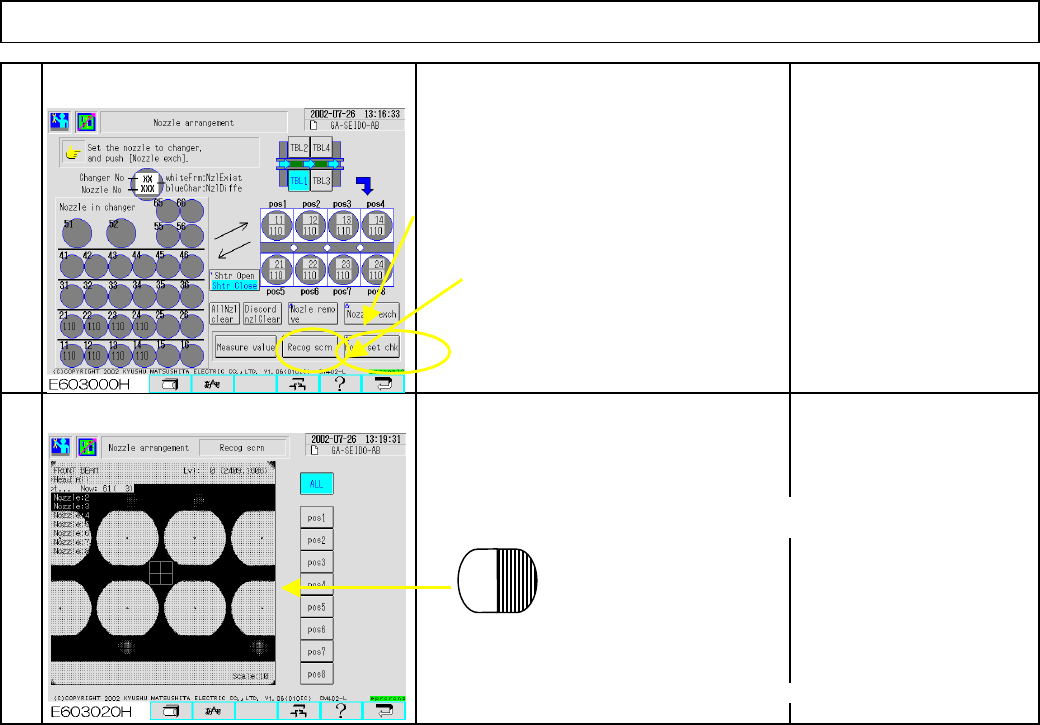
Press
[
Nozzle set check
]
.
Press
[
Reco
g
screen
]
and
check reco
g
nition.
The entire nozzle reflector should be li
g
ht
in color on the monitor.
If the half of the nozzle reflector is dark on
the reco
g
nition screen
,
ad
j
ustment is needed.
10
(
1
)
Movin
g
the cover
g
lass holdin
g
p
late
,
p
recisel
y
p
osition the
p
lates.
(
2
)
Check
,
takin
g
Ste
p
s 5 and 6
(
3
)
The entire nozzle reflector should be li
g
ht.
EJM8A-E-SMA040115-A01-00
Page 4-1-15-4