CM602all_EJM8AESM_Service Manual.pdf - 第766页
C-1: CN5 to INTENS,DISPLACE (LB1 to LZ1) C-2: CN5 to INTENS,DISPLACE (LB2 to LZ2) C-3: CN5 to INTENS,DISPLACE (LB3 to LZ3) C-4: CN5 to INTENS,DISPLACE (LB4 to LZ4) D-1 : CN4-LB1 to ANALOG-LZ1 The section of a cable conne…
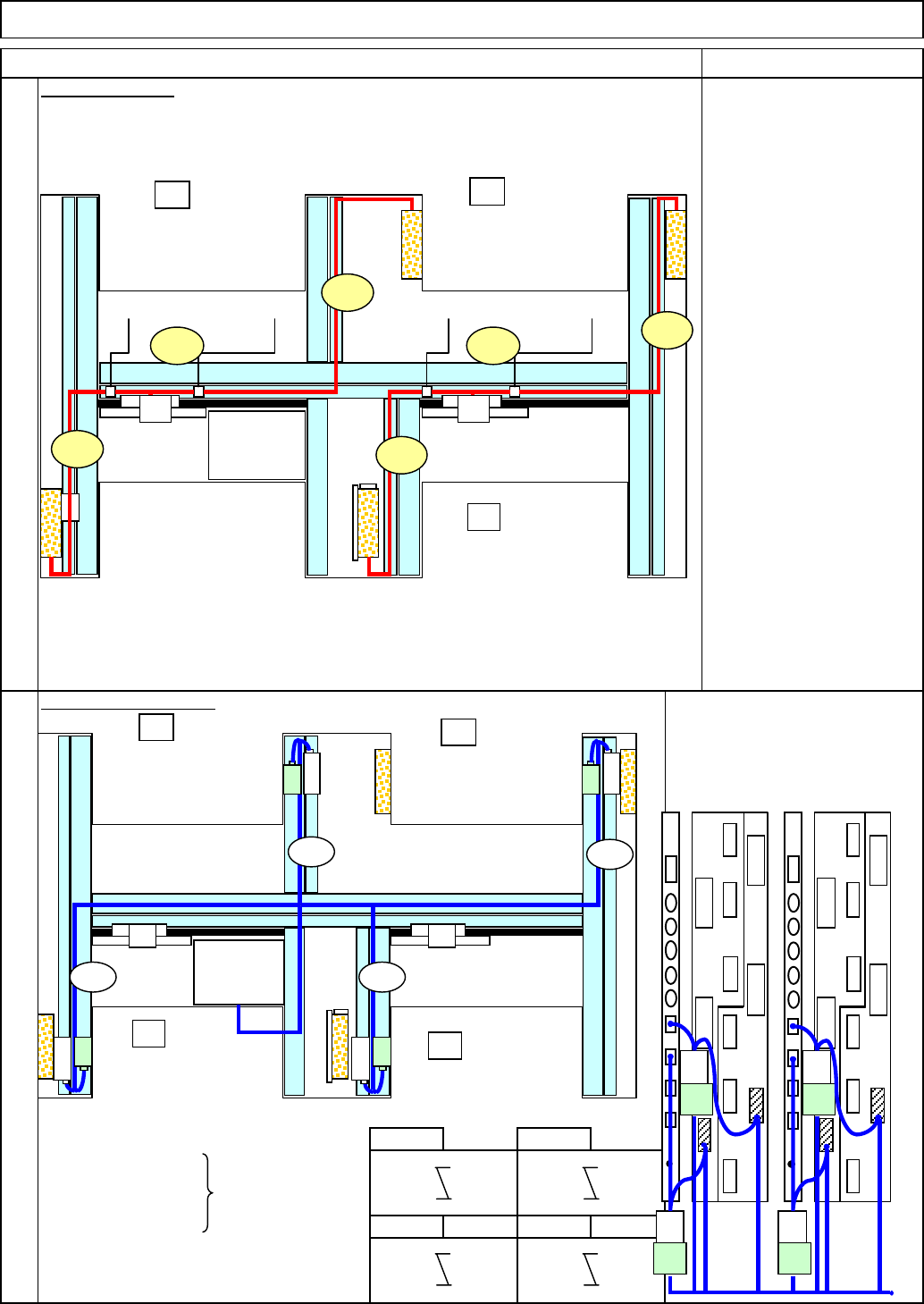
CN3ND1 to CN3PR1
CN3ND3 to CN4PR1 Greem mark
CN3ND5 to CN3PR2
CN3ND7 to CN4PR2
The cables above are positioned
even when the laser unit is not used.
Optional Accessory Parts Replacement Lead Checker
CN3-P1 CN3PR1
CN3ND2 CN1LB1
CN4-P1 CN4PR1
CN3ND4 CN1LB2
CN3-P2 CN3PR2
CN3ND6 CN1LB3
CN4-P2 CN4PR2
CN3ND8 CN1LB4
B-3 B-4
A-1: A41AR to L,N,E
A-2: A42AR to L,N,E
A-3: A41BR to L,N,E
A-2: A42BR to L,N,E
G-1: A4 to A41P,A42P
G-2: A4 to A41P,A42P
12
13
Item
B-1 B-2
Encoder Cable Layout
AC Cable Layout
Remark
AF
A4A4
A42PA41PA42P A41P
POWER
UNIT#1
POWER
UNIT#2
CPUBOX
AR
BF
BR
A-1
G-2G-1
A-4
A-3
A-2
AF
A4A4
POWER
UNIT#1
POWER
UNIT#2
CPUBOX
AR
BF
BR
Y4
X4
Y2
X2
B-1
Y3
X3
Y1
X1
B-2
B-4
B-3
CN3ND7
CN3ND8CN3ND4
CN3ND3
CN3ND6
CN3ND5CN3ND1
CN3ND2
CN10SW1
CN5
CN1 CN2
CN3
CN4
CN6
CN7
CN8
CN9
CN10
SW1
CN5CN1 CN2 CN3 CN4 CN6
CN7
CN8 CN9
CN7-P CN7-PCN4-P CN4-PCN5-PCN5-P
CN2
CN2 CN3
CN3
CN1
CN1
CN7-P CN7-PCN4-P CN4-PCN5-PCN5-P
CN2
CN2
CN3
CN3
CN1
CN1
CN3
-P1
CN3
-PR1
CN3
-P2
CN3
-PR2
CN4
-P1
CN4
-PR1
CN4
-P2
CN4
-PR2
LB1
LB2
LB3
LB4
EJM8A-E-SMA060301-A01-00
Page 6-3-1-6
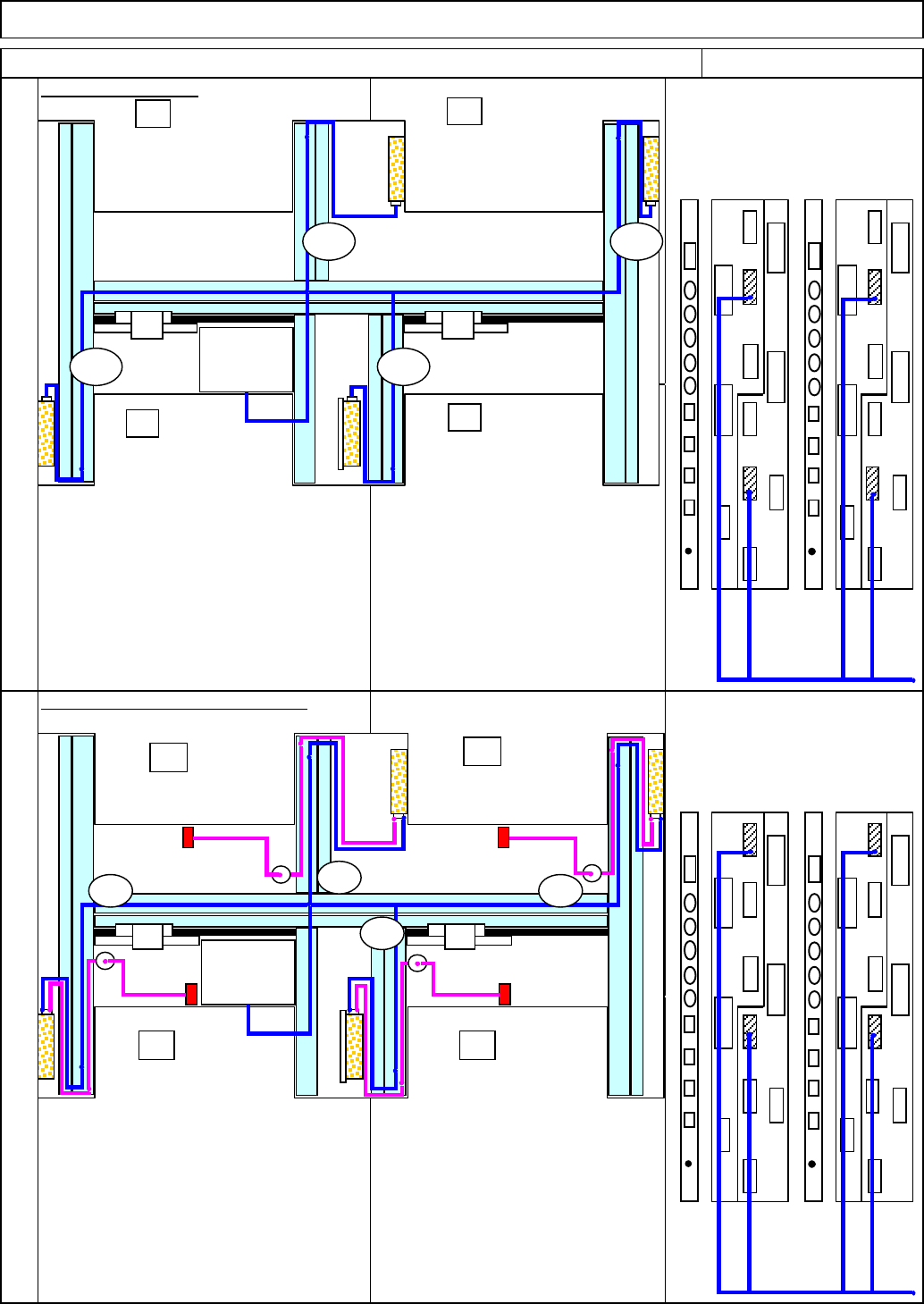
C-1: CN5 to INTENS,DISPLACE
(LB1 to LZ1)
C-2: CN5 to INTENS,DISPLACE
(LB2 to LZ2)
C-3: CN5 to INTENS,DISPLACE
(LB3 to LZ3)
C-4: CN5 to INTENS,DISPLACE
(LB4 to LZ4)
D-1:CN4-LB1 to ANALOG-LZ1
The section of a cable connected
D-2:CN4-LB2 to ANALOG-LZ2 from 〇 to the sensor is
p
ositione
d
D-3:CN4-LB3 to ANALOG-LZ3
on the upper surface of the body
D-4:CN4-LB4 to ANALOG-LZ4
frame.
Remark
Optional Accessory Parts Replacement Lead Checker
Item
Laser Analog Signal Cable Layout
15
14
Signal Cable Layout
CN10
SW1
CN5
CN1 CN2
CN3
CN4 CN6
CN7 CN8
CN9
CN10
SW1
CN5
CN1
CN2 CN3 CN4 CN6 CN7 CN8 CN9
CN7-P CN7-P
CN4-P CN4-P
CN5-P
CN5-P
CN2
CN2 CN3
CN3
CN1
CN1
CN7-P CN7-PCN4-P CN4-P
CN5-P
CN5-P
CN2
CN2
CN3
CN3
CN1
CN1
LB1
LB2
LB3
LB4
AF
A4A4
POWER
UNIT#1
POWER
UNIT#2
CPUBOX
AR
BF
BR
C-2 C-4
C-3C-1
INTENS
DISPLACE
LZ1
INTENS
DISPLACE
LZ4
INTENS
DISPLACE
LZ3
INTENS
DISPLACE
LZ2
CN10
SW1
CN5
CN1 CN2
CN3
CN4 CN6
CN7 CN8
CN9
CN10
SW1 CN5CN1 CN2 CN3 CN4 CN6CN7 CN8 CN9
CN7-P CN7-P
CN4-P
CN4-P
CN5-P
CN5-P
CN2
CN2 CN3
CN3
CN1
CN1
CN7-P CN7-P
CN4-P
CN4-P
CN5-P
CN5-P
CN2
CN2
CN3
CN3
CN1
CN1
LB1
LB2
LB3
LB4
AF
A4A4
POWER
UNIT#1
POWER
UNIT#2
CPUBOX
AR
BF
BR
D-2
D-4
D-3
D-1
ANALOG
LZ1
ANALOG
LZ4
ANALOG
LZ3
ANALOG
LZ2
Sensor
Sensor
Sensor
Sensor
EJM8A-E-SMA060301-A01-00
Page 6-3-1-7
18
16
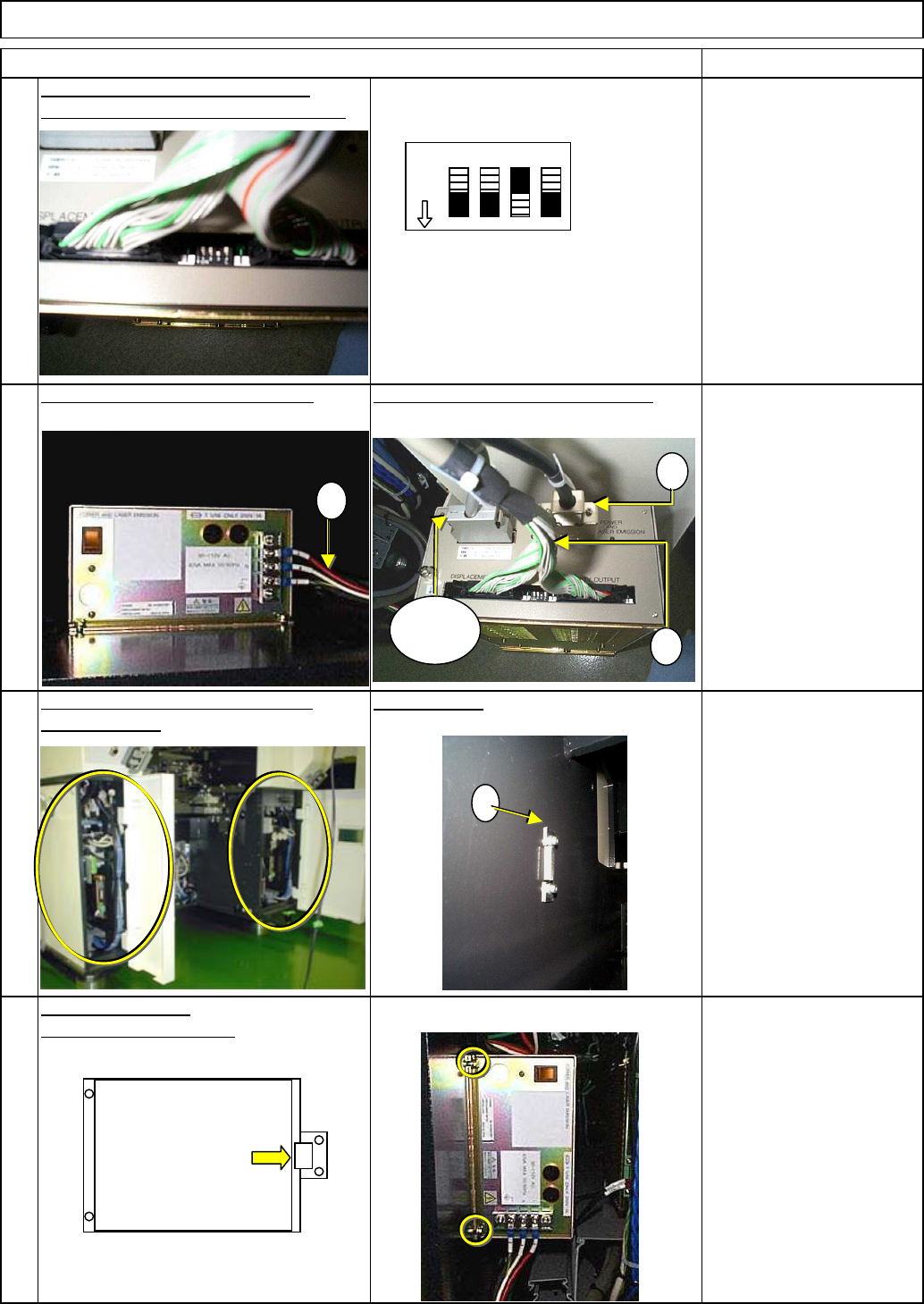
Set up the DIP switches, which are
Allen key 3 mm
Screw M4 2 pcs.
located at the rear side of the amplifier.
Fit Bracket ⑥.
Fix the amplifier in place.
Insert the amplifier.
Phillips screwdriver #2
Terminal screw 3 pcs.
17
Optional Accessory Parts Replacement Lead Checker
Item Remark
Connect the amplifier power cable.
Connect the communication cables.
Open the left covers on the AF, AR
Amplifier holding bracket
(small)
Allen key 3 mm
Screw M4 2 pcs.
19
and BR stages.
C
D
Sensor
cable
A
12 3 4
ON
6
EJM8A-E-SMA060301-A01-00
Page 6-3-1-8