User Manual - SIPLACE Glue Feedeer - 第12页
2 General 2.1 Workflows - Typical Scenarios 12 User Manual SIPLACE Glue Feeder 05/2020 Example The following data is entered in the component shape which describes a 1206 chip component: ● The position of the glue dot i.…

2 General
2.1 Workflows - Typical Scenarios
User Manual SIPLACE Glue Feeder 05/2020 11
2 General
The SIPLACE Glue Feeder enables you to apply adhesive of a pre-defined glue dot size to SMD
components. When using highly viscous glues in connection with certain applications, you may find
it helpful to briefly warm the glue before applying it, in order to lower the viscosity. The Glue Feeder
has a special nozzle heater for these cases.
Through direction application of glue to the underside of the required components, the SIPLACE
Glue Feeder makes the gluing process highly efficient with only a minimal effect on the speed of
the placement process. The integration of the Glue Feeder into the setup leads to exceptional pro-
cess flexibility and significant space saving along the assembly line.In the past, dispensing units
were allocated to a fixed machine and could not be moved between lines. The Glue Feeder, in con-
trast, is as flexible as a feeder module and can be used for different lines, as the need arises. The
reconfiguration and setup time is only a few minutes.
Another advantage of the Glue Feeder is that, after being dispensed, the glue dots are on the un-
derside of the component, which can be checked by the component inspection system SIPLACE
Vision (provided the glue used has produced a dot with adequate contrast). If the glue dot does not
have the required size or is not in the position of choice, the component can be immediately rejec-
ted and glue can then be easily applied to a new component.
As the Glue Feeder has a similar structure to the X feeder module, it can be easily removed. This
makes it simple to refill the glue or clean and maintain the Glue Feeder.
2.1 Workflows - Typical Scenarios
SMD components are usually glued for the following reasons:
●
The component lies on the first placed and soldered side of a board which had been placed
on both sides. It then needs to be secured for soldering on the second side, for which it is
transported hanging head down, to prevent it falling off when the solder medium melts on to it.
●
The component sits on the side of a one-sided or two-sided board which has been wave
soldered or partially/selectively wave soldered. The component is affected to such a degree
by the temperature that it would melt again and fall off.
●
The component needs to be secured before soldering with an additional glue application, to
prevent it being displaced from its original placement position.
●
The component (usually heavy duty connectors) needs to be mechanically strengthened with
a glue application so that the solder place does not break due to mechanical stress.
The workflow is the same for all the above scenarios.
In the development phase the components to be glued during electronics assembly are defined,
along with the type of glue to be used. The placement program created for this assembly group
defines in the component library (component shape) the position, quantity and diameter of all glue
dots to be applied to that component. This is performed for each component to be glued. The cre-
ation of a glue dot description does not mean that this component always has to be glued and is
only saved in case a component of this component shape does need to be glued in the future. In
addition, you also need to specify in the component number list, which component number can and
is to be glued.

2 General
2.1 Workflows - Typical Scenarios
12 User Manual SIPLACE Glue Feeder 05/2020
Example
The following data is entered in the component shape which describes a 1206 chip component:
●
The position of the glue dot i.e. in the center of the component body
●
The size of the glue dot (diameter in mm)
●
You need to specify whether the glue dot is to be checked by the Vision inspection system. If
yes, you will also need to set the Vision system with the teach function (illumination etc.)
●
However, since not all components of type 1206 are usually glued, you need to define which
specific component numbers of this type are to be glued. For example, component number
123456, a 1206 100 ohm resistor should be glued.
●
In the placement list, you can then define which placement positions for this component
123456 actually need to be glued because, for example, they are on the underside of a board
which has been wave soldered (scenario b ).
Once all these definitions have been recorded and therefore all conditions fulfilled, a glue dot is ap-
plied to this component at the programmed placement position. This glue dot can, depending on its
diameter, be made up of one or more individual glue dots. In the jet dispense method, each shot of
glue applies a nearly constant volume of glue from the nozzle to the target medium.
Setup
As soon as at least one component which needs a glue dot is defined in a placement program, the
product setup will require a Glue Feeder. The Glue Feeder is configured on the same changeover
table as those components which need to be glued. If you need to glue more components than you
have locations on one changeover table or if you need to apply glue to components requiring differ-
ent placement heads on separate machines, you will need to set up multiple Glue Feeders on indi-
vidual changeover tables. Only one Glue Feeder can be configured for each placement head.
Only one Glue Feeder of the same glue type can be set up at any one machine.
When configuring a Glue Feeder, we recommend that you set it up in a fixed position at the center
of the table. If you need to glue several different components, this then gives the shortest possible
travel paths for the placement head. This central position also gives large components in particular
the greatest freedom, for example when a long connector needs a glue dot at the ends and the
middle. If you only need to glue a few components, the feeder modules for these components
should be placed as near as possible to the Glue Feeder.
Setting up the Glue Feeder
Before a Glue Feeder is configured, make sure that all parts which come into contact with the glue
have been cleaned correctly and that all these parts are correctly fitted into place after cleaning. A
suitable cartridge (for which the use before date has not expired) with glue is screwed into the Glue
Feeder. The Glue Feeder is then placed on the changeover table track described in the setup and
locked into place (logged in). After this, the Glue Feeder is connected to the compressed air supply
of the machine and to the safety circuit of the machine.
For a detailed description of how to commission the Glue Feeders, see section 3 "Initial Opera-
tion" [}23].
2 General
2.2 Module Description
User Manual SIPLACE Glue Feeder 05/2020 13
2.2 Module Description
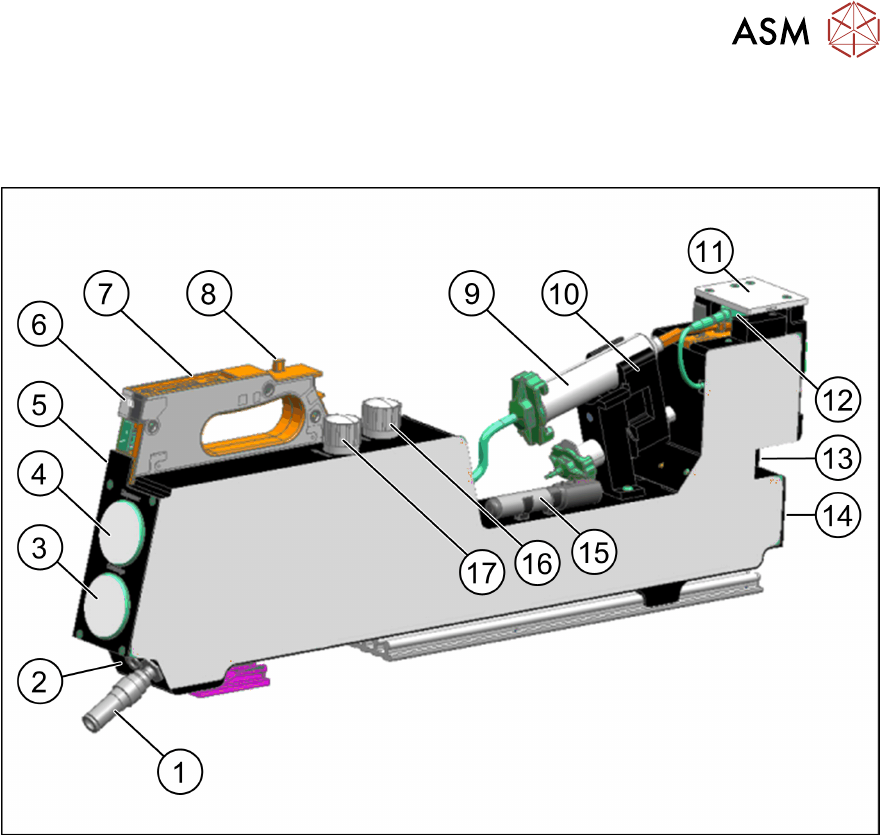
2.2.1 Overview
Fig.2: Overview of Glue Feeder
1. Connection for external compressed air
supply
10. Cartridge holder for 10 ml-/ 30 ml cart-
ridges
2. Connection to machine safety circuit
3. Manometer for current pressure at the
cartridge
11. Nozzle
12. Nozzle heating
4. Manometer for current pressure at the jet
valve
13. Setting screw for the spring pre-tension at
the jet valve
5. Removal handle
6. Status display LED 14. EDIF energy and data interface
7. Control panel 15. Special tool
8. Back centering pin 16. Pressure reducer for pressure at jet valve
of dispenser nozzle
9. Glue cartridge
17. Pressure reducer for pressure at cartridge
Item no. 03088129-xx