User Manual - SIPLACE Glue Feedeer - 第31页
3 Initial Operation 3.5 Predosing the Glue Feeder User Manual SIPLACE Glue Feeder 05/2020 31 ► Position the safety cover over the dispenser nozzle of the Glue Feeder, as shown in the dia- gram. This automatically activat…
3 Initial Operation
3.5 Predosing the Glue Feeder
30 User Manual SIPLACE Glue Feeder 05/2020
3.5 Predosing the Glue Feeder
The aim of this task is to distribute the glue in the feed pipe, jet block and dispenser nozzle on
setup or after cleaning and to also make sure that there is no air left in these parts.
NOTICE
Pressure set?
Before you begin with the predosing, check that the pressure at the cartridge and at the jet
valve has been correctly set (see section 2.2.5
"Overview of Glues" [}16] and section4.3.1
"Setting the Pressure Reducer" [}63]).
Also observe the Technical Information TI2015-05E11 "Maintenance and production pre-
paration tips for the Glue Feeder".
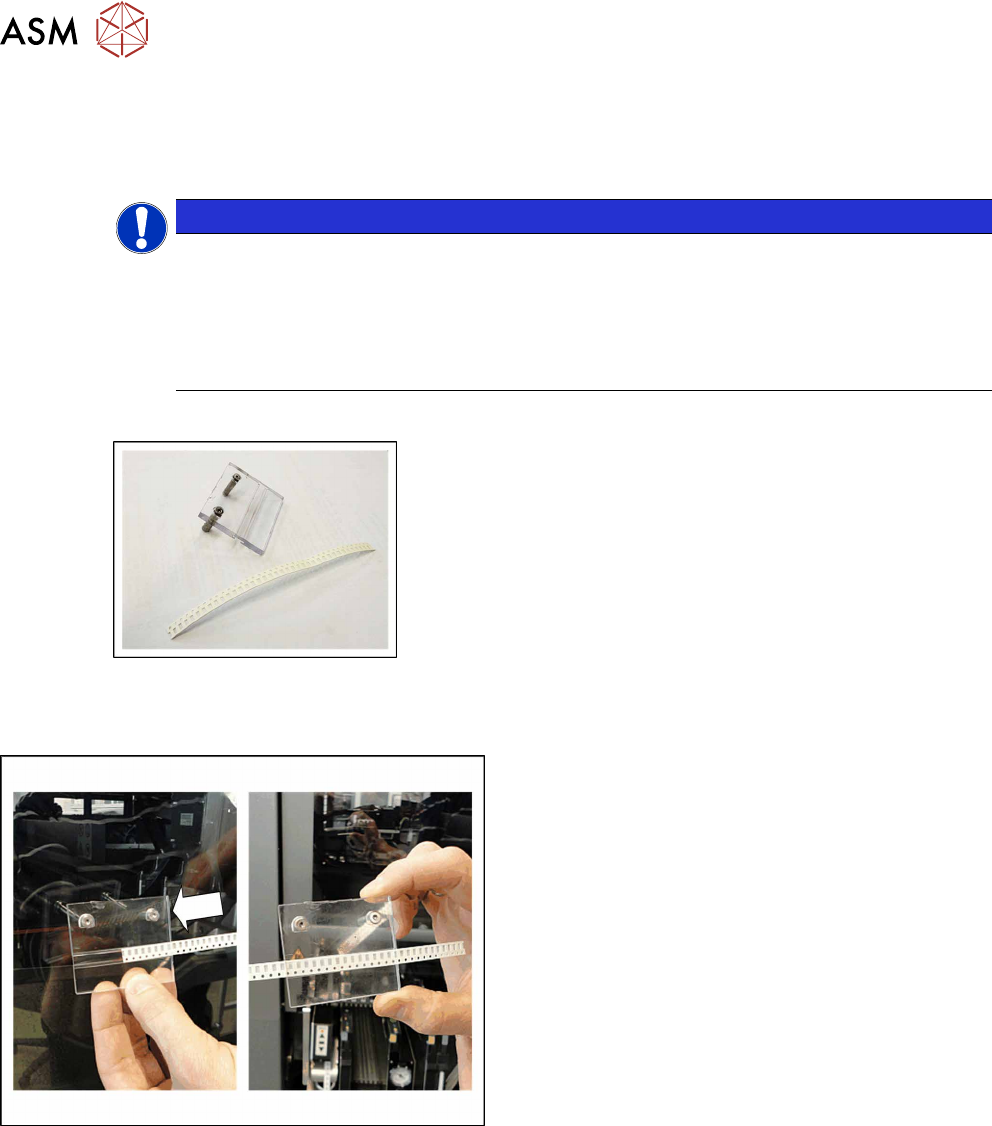
Equipment required
●
Safety cover
(The new version of the safety cover is made of black metal)
●
8mm paper tape
► Push the paper tape into the safety cover as
shown in the diagram.
► Open the machine hood.
► Push the gantry back.
3 Initial Operation
3.5 Predosing the Glue Feeder
User Manual SIPLACE Glue Feeder 05/2020 31
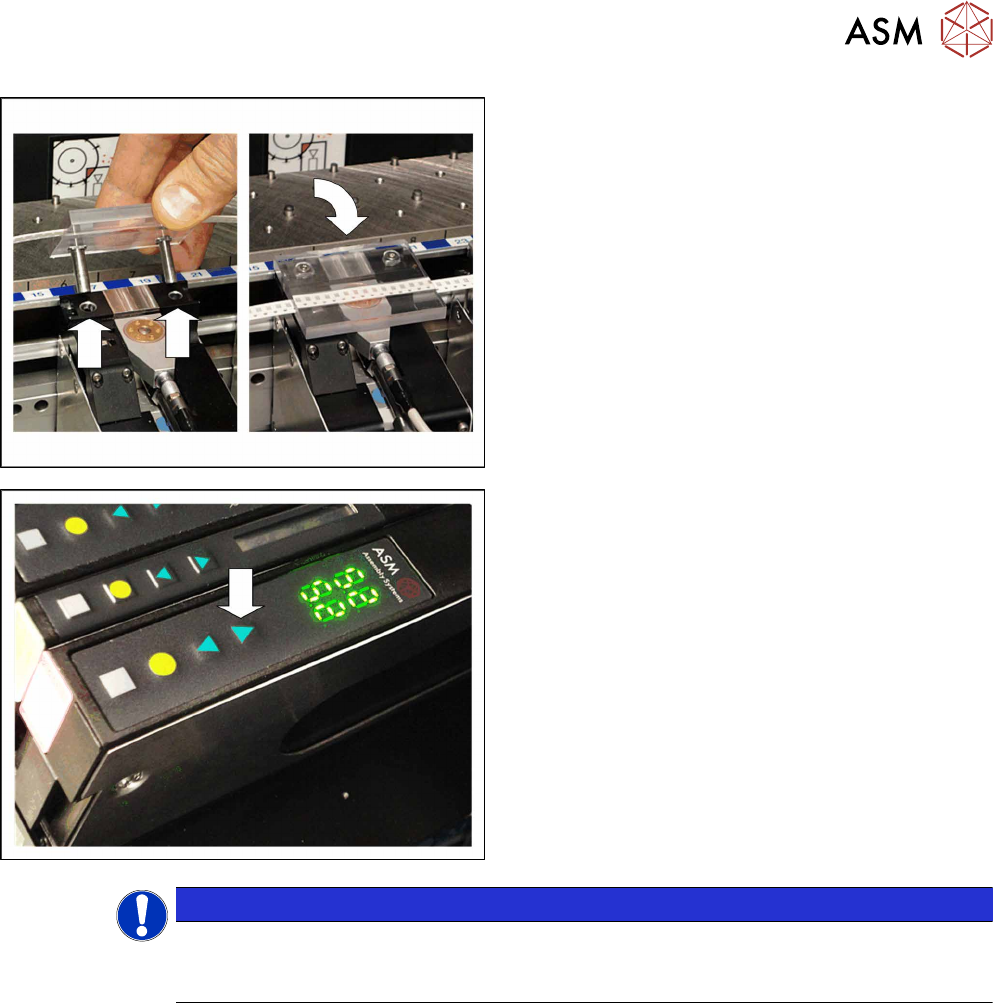
► Position the safety cover over the dispenser
nozzle of the Glue Feeder, as shown in the dia-
gram.
This automatically activates the nozzle heating.
► After reaching the set nominal temperature, the
Glue Feeder will start a waiting period of
25seconds, to ensure that the glue in the jet
block has been fully warmed through. During the
waiting period, the display will flash the current
temperature.
Predosing is only possible after this waiting
period.
► Press the front arrow button to release a glue dot
(shot of glue).
Short press = 1 drop
Long press = 20 drops
Normally 3x20 drops are sufficient.
► Remove the safety cover and check the glue dot.
NOTICE
Actual temperature does not change?
If the displayed actual temperature does not change, check whether the safety cover has
been correctly fitted.
The glue dot should be round and with no satellite formation. If it is not, move the paper tape in the
safety cover and repeat the procedure.
If the result is in the required range, you can use the component shape teach mode to pick up a
component, apply glue to it and check it with SIPLACE Vision. If all the settings are correct, test the
placement program on a test board.
To check whether the volume of glue applied is enough or to make sure that it is not too large, you
can carefully lift the glued components off the test board with a pair of tweezers. If the glue coating
on the board is as you expected, you can start production operations.
If you want to use the glue at the same time as solder paste, the test board should also have solder
paste applied to it. This is the only way to check whether the height of the glue dot is enough to
coat the board.

3 Initial Operation
3.6 Deaerating
32 User Manual SIPLACE Glue Feeder 05/2020
3.6 Deaerating
On initial setup, when first using a fully cleaned Glue Feeder or after replacing a cartridge, check
the functionality of the Glue Feeder.
It is normally enough to follow the procedure described in section 3.5 "Predosing the Glue
Feeder" [}30], activate 3x the dosage of 20drops with a "long press" of the front arrow button, to
get the first amount of adhesive out of the nozzle.
However, even after the first dispensing, there might still be air bubbles in the system, so that it
should then be "deaerated".
Procedure
The main procedure is very similar to that described in section 4.2.6 "Applying Glue for Test-
ing" [}58].
Instead of the relatively short paper tape, now use an approx. 30 cm long piece of paper tape as a
test strip.
► Insert the test strip into the safety cover, as shown.
► Proceed as described in section 4.2.6 "Applying Glue for Testing" [}58].
► In the dialog Dispense set the number of glue dots to 200.
In the same dialog, set the cycle time to the value you then want to use for your production.
► Click on Start and slowly and evenly pull the test strip through the safety cover.
► Remove the test strip.
► Check whether there are glue dots missing on the test strip.
If more than 5 glue dots are missing or if several are missing at the end of the test strip, repeat this
procedure with a new test strip each time, until all 200 glue dots can be seen on the test strip.
The system is then deaerated and you can start the production process.