User Manual - SIPLACE Glue Feedeer - 第62页
4 Operation 4.2 Individual Functions in Stations Software 706.1 and Higher 62 User Manual SIPLACE Glue Feeder 05/2020 ► This dialog allows you to change the number of glue dots and the cycle time (in milliseconds). Selec…
4 Operation
4.2 Individual Functions in Stations Software 706.1 and Higher
User Manual SIPLACE Glue Feeder 05/2020 61
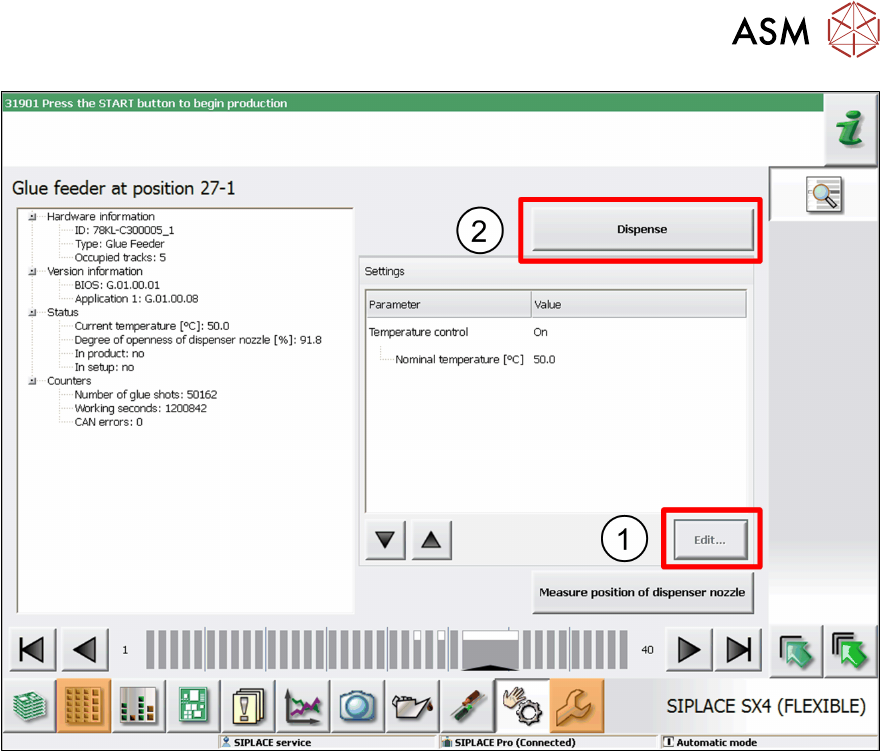
► If necessary, you can also change the nominal temperature of the glue.
To do this, go to Settings
, mark the entry Nominal Temperature and then click on Edit. (1)
Adjust the temperature as required in the dialog box shown and then click on Accept.
► To test the glue, click on Dispense. (2)
4 Operation
4.2 Individual Functions in Stations Software 706.1 and Higher
62 User Manual SIPLACE Glue Feeder 05/2020
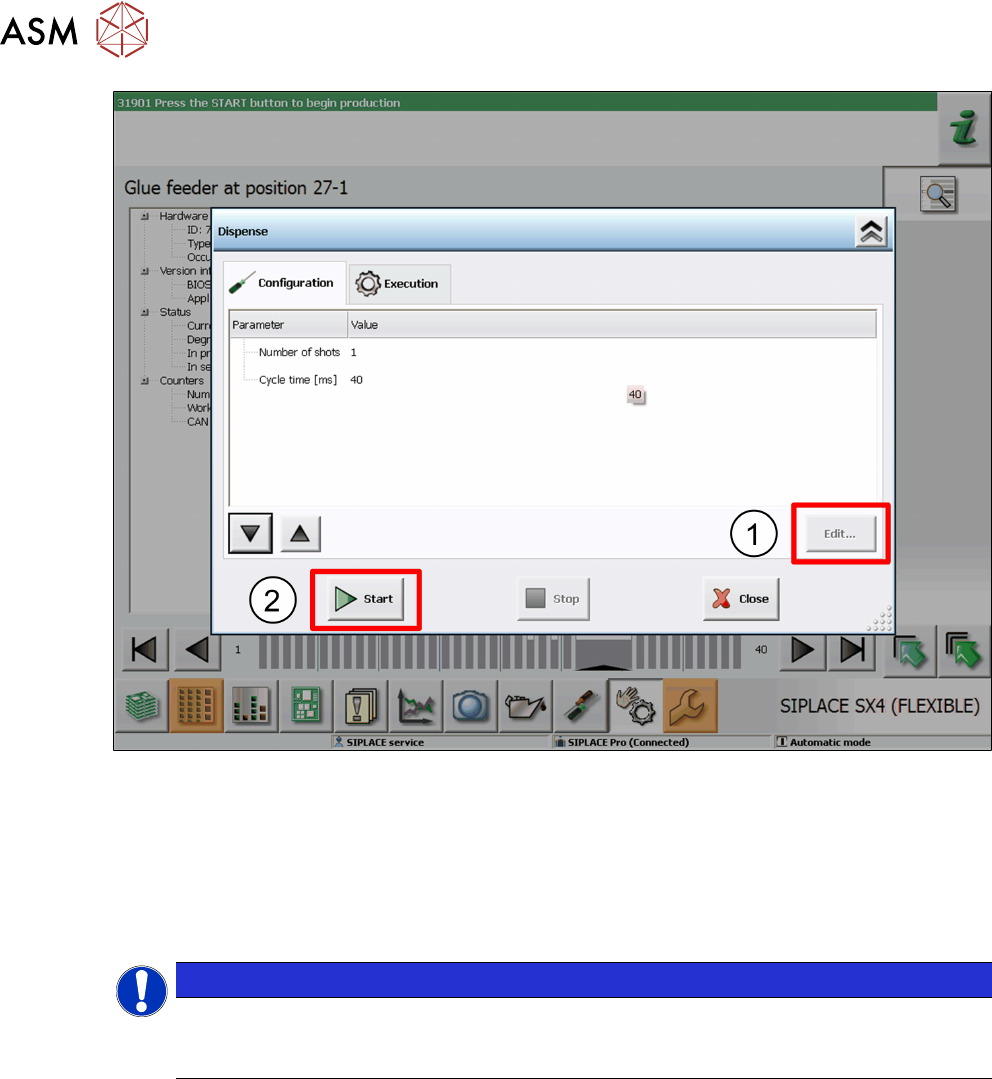
► This dialog allows you to change the number of glue dots and the cycle time (in milliseconds).
Select the parameters to be changed and click on Edit
. (1)
Set the value as required in the dialog shown and then click on Accept.
► To test the glue, click on Start. (2)
The glue will be applied to the paper tape.
► Take the safety cover off the Glue Feeder and check the test result.
You can repeat this procedure as often as you need.
NOTICE
Removing the safety cover
Once the tests have been completed, remove the safety cover from the Glue Feeder and
close the machine cover.
4 Operation
4.3 Manual Settings
User Manual SIPLACE Glue Feeder 05/2020 63
4.3 Manual Settings
4.3.1 Setting the Pressure Reducer
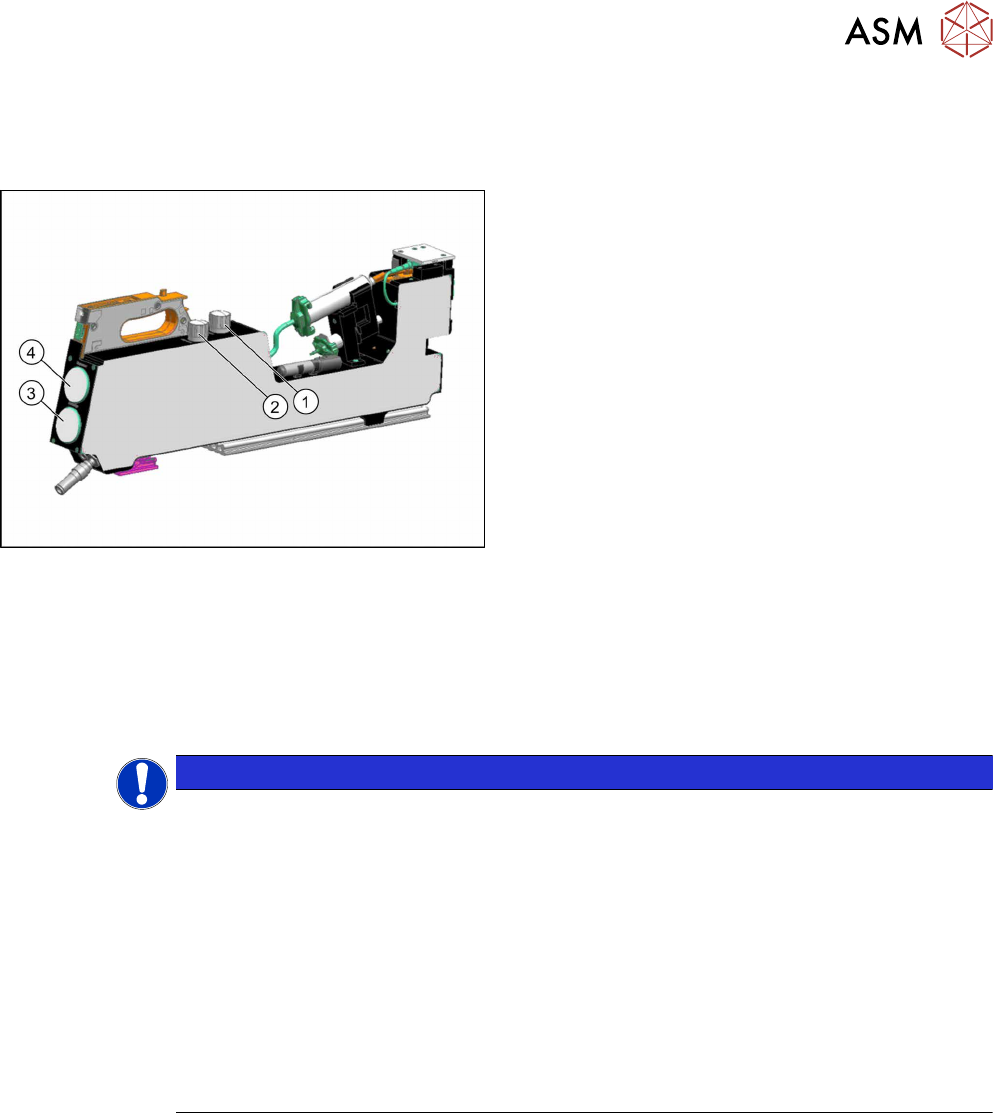
1. Pressure reducer for the pressure at jet valve of
dispenser nozzle
2. Pressure reducer for the pressure at the cartridge
3. Manometer for the pressure at the cartridge
4. Manometer for the pressure at the jet valve of the
dispenser nozzle
The current pressure settings are shown at both manometers.
The pressure at the cartridge and the jet valve may need to be adjusted according to the glue used.
For an overview of the individual values, refer to section 2.2.5
"Overview of Glues" [}16].
► To lower the pressure, turn the valve on the pressure reducer to the left.
► To increase the pressure, turn the valve on the pressure reducer to the right.
This change will be shown on the manometer belonging to the pressure reducer.
NOTICE
Use an external compressed air connection if you need a dispensing pressure > 4.5
bar
If the Glue Feeder is not supplied with compressed air via an external source but from the
compressed air connection of the placement machine, we recommend that the pressure re-
ducer for the pressure at the jet valve is set to max. 4.5bar. A pressure of 2 to max. 4.5bar
is usually sufficient for all common SMT adhesives.
If you want to use special adhesives in your production, which need a higher dispensing
pressure than 4.5 bar, the Glue Feeder should in this case be supplied via an external com-
pressed air connection, separate from the placement machine.
Background: If you set higher dispensing pressures than 4.5, you may experience brief re-
curring pressure drops to 4.5 bar at the compressed air connection of the placement
machine, if there are other compressed air consumers (e.g. the tape cutter) being activated.
This could cause irregular glue droplet sizes to be produced.