User Manual - SIPLACE Glue Feedeer - 第93页
6 Troubleshooting User Manual SIPLACE Glue Feeder 05/2020 93 6 Troubleshooting Error type Message via CAN Bus Status display LED 7 segment display. No. Display value / symbol Nominal temperature was not reached within …
5 Cleaning and Maintenance
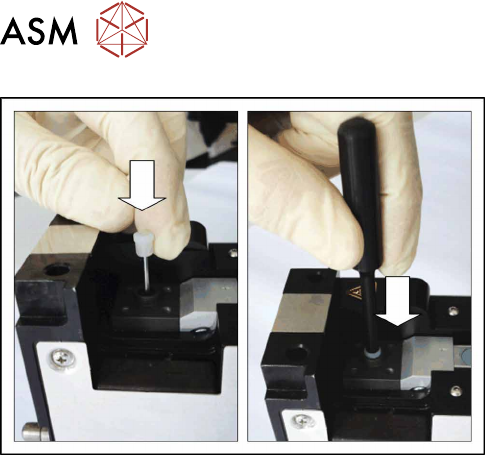
5.6 Guide Bushing and Actuator O-Ring
92 User Manual SIPLACE Glue Feeder 05/2020
► From above, fit the guide bushing onto the jet
plunger.
► From above, fit the O-ring service tool vertically
onto the jet plunger and push the guide sleeve as
far as possible (end stop) onto the jet plunger.
► Remove the O-ring service tool.
► Fit the glue unit (see section 5.4.3 "Fitting the
Gluing Unit" [}79]).

6 Troubleshooting
User Manual SIPLACE Glue Feeder 05/2020 93
6 Troubleshooting
Error type Message
via
CAN Bus
Status
display
LED
7 segment display.
No. Display value /
symbol
Nominal temperature was not reached within
the timeout period during warm-up phase.
X RED 1/2 H E (heating)
3/4 E r (error)
Nominal temperature was not reached within
the timeout period during cool-down phase.
X RED 1/2 C o (cooling)
3/4 E r (error)
Removal handle is not pushed in after
powering up.
Measure:
Press the removal handle in the glue feeder.
X RED 1/2 H A (handle)
3/4 o u (out)
Supply voltage drop below the permissible
threshold.
X RED 1/2 Display
switched off
3/4 Display
switched off
CAN-Bus error --- RED 1/2 C A (CAN-Bus)
3/4 E r (error)
No valid application loaded --- RED, flash-
ing
rapidly
1/2 OFF
3/4 OFF
Embedded feeder module software is not
compatible with the available feeder module
hardware version.
Measure:
Install the current application version.
X RED 1/2 H A (hardware)
3/4 E r (error)
Error during last data backup, i.e. the stored
runtime data are invalid (e.g. nominal tem-
perature may need to be set again)
X unchanged 1/2 unchanged
3/4 unchanged
Data memory in processor is defect, unable
to store anymore runtime data.
X unchanged 1/2 unchanged
3/4 unchanged
Stored factory data are invalid (e.g. electron-
ically stored feeder ID is not available)
X unchanged 1/2 unchanged
3/4 unchanged
Nominal temperature not reached
If the nominal temperature is not reached within the waiting period (timeout), this indicates that the
nozzle heating may be defect (if current temperature is too low) or that the waiting period is too
short.
If the current temperature is too high, this could indicate that the ambient temperature is also too
high (error during cooling down).
CAN Bus error
► Check whether the EDIF is dirty and, if so, clean it.
► Check whether the glue feeder has been correctly set and push it forwards, as far as the stop.
Invalid application
If there is no valid application present, the system will be unable to query the sensors or send any
error messages i.e. one result of this is that the critical state when the safety cover is on the jet
valve will not be recognized.
► The application needs to be reloaded.

6 Troubleshooting
94 User Manual SIPLACE Glue Feeder 05/2020