IT Feeder Manual-45Series(English V2.0)Ver5.pdf - 第13页
IT Feeder System 1-1 Chapter 1. IT Feeder System 1.1. Overview Intelligent Feeder System (hereinafter IFS) consisting of on-line and off-li ne sub sy stems is Samsung T echwin ’ s integrated system to prevent faulty plac…

IT Feeder System
1-1
Chapter 1. IT Feeder System
1.1. Overview
Intelligent Feeder System (hereinafter IFS) consisting of on-line and off-line sub systems
is Samsung Techwin’s integrated system to prevent faulty placement of components and
to provide automatic component recognition function.
1.1.1. System structure
The minimum system structure consists of the following 3 subsystems and each
subsystem is integrated into the system though networking.
Part Station: Registers and controls part reels off-line.
Feeder Station: Programs information on the component to be mounted in the feeder
and current part count when components are mounted in the feeder off-line.
Feeder Information Server and MMI: Automatically recognizes the parts fed by the
feeder mounted on the machine, checks the misplacement of parts, and counts the
number of remaining parts in order to generate remaining parts warning message.
(Factory options, need hardware and software support).
This manual provides information on the installation and use of Feeder Information
Server (hereinafter, FIS), installation elements of IFS in the equipment.
1.2. System installation
1.2.1. Installation procedure and environment setup
To use IFS in CP45F(V), the MMI S/W for FIS and IFS need to be installed. (Please
refer to 1.2.2 for installation file structure and path)
1.2.1.1. MMI environment setup
After installing the MMI S/W for IFS, set the item related to IFS in the file Mark3.ini to
'1'. Only when ‘IQFeeder = 1’ is set in the file “C:\Mark3\bin\Mark3.ini”, MMI is
executed as an IFS option.
Only after completing the installation of MMI S/W for IFS and modification of the
environment setup, operate CP45F(V) MMI (Mark3.exe).
(In the case of CP55 model, modify the “C:\Mark4\bin\Mark4.ini” file and execute the
“Mark4.exe” file.)
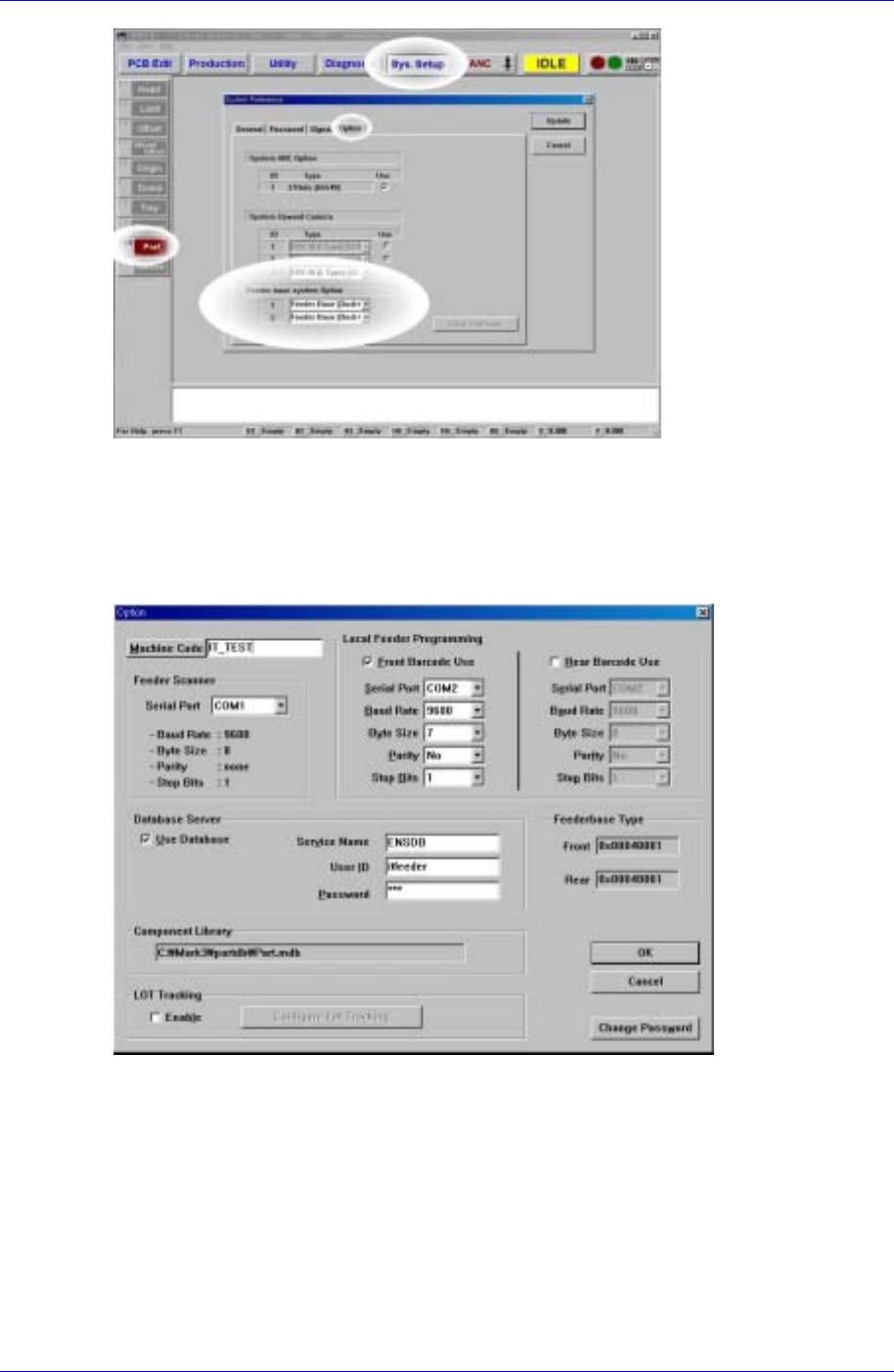
Specify the setting following the order of [Sys.Setup Pref. Option Feeder base
system Option] as shown in [Figure1-1]. (IFS: Intelligent Feeder System)
For example, if the IFS with a Docking Cart on the front feeder lane is applied, set the
item ‘1’ to ‘Feeder Base [Dock+IQ]’. [Figure 1-1] shows the setting for the case where the
IFS with Docking Carts on both front (‘1’) and back (‘2’) is applied.
Samsung Intelligent Feeder System
Figure 1-1. System Setup Dialog box for IFS application
1.2.1.2. FIS environment setup
After installing FIS, use System Setup in FIS to set configuration to be compatible with
the equipment. (FIS: Feeder Information Server)
Figure 1-2. FIS environment setup dialog box
The variables in Figure 1-2 and their meanings are illustrated in Table A-1.
1-2