wire-bonder.pdf - 第106页
WEST•BOND MODEL 454647E SER IES INSTRUCTION MANUAL 100 TROUBLESHOOTING Inconsistent Looping The 454647E’s 45 ° Tooling Head configuration offers excellent looping control. The bonding wires natural characteristics and te…

WEST•BOND MODEL 454647E SERIES INSTRUCTION MANUAL
99
TROUBLESHOOTING
Poor Bond Quality
The following are possible causes for poor bond quality. Poor bond quality could either mean a bond
does not meet visual criteria, does not adhere to bonding surface, or produce unacceptable bond pull
tests.
There are six key areas where the problem may be found causing poor bond quality.
1. Tool
a. Position
b. Clamping Force, Set Screw Torque
c. Characteristics / Geometry of Tool / Condition of Tool
d. Condition of Bonding Surface
e. Bonding Surface Area
2. Workholder
a. Temperature / Stability
b. Heat Transfer
c. Rigidity
d. Environment
e. Positioning Accuracy
3. Wire
a. Size
b. Type
c. Breaking Load
d. Elongation
e. Age / Condition / Quality
f. Uniformity / Twist / Curl
4. Bonded Wire
a. Wire / Tool Interface
b. Optimized Bonding Schedule
c. Location
d. Wire Curl
e. Intermetallics
f. Time / Temperature Environment
g. Bond Interface Condition
h. Ergonomics
5. Bonding Surface
a. Metal Purity
b. Metal Uniformity
c. Metal Thickness
d. Surface Contamination
e. Surface Texture
f. Metal Bondability, Initial and after Time/Temp.
6. Bonder
a. Mechanical / Electrical Calibration of Machine
b. Optimized Bonding Schedule
i. Ultrasonic Energy
ii. Ultrasonic Time
iii. Bond Pressure
iv. Temperature
c. Operator Skill
d. Ergonomics

WEST•BOND MODEL 454647E SERIES INSTRUCTION MANUAL
100
TROUBLESHOOTING
Inconsistent Looping
The 454647E’s 45° Tooling Head configuration offers excellent looping control. The bonding wires natural
characteristics and tendencies are to resist and sometimes refuse to bends or form a loop in a desired
fashion. Please refer to the following list for consideration to solve any experience with inconsistent loop
control on your application.
1. “Loop Height” Profile is too low.
2. Insufficient “Backbend” during looping.
3. Insufficient “Z-Before-Y” during looping.
4. Excessive “Loop Pull” during looping.
5. Clamps remain open while descending to the 2
nd
Bond.
6. Bonding tool feed through hole is excessive for wire diameter.
7. Bonding tool feed through hole angle is not applicable for this application.
(Generally, a 45° feed through hole is recommended.)
8. Clamps are not centered properly with Bonding Tool.
9. Force Calibration need to be verified.
10. Using of aged or damaged wire.
WEST•BOND MODEL 454647E SERIES INSTRUCTION MANUAL
101
TROUBLESHOOTING
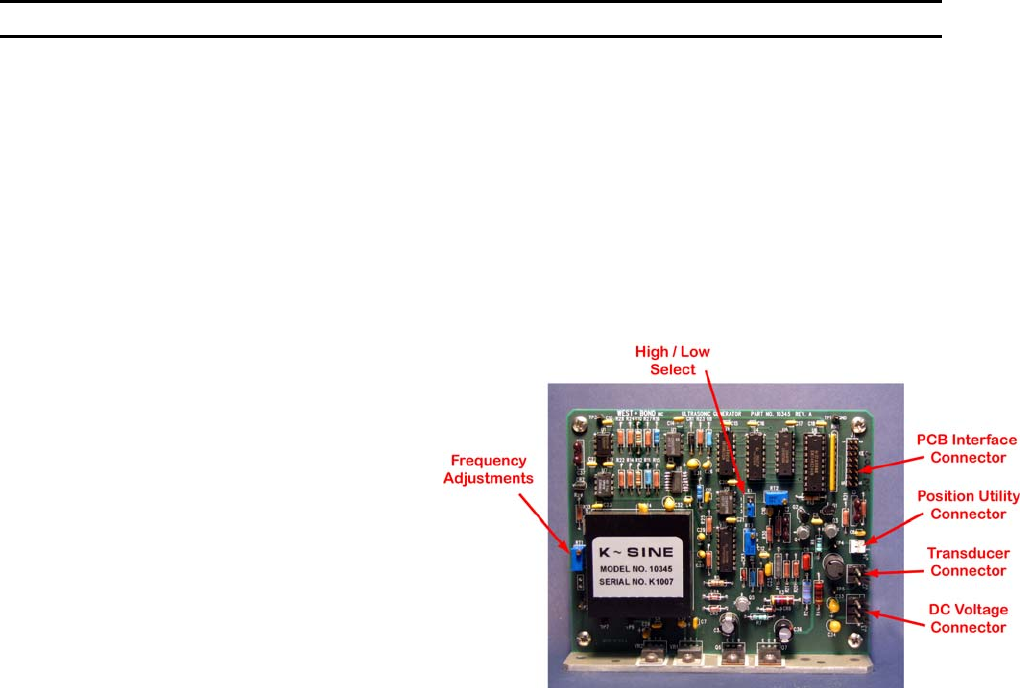
Ultrasonic Board (P/N A-10345)
IN-MACHINE CALIBRATION
1. Equipment required:
1.1 An oscilloscope.
1.2 A multi-meter (true RMS voltages up to 100 KHz).
1.3 20 Ohm resistor, 5 Watt minimum.
* All following measurements are made with respect to circuit common TP1*
2. DC voltage verification:
2.1 Turn on bonder main power and leave it idle at home.
2.2 Using DC volt meter, verify the DC
voltages as follows:
• At J3 pin 1 for -15 VDC
• At J3 pin 3 for +15 VDC
• At TP6 for -5 VDC
• At TP7 for +5 VDC
• At TP3 for -1.2 VDC
• At TP5 for 0 VDC
3. Oscillator calibration:
3.1 Disconnect transducer at connector
J2.
3.2 Connect the oscilloscope probe to
TP2.
3.3 Verify that the signal is a 5V square
wave.
3.4 Adjust potentiometer RT1 till the scope reads about 63.5 KHz (15.75uS).
4. Output voltage calibration:
4.1 Connect a 20 Ohm, 5 Watt resistor across pin 1 and pin 2 of connector J2. Take care not to short
across 2 pins.
4.2 Connect AC volt meter and oscilloscope probes to TP5.
4.3 Connect jumper E1 pin1 to pin 2 (high power output).
4.4 Remove PCB Interface (J1)
4.5 Connect a jumper wire from J1-pin1 to TP7 (5vdc)
4.6 Verify that the meter reads .038 Vrms (0.100 Vp-p) and scope shows a clean sine wave.
4.7 Adjust RT4 to obtain the reading
4.8 Remove jumper and reconnect J1
4.9 Program selected channel to have bond power 999 (full power) and bond time 999 (999mS).
4.10 While trigger the selected channel, verify that the meter reads 8 Vrms (22.63Vp-p) and scope
shows a clean sine wave. Adjust RT2 to obtain the reading.
4.11 Connect jumper E1 pin 2 to pin 3 (low power output).
4.12 While trigger the selected channel, verify that the meter reads 4.5 Vrms (12.73Vp-p). Adjust RT3
to obtain the reading.
5. Final check:
5.1 Remove 20 Ohm resistor at connector J2 and connect machine transducer to it.
5.2 Return jumper E1 pin connections to original position.
5.3 Connect Oscilloscope to TP5 and trigger ultrasonics and verify frequency of <65KHz.
5.4 Remove all test leads.
5.5 Press the machine reset switch or recycle machine main power, verify that there is no error
message from the machine.