wire-bonder.pdf - 第16页
WEST•BOND MODEL 454647E SER IES INSTRUCTION MANUAL 10 CAUTIONS Micromanipulator The hand controls on your W EST • B OND machine have been design ed for minimal exertion of the hand and fingers. The position of the contro…

WEST•BOND MODEL 454647E SERIES INSTRUCTION MANUAL
9
CAUTIONS
Work Station Exercises
Sometimes it is only when we take breaks at work that we realize how stiff or uncomfortable we have
become from working in a seated position. When we concentrate intensely on our work, these types of
discomfort often go unnoticed and therefore, we recommend the following exercise program.
After Work Cool-Down Exercises
When you return home from work, it is helpful to relax the hard working muscle groups by repeating your
morning exercise program. Many people also find that taking a gentle walk or similar forms of activity
provide a nice change of pace from the immobile routine encountered at work. Please check with your
physician, however, before beginning any type of exercise program.
Take periodic breaks several times during the work schedule. Gently press your hands against a table,
stretch, and hold for several seconds. Stretch and massage your fingers, hands, wrists and forearms
throughout the day. Shake your hands and fingers to relieve any tension and to promote blood flow.
Rotate your shoulders forward and backward in a full circle several times daily. Try to use different
muscle groups throughout the day, i.e. if sitting for prolonged periods, get up and walk around several
times a day.
If you experience pain any time during the operation of your W
EST•BOND machine, consult a qualified
health professional.
Chair And Table Top
When evaluating your workstation, pay particular attention to those surfaces that come in contact with
your wrist and forearms. Sharp edges or hard surfaces should be modified to form a work surface that is
comfortable at the point of contact. Reshaping corners and applying a more comfortable softer surface in
the work area can be extremely helpful.
The chair should be comfortable and provide firm support to the lumbar region (lower back). The chair
should be adjustable in height so that your forearms form approximate right angles with the upper arms
while hands rest upon the tabletop. Next, ensure feet rest flat on the floor and, if not, use a footrest that is
high enough so that your thighs are reasonably parallel to the floor while seated. During the course of
operating your W
EST•BOND machine, maintain this recommended posture—any slouching puts
unnecessary strain on your back and may weaken muscles over time.
Microscope / Monitor
It is important to look away from the microscope eyepieces and/or monitor frequently. Try to focus on an
object about 20 feet away from several seconds. Eyepieces of the microscope should be clean and
microscope should be frequently calibrated for parfocal viewing.

WEST•BOND MODEL 454647E SERIES INSTRUCTION MANUAL
10
CAUTIONS
Micromanipulator
The hand controls on your WEST•BOND machine have been designed for minimal exertion of the hand
and fingers. The position of the control knob is purposely set to coincide with a natural rest position of the
hand (fetal position). During operation, the operator should rest his/her hand, wrist, and forearm on the
tabletop so that the thumb, index and middle fingers gently grip the manipulator knob. With the work
piece centered in the microscope, and the tool centered to the optics, usual movement or excursion of the
manipulator is usually within plus or minus one-half inch, which is well within natural flexure of the thumb
and fingers gripping the control knob. The force required to move the mechanism is somewhat equivalent
to pushing a pencil while writing. Following the recommendations set forth in “Exercises” above vastly
relieves any perception of muscle fatigue.
The last key point; all these guidelines should be applied to your home work station and home activities,
particularly home computers. They should also be applied to video games and your recreational
television viewing.
After a long day at work, your body does not need more of the same type of activity when you return
home. Remember, diversity of physical activity may well be the simplest and most meaningful
recommendation to avoid repetitive stress syndrome such as carpal tunnel syndrome.
WEST•BOND MODEL 454647E SERIES INSTRUCTION MANUAL
11
INSTALLATION
Unpacking and Inspection
STEP 1
Remove the accessory box, identify, and account for all contents.
3
ITEM OPTION
3
ITEM OPTION
Mani
p
ulator Control Arms standard
A
ir Re
g
ulator standard
Ke
y
Pad standard
A
dditional Wire Clam
p
s
(
90°
)
standard
Video Monitor standard
A
dditional Ball Bond Head standard
Camera standard Microsco
p
e
(
o
p
tional
)
Camera Cables standard Illuminator
(
o
p
tional
)
NEFO Unit standard Work Holder
(
o
p
tional
)
Crosshair Generator standard Temperature Controller (optional)
STEP 2
Remove the accessory pedestal insert and carefully lift the
454647E and the attached shipping board from the bottom of
the shipping carton.
S
TEP 3
Remove the six shipping bolts that fasten the 454647E to the
shipping board.
N
OTE! Save all packing material for use during any
future equipment relocation
S
TEP 4
Position the 454647E where it will be used.
S
TEP 5
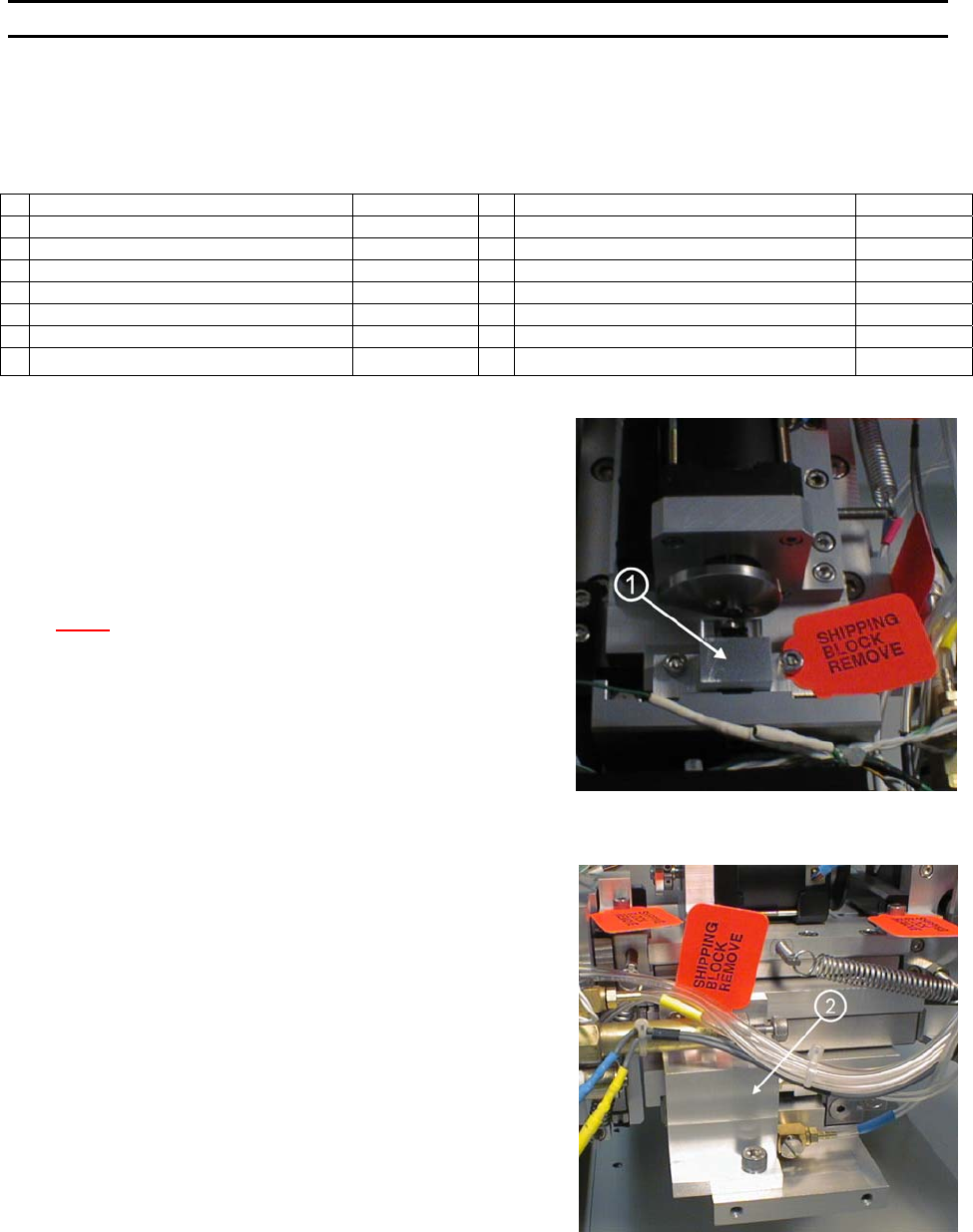
Remove the cover of the X-Y-Z Assembly unit to gain access
to the shipping blocks.
S
TEP 6
Remove the two Z-Mount Shipping Brackets (P/N’s 9081 and
9082) ← located just behind and below the microscope
mount. Remove the two shipping cap screws to remove the
brackets.
S
TEP 7
Remove the X Mount Shipping Bracket (P/N 9079) ↑ located
behind and just below the dual force cylinder. Remove the
shipping cap screw at the bottom and two more at the top of
the bracket.
S
TEP 8
Remove the Y-Mount Shipping Bracket (P/N 9080) → located
at the back of the X-Y-Z Assembly. Remove the two shipping
cap screws. Replace the Shipping bracket with the Cam
Follower Mount Y-Slide (P/N 8928) ↓, Tie Wrapped to the X-
Y-Z Cover.