wire-bonder.pdf - 第38页
WEST•BOND MODEL 454647E SER IES INSTRUCTION MANUAL 32 OPERATION Manual Bonding This mode allows the operator to sl owly lower the Tooling Head by pressin g the 0 key until the Bonding Tool gently touches the b ond surfac…
WEST•BOND MODEL 454647E SERIES INSTRUCTION MANUAL
31
OPERATION
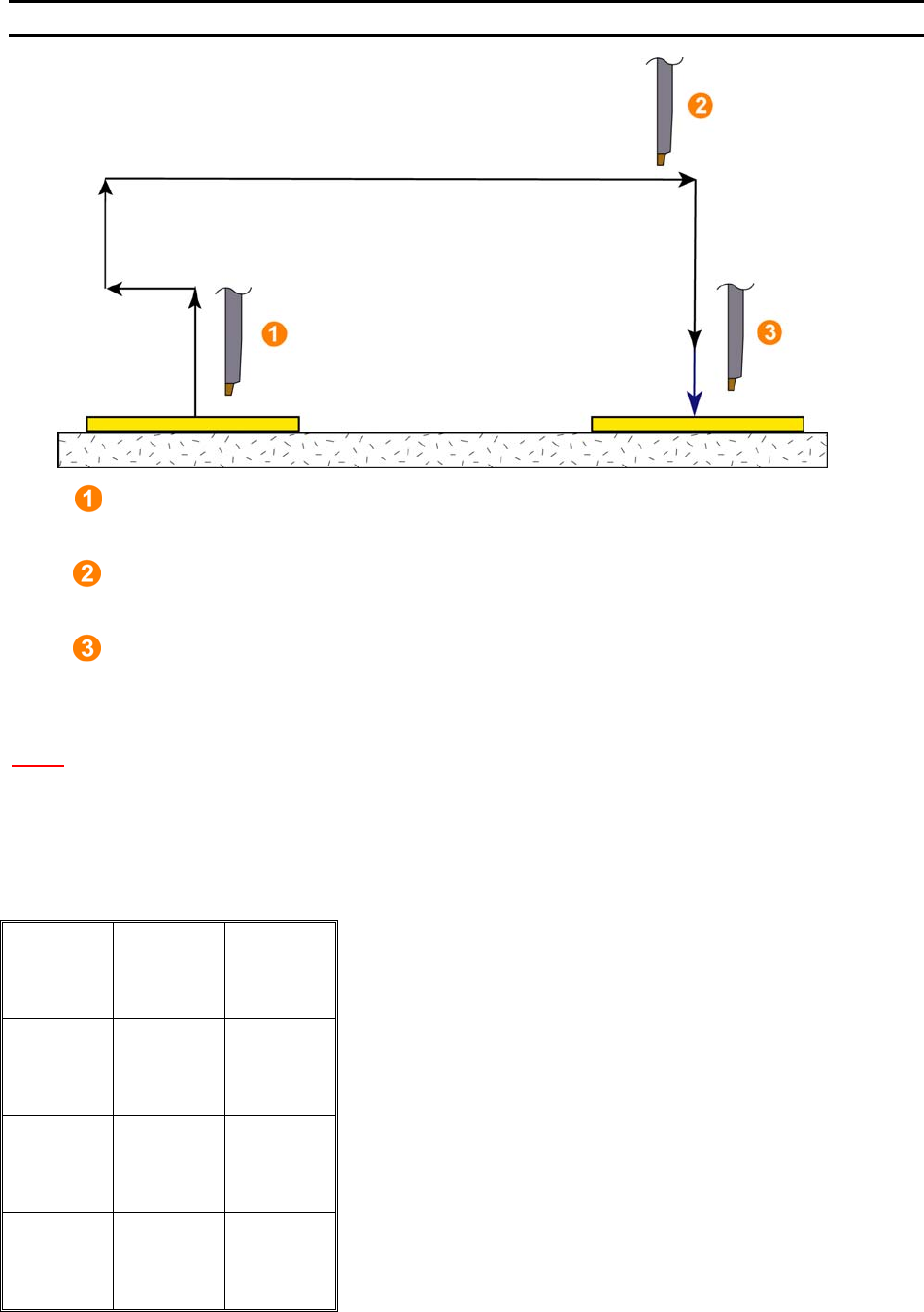
Half-Auto Bonding
1. Search After First Bond
The tool will stop here if the G key is pressed and held. This allows the movement of the
X-Y manipulator. The bonding sequence will continue once the G key is released.
2. Loop Height
When in H
ALF-AUTO mode the tool will automatically stop here to allow movement of the
X-Y manipulator for targeting. Press the G key to complete the bonding sequence.
3. Search Before Second Bond
The tool will stop here if the G key is pressed and held after loop height. This allows the
movement of the X-Y manipulator for final targeting. The bonding sequence will continue
once the G key is released.
N
OTE! This process is also allowed in Full-Auto mode if the first bond is inhibited.
Key Format:
1
2
3
4
5
6
7
8
9
A
0
Manual
Bond
G
WEST•BOND MODEL 454647E SERIES INSTRUCTION MANUAL
32
OPERATION
Manual Bonding
This mode allows the operator to slowly lower the Tooling Head by pressing the 0 key until the Bonding
Tool gently touches the bond surface. At anytime the operator can manually select a bonding point by
using the micromanipulator to position the tool prior to contact. If it is necessary to raise the already
lowered bond tool, the operator can press the 5 key to raise the Tooling Head. Depending on whether the
machine is set-up in half-auto or full-auto mode, the bond to will proceed to the loop height or the search
height of the second bond.
ϑ To call “Manual Bonding”
From the H
OME menu press 0 (MANUAL BOND MODE). Or press and release any key while
auto bonding.
Key Format:
1
Go To
Device/Type
2
Home
3
4
↑ inch
up
5
Open Clamp
6
Inch tail
Forward
7
8
Inch tail
Backward
9
Feed
A
↓ inch
down
0
Half-
or
Full-Auto G
Bond 1 of 5 -->Look in microscope
5=inch up 6=Open clamp
7=Inch Tail (+) 9=Inch Tail (-)
A=Feed 0=inch down G=Full-Auto
6 = Close clamp (If the clamps are open.)
A = Feed (Only available at first bond)
2 = Go To Device/Type
3 = Exit to Align
WEST•BOND MODEL 454647E SERIES INSTRUCTION MANUAL
33
OPERATION
Thread or Bond-off
From this menu, the operator can utilize the key pad to facilitate the threading of the wire guide, the
clamps, and finally, the bonding tool. After the bonding tool has been threaded, the operator can then inch
down to contact the work and bond off any excess wire.
Thread & bond using Type 1 Bond 2
4=Ultrasonics 5=Inch up 6=Close clamp
7=Move XY
A=Feed 0/G=Inch down & bond-off
If clamps are open, the 6=Close clamps. If
the XY is movable, then key 7 = Lock XY
0 = Inch down & Bond off at a slow rate
G = Inch down & Bond off at a fast rate
ϑ To call “Thread or Bond-off” Menu
From the H
OME menu press 6 (THREAD / BOND-OFF) then follow the instructions on the LCD.
Key Format:
1
Go To
Device/Type
2
Home
3
4
↑ inch
up
5
Close Clamp
6
Move XY
7
8
9
Feed
A
↓ slow inch
down &
bond-off 0
↓ fast inch
down &
bond-off G