wire-bonder.pdf - 第67页
WEST•BOND MODEL 454647E SER IES INSTRUCTION MANUAL 61 ADVANCED PROGRAMMING Restart Height RESTART HEIGHT ELEVATION Restart Height Elevation: 1400 from top 4=Key in 5=Up (0.29167”) 7=Work height 8=Suggest A=Prev option 0=…
WEST•BOND MODEL 454647E SERIES INSTRUCTION MANUAL
60
ADVANCED PROGRAMMING
Low Force
This screen will only be displayed if the
operator has selected the DUAL FORCE
option. Having selected O
N for the DUAL
FORCE option, the operator is allowed to
calibrate the low force setting while at this
menu.
The operator should expect to hear the air
cylinder activate when entering this menu.
The air cylinder will deactivate when leaving
this menu.
R
EMINDER: This menu is used for calibrating
or establishing the L
OW FORCE setting.
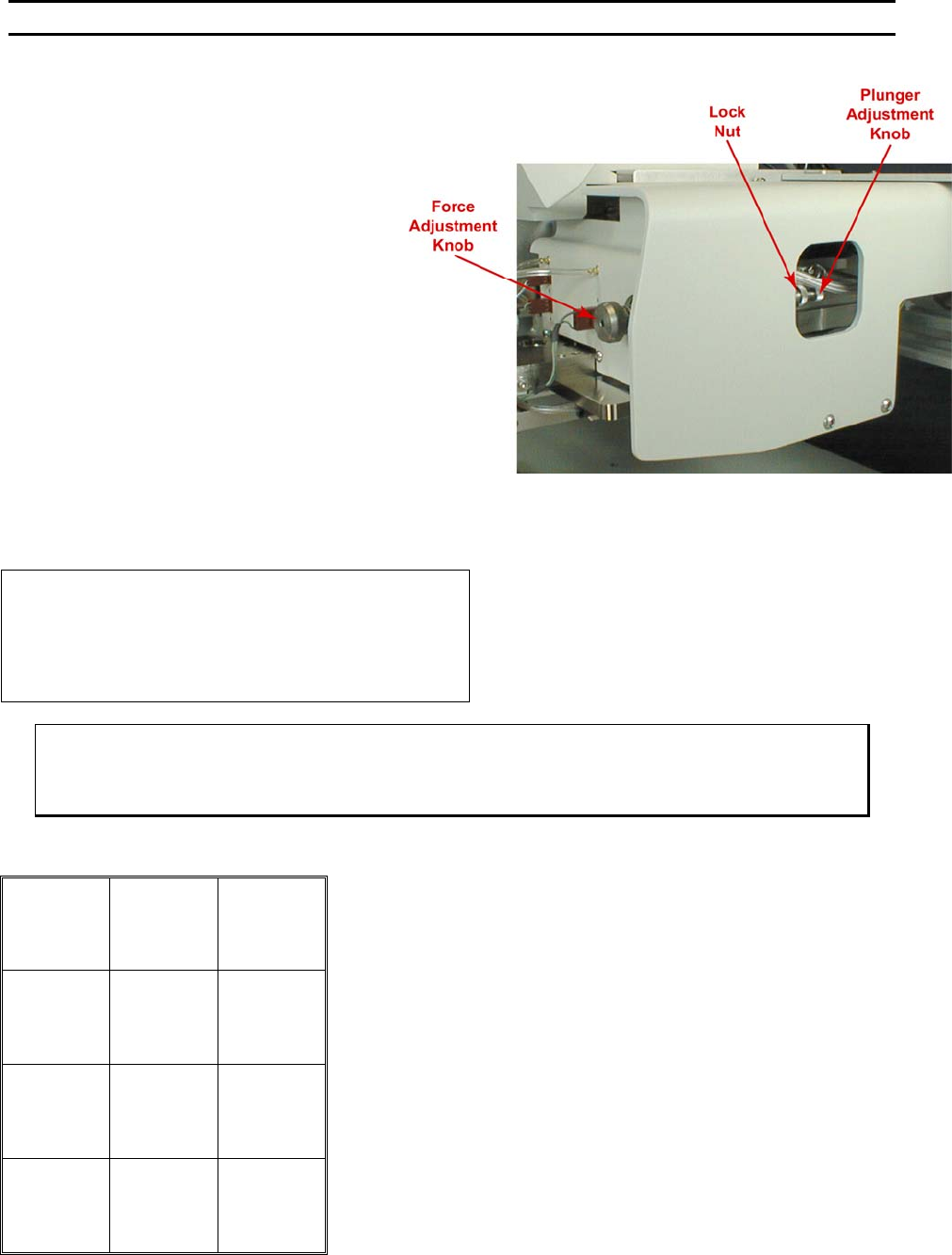
To Adjust the L
OW FORCE setting, loosen the
knurled L
OCK NUT and turn the knurled
PLUNGER ADJUSTMENT KNOB located on the
opposite end of the HIGH FORCE knob. Use
the gram gauge to determine the L
OW FORCE
setting. See page 82 for details on how to
select High or Low force for individual bonds.
LOW FORCE (Displayed if Dual Force is On)
CALIBRATE LOW FORCE
Use force gage to measure Calibration
Force at the tool.
A=Prev option G=Next option
ϑ To edit “Low Force” (If Dual Force is ON) or “Force” (If Dual Force is OFF)
From the H
OME menu press 4 (EDIT), 6 (MACHINE), 8 (FORCE ADJUST), then G (SEQUENCE)
Key Format:
1
2
Home
3
4
5
6
7
8
9
Previous
option
A
0
Next option
G
WEST•BOND MODEL 454647E SERIES INSTRUCTION MANUAL
61
ADVANCED PROGRAMMING
Restart Height
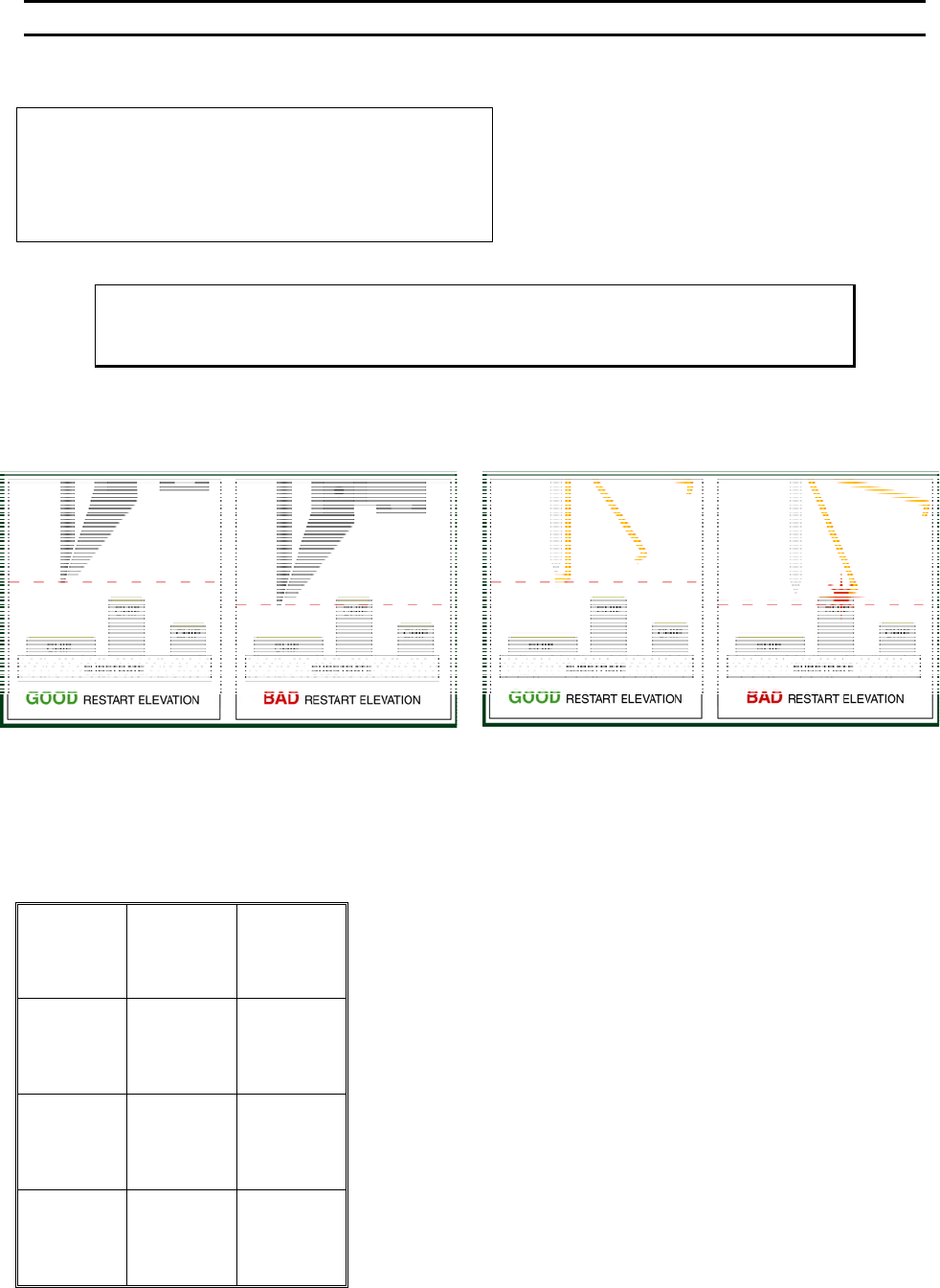
RESTART HEIGHT ELEVATION
Restart Height Elevation: 1400 from top
4=Key in 5=Up (0.29167”)
7=Work height 8=Suggest
A=Prev option 0=Down G=Next option
800 is the suggested elevation for the 4700E
Programmed in Z Motor half-steps from home
7=Work Height Verification (see page 28)
Key Format:
Previous
Menu
1
2
Home
3
Key in
4
↑
Up
5
6
Work height
7
Suggest
8
9
Previous
option
A
↓
Down
0
Next option
G
ϑ To edit “Restart Height Elevation”
From the H
OME menu press 4 (EDIT), 6 (MACHINE), and then 9 (RESTART HT).
WEST•BOND MODEL 454647E SERIES INSTRUCTION MANUAL
62
ADVANCED PROGRAMMING
Lift Before Pull
FOR 4500E AND 4600E MODES ONLY
To change the selection of this feature press the “5” key for ON or the “0” key for OFF option. The
454647E will wait until the Tooling Head has lifted off the terminating bond site before actuating the pull
stroke if this feature is selected to “ON”. The suggested setting is “OFF”. This feature can prove
beneficial for those applications in which the terminating bond is made on delicate or sensitive
components, or for applications with extremely soft wire.
LIFT BEFORE PULL (Display this menu if 45° feed tool is in use.)
Lift Before Pull: Off
5=On
8=Suggest
A=Prev option 0=Off G=Next option
LIFT BEFORE PULL (Display this menu if 90° feed tool is in use.)
Lift Before Pull: 6 (1Z= .0002083”)
4=Key in 5=Up
8=Suggest
A=Prev option 0=Down G=Next option
To edit “Lift Before Pull”
From the H
OME menu press 4 (EDIT), 6 (MACHINE), 0 (MORE OPTIONS), then 4 (LIFT-TO-PULL).
Key Format:
Previous
Menu
1
2
Home
3
4
On
5
6
7
Suggest
8
9
Previous
option
A
Off
0
Next option
G