Eaton 9155 8-15 kVA.pdf - 第28页
UPS 8 – 15 kV A, 230V 50/60 Hz output User ’ s Guide 1 022403 Revision D 28 XSlot communication (option) X Sl ot m odu le s all ow t he U PS to c omm un ic ate i n a v ar ie ty o f n et wo rki ng e nv ir on me nt s a nd …

UPS 8 – 15 kVA, 230V 50/60 Hz output
User’s Guide
1022403
Revision D
27
Warning!
The relay contacts must not be directly connected to mains related circuits.
Reinforced insulation to the mains is required.
Programmable signal inputs
The UPS incorporates two programmable inputs (X44, X45). Use of a non-polar (relay) control
input is recommended. The pins must be shorted with maximum resistance of 10 ohm in order
to activate the specific input.
Note!
Please note the polarity of the inputs as indicated in the external control
connections if used with a polarity control.
The default and programmable settings for the signal inputs are
a) Disable Bypass Operation
If active the automatic transfer to the static bypass is prevented.
b) Charger off
If active the batteries charging is disabled. In case of mains power outage the discharge of
batteries is supported.
c) Remote ON/OFF
If active the UPS output turns off regardless of mode of operation. Auxiliary power, fan,
communications and rectifier/battery charger shall remain functional. Restart initiated
immediately when inactive.
d) Request Bypass
If active the UPS transfers to bypass if bypass voltage, frequency and synchronisation are ok.
e) Request Normal
If active the UPS transfers to inverter operation if not prohibited by EPO or alarm condition.
f) Force Bypass
If active the UPS is forced to static bypass operation regardless of the bypass status.
g) External Battery Breaker Status
If active the UPS knows that the batteries are disconnected.
h) Building alarm 1-6
These can be activated separately or at the same time with other building alarms.
i) Not in use (default)
j)
Shutdown
If active the UPS will shutdown immediately.
k) Delayed Shutdown
If active the UPS will shutdown after user configurable delay time. Restart initiated
immediately when inactive.
l) Normal/Bypass
If active the UPS transfers to bypass if ok. If inactive the UPS transfers to inverter when
possible.
m) Output transformer over temperature
If active the UPS output turns off after user configurable delay time.
n) Input transformer over temperature without bypass
If active the UPS will start to operate on battery or shutdown when batteries not available after
one minute delay.
o) Input transformer over temperature with bypass
If active the UPS will start to operate on battery or transfer to bypass after one minute delay.
UPS 8 – 15 kVA, 230V 50/60 Hz output
User’s Guide
1022403
Revision D
28
XSlot communication (option)
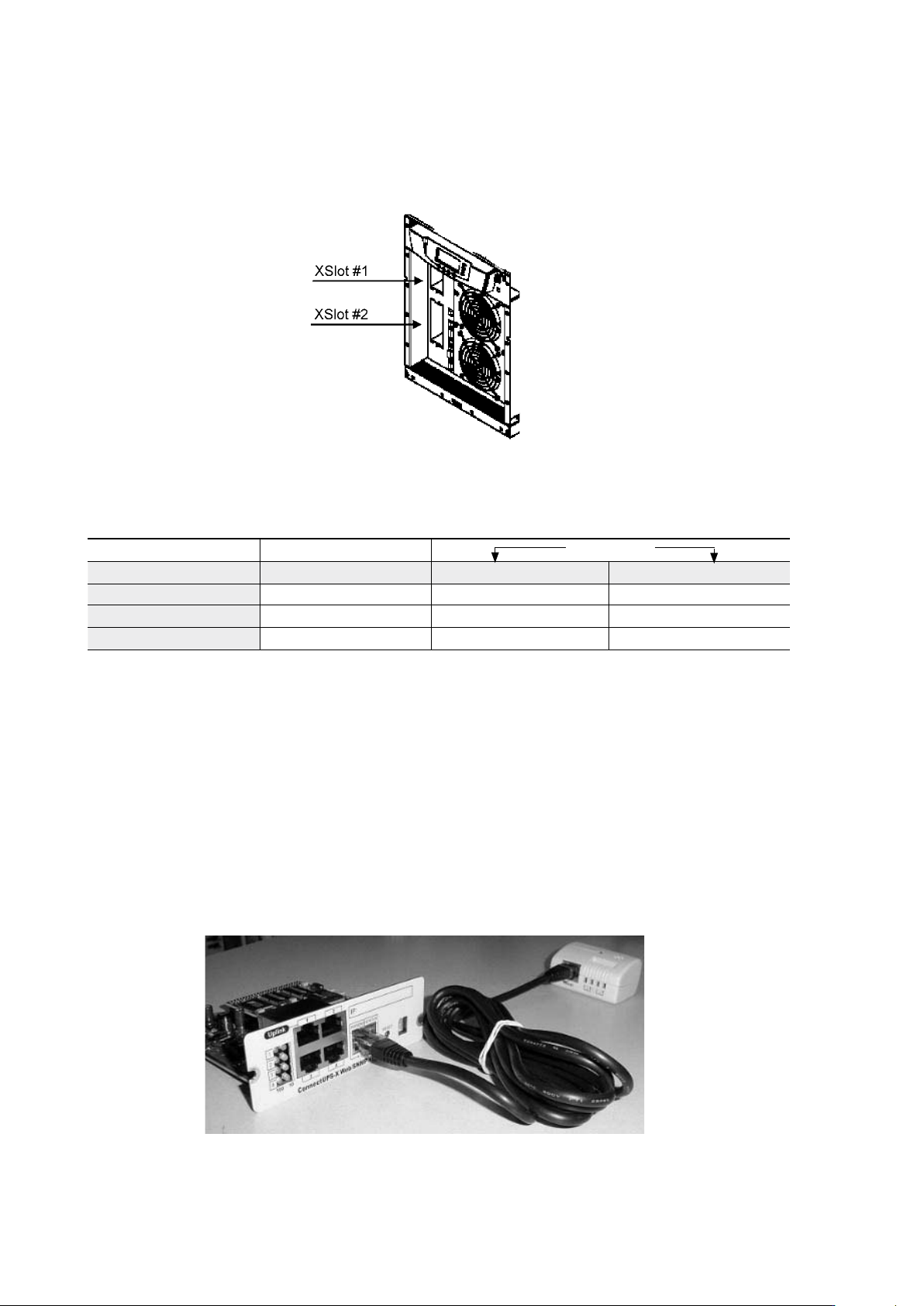
XSlot modules allow the UPS to communicate in a variety of networking environments and with
different types of devices. The UPS incorporates two (2) empty XSlot communication bays.
Figure 29. Location of empty XSlot bays.
The UPS supports two serial communication devices according to the table below.
Table 24. Typical XSlot configurations for UPS communication.
Web/SNMP Module (optional)
The module supports SNMP and HTTP compliant remote monitoring and shutdown for
the protected computer systems. It can be connected to a twisted-pair Ethernet network
(10/100BaseT) using an RJ45 connector.
The Web/SNMP module has a build-in switching hub that allows three (3) additional network
devices to be connected to the network without the requirement of additional network drops.
In addition, an Environmental Monitoring Probe can be requested from the UPS manufacturer
to obtain humidity, temperature, smoke alarm and security information. It is connected to the
communication port of the Web/SNMP module as option.
Figure 30. ConnectUPS-X Web/SNMP Module and Environmental Monitoring Probe.
Independent Multiplexed
Configuration XSlot #1 X-slot #2 Std. RS-232 port
Default #1 Any XSlot Module Any XSlot Module Not in use
Default #2 Any XSlot Module Relay Module Available
Default #3 Any XSlot Module Not in use Available
UPS 8 – 15 kVA, 230V 50/60 Hz output
User’s Guide
1022403
Revision D
29
AS400 Relay Module (optional)
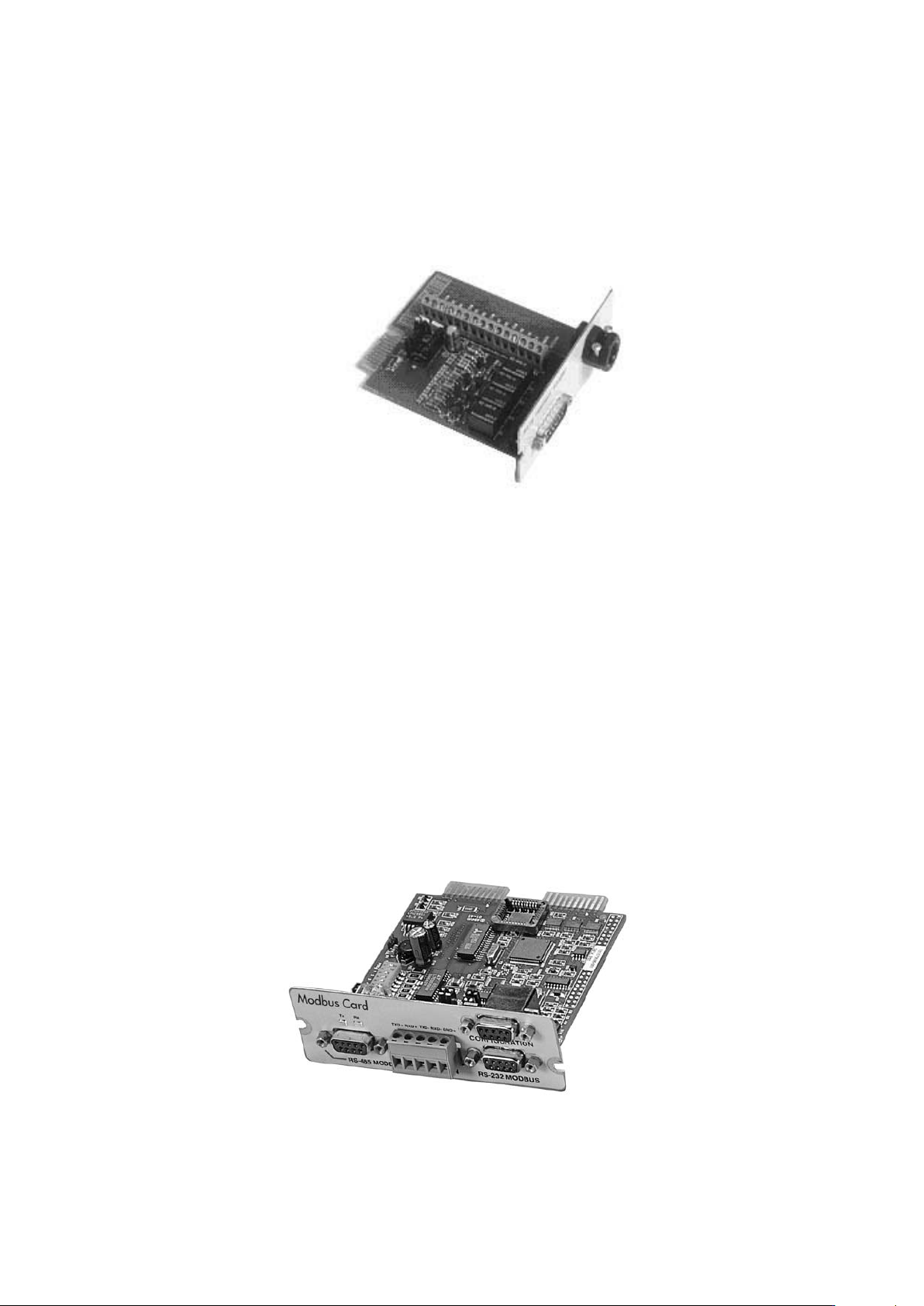
The Relay Module provides potential free relay interface for AS/400 connected computers and
industrial applications. The relay interface supports both 15-pin D-sub connector and terminal
block connections up to four (4) potential free relays.
The relay contacts are rated for 1 A, 30 Vac or 200 mA, 60 Vdc, and they have a galvanic
isolation from the other circuits of the UPS unit.
Figure 31. AS400 Relay Module.
Single Serial Port Module (optional)
To establish communication between the UPS and a computer, connect your computer to the
UPS communication port using the supplied communication cable.
When the communication cable is installed, power management software can exchange data
with the UPS. The software polls the UPS for detailed information on the status of the power
environment. If a power emergency occurs, the software initiates the saving of all data and an
orderly shutdown of the equipment.
Modus/Jbus Module (optional)
The Modbus module provides monitoring and integration to the Building Management
Software (BMS) such as Wonderware. It features continuous and reliable communication
through isolated DB9 ports (RS485/RS232) or a terminal strip (RS485).
Figure 32. Modus/Jbus Module.