00198622-02_IM_WES7_WIN10_EN_DE.pdf - 第5页
WES7 / Win10 - Installation M anual 04/2019 Edition 5 1 Overview This installation manual provides in structions on installing the Wind ows Embedded Standar d 7 (WES7) or Windo ws 10 IoT (Win10) operating syste ms on the…
WES7 / Win10 - Installation Manual 04/2019 Edition
5
1 Overview
This installation manual provides instructions on installing the Windows Embedded Standard 7
(WES7) or Windows 10 IoT (Win10) operating systems on the station computer and, if applicable
on other computers (e.g. Coplan computer: 3D Coplanarity Module option). It contains information
on the scope of delivery and requirements for successful installation.
As of the 707 and 605.04 station software versions, WES7 is supported in all machine
configurations. As of station software version 712.0, Win10 can be used on the SIPLACE SX V2-
series placement machines. As of station software version 712.1, Win10 can also be used on the
SIPLACE TX- and X S-series placement machine with SIMATIC MicroBox 427D station computers.
The following computer types are supported:
– SIMATIC BoxPC 627B/827B (WES7)
– SIMATIC BoxPC 627C/827C (WES7)
– SIMATIC BoxPC 627D/827D (WES7)
– SIMATIC MicroBox 427D (WES7, Win10)
– iBASE ABP 102-A (WES7)
– iBASE ABP 402-A (WES7)
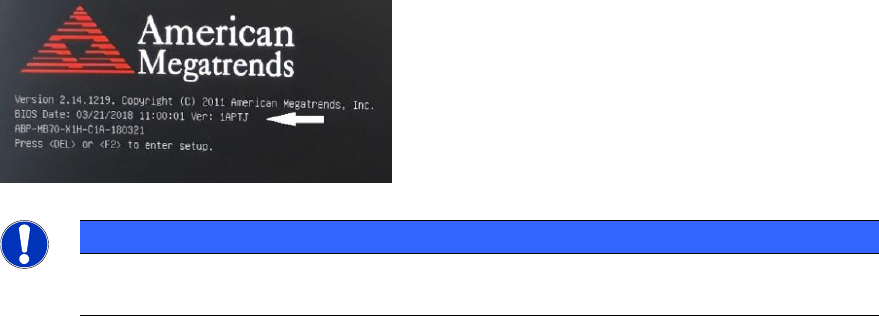
– iBASE ABP 402-A (WES7, Win10); Win10 is only available on iBASE computers with functional
status [-04] or higher, e.g. [03120423-04] (BIOS Date: 03/21/2018 or newer).
NOTICE
As of the 708 and 605.04 station software versions, the Windows XP operating system is
not supported on the station / Coplan computer anymore.

WES7 / Win10 - Installation Manual 04/2019 Edition
6
2 Scope of Delivery
A media standard package is available for installing the Windows Embedded Standard 7 and
Windows 10 IoT operating systems.
CAUTION
Installation of the operating system is provided for the computer types mentioned in the
following table only (the computer type is displayed during the BIOS boot or is registered
in the BIOS).
For station software version 605.x (WES7 with 32 bit only):
Operating system DVD Pack WES7(605) V2.6, item no. [00117111-xx]
The DVD package contains:
– SIPLACE WES7 Configurator CD V2.4.3, item no. [00711123-xx]
– SIPLACE WES7 627B/C/827B/C V2.1 DVD, item no. [03101485-xx]
– SIPLACE WES7 627D/827D V1.0 DVD, item no. [03164755-xx]
– SIPLACE WES7 iBASE_102-A V1.0 DVD, item no. [03121253-xx]
– SIPLACE WES7 iBASE_402-A V1.0 DVD, item no. [03121255-xx]
– Installation Manual "Operating Systems Windows Embedded Standard 7 / Windows 10 IoT",
item no. [00198622-xx]
For station software version 7xx:
Operating system USB package WES7(7xx) V3.3, item no. [00117122-xx]
The bootable USB stick contains:
– SIPLACE WinPE for WES7-Restore V2019-1 (to start up the computer)
– SIPLACE WES7 Configurator V2.4.4 (current version for the computer configuration)
– Installation Manual "Operating Systems Windows Embedded Standard 7 / Windows 10 IoT",
item no. [00198622-xx]
– The following image files:
– SIPLACE_WES7x64_iBaseABP402A_V41.wim
– SIPLACE_WES7x64_SIMATICBoxPC827D_V3.wim
– SIPLACE_WES7x64_SIMATICMicroBox427D_V4.wim
– SIPLACE_WES7x86_SIMATICBoxPC627-827B+C_V4.wim
– SIPLACE_WES7x86_iBaseABP402A_V2.wim