OCP-02502-G - 第16页
VITRONICS REFLOW SOLDERING SYSTEMS EM 02502- G 15-Nov-00 (c) PAGE Operator’s Manual 15 PRODUCTS & RECIPES PRODUCT AND RECIPE EXPLANATION Each individual Printed Circuit Assembly to be processed by the oven will have …
VITRONICS REFLOW SOLDERING SYSTEMS
EM 02502-G 15-Nov-00 (c) PAGE Operator’s Manual
14
PRINTING
The Vitronics Oven Control Program will print to a Color Ink-Jet or a Laser printer if the
corresponding printer drivers have been installed.
To install other Printer Drivers: First, it is necessary to select “Tools”, then “Add/View
Printers”, then follow directions install Printer drivers from the MicroSoft Windows™ CD.
Printing is possible at several places in the software for record keeping purposes.
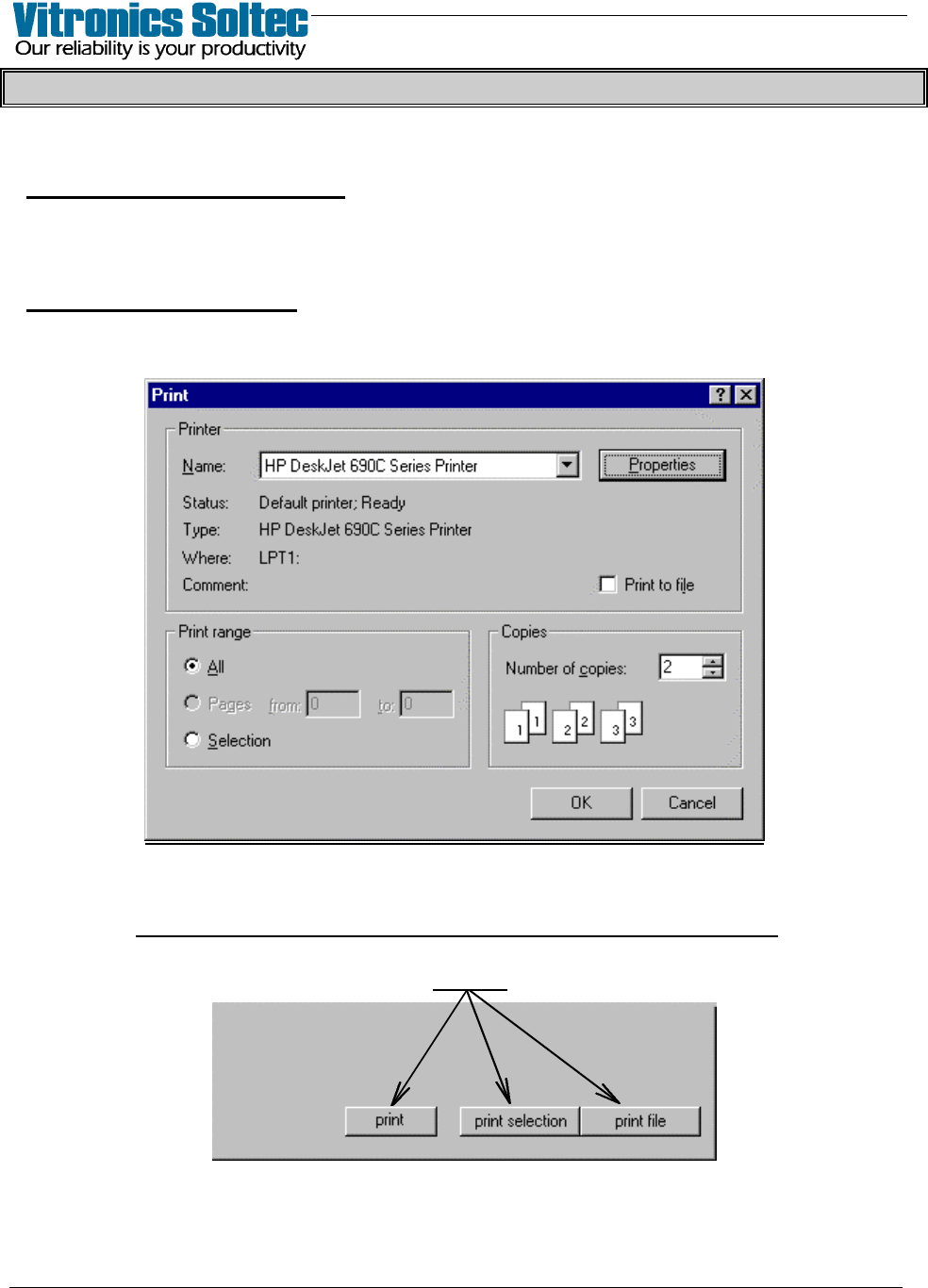
First, Set-up the printer: At the “Pull-down Menu, select “File”, then “Printer
Setup” to display the “Print Dialogue Box”. Depending on the Windows ™ default
printer, the “Print Dialogue Box” shown may not be the same as the one illustrated here.
The “Print Dialogue Box” is used to select the printer, image quality, paper size, copy
quantity , color/no color and other characteristics of the printer output.
It is NOT possible to “print” from this “Print Dialogue Box” .
Printing is available in recipe, product, alarm, trending, and other dialogue boxes.
Printing is done by selecting one of the “buttons” shown below wherever they appear.
(The nature and quantity of the printer output will depend on
“set-up” selections made in the “Print Dialogue Box”)
VITRONICS REFLOW SOLDERING SYSTEMS
EM 02502-G 15-Nov-00 (c) PAGE Operator’s Manual
15
PRODUCTS & RECIPES
PRODUCT AND RECIPE EXPLANATION
Each individual Printed Circuit Assembly to be processed by the oven will have it's
own “unique physical description” ( PRODUCT) and the “unique treatment”
(RECIPE) it will receive when being processed through the oven.
REMEMBER:
A PRODUCT consists of a product (Printed Circuit Assembly) name,
description, the product dimensions and a Recipe.
A RECIPE consists of a Recipe name, description, process set points and
process alarm limits.
A Recipe is referenced in each Product when the Product is “Started”.
VITRONICS REFLOW SOLDERING SYSTEMS
EM 02502-G 15-Nov-00 (c) PAGE Operator’s Manual
16
SELECT AND START A PROCESS (Product Or Recipe)
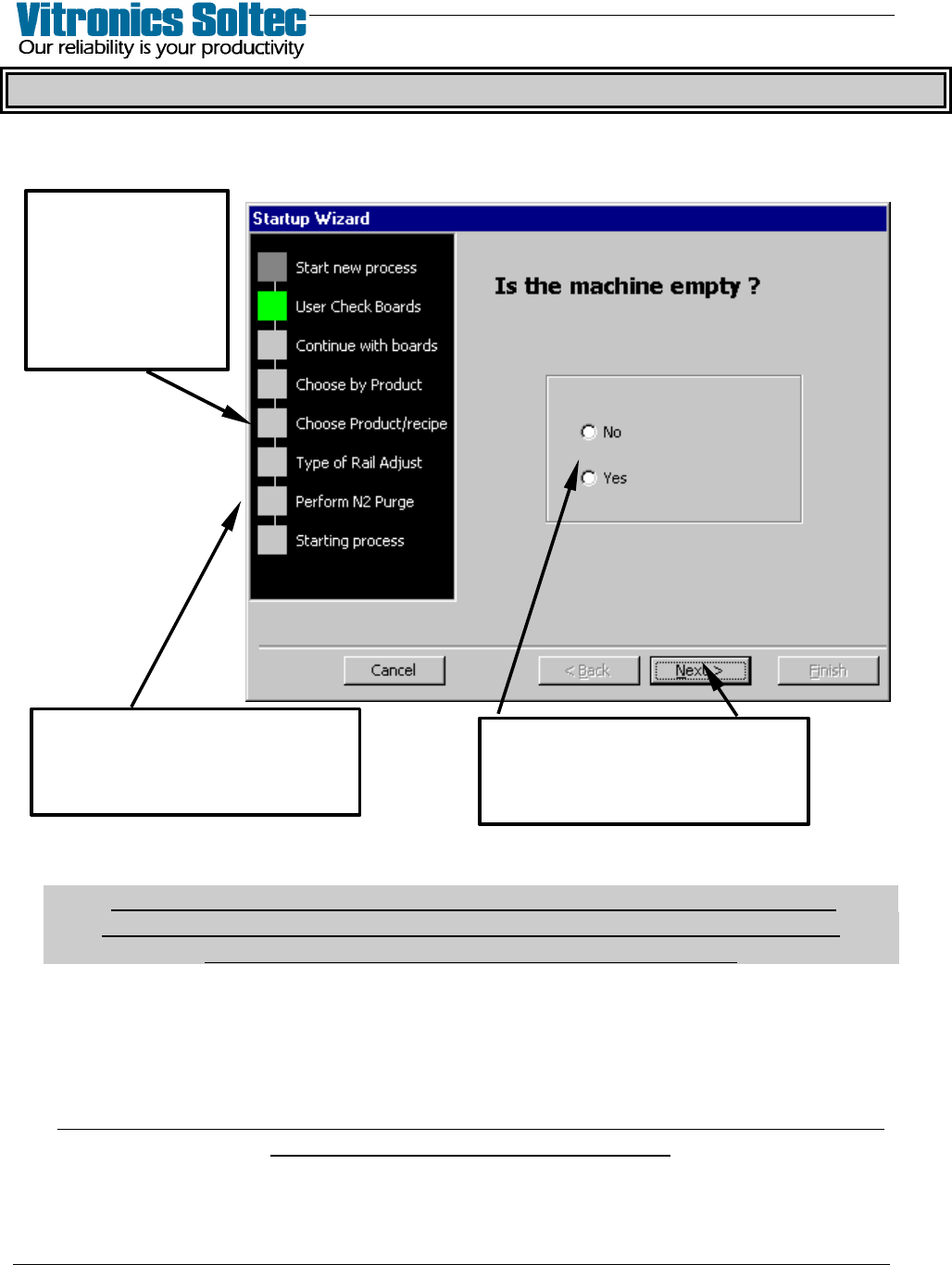
Operating the Reflow Oven involves “Starting a Process” by selecting File, then
Start New Process, which produces the Start-up Wizard:
The “PROCESS” which is started can be a PRODUCT or a RECIPE at the discretion
of Reflow Oven Operator.
(If a “Recipe” is selected, the default “Product” is automatically selected.
Board Width, Length, and Jam setting are applied to the “Selected Recipe”
See “Edit Product” to change “Default Product” file )
The cell fans will start immediately, and slowly accelerate to full RPM within the next
minute. On ovens with a rail or combination conveyor, the display will ask about
adjusting the rail width. If the answer was YES, the rail width can be adjusted
manually using the manual selector switches at the Off-load end of the oven.
On ovens with the "automatic rail width adjustment option", the rail width adjustment
begins after the Operator selects “Start”.
At this “Step”,
select
“Advanced” to
disable some
repetitive
questions
The Start-up Wizard
progresses through the
“Steps” shown.
Provide the requested
information at each “Step”,
then select “Next”