OCP-02502-G - 第18页
VITRONICS REFLOW SOLDERING SYSTEMS EM 02502- G 15-Nov-00 (c) PAGE Operator’s Manual 17 OVEN S TA TUS - ALARMS , WARNINGS, AND SHUTDOWNS ALARM LEVELS There are five (5) alarm levels. Starting with the least serious, they …
VITRONICS REFLOW SOLDERING SYSTEMS
EM 02502-G 15-Nov-00 (c) PAGE Operator’s Manual
16
SELECT AND START A PROCESS (Product Or Recipe)
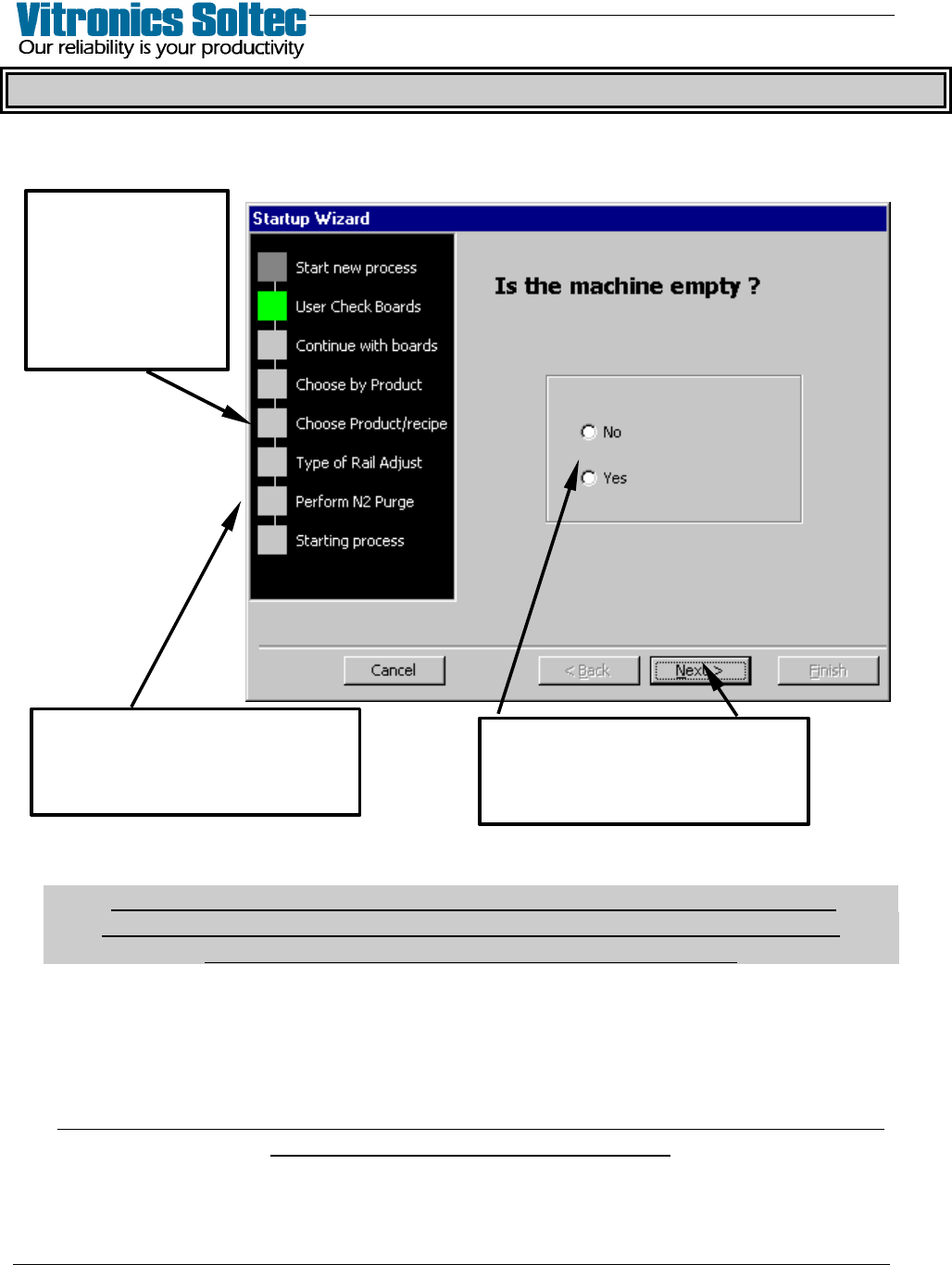
Operating the Reflow Oven involves “Starting a Process” by selecting File, then
Start New Process, which produces the Start-up Wizard:
The “PROCESS” which is started can be a PRODUCT or a RECIPE at the discretion
of Reflow Oven Operator.
(If a “Recipe” is selected, the default “Product” is automatically selected.
Board Width, Length, and Jam setting are applied to the “Selected Recipe”
See “Edit Product” to change “Default Product” file )
The cell fans will start immediately, and slowly accelerate to full RPM within the next
minute. On ovens with a rail or combination conveyor, the display will ask about
adjusting the rail width. If the answer was YES, the rail width can be adjusted
manually using the manual selector switches at the Off-load end of the oven.
On ovens with the "automatic rail width adjustment option", the rail width adjustment
begins after the Operator selects “Start”.
At this “Step”,
select
“Advanced” to
disable some
repetitive
questions
The Start-up Wizard
progresses through the
“Steps” shown.
Provide the requested
information at each “Step”,
then select “Next”
VITRONICS REFLOW SOLDERING SYSTEMS
EM 02502-G 15-Nov-00 (c) PAGE Operator’s Manual
17
OVEN STATUS - ALARMS, WARNINGS, AND SHUTDOWNS
ALARM LEVELS
There are five (5) alarm levels. Starting with the least serious, they are:
1) Notify - During this condition:
1) No change occurs in the Oven Operation
2) The Oven Status Bar will display the “Parameter Status”.
2) Warning - During this condition:
1) The Yellow light on the light tower will be on
2) The audible alarm will be off.
3) The conveyor will remain at setpoint
4) The heaters will remain at setpoint
5) Nitrogen or Air will remain at setpoint
6) Cell Fans will continue to run
7) The Oven Status Bar will display WARNING in Blue Letters.
No user input is required to clear this alarm state. The oven will go to the
process ready state when the alarm condition no longer exists.
3) Critical Warning - During this condition:
1) The Red light on the light tower will be on
2) The audible alarm will be on
3) The conveyor will continue to run at setpoint
4) The heaters will continue temperature at setpoint
5) Nitrogen or Air will remain at setpoint
6) Cell Fans will continue to run at setpoint
7) The Oven Status Bar will display CRITICAL WARNING in Blue Letters.
4) Alarm - During this condition:
1) The Red light on the light tower will be on
2) The audible alarm will be on
3) The conveyor will run if oven temp above 100 deg
4) The heaters will turn off
5) Nitrogen or Air will be turned off
6) Cell Fans will continue to run (Full speed with Nitrogen Option)
7) The Oven Status Bar will display ALARM in Blue letters.
5) Critical Alarm - During this condition:
1) The Red light on the light tower will be on
2) The audible alarm will be on
3) The conveyor will run
4) The heaters will turn off
5) Nitrogen or Air will be turned off
6) Cell Fans will stop
7) The Oven Status Bar will display CRITICAL ALARM in Red Letters.
SELECT “SETUP”, and “DISPLAY LAYOUT” TO SET “RED”
SCREEN BACKGROUND WHEN ALARMS OCCUR
VITRONICS REFLOW SOLDERING SYSTEMS
EM 02502-G 15-Nov-00 (c) PAGE Operator’s Manual
18
STABILIZING
Stabilization Time and Countdown Time are edited in the Process Recipe.
Stabilization Time is the maximum period necessary for the oven to normalize
and bring all conditions within operating tolerances.
(That is; "at setpoint".)
Countdown Time is a time period the "at setpoint" conditions must be maintained
after which, the oven will go to "Process Ready".
When a Product is started, Stabilizing starts and the “Status Bar” displays:
STABILIZING - #
(The (#) number indicates the remaining minutes of stabilization time
During Stabilizing, if the oven reaches "at setpoint", the Countdown Time starts.
After Countdown: 1) If "at setpoint", then the oven enters "Process Ready".
2) If "not at setpoint ", then the oven continues Stabilizing
(or Re-Stabilizing)
(Oven can re-enter Countdown again by reaching
"at setpoint " within the remaining Stabilizing Time)
If the Stabilizing Time has expired and the oven conditions are not within the:
1) process warning tolerances - the oven enters a Warning State.
2) process shutdown tolerances - the oven enters a Shutdown State.
SYSTEM SETUP
The oven enters the system setup state any time an action is performed which will
cause a process parameter to go beyond the tolerance; such as during calibrations,
during QUICK COOL, MANUAL RAIL WIDTH ADJUST, and other similar
functions. This occurs automatically to temporarily disable any non-critical alarms
which may be affected, and the Yellow light on the light tower will be on.
The Oven Status Bar will display:
SETUP
WARNING
The oven displays a warning when a cell's temperature, the conveyor speed, (or
other function set) goes beyond the values specified in the process recipe.
The Process Ready signal is turned off and the yellow light will light.
The Oven Status Bar will display:
WARNING
The Event & Alarm log will display the reason for the warning state.
A part of any cell with low temperature will be displayed in blue. (The more it goes
below temp, the more blue will be displayed)