00198654-01_UM_Nozzle_Cleaning_Station_EN - 第51页
6 Operating the machine User Manual SIPLACE Nozzle Cleaning Station 09/2019 51 6 Operating the machine The machine features a safety system comprising the ESS explained in 2.3 "Safety instructions for operation&qu…

5 Tasks at the nozzle cleaning station
5.1 Filling and draining the Container
50 User Manual SIPLACE Nozzle Cleaning Station 09/2019
Draining the tip cleaning container
► Open the front and the back cover.
► Remove the cover plate for draining (3).
► Take the drain hose and connect it to the drain valve (7) of the tip cleaning container.
► Put the open end of the drain hose into a sufficiently large and suitable waste container and
ensure that no liquid can escape.
► Open the drain valve (7) to empty the tip cleaning container (5).
► Close the drain valve (7) when ready.
► Remove the drain hose, empty it into the waste container and put it back.
► Remove any liquid residues and install the cover plate for draining (3).
► Close the front and the back cover.
Filling the shaft cleaning container
► Remove the front cover.
► Open the cover plate (1).
► Fill up the shaft cleaning container (2) with "Zestron Vigon SC" until the sensor to check the
water level is well covered.
► Close the cover plate (1) and the front cover.
Draining the shaft cleaning container
► Open the front and the back cover.
► Remove the cover plate for draining (3).
► Take the drain hose and connect it to the drain valve (6) of the shaft cleaning container.
► Put the open end of the drain hose into a sufficiently large and suitable waste container and
ensure that no liquid can escape.
► Open the drain valve (6) to empty the shaft cleaning container (2).
► Close the drain valve (6) when ready.
► Remove the drain hose, empty it into the waste container and put it back.
► Remove any liquid residues and install the cover plate for draining (3).
► Close the front and the back cover.
6 Operating the machine
User Manual SIPLACE Nozzle Cleaning Station 09/2019 51
6 Operating the machine
The machine features a safety system comprising the ESS explained in 2.3 "Safety instructions for
operation" [}15].
CAUTION
Risk of damage or injury!
Before operating the machine please observe the safety instructions in section 2 "Opera-
tional safety" [}11].
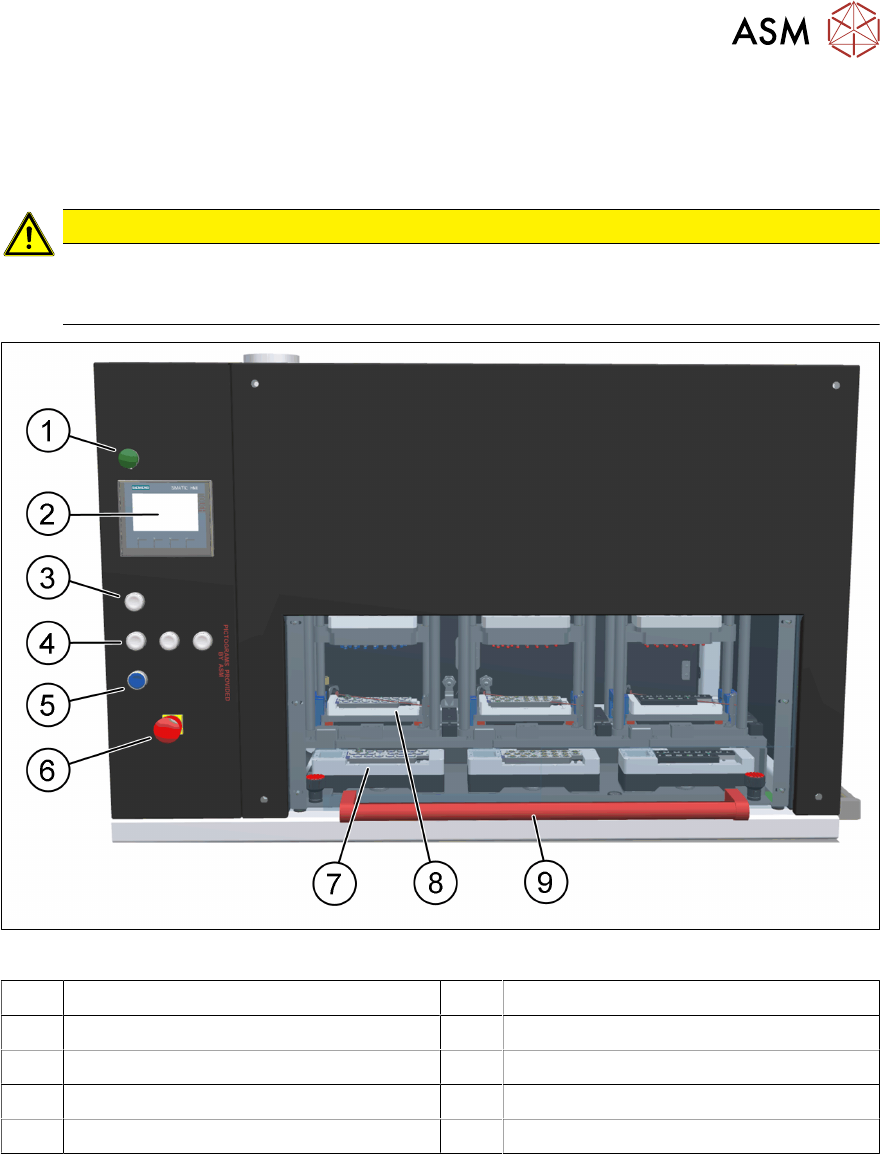
Fig.36: NCS - operating elements
1 Processing finished indicator lamp 2 HMI operating panel
3 START button shaft cleaning 4 START button tip cleaning
5 RESET button 6 EMERGENCY STOP (ESS) button
7 Tip cleaning module(s) 8 Shaft cleaning module(s)
9 Handle for safety cover

6 Operating the machine
6.1 Starting the processing cycle
52 User Manual SIPLACE Nozzle Cleaning Station 09/2019
6.1 Starting the processing cycle
The cleaning of the SIPLACE ceramic nozzles is done in two steps.
●
Cleaning of the nozzle with KG15+ and following rinsing with demi
●
Cleaning of the nozzle shaft with Vigon SC and following drying with compressed air
In order to run a smooth cleaning process, it is recommended to start the process with the tip
cleaning and proceed with the shaft cleaning after the tip cleaning has been completed.
With the first modules moved from the tip to the shaft cleaning module(s) next magazines can be
loaded to the tip cleaning module(s). When now starting the cleaning the tip and shaft cleaning pro-
cess runs parallel.
NOTICE
Ensure readiness!
Prior to the cleaning make sure:
► The NCS is properly setup and the wheels are locked by the brakes.
► All containers are filled with the correct liquids and in sufficient quantity.
Nozzle Cleaning
► Turn the main power switch on and open the main compressed air supply valve.
► Open the safety cover.
► Insert the magazine(s) in the corresponding tip cleaning and/or shaft cleaning module(s).
► Close the safety cover.
► Start the tip cleaning and/or shaft cleaning with the corresponding START button(s) on the
machine's control panel.
NOTICE
One button operation!
The shaft cleaning starts only if a magazine is detected by the sensor in the corner. If not
the cleaning will be skipped in all modules without a magazine.
► After the cleaning process is finished the processing finished indicator lamp turns on.
► Open the safety door and remove the magazines from the shaft cleaning module(s), move the
magazine(s) from the tip cleaning to the shaft cleaning module(s) and fill up the tip cleaning
module(s).
► Start the tip cleaning and/or shaft cleaning with the corresponding START button(s) on the
machine's control panel.
6.2 Finishing work with the machine
To stop and turn off the machine, wait until all automatic processing cycles which are in progress
come to an end, or force their stopping by pressing and holding the respective START buttons for a
minimum of 3 seconds. Next, turn the main power switch from ON to OFF. Close the main com-
pressed air supply valve.