00198654-01_UM_Nozzle_Cleaning_Station_EN - 第60页
7 The HMI operating panel 7.6 Program selection 60 User Manual SIPLACE Nozzle Cleaning Station 09/2019 Description and function ► Create a new program by pressing icon (5) . ► Next enter a unique name for the program by …
7 The HMI operating panel
7.5 Parameter setting screens
User Manual SIPLACE Nozzle Cleaning Station 09/2019 59
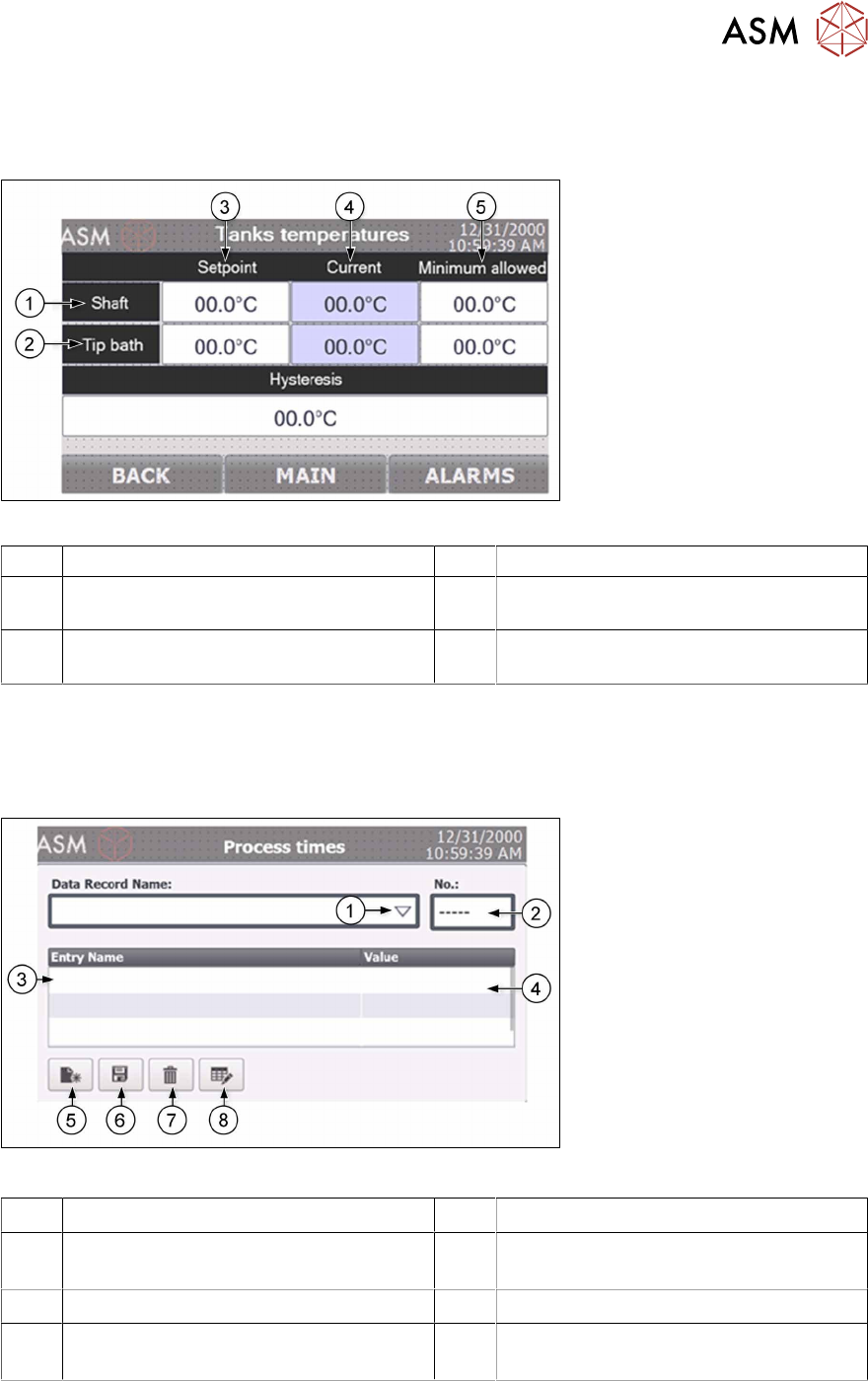
7.5.1 Tanks temperatures screen
The tank heater temperature screen provides an overview on the temperatures in the tip and shaft
cleaning container and allows to adapt them.
Fig.48: NCS - HMI temperatures screen
1 Shaft cleaning parameter section 2 Tip cleaning parameter section
3 Setpoint defines the temperature to be
reached
4 Current shows the actual temperature
values in the container (read only)
5 Minimum allowed defines the threshold
from when the machine starts working
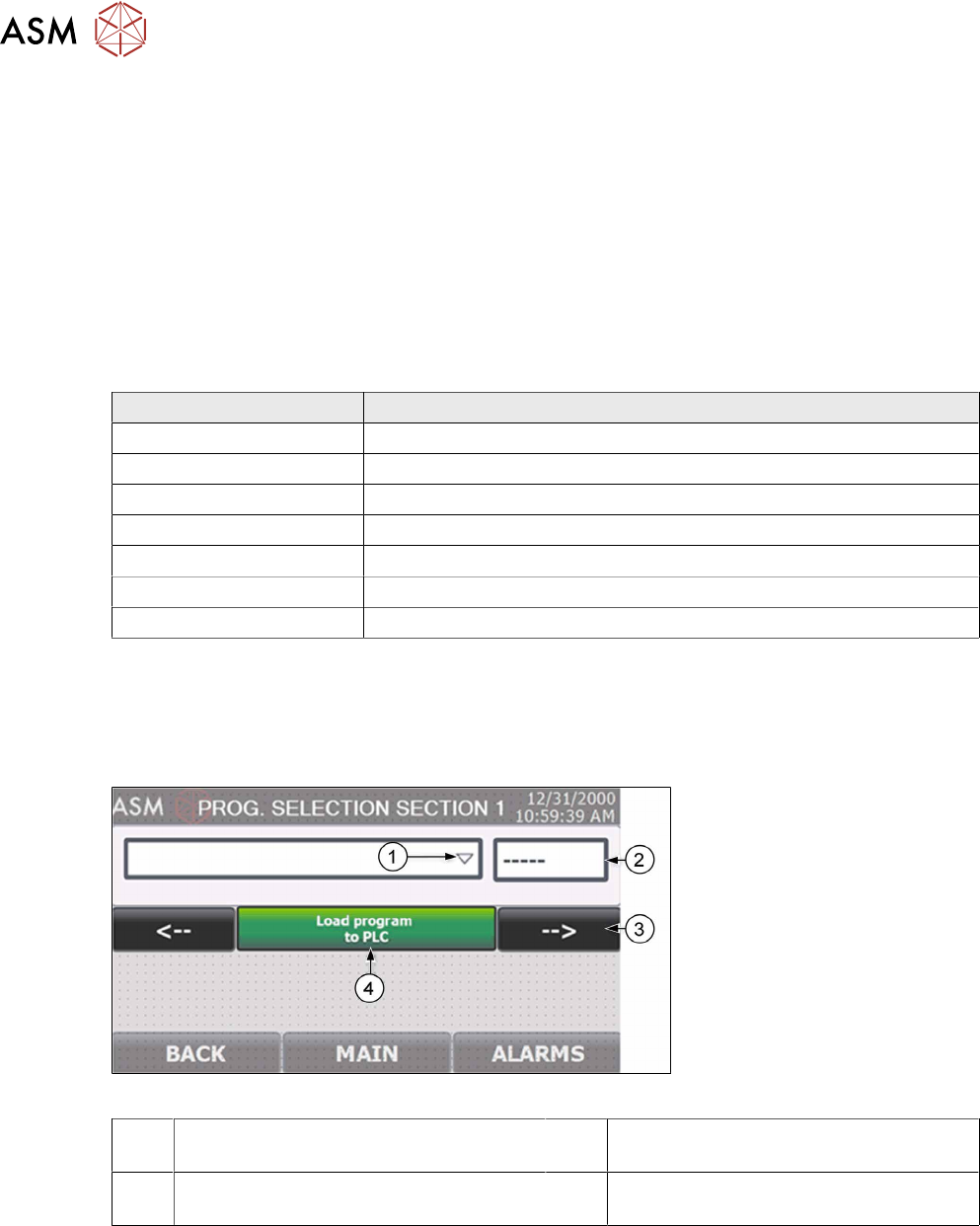
7.5.2 Process times screen
The Process time screen provides the possibility to generate up to 150 unique cleaning process
program combinations. The process engineer may add and name programs and upload them to
the PLC's main software.
Fig.49: NCS - HMI process times screen
1 Drop down to list existing programs 2 Number of the currently edited program
3 Parameter names 4 Parameter value (after click on the input
field
5 Create new program 6 Save the current program settings
7 Delete the selected program 8 Change the name of the selected pro-
gram
7 The HMI operating panel
7.6 Program selection
60 User Manual SIPLACE Nozzle Cleaning Station 09/2019
Description and function
► Create a new program by pressing icon (5).
► Next enter a unique name for the program by a click on the white “Data Record Name” field.
This will make it easier to find the program later.
► A click on the arrow (1) opens a dropdown list of existing programs. You can edit any program
listed. Each program has a unique number(2) which gets assigned automatically.
► You can edit parameters by a click on its value field (4). Scroll down the parameter list(3) to
see more parameters. Save the modified or created program by click on icon(6).
► To delete a program, it must first be selected and then icon (7) pressed.
Parameters which can be set in each program
Parameter Description
Shaft cleaning time Time the cleaning valve remains open during cleaning
Shaft drying time The total drying after cleaning
Drying valve – open Drying valve open position pulse duration during cleaning
Drying valve – closed Drying valve close position pulse duration during cleaning
Tip – cleaning time Running time of the membrane pump during neutralization
Tip – neutralization time Running time of the membrane pump during cleaning
Actuator delay Delay before lifting the shaft cleaning actuator after cleaning / drying
7.6 Program selection
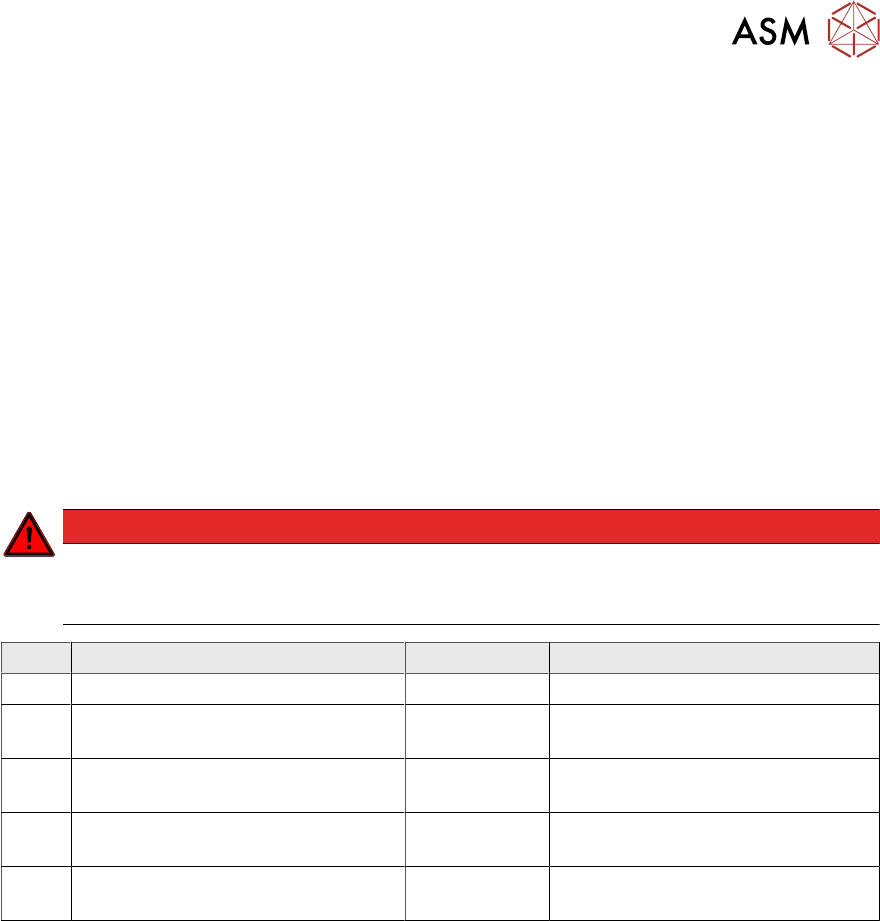
The operator can change the processing program on the Program Selection screen. The Program
Selection screen is accessed without a security password; however, you may only choose pro-
grams and you cannot edit them on the screen.
Fig.50: NCS - HMI program selection screen
1 Drop down to list existing programs 2 Number of the currently selected pro-
gram
3 Select the cleaning section the program
is to be assigned to
4 Load the selected program to the PLC
software (press and hold for minimum 2s)
8 Maintenance
8.1 Maintenance types and scope
User Manual SIPLACE Nozzle Cleaning Station 09/2019 61
8 Maintenance
8.1 Maintenance types and scope
8.1.1 Daily maintenance
Keep all operating controls clean. Do not the interior of the machine become too dirty.
Daily maintenance tasks:
► Visual inspection of the entire machine for damage and leaks.
► Functional testing of the safety system.
► Pressure gauge indication check.
► Fluid tank level check.
8.1.2 Periodic maintenance
DANGER
Risk of damage / life!
Before maintaining the machine, disconnect it from the power supply with the main power
switch.
Pos. Inspected component/part Intervals Guidelines
1 Tanks and processing cells 1 month Clean thoroughly.
2 Flexible air lines 1 month Visually inspect; replace if severely
worn.
3 Pneumatic system and valve actuat-
ors
6 months Visually inspect; replace if severely
worn or leaking.
4 Pumps and valves 6 months Check the seals. Replace if worn
out or leaking.
5 Piston outer seals 6 months Visually inspect; replace if severely
worn.