WPC4 services manual.pdf - 第53页
Replacing Spare Parts Replacing the Collision Light Barriers [03047281- xx] Limit Switches, Sensors and Light Barriers Service Manual SIPLACE WPC4 53 3.6.8 Replacing the Collisio n Light Barriers [03047281-xx] Overvi ew …
Replacing Spare Parts
Limit Switches, Sensors and Light Barriers Replacing the Feed Axis Limit Switch on Tower Side [03047276-xx]
52 Service Manual SIPLACE WPC4
X If necessary, correct the mechanical position of the limit switch and repeat the measurement
procedure.
X If the value is within the permissible limits, save the data by clicking on
Accept
.
X Seal the two mounting bracket fastening screws with locking varnish.
Replacing Spare Parts
Replacing the Collision Light Barriers [03047281-xx] Limit Switches, Sensors and Light Barriers
Service Manual SIPLACE WPC4
53
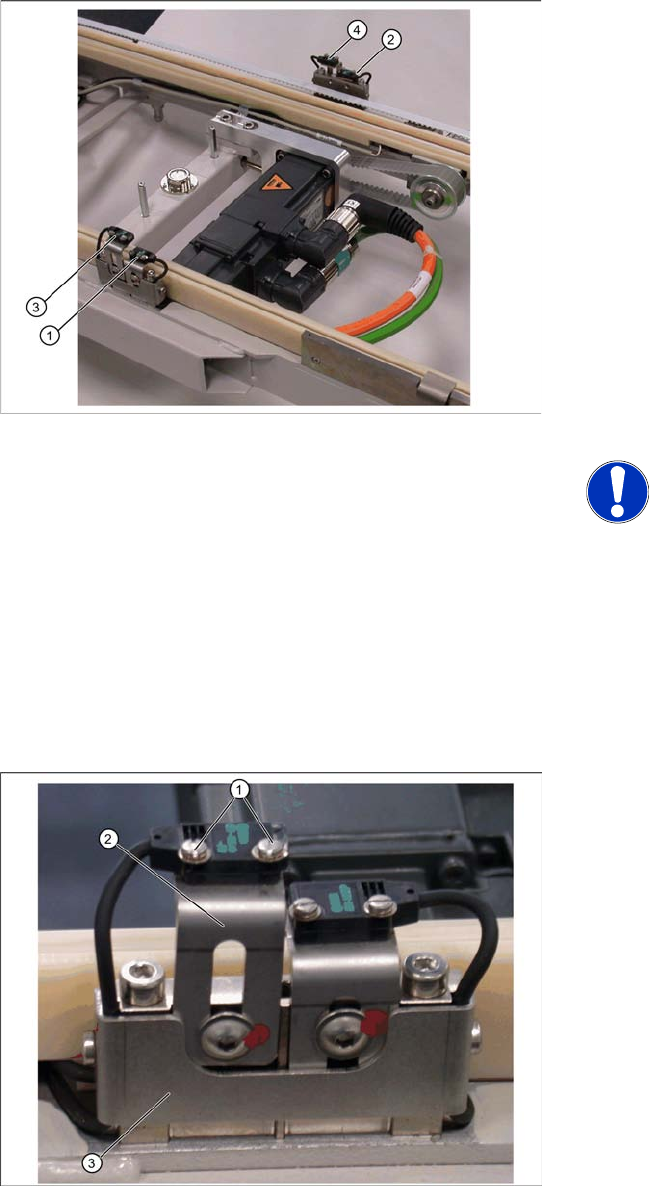
3.6.8 Replacing the Collision Light Barriers [03047281-xx]
Overview
1. Collision light barrier for normal components
(receiver) with LED
2. Collision light barrier for normal components
(transmitter)
3. Collision light barrier for high components
(transmitter)
4. Collision light barrier for high components
(receiver) with LED
Spare parts
Collision LB for normal components
[03047281-01]
Collision LB for high components [03047282-
01]
NOTE: Transmitter and receiver
together as one spare part
The transmitter and receiver of the
relevant collision light barrier are
stocked as one spare part with one part
number.
X Depending on the error occurring,
you may need to replace the
transmitter and receiver together.
X Loosen the two fastening screws (1) for the
relevant sensor (transmitter or receiver) on the
mounting bracket (2).
X Loosen the two screws holding the cable
fixtures (3).
X You need to remove the plastic guidance on
the right-hand side, so that you can unthread
the plug or light barrier.
X Loosen the cable clamps and remove the
cable ties.
X Unthread the connection cable as far as the
control unit back plane and unplug it from the
terminal strip.
X Fit the sensor on the mounting bracket (2).
X Align the sensor parallel to the mounting
bracket (3).
X Restore the electrical connection and fix the
connection cable into place.
Settings
Set the collision light barriers. See Section 3.6.8.1
Einstellung der Crashlichtschranken [J54].
Replacing Spare Parts
Limit Switches, Sensors and Light Barriers Replacing the Collision Light Barriers [03047281-xx]
54 Service Manual SIPLACE WPC4
3.6.8.1 Adjusting the Collision Light Barriers
The status of the collision lightbarrier is displayed at the integrated LED
Red LED ON = not triggered (normal mode)
Red LED OFF = triggered (light beam is interrupted - collision situation)
Green LED ON = ready for operation/stability display (optimum light barrier setting)
Green LED OFF = ready for operation/stability display (no optimum light barrier setting)
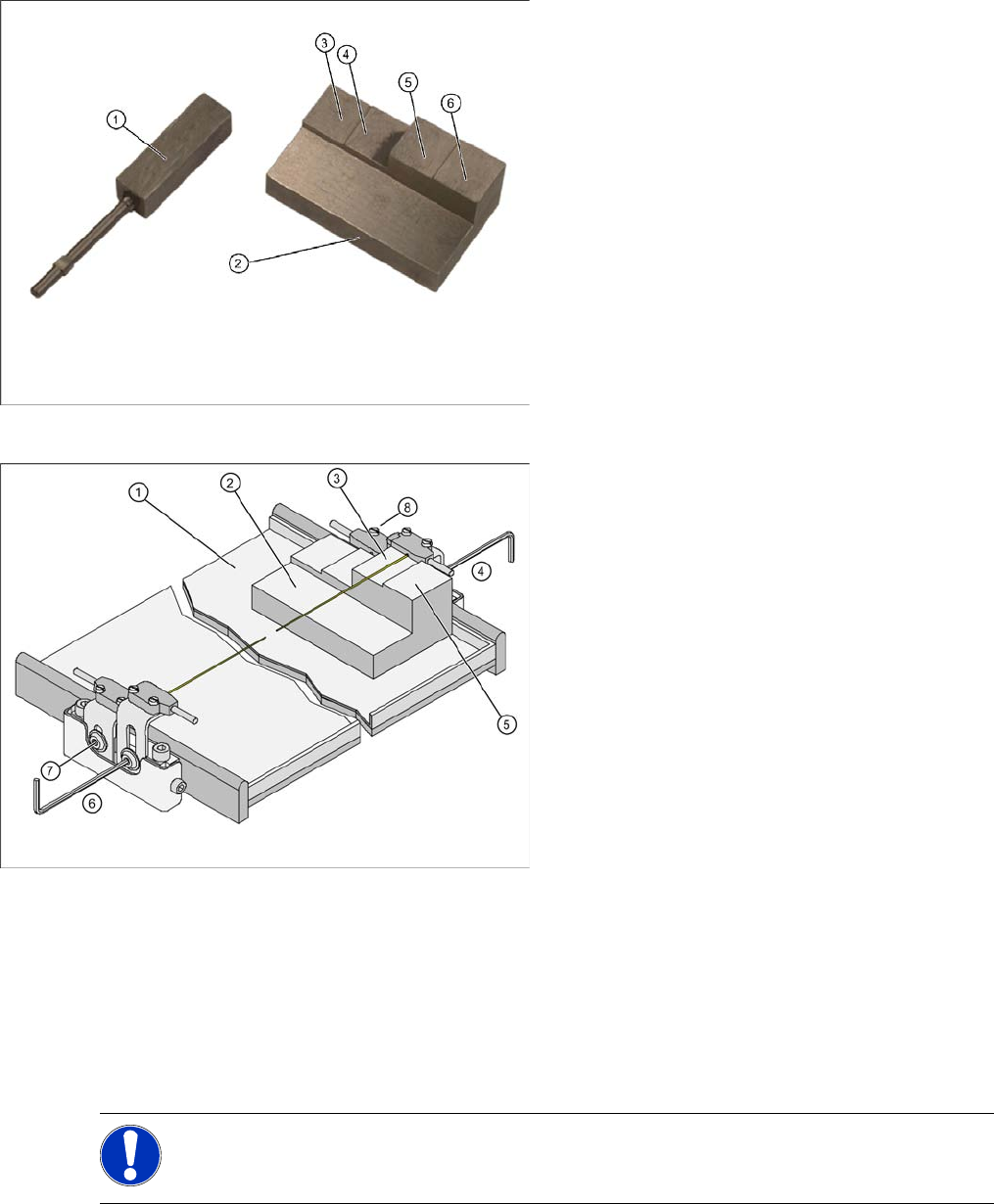
X For the setting of the collision lightbarriers the large setting gauge (2) is needed.
Step 1: Height setting
X Put the setting gauge with the step for passage height on the WPTC in front of the corresponding
sender/receiver.
Tools and equipment
1. Setting gauge small [03052363-02]
2. Setting gauge large for collision lightbarriers
[03051814-01]
3. Step for passage height of "normal"
components in case that every level of the
WPC is used.
4. Step for trigger height of collision light barrier
for "normal" components
5. Step for passage height for "high" components
if the subsequent level above is not used.
6. Step for trigger height of collision lightbarrier
for "high" components
Measurement setup and procedure
1. Waffle pack tray carrier (WPTC)
2. Setting gauge
3. Passage height (for high components)
4. Setting of collision lightbarrier (receiver) for
high components
5. Step for trigger height of collision lightbarrier
for "high" components
6. Setting of collision lightbarrier (sender) for high
components
7. Setting of collision lightbarrier (receiver) for
normal components
8. Setting of collision lightbarrier (sender) for
normal components
NOTE:
X The settings must be set on both sides of the WPTC.
X Check the function in SITEST (Step 2)