0771445_7708_Mar2018_077144500.pdf - 第22页
Model 7708 M ultiplexer M odule I nstructions for use with DAQ6510 22 077144500 / April 2018 2. Install the m odule in Slot 1 of the DAQ6510. 3. Turn on the power. 4. Allow the instrum ent to warm up for one hour. 5. Mak…
Model 7708 Multiplexer Module Instructions for use with DAQ6510
077144500 / April 2018 21
Verifying temperature
Thermocouple, thermistor, and RTD temperature readings are derived from DC volts and resistance
measurements, respectively. For that reason, it is not necessary to independently verify the accuracy of
temperature measurements. If the DC volts and resistance functions meet or exceed specifications,
temperature function accuracy is automatically verified.
You can verify temperature accuracy using the following procedures.
Thermocouple temperature
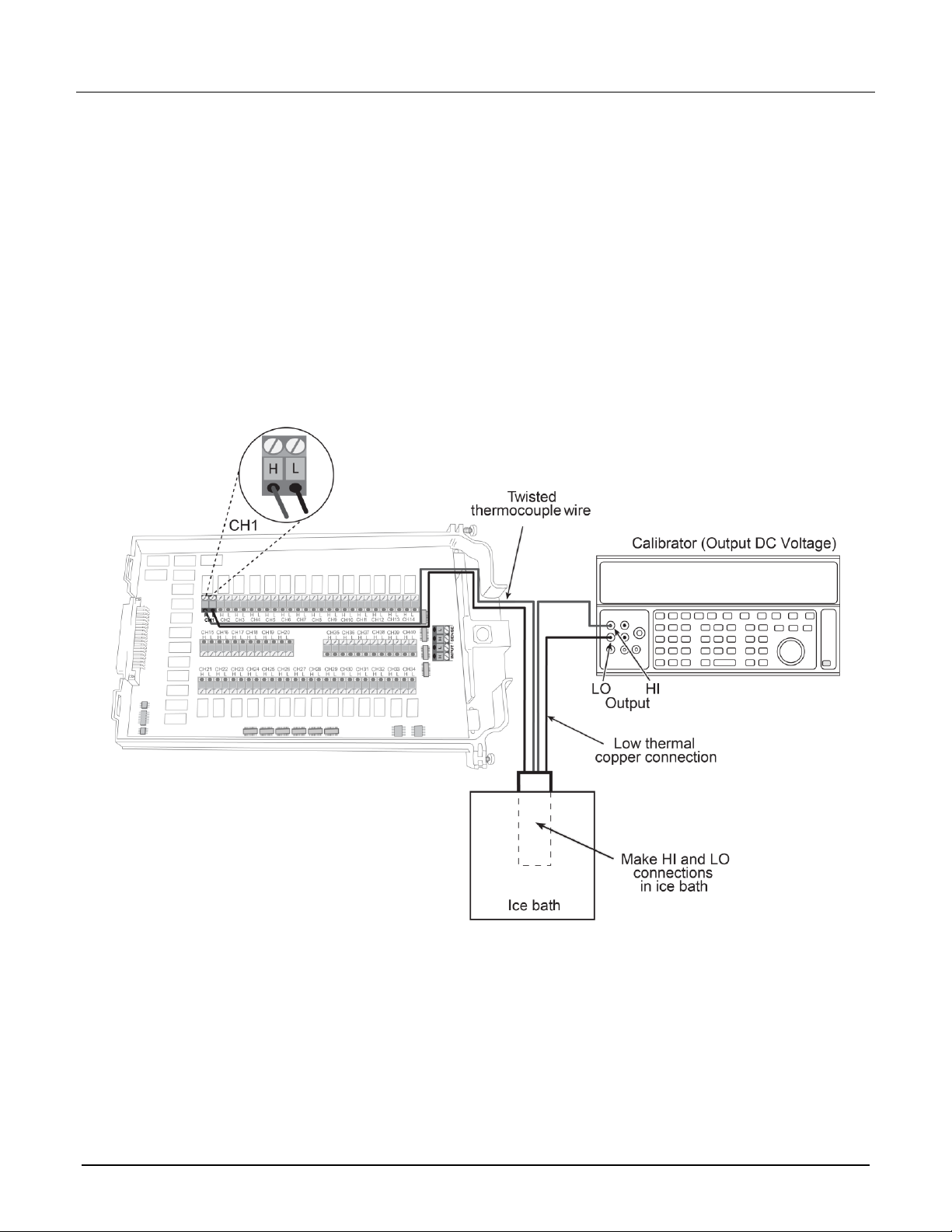
This setup and reading limits table below does not include errors from ice point, thermocouple wire, and
connections. HI and LO connections from the calibrator and 7700 must be electrically isolated from each other.
To verify the thermocouple temperature:
1. Connect the DC voltage calibrator output terminals and ice point reference to the CH1 H and L INPUT
terminals of the module using low-thermal shielded connections, as shown in the next figure.

Model 7708 Multiplexer Module Instructions for use with DAQ6510
22 077144500 / April 2018
2. Install the module in Slot 1 of the DAQ6510.
3. Turn on the power.
4. Allow the instrument to warm up for one hour.
5. Make sure that the front-panel TERMINALS switch is set to REAR.
6. On the front panel of the instrument, select the FUNCTION key and then select Temperature.
7. On the Home screen, swipe to the CHANNEL swipe screen.
8. Close channel 101.
9. Set the channel to temperature.
10. Configure the channel for °C units, thermocouple, and internal reference junction as follows:
a. Press the MENU key.
b. Select Channel Settings.
c. Set the Transducer to TC.
d. Set the Thermocouple to K or J.
e. Set the Unit to Celsius.
f. Set the Reference Junction to Internal.
11. Source each of the voltages in the table below based on the type of thermocouple used. Verify that the
temperature readings are within limits.
12. Return to the CHANNEL swipe screen and open Channel 1.
Based on the type of thermocouple used, verify your data against the specifications in the following table.
Thermocouple type
Applied DC voltage*
Reading limits (1 year, 18 °C to 28 °C)
J
-7.659 mV
-192.33 °C to -187.67 °C
0 mV
-1.0 °C to +1.0 °C
42.280 mV
749.0 °C to 751.0 °C
K
-5.730 mV
-192.33 °C to -187.67 °C
0 mV
-1.0 °C to +1.0 °C
54.138 mV
1349.0 °C to 1351.0 °C
*Voltages shown are based on the ITS-90 standard.

Model 7708 Multiplexer Module Instructions for use with DAQ6510
077144500 / April 2018 23
RTD temperature
To verify the RTD temperature:
1. Connect the precision decade resistance box to the CH1 and CH11 H and L terminals of the module using
four-wire connections. Refer to the first figure in Verifying resistance for connections.
2. Install the module in Slot 1 of the DAQ6510.
3. Turn on the power.
4. Allow the instrument to warm up for one hour.
5. Make sure that the front-panel TERMINALS switch is set to REAR.
6. On the front panel of the instrument, select the FUNCTION key and then select Temperature.
7. On the Home screen, swipe to the CHANNEL swipe screen.
8. Close channel 101.
9. Set the channel to Temperature.
10. Configure the channel for °C units and RTD temperature sensor as follows:
a. Press the MENU key.
b. Select Channel Settings.
c. Set Transducer to 4-Wire RTD.
d. Set 4-Wire RTD to PT385.
11. Source each of the voltages in the table below to verify that the temperature readings are within limits.
Make sure to select the appropriate thermocouple type for each group of readings.
12. Set the decade resistance box to each of the values shown in the table below. Verify that the temperature
readings are within the required limits.
13. Return to the CHANNEL swipe screen, and open Channel 1.
Applied resistance*
Reading limits (1 year, 18 °C to 28 °C)
22.80 Ω
-190.06 °C to -189.94 °C
100.00 Ω
-0.06 °C to +0.06 °C
313.59 Ω
599.94 °C to 600.06 °C
*Based on = 0.00385