0771445_7708_Mar2018_077144500.pdf - 第26页
Model 7708 M ultiplexer M odule I nstructions for use with DAQ6510 26 077144500 / April 2018 Range Applied DC voltage Reading limits (1 y ear, 18 °C to 28 °C) 100 mV 100.0000 mV 99.9935 to 100.0065 mV 1 V 1.000000 V 0.99…
Model 7708 Multiplexer Module Instructions for use with DAQ6510
077144500 / April 2018 25
Verifying ratio and average
Follow the procedure below to verify ratio and average.
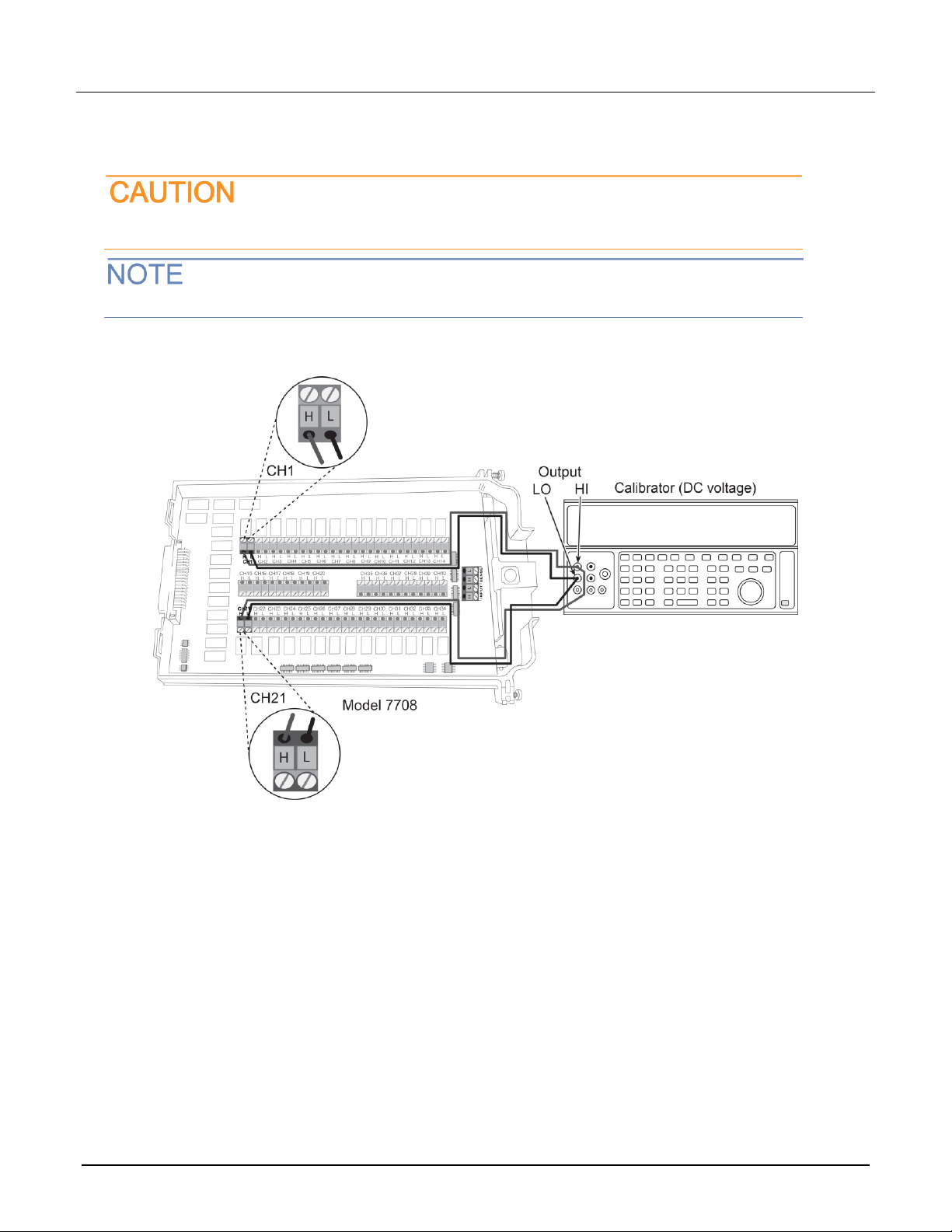
Do not exceed 300 VDC between plug-in module INPUT H and L terminals or between any
adjacent channels. Failure to observe this precaution can cause instrument damage.
Use shielded cables to minimize noise.
To verify ratio and average:
1. Connect the CH1 H and L INPUT terminals to the DC voltage calibrator as shown in the next figure.
2. Install the module in Slot 1 of the DAQ6510.
3. Turn on the power.
4. Allow the instrument to warm up for one hour.
5. Make sure that the front-panel TERMINALS switch is set to REAR.
6. On the front panel of the instrument, select FUNCTION and then select DCV Ratio.
7. On the Home screen, swipe to the CHANNEL swipe screen.
8. Close channel 101.
9. Set the range to 1 V.
10. Set the calibrator output to 1.00000 VDC.
11. Allow the reading to settle.
12. Verify that the ratio reading is between 0.9999926 and 1.000074.
13. Return to the CHANNEL swipe screen and open Channel 1.
Model 7708 Multiplexer Module Instructions for use with DAQ6510
26 077144500 / April 2018
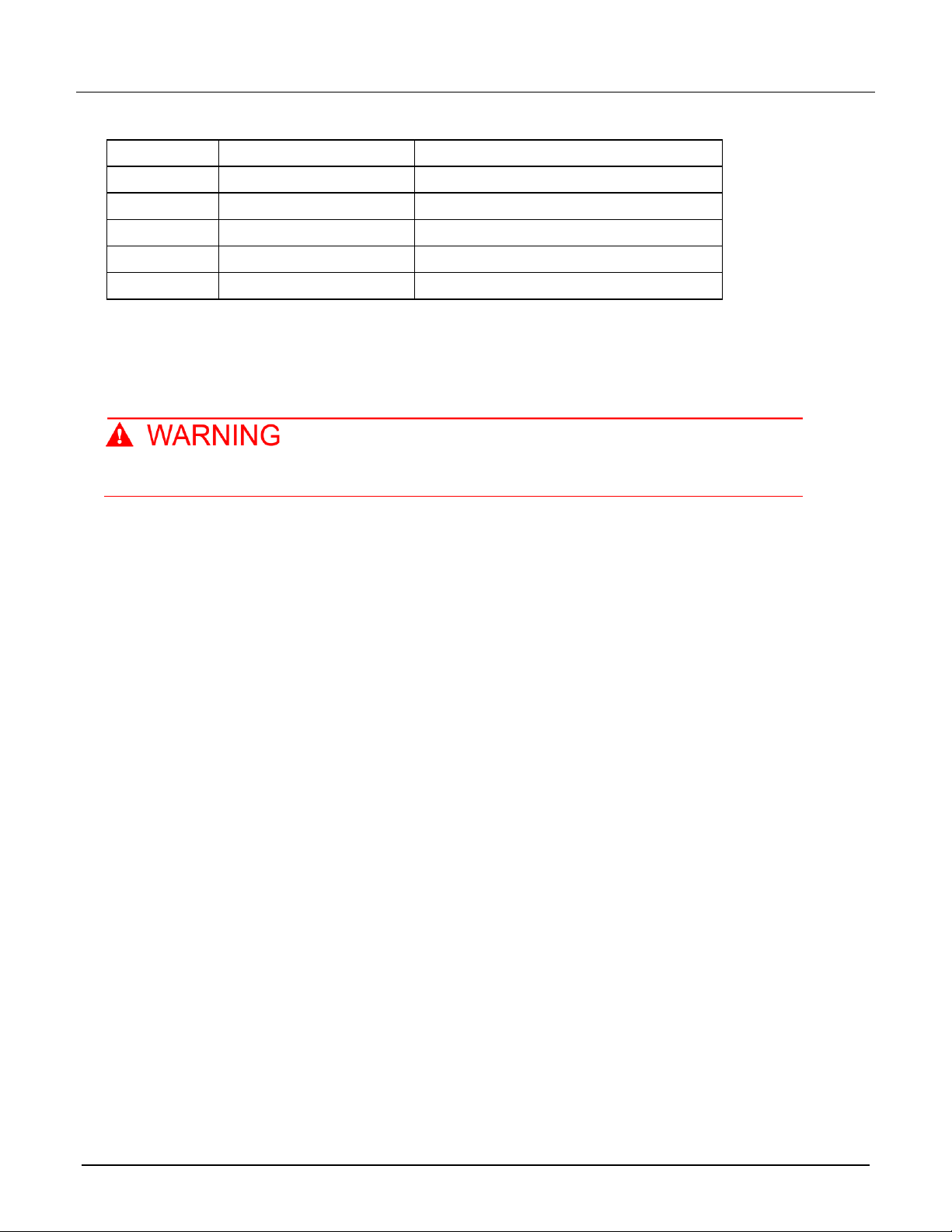
Range
Applied DC voltage
Reading limits (1 year, 18 °C to 28 °C)
100 mV
100.0000 mV
99.9935 to 100.0065 mV
1 V
1.000000 V
0.999969 to 1.000031 V
10 V
10.00000 V
9.99970 to 10.00030 V
100 V
100.0000 V
99.9955 to 100.0045 V
1000 V
300.000 V
299.983 V to 300.017 V
Calibration
The following procedure calibrates the temperature sensors on the modules.
Do not attempt to perform this procedure unless qualified to do so. Failure to recognize and
observe normal safety precautions could result in personal injury or death.
Recommended test equipment
To calibrate the module, you need the following equipment.
▪ Digital thermometer: 18 °C to 28 °C ±0.1 °C
▪ Keithley 7797 Calibration/Extender Board
Extender board connections
The extender board is installed in the DAQ6510. The module is connected to the extender board externally to
prevent heating of the module during calibration.
To make extender board connections:
1. Remove power from the DAQ6510.
2. Install the extender board into Slot 1 of the instrument.
3. Plug the module into the P1000 connector on the rear of the 7797 Calibration/Extender Board.

Model 7708 Multiplexer Module Instructions for use with DAQ6510
077144500 / April 2018 27
Calibration procedure
Before calibrating the temperature on the module, make sure that power has been removed from the
module for at least two hours to allow module circuitry to cool down. After turning on the power
during the calibration procedure, complete the procedure as quickly as possible to minimize module
heating that could affect calibration accuracy. Initially allow the DAQ6510 to warm up for at least one
hour with the 7797 calibration card installed. If you are calibrating multiple modules sequentially, then
power off the DAQ6510, quickly unplug the previously calibrated module, and plug in the next one.
You must use remote commands to run calibration. Refer to the DAQ6510 reference manual (document
number DAQ6510-901-01) for information on setting up remote communications.
To set up calibration:
1. Turn on the DAQ6510 power.
2. To make sure that the instrument is using the SCPI command set, send:
*LANG SCPI
3. Turn power off, and turn power back on.
4. On the front panel, verify that TERMINALS is set to REAR.
To calibrate temperature:
1. Accurately measure and record the cold temperature of the module surface at the center of the module with
the digital thermometer.
2. Unlock calibration by sending:
:CALibration:PROTected:CODE "KI006510"
3. Calibrate temperature on the module with the following command, where <temp> is the cold calibration
temperature measured in step 1:
:CALibration:PROTected:CARD1:STEP0 <temp>
4. Send the following commands to save and lock out calibration:
:CALibration:PROTected:CARD1:SAVE
:CALibration:PROTected:CARD1:LOCK
Errors that can occur during calibration
If calibration errors occur, they are reported in the event log. You can review the event log from the front panel
of the instrument, by using the SCPI :SYSTem:EVENtlog:NEXT? command, or by using the TSP
eventlog.next() command.
The error that can occur on this module is "5527, Temperature Cold Cal error." If this error occurs, contact
Keithley Instruments. Refer to Factory service (on page 27).
Factory service
To return the switching module to Keithley Instruments for repair:
▪ Call the Repair Department at 1-800-833-9200 or send an email to RMAREQUEST@tektronix.com for a
Return Material Authorization (RMA) number.
▪ Carefully pack the instrument in the original packing carton.
▪ Write ATTENTION REPAIR DEPARTMENT and the RMA number on the shipping label.