00195642-01_IM-SetupCenter-3.0_EN.pdf - 第17页
System components and configurations Setup Center System components Installation Manual SIPLACE Setup Center V3.0 17 5 System component s and configurations 5.1 System component s 5.1.1 Setup Center A complete installati…
System Requirements
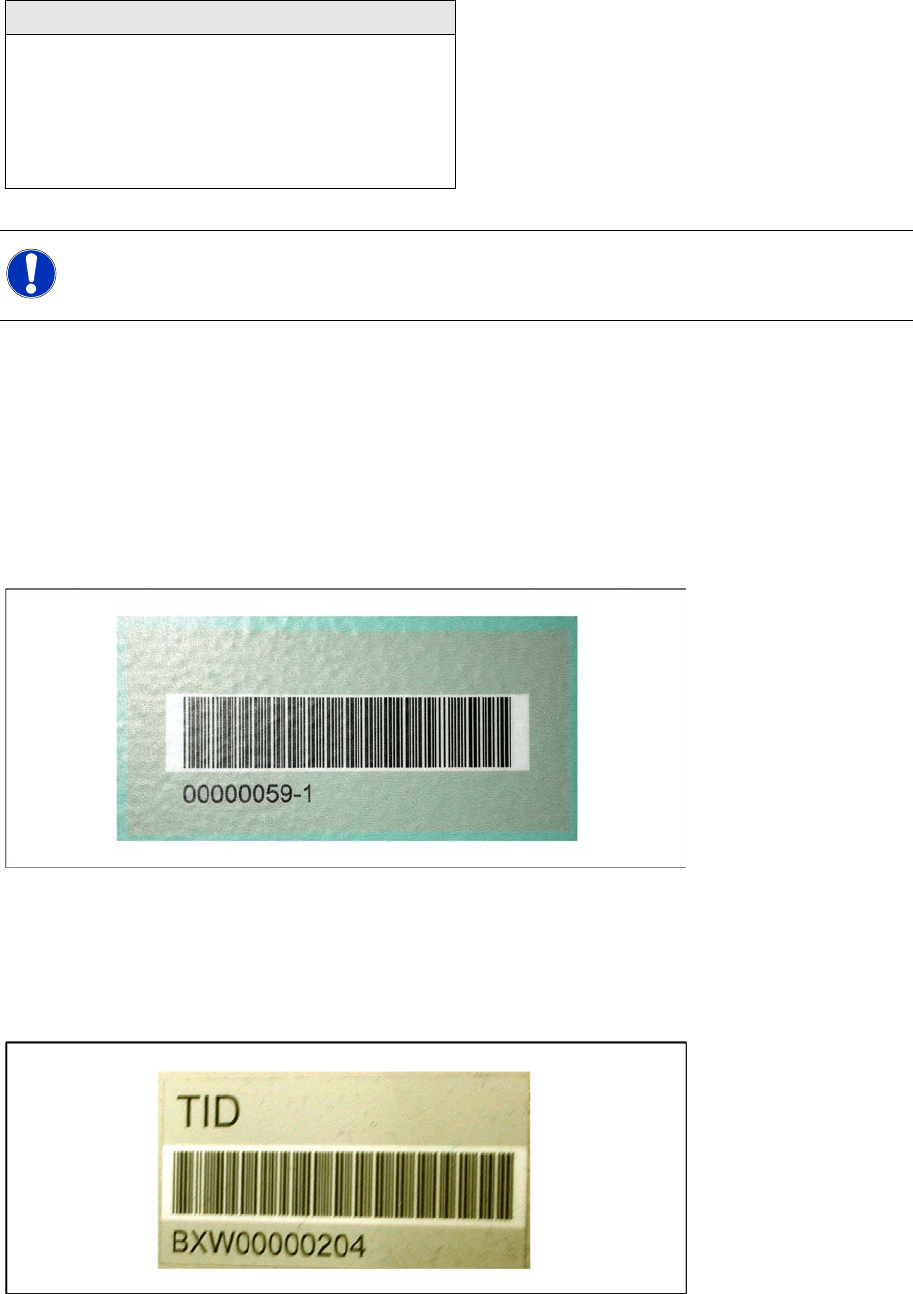
Device Recognition Unique Machine IDs
16 Installation Manual SIPLACE Setup Center V3.0
Supported Feeder Types
4.5 Device Recognition
4.5.1 Unique Machine IDs
Unique machine IDs are attached to all X-Series machines ex factory.
For other machine series we recommend you order the unique machine IDs before installation and
attach them to each machine (item no.: 0303470-xx).
4.5.2 Unique Table ID
Unique table IDs are attached to all X-Series changeover tables ex factory.
For other machine series we recommend you order the unique table IDs before installation and attach
them to each table (item no.: 03046294-xx).
Feeder Types
WPC
MTC 1 & 2
All Tray Loader
All tape feeder types
All Linear feeders
X feeder adapter
NOTE:
NOTE: The programming system SIPLACE Pro and the hardware in use can restrict this range
of feeders.

System components and configurations
Setup Center System components
Installation Manual SIPLACE Setup Center V3.0
17
5 System components and configurations
5.1 System components
5.1.1 Setup Center
A complete installation of SIPLACE Setup Center requires:
SIPLACE Pro Interface and SIPLACE Pro Desk
SIPLACE Setup Center consists of the following components:
SIPLACE Setup Center GUI
SIPLACE Setup Center Database
5.1.2 Scanner system
Dragon / PowerScan Scanner
The Setup Center supports the radio-controlled scanner system "Dragon M101" or "PowerScan M8300-
D (Dragon M131)" by Datalogic. This scanner has a four-line display and supports 1D barcodes only.
Communication between the scanner and the Setup Center requires the cradle "OM-Dragon" or "BC-
8030". This is connected to the Setup Center PC via the serial port. Each Setup Center GUI supports
one cradle. Up to 32 scanners can be linked to one cradle. Setup Center supports simultaneous
operation with multiple scanners.
Motorola / Symbol MC70
The Setup Center supports the 2D barcode scanning with the "Motorola / Symbol MC70" scanner,
equipped with 2D scan engine, usable with 2,4 GHz and 5 GHz WLAN.
2D barcodes contains more information than 1D barcodes. The support for 2D barcode scanners
enables the operator to scan more packaging information at same time.
5.1.3 Forced Setup Verification
The software CD "SIPLACE Setup Center" activates the forced setup verification and the component
level indicator at the SIPLACE placement machine.
The forced setup verification monitors the verification status of individual tracks. Non-verified tracks are
disabled by setup center.
The component level indicator identifies the component fill level for each track, and updates the fill level
for each track at the end of each PCB. Further, it manages threshold values for each track and stops the
pick up process, if a threshold is reached.
5.1.4 Docking Station
The docking station is the link between the X-Series changeover table and the X-Series feeder and forms
the communication point between Setup Center PC and feeders/changeover tables. Docking stations
supply the feeders with compressed air and energy. Data transfer is via a CAN bus cable.
NOTE:
A docking station is required additionally for the pre-setup of X-tables.
System components and configurations
System configuration SIPLACE Pro
18 Installation Manual SIPLACE Setup Center V3.0
5.2 System configuration
There are several different recommended installation scenarios for SIPLACE Setup Center. The
installation depends on the working area where SIPLACE Setup Center will be used and on other
conditions as described below.
5.2.1 SIPLACE Pro
It is recommended that at least the SIPLACE Pro Interface (SPI) is installed on the system. SIPLACE
Setup Center works with SIPLACE Pro 3.2 SP1, 4.1 SP1, 5.0 SP1 and 5.2 but it uses different files,
depending on the SIPLACE Pro version.
Further information about this is given in the according installation steps for SIPLACE Setup Center GUI.
5.2.2 Setup Center Database
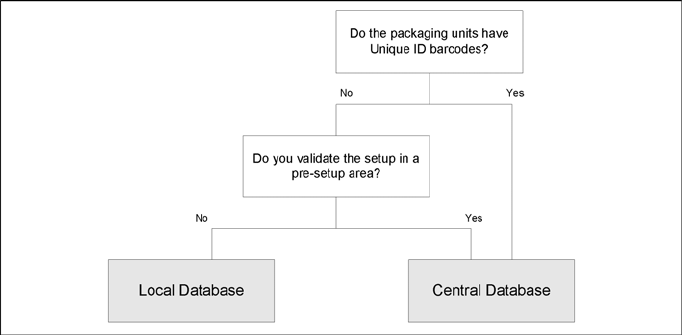
Before the first installation you must decide which type of data management will be used. The following
decision tree should give you support with this decision. Please read through the questions thoroughly
and follow the appropriate result path. As a result you get the recommended kind of installation for the
SIPLACE Setup Center database.
Questions:
Do the packaging units have Unique ID barcodes?
Each packaging unit in the factory must be marked with a unique barcode. It is possible that the
unique ID is part of a combined barcode.
Do you validate the setup in a pre-setup area?
The pre-setup area is used to validate the setup for correctness and completeness. The validated
tables are docked to the production line(s) for use.
Local database
This scenario does track the numbers of components on each packaging unit. The current number
of components are "remembered" when the packaging unit is torn down. If the packaging unit is
moved to another line the other Setup Center system does not know this reel and will start with the
start quantity. Therefore the operator need to check each partially fractured packaging unit he gets
from the stock and need to adjust the quantity if necessary.
This scenario offers a higher amount of operation safety, because the SIPLACE Setup Center and
a local database are installed to different computers for each production line. If one component of
SIPLACE Setup Center encounters an error, only one production line is affected.