00195642-01_IM-SetupCenter-3.0_EN.pdf - 第86页
Installation Troubleshooting Conflicting old SIPLACE Se tup Center installations 86 Installation Manual SIPLACE Setup Center V3.0 6.6.3 Conflicting old SIPLACE Setup Center inst allations Error Description: InstallShield…

Installation
Relevant files to analyze installation problems Troubleshooting
Installation Manual SIPLACE Setup Center V3.0
85
6.6.1 Relevant files to analyze installation problems
Error description
Whenever problems arise during setup, please inspect the file
SIPLACESetupCenterSetupLog.html
,
which is written during each installation.
Cause
Setup problems.
Solution
The log file is found either in
C:\
(prior to the "move data phase") or in the selected program folder.
Old versions of the log file are located in the program folder. A timestamp is added to the filename. Dialog
boxes appear during the file copying phase of installation which only contain
X Yes and No options.
Hint
X If you need Siemens support regarding installation problems, please provide all installation log files.
6.6.2 Error code 1316 and 1603
"Error 1316. A network error occurred while attempting to read from the file
C:\WINDOWS\Installer\SIPLACE Setup Center.msi
"
Error description:
The error messages 1316 and 1603 from the Microsoft Installer Service could appear under different
conditions.
Cause:
X See Install Shield knowledgebase articles
Q107390
and
Q107182
.
Workaround:
X Copy the files "
SIPLACE Setup Center.msi
" and "
Data1.cab
" from the setup CD in the directory
mentioned in the error message e.g.
C:/Windows/Installer/SIPLACE Setup Center.msi
X Retry the setup:
The error message offers to cancel the setup or
Confirm the error message with OK. The setup is cancelled. Then restart the setup.
X After a successful setup, remove the copied files.
If the copied files are not removed, the installer could access these outdated files during the next
setup, which might cause further problems.
NOTE:
It has not been proven if this workaround helps in all possible situations. In case of any further
problems please contact your SIPLACE hotline.
Installation
Troubleshooting Conflicting old SIPLACE Setup Center installations
86 Installation Manual SIPLACE Setup Center V3.0
6.6.3 Conflicting old SIPLACE Setup Center installations
Error Description:
InstallShield reports a conflicting old installation of SIPLACE Setup Center.
Cause:
The new SIPLACE Setup Center installation conflicts with old SIPLACE Setup Center installations.
Solution:
If SIPLACE Setup Center setup detects old installations and if you are absolutely sure you have
uninstalled the old version of SIPLACE Setup Center, please proceed as follow:
Make sure that you have manually removed any remnants of this old installation from the program folder
except for the database.
6.6.4 Conflicts with old SIPLACE Setup Center configurations
Error Description
After reinstalling SIPLACE Setup Center, the program starts but displays an error that the database can
not be reached. During the installation the correct database server was selected.
Cause
The database server’s name has probably changed since the last installation. When uninstalling
SIPLACE Setup Center, all configuration files are backed up and restored after a new installation. The
old settings, including the database server’s name, will be restored. In this case the selected database
server will be overwritten in the settings.
Solution
Please correct the database server name in the settings dialog of SIPLACE Setup Center.
6.6.5 Remote installation with Windows XP clients
Error description:
If you are logged on to the server via remote desktop connection and start the installation following
message will be shown.
1607: Installation of Install Shield Scripting not possible
Solution:
Copy the complete content from the Setup CD to the server to be able to start the installation.
6.6.6 Conflicting applications
At the moment, no conflicting applications exist.
Modify
Modify Setup Center
Installation Manual SIPLACE Setup Center V3.0
87
7Modify
7.1 Modify Setup Center
It is possible to modify the installation by starting the Installer on a computer where the Setup Center is
installed. The Installer detects the installation automatically and offers the modify option.
Select the packages you want to remove or to add. Refer to the procedures described above for more
details.
7.2 Modify Forced Setup Center
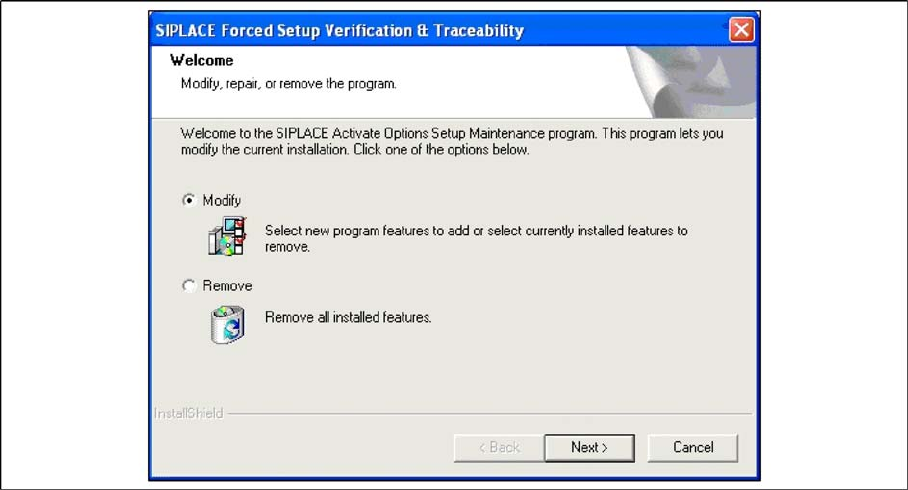
If the Setup at the software CD "SIPLACE Setup Center 3.0" is called up again, the following dialog
appears.
You can change the current installation by selecting the checkbox Modify.
The following masks appears:
– Setup verification system
– Configuration of the Splice detection (If not X-machine)
– Fill Level Control
– Activation of locked tracks
– Traceability
– Overview of the settings
– Finishing the installation
See above for more infomation.