00195642-01_IM-SetupCenter-3.0_EN.pdf - 第88页
Modify Modify Forced Setup Center 88 Installation Manual SIPLACE Setup Center V3.0
Modify
Modify Setup Center
Installation Manual SIPLACE Setup Center V3.0
87
7Modify
7.1 Modify Setup Center
It is possible to modify the installation by starting the Installer on a computer where the Setup Center is
installed. The Installer detects the installation automatically and offers the modify option.
Select the packages you want to remove or to add. Refer to the procedures described above for more
details.
7.2 Modify Forced Setup Center
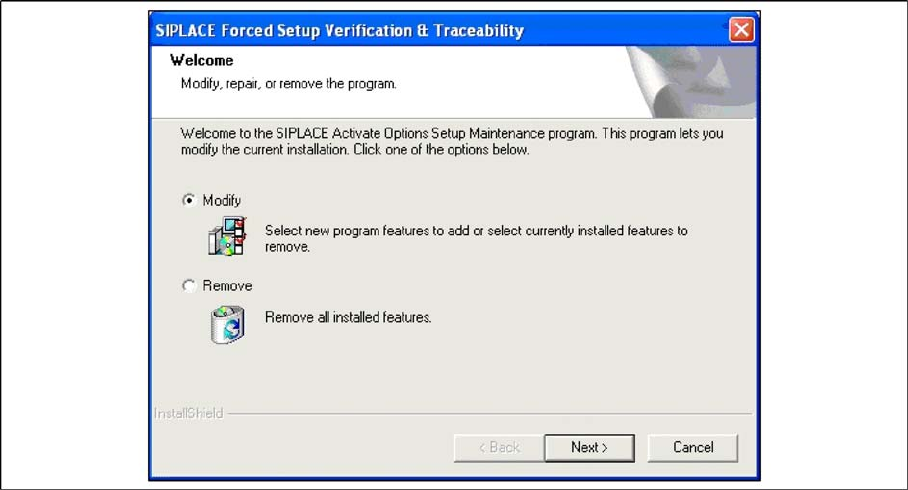
If the Setup at the software CD "SIPLACE Setup Center 3.0" is called up again, the following dialog
appears.
You can change the current installation by selecting the checkbox Modify.
The following masks appears:
– Setup verification system
– Configuration of the Splice detection (If not X-machine)
– Fill Level Control
– Activation of locked tracks
– Traceability
– Overview of the settings
– Finishing the installation
See above for more infomation.
Modify
Modify Forced Setup Center
88 Installation Manual SIPLACE Setup Center V3.0
Uninstalling
Backup configuration files
Installation Manual SIPLACE Setup Center V3.0
89
8 Uninstalling
8.1 Backup configuration files
Copy all
.xml
files from the
\Program Files\Siemens SIPLACE\Setup Center
directory to a save
location.
8.2 Uninstalling Setup Center GUI
Uninstalling SIPLACE Setup Center deletes all SIPLACE Setup Center software components from the
system except for the SIPLACE Setup Center database and the configurations files.
The SIPLACE Setup Center database is not uninstalled automatically in order to prevent possible data
loss.
Step 1
Uninstall SIPLACE Setup Center via the Control Panel.
You require the uninstall window in Windows for uninstalling.
X Click Start in the Windows start menu.
X Click Settings.
X Click Control Panel.
X Double-click Add / Remove Programs.
A list appears with the names of the software packages installed on the computer.
X Select SIPLACE Setup Center.
X Click the Change/Remove components button.
X In the Confirm File Deletion dialog box, click Yes if you wish to proceed or No if you wish to cancel
the uninstall process.
X Select Remove to remove all installed features.
X Click Next to continue.
X In the Confirm File Deletion dialog box, click OK if you wish to proceed or Cancel if you wish to
cancel the uninstall process.
X Click Next and you get a summary of all components to be deleted.
X Click Next if you accept all the information entered so far.
X Click Done.
Step 2
X Clean up the disk and make sure that there are no more program files.
X Check the path (default)
Program Files\Siemens SIPLACE\SIPLACE Setup Center
.
X If you will find additional files, please delete them (except for the database files with extensions
.mdf
and
.ldf
and the configuration files with extension
.xml
).