00195642-01_IM-SetupCenter-3.0_EN.pdf - 第92页
Uninstalling Optional: Uninstalling the C167API338W2K.exe of CAN Driver s Un installing SQL Server Express or MSDE installations 92 Installation Manual SIPLACE Setup Center V3.0 8.6 Optional: Uninst alling the C167API338…
Uninstalling
Uninstalling SQL Server Express or MSDE installations Uninstalling Forced Setup Verification
Installation Manual SIPLACE Setup Center V3.0
91
8.4 Uninstalling Forced Setup Verification
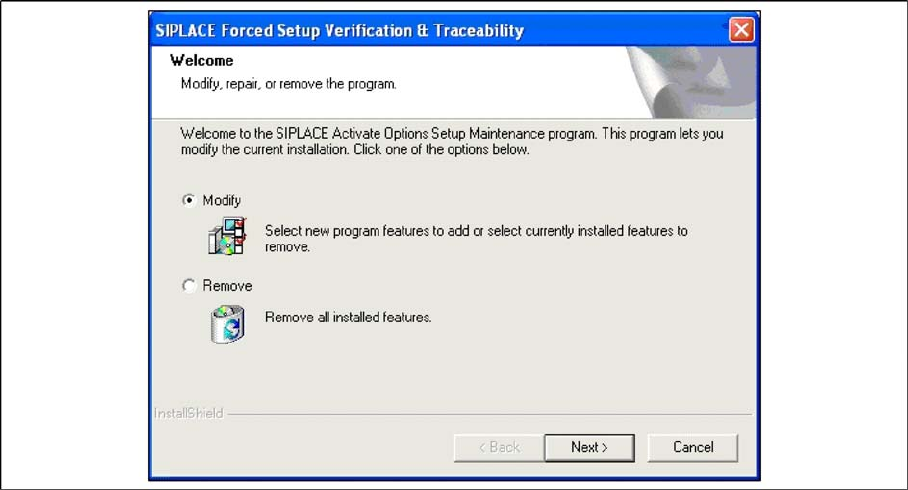
If the Setup at the software CD "SIPLACE Setup Center 3.0" is called up at the SIPLACE station again,
the following dialog appears.
X If Remove is selected, the option Forced Setup Verification and Traceability will be deactivated.
8.5 Optional: Uninstalling the CAN Drivers
The CAN drivers can be uninstalled with the Microsoft Device Manager within the Computer
Management.
X Click Start in the Windows start menu.
X Click Settings.
X Click Control Panel.
X Click Administrative Tools.
X Click Computer Management.
X Expand the node Device Manager at the left side
X Expand the node CAN Hardware at the right side
X Right Click to pen the context menu for C167D00N
X Choose Uninstall…
X Confirm the deletion of the driver.
Uninstalling
Optional: Uninstalling the C167API338W2K.exe of CAN Drivers Uninstalling SQL Server Express or MSDE installations
92 Installation Manual SIPLACE Setup Center V3.0
8.6 Optional: Uninstalling the C167API338W2K.exe of CAN
Drivers
X Click Start in the Windows start menu.
X Click Settings.
X Click Control Panel.
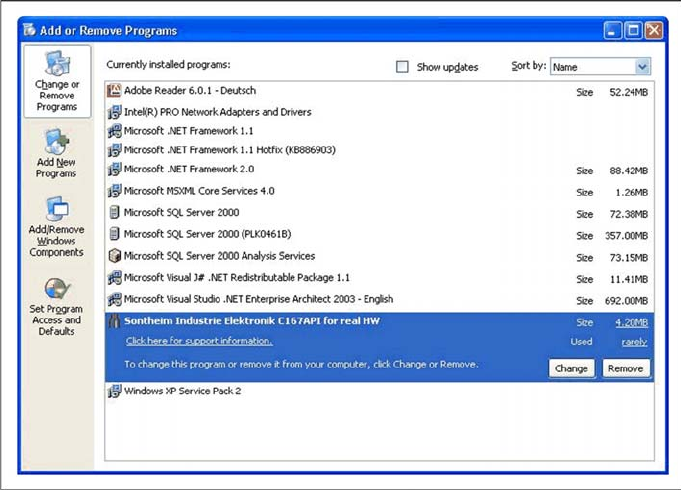
X Double-click Add / Remove Programs.
A list appears with the names of the software packages installed on the computer.
X Select Sontheim Industrie Elektronik C167API for real HW.
X Click the Remove button.
X Confirm the deletion of the application.