YC8_Mainte_E.pdf - 第54页
3-5 3 Periodic maintenance items 1.2.2 Checking the board clamp condition Check the follo wing points to see the board clamp condition. 1. T he board is clamped without play when the board clamp is raised. 2. T here is n…
3-4
3
Periodic maintenance items
1.2 Checking the conveyor sensor condition and operation
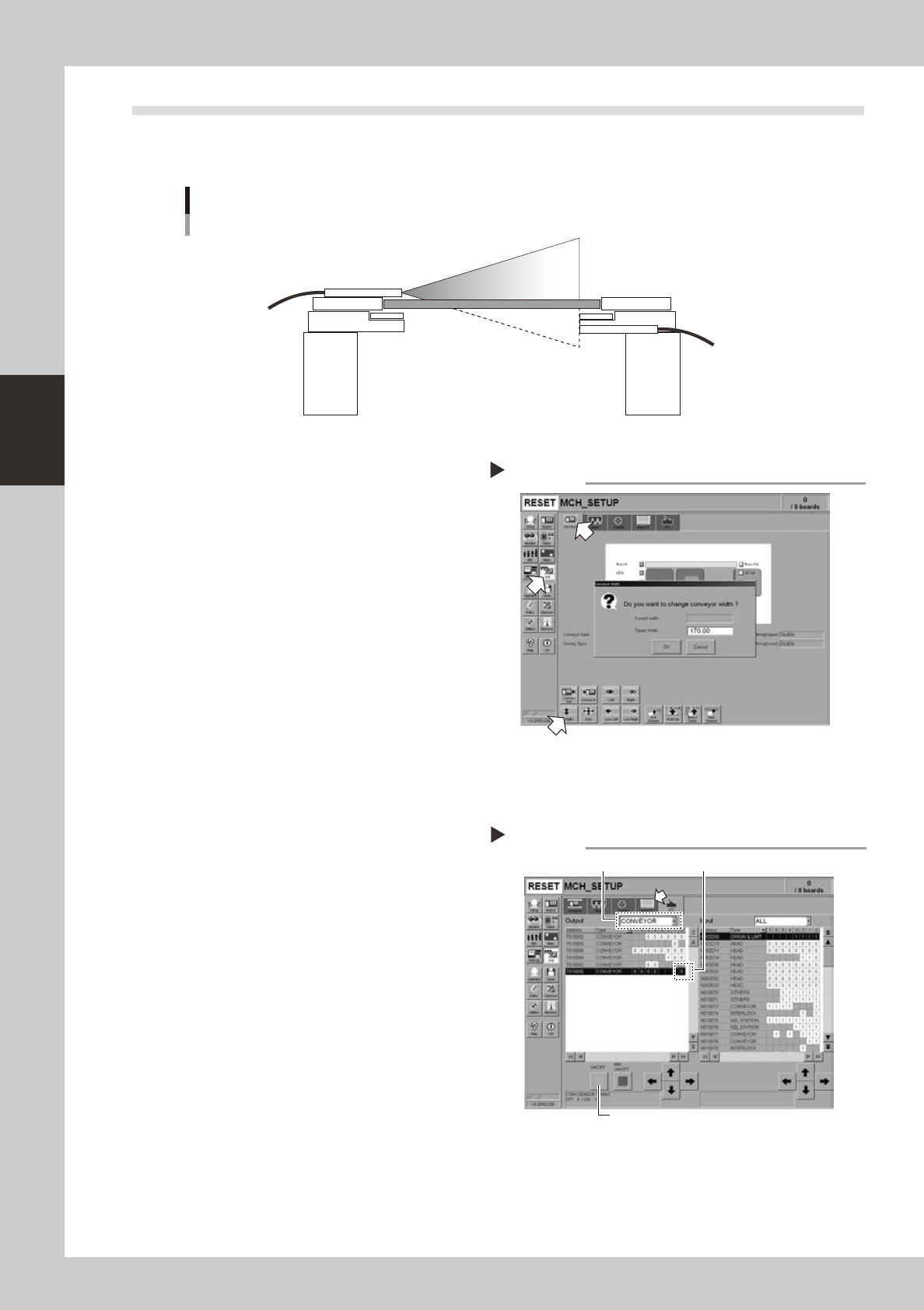
This machine uses a transmission mode fiber sensor as the conveyor sensor.
Check whether the sensor operates correctly even when the conveyor rail width is changed.
Checking the conveyor sensor condition and operation
Light emitter
Light
sensor
53304-N8-00
1
Open the [Unit] – [Conveyor] tab.
2
Press the [Width] button to change
the conveyor width.
In the "Conveyor Width" dialog box that
appears, enter a conveyor width and press
[OK].
The conveyor is changed to the width that
was just entered.
3
Check whether an error has
occurred.
The conveyor sensor is operating properly
unless an error message appears when the
conveyor width is changed. No further check
is necessary.
54301-N8-00
n
If an error message appears, then adjust the sensor with the procedure below.
· Adjusting the conveyor sensor
If an error occurred when the conveyor width was
changed, check the output status of the conveyor
sensor.
1. Open the [Unit] – [I/O] tab.
2. From the "Output" drop-down list, select
"CONVEYOR".
3. Select "CONV SENSOR TUNING" (T01000E) in the
output I/O list.
4. Press the [ON/OFF] button to switch the I/O status
from "0" (OFF)
→
"1" (ON)
→
"0" (OFF) to perform
auto tuning.
5. On the [Unit] – [Conveyor] tab, press the [Axis]
button again and change the conveyor width. The
sensor is operating properly unless an error message
appears.
54302-N8-00
Checking the conveyor sensor
Step 1-3
Conveyor sensor tuning
2
3
4
3-5
3
Periodic maintenance items
1.2.2 Checking the board clamp condition
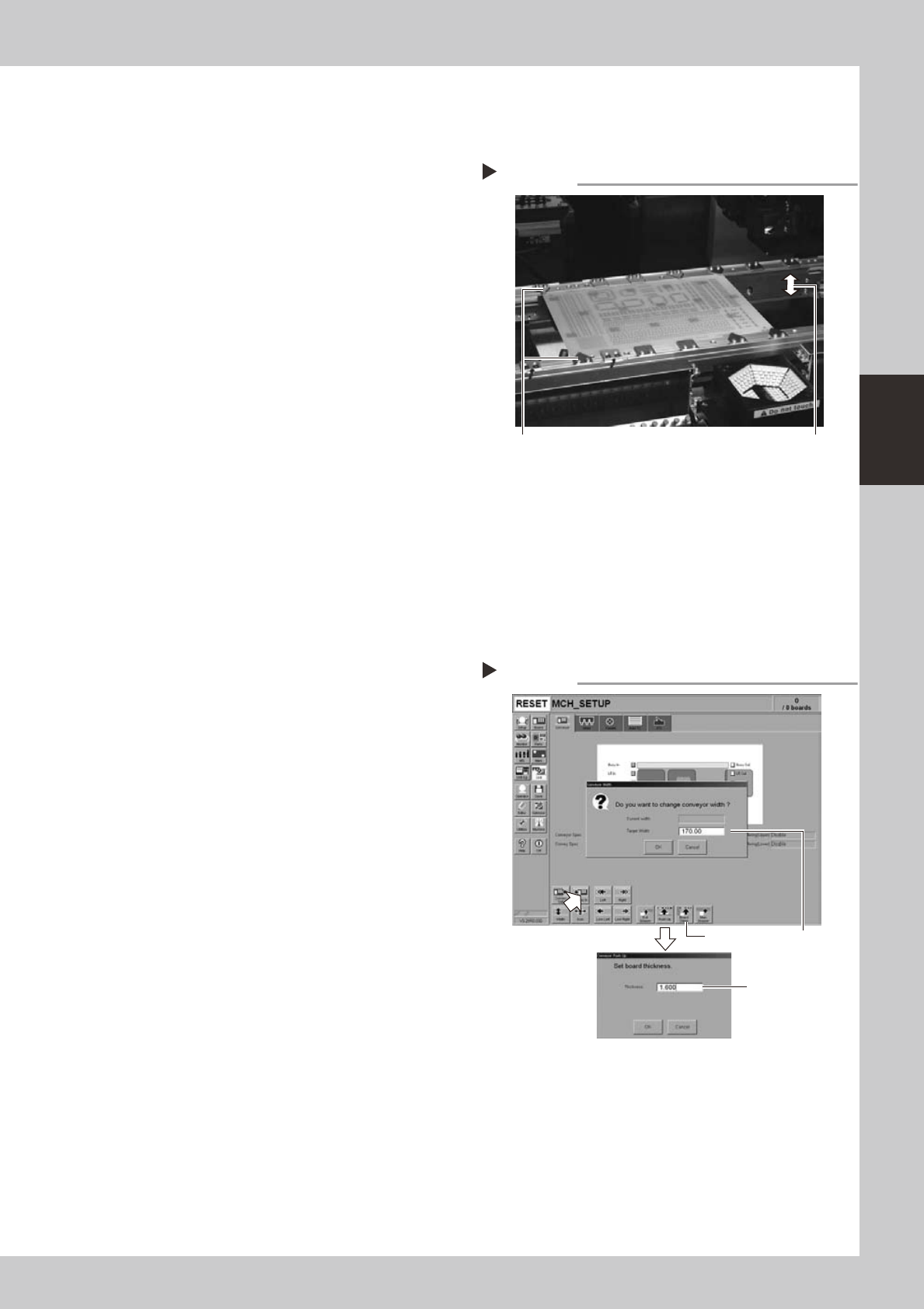
Check the following points to see the board clamp condition.
1. The board is clamped without play when the board
clamp is raised.
2. There is no clearance between the board and the
board hold plate when the board clamp is raised.
3. The board is flush with the upper surface of the
conveyor rails when the board clamp is raised.
4. The board clamp unit moves smoothly.
53305-N8-00
1.2.3 Checking the board clamp operation
1
Open the [Unit] – [Conveyor] tab.
2
Press the [Width] button to set the
conveyor width.
In the "Target Width" box in the "Conveyor
Width" dialog box that appears, enter the
board width and press [OK].
The conveyor is changed to the width that
was just entered.
3
Press the [Push Up] button to enter
the board thickness.
In the dialog box that appears, enter the
board thickness and press [OK].
4
Press the [Board Clamp] button to
clamp the board.
5
Press the [Board Clamp] button
again to unclamp the board.
54309-N8-00
Repeat steps 4 and 5 to clamp and unclamp the
board to make sure the clamp unit operates
smoothly.
Checking the clamp condition
Check that there is no clearance
between the board and board hold
plate and also that the board is flush
with the conveyor rails.
Clamp and unclamp the
board to check the
movement.
Checking the clamp operation
Step 2-5
Step2Step4, Step5
Step3
3-6
3
Periodic maintenance items
2. Monthly inspection
This section mainly explains the inspection and cleaning procedures. For details about locations needing
lubrication after cleaning, see Chapter 4, "Lubrication points".
c
2.1 Head
2.1.1 Cleaning the nozzle air path
n
Required tools
• Air blow tool (option)
c
e
1
Remove the nozzle from the head.
Always first press the emergency stop button
and then remove the nozzle from the head.
The machine must be in emergency stop to
ensure safety during work.
c
When the machine is equipped with a nozzle station
nozzle station after cleaning.
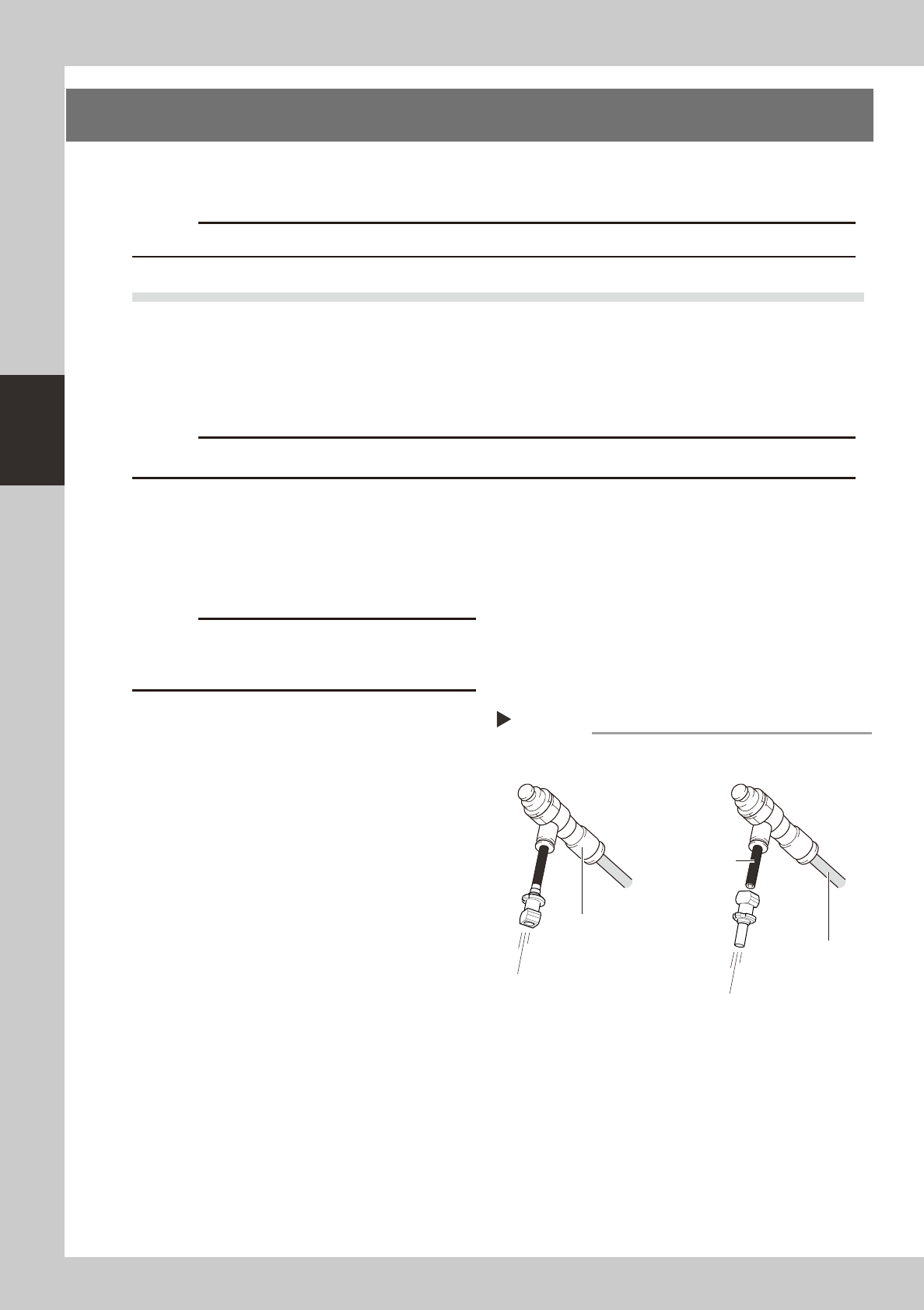
2
Blow air through the nozzle.
Using an air blow tool, blow air through the
nozzle from the nozzle tip and then from the
other end.
53306-N8-00
Air blow
Step 2
Insert the nozzle tip into the air tube
and blow the air.
Air tube (black)
Air blow tool (option)
Air tube (orange)
connected to air supply
port
Blow the air from the nozzle
attachment side.