YC8_Mainte_E.pdf - 第63页
3-14 3 Periodic maintenance items 2.3.2 Cleaning and greasing the hexagon spline n Required tools • Lint-free cleaning cloth or paper towel • Specified grease: NSL c Always wear protective goggles and gloves when…
3-13
3
Periodic maintenance items
2.3 Conveyor
2.3.1 Inspecting and cleaning the conveyor belt
Inspect the conveyor belt for wear. As the belt wears away, slippages may occur and the boards may not be
conveyed stably. It is therefore necessary to periodically inspect the conveyor belt for wear.
Belt wear may also cause trouble such as incorrect detection of the conveyor sensor due to dust from belt wear
accumulating on the light receiving surface of the conveyor sensor, or dust from belt wear accumulating in the
belt guide grooves may cause the belt to stick, etc.
n
Required tools
• Slotted screwdriver
• Hex wrench (4mm, 5mm)
• Vacuum ASSY (option)
1
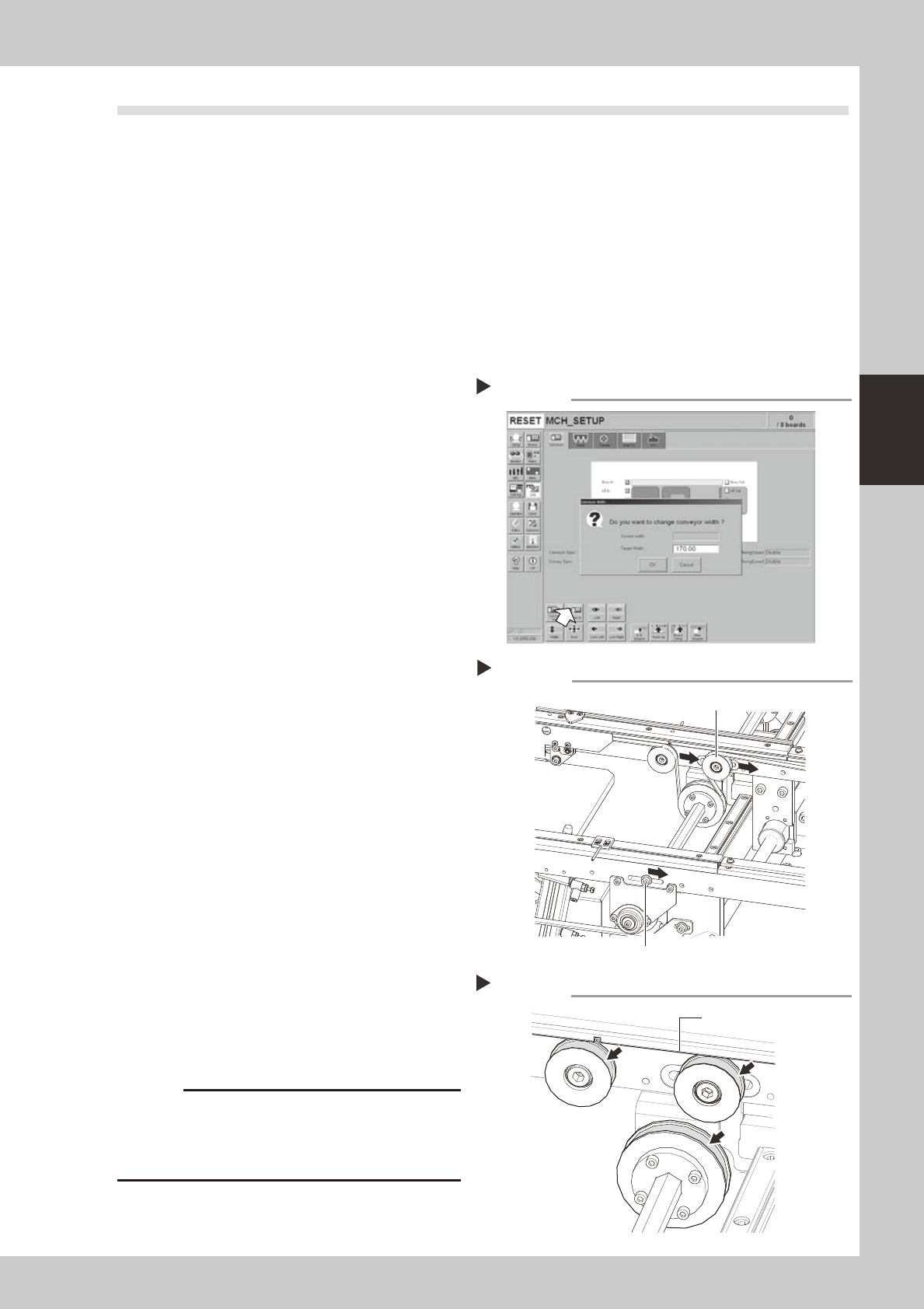
Change the conveyor width to a
convenient width for the
maintenance work.
1. Press the [Width] button to display the
"Conveyor Width" dialog box.
2. In the "Target Width" box, enter a width
large enough for the maintenance work
(slotted screwdriver can be used) and
press [OK].
The conveyor is changed to the width
you have specified.
54305-N8-00
e
2
Loosen the conveyor belt tension.
Press the emergency stop button. Use 4mm
and 5mm hex wrenches to loosen the belt
tension of each conveyor.
53315-N8-00
3
Remove the conveyor belt.
Remove the conveyor belt from the pulley
and the belt groove of the board guide.
4
Check the board conveying side of
the conveyor belt for wear.
Check if the board conveying side of the
conveyor belt you have removed in step 3 is
worn out.
5
Clean the belt grooves and pulleys
on the board guide.
Use the vacuum ASSY (option) to suck in belt
wear dust particles from the belt groove or
the sensor detection surface. Also, clean the
pulley and other parts for the conveyor belt
of each conveyor.
53316-N8-00
c
sometimes adhere to and darken the outer
Changing the conveyor width
Step 1
Loosening the tension on the belt
Step 2
Tensioner bolt
Tensioner pulley
Cleaning the belt grooves
Step 5
Belt groove
3-14
3
Periodic maintenance items
2.3.2 Cleaning and greasing the hexagon spline
n
Required tools
• Lint-free cleaning cloth or paper towel
• Specified grease: NSL
c
Always wear protective goggles and gloves when using grease.
e
1
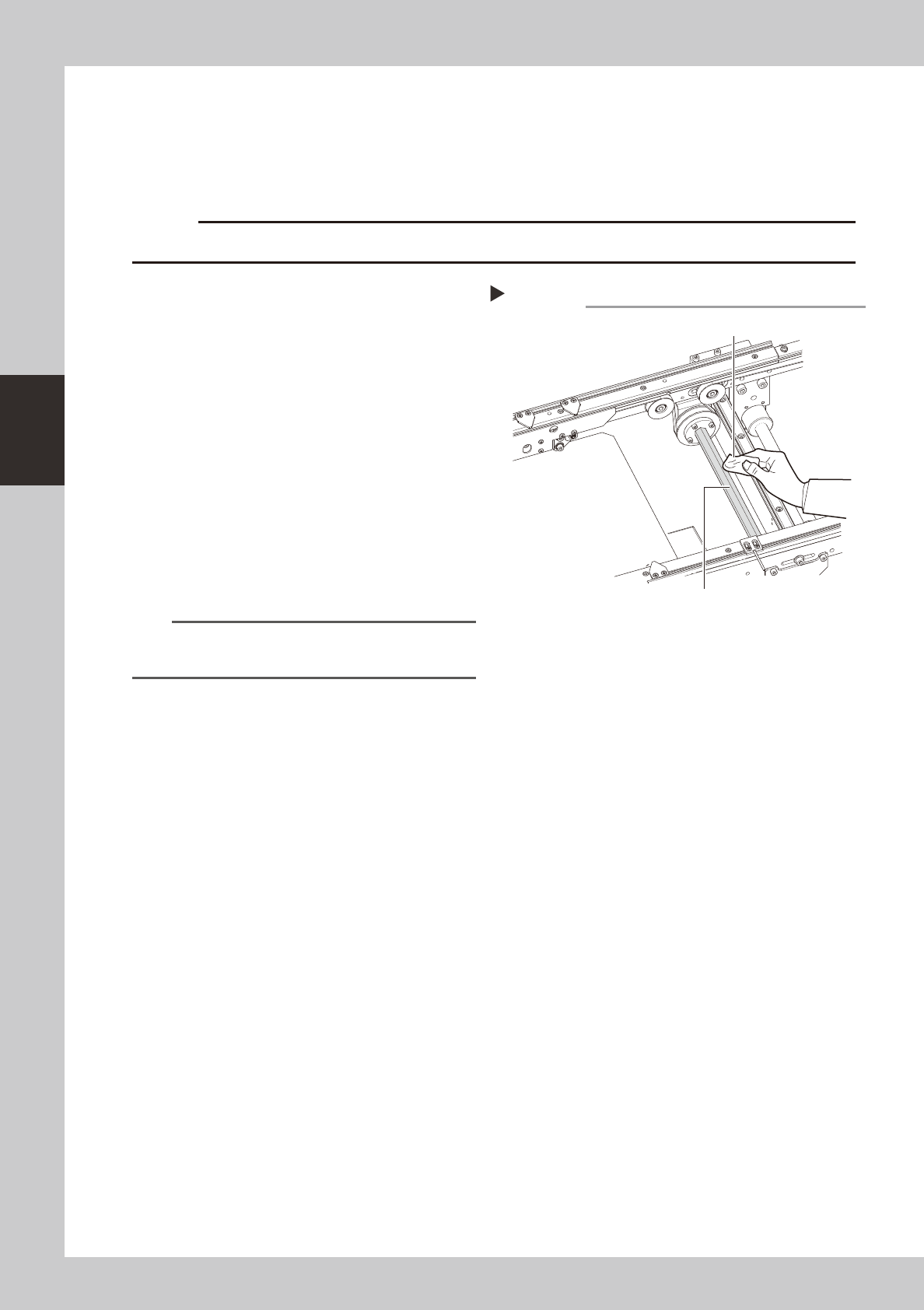
Clean the hexagon spline.
1 Set the board width to its maximum level
with manual operation and put the
machine in the emergency stop state.
2 Wipe away the old grease and dirt from
the entire hexagon spline with a lint-free
cloth or paper towel.
3 Cancel the emergency stop and make
the board width narrower. After that,
wipe also the remaining portions.
53317-N8-00
2
Apply grease.
Apply the specified grease (NSL) by hand
uniformly over the surface of the hexagon
spline.
n
NOTE
In the same manner as described in step 1, apply the
grease to the entire hexagon spline.
Cleaning the hexagon spline
Step 1
Hexagon spline
lint-free cloth or paper towel
3-15
3
Periodic maintenance items
2.3.3
Inspecting, cleaning and greasing the PU (push-up) shaft (option)
The push-up shaft is designed to prevent flexing or warping of the board during clamping and is important
because it prevents depressing of the board during component mounting.
The push-up shaft also prevents deviations in the component mounting accuracy due to the board depressing
during component mounting, so it is important to regularly clean and inspect the push-up shaft to ensure it
operates correctly.
c
cleaning of the push-up shaft by the user will void the warranty.
n
Required tools
• Hex wrench (3mm)
• Specified grease: NSL
c
Always wear protective goggles and gloves when using grease.
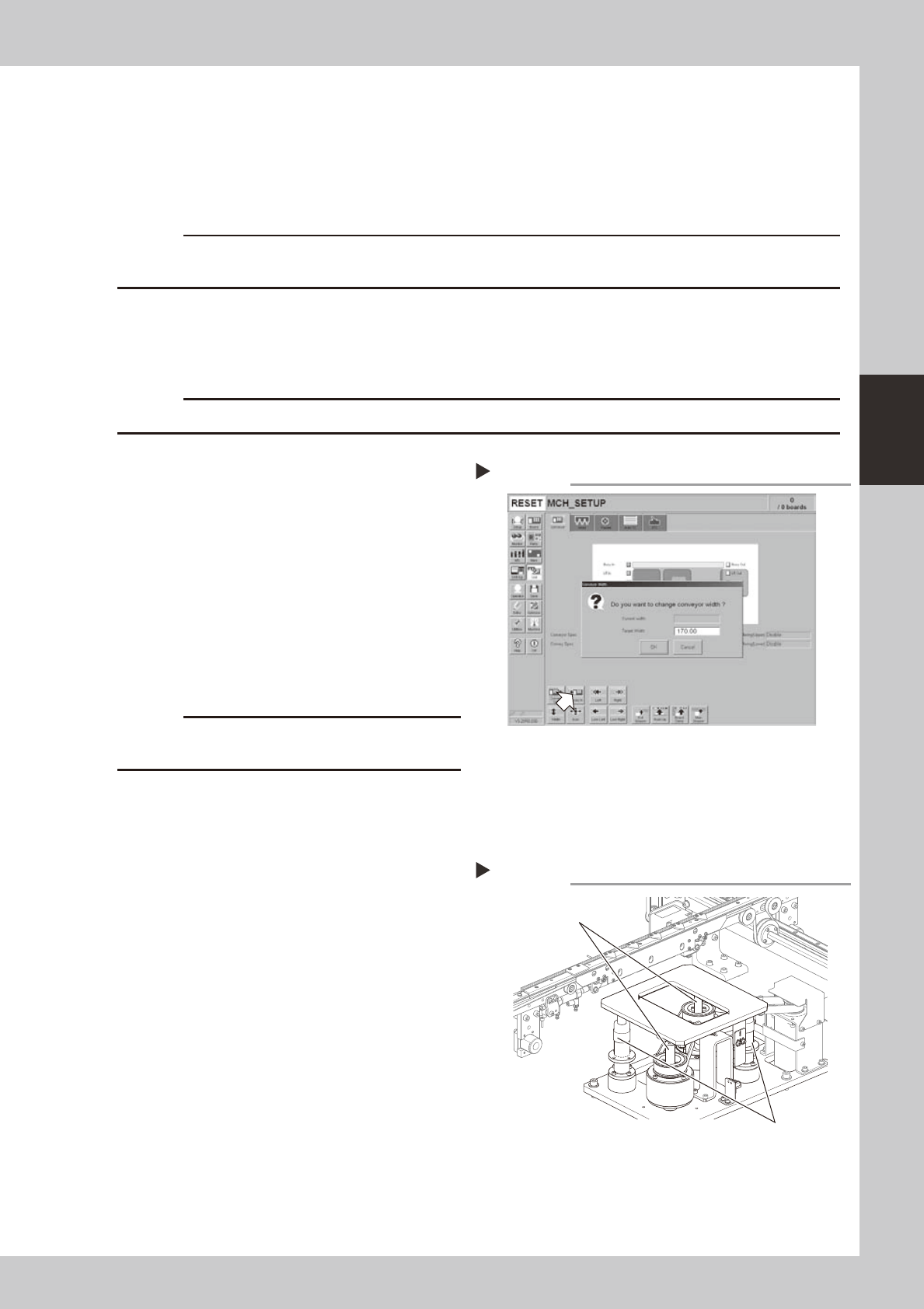
1
Set the conveyor width to
maximum.
Press the [Width] button to display the
"Conveyor Width" dialog. Enter the maximum
conveyor width from the specifications and
press [OK]. The conveyor is changed to the
width that was just entered.
54304-N8-00
e
2
Remove the push-up plate.
Press the emergency stop button and then
remove the push-up plate using a hex
wrench.
c
The push-up plate is heavy so use plenty of caution
during handling.
3
Raise the push-up unit.
Cancel emergency stop and raise the
push-up unit manually.
e
4
Remove the old grease by hand.
After pressing the emergency stop button,
thoroughly remove the old grease from the
two ball screws and the two ball guides by
hand.
5
Apply the new grease by hand.
Ball screw
Apply as much as 2 cm of new grease to
your finger, and rub it evenly into the ball
screw grooves.
Ball guide
Apply as much as 2 cm of new grease to
your finger, and coat it evenly on the ball
guides.
53318-N8-00
Setting the conveyor width
Step 1
Applying the grease
Step 5
Ball guides
Ball screws