YC8_Mainte_E.pdf - 第91页
5-7 5 How to replace consumable parts 5 Detach the belt from the conv ey or . After you have detached the belt, clean the clearance between the conveyor frame and board guide with a fine brush or clot h rag. 53513-N8-00 …
5-6
5
How to replace consumable parts
3. Conveyor belt
The following describes how to replace the conveyor belt.
n
Required tools
• Hex wrench (3mm, 4mm, 5mm)
• Fine brush
• Cleaning rag
e
1
Press the emergency stop button.
The machine must be in emergency stop to
ensure safety during work.
2
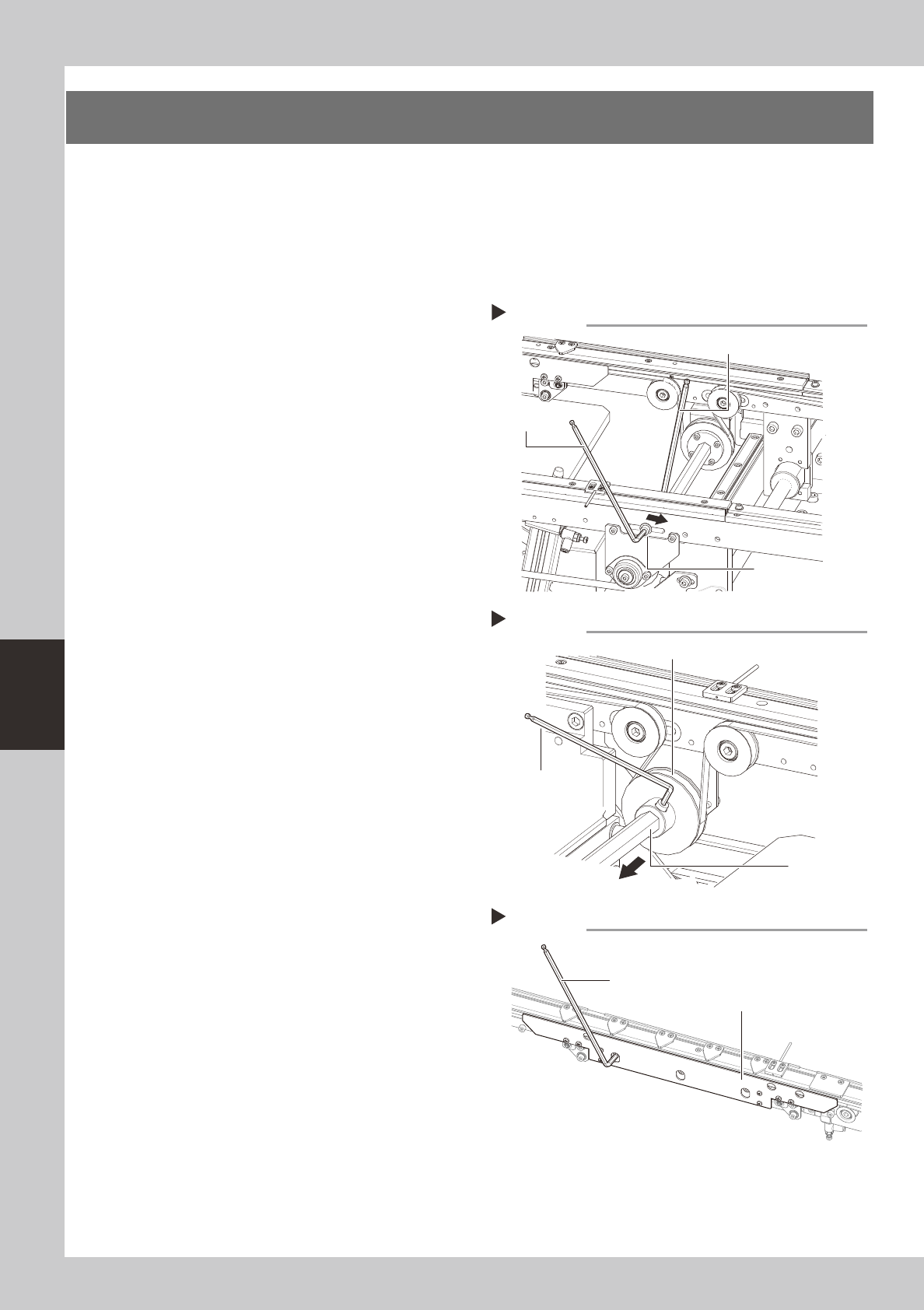
Slacken the belt.
Loosen the belt tensioner bolt with the hex
wrench (4, 5) and slide the bolt fully along
the elongate hole (in the direction of
slackening the belt).
53510-N8-00
3
Detach the belt.
1. Use the hex wrench (3) to loosen the bolt
securing the belt drive pulley and pull
the shaft away from the pulley.
2. Detach the belt from the pulley and take
it out through the space between the
pulley and the shaft.
53511-N8-00
4
Remove the board clamp assembly.
Use the hex wrench (3) to remove the
mounting bolts (3 places) and remove the
board clamp ASSY.
53512-N8-00
Slackening the belt
Step 2
Hex wrench (5)
Tension bolt
Hex wrench (4)
Removing the shaft
Step 3
Drive pulley
Hex wrench (3)
Shaft
Removing the board clamp assembly
Step 4
Hex wrench (3)
Board clamp assembly
5-7
5
How to replace consumable parts
5
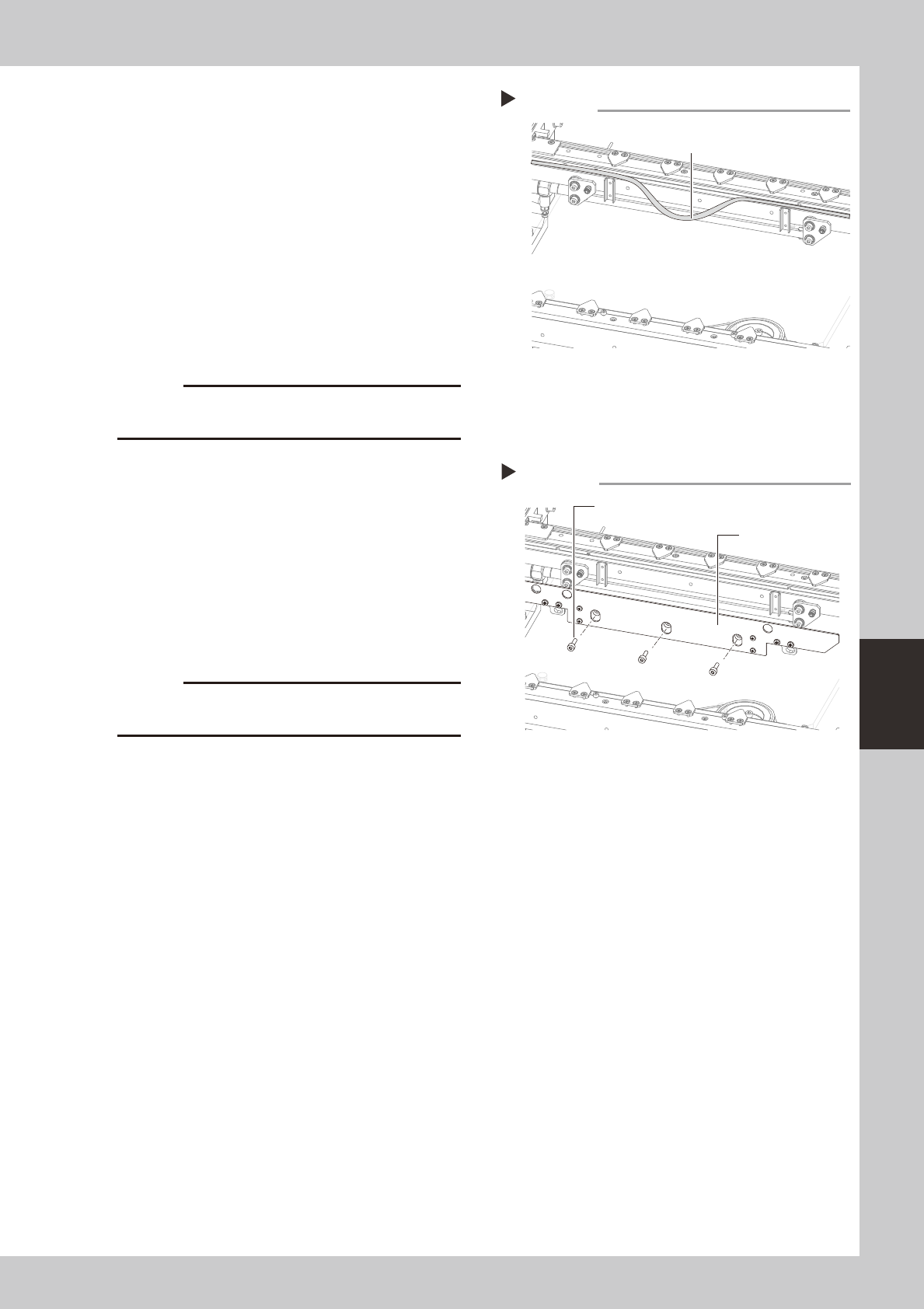
Detach the belt from the conveyor.
After you have detached the belt, clean the
clearance between the conveyor frame
and board guide with a fine brush or cloth
rag.
53513-N8-00
6
Attach a new belt.
1. Temporarily fit a new belt onto the pulley.
2. Reconnect the shaft to the pulley and
tighten the bolt.
3. Tighten the belt tensioner bolt while
applying a proper tension to the belt by
moving the belt tensioner bolt.
c
7
Reattach the board clamp assembly.
1. Install the board clamp assembly in the
original position and temporarily tighten
the bolts to secure the board clamp
assembly.
2. On the [Unit] – [Conveyor] tab, press the
[Board Clamp] button to raise the board
clamp assembly and tighten the bolts
securely.
53514-N8-00
c
and the board clamp raised.
8
Check the belt rotating condition.
1. Open the [Unit]-[Conveyor] tab, and
press the [Board Clamp] button again to
unclamp.
2. On the [Unit]-[Conveyor] tab, press the
[Conveyor In] button or [Conveyor Out]
button to turn on the conveyor motor
and check the belt rotation.
3. If the rotation speed fluctuates or there is
slack in the belt, adjust the position of the
tensioner bolt and then check the
rotation again.
Detaching the belt from the conveyor
Step 5
Belt
Installing the board clamp assembly
Step 7
Board clamp assembly
Mounting bolt (3 places)