00196626-06_AI_Portalmodularitaet_SX12_de_en.pdf - 第77页
Brief Description Configurations Overview Gantry Modularity Portalmodular ität 77 2.1.4.2 Stationary Cameras Stationary ca meras on t he SX1 SX1 1. Location 1 in outer p osition 2. Location 2 in inner positio n 3. Gantry…

Brief Description
Overview Configurations
76 Gantry Modularity Portalmodularität
2.1.4 Configurations
2.1.4.1 Table Positions
The table position required for the SIPLACE SX1/SX2 varies according to the head configuration:
SIPLACE SX1:
SIPLACE SX2:
Gantry 1 C&P20A CPP_L CPP_H without
stat. camera
CPP_H with
stat. camera
TH
Table position
location 1
Inner Inner Inner Outer Outer
Table position
location 2
Inner Inner Inner Inner Inner
Gantry 1 C&P20A CPP_L CPP_H
with stat.
camera
CPP_H
with stat.
camera
TH TH TH
Table position
location 1
Inner Inner Outer Outer Outer Outer Outer
Gantry 2 C&P20A CPP_L CPP_H
with stat.
camera
CPP_H
without
stat. cam-
era
CPP_H
with stat.
camera
CPP_H
without
stat. cam-
era
TH
Table position
location 2
Inner Inner Outer Inner Outer Inner Outer
NOTICE
CPP: only with stationary camera IC camera SST33
TH: with stationary camera IC camera SST33 at both locations, FC camera SST25 at location
1 only
Brief Description
Configurations Overview
Gantry Modularity Portalmodularität 77
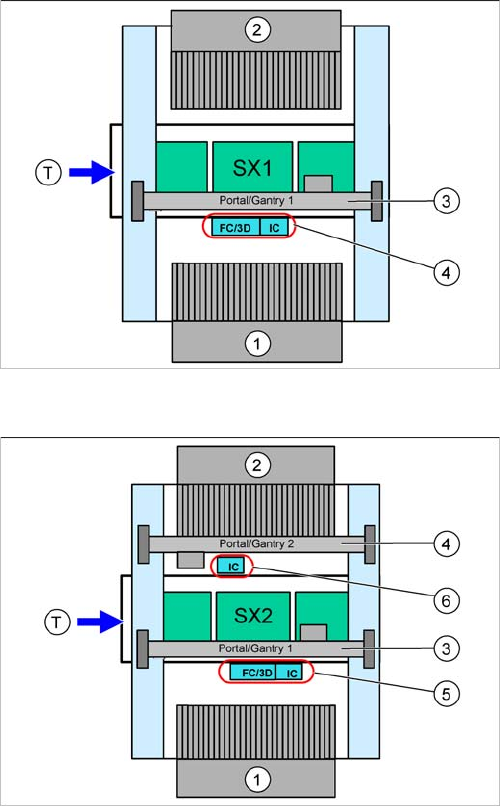
2.1.4.2 Stationary Cameras
Stationary cameras on the SX1
SX1
1. Location 1 in outer position
2. Location 2 in inner position
3. Gantry 1
4. IC camera and/or FC camera/3D coplanarity module
(location 1)
You can only install either an FC camera or a 3D co-
planarity module!
Stationary cameras on the SX2
SX2
1. Location 1 in outer position
2. Location 2 in outer position
3. Gantry 1
4. Gantry 2
5. IC camera and/or FC camera/3D coplanarity module
(location 1)
You can only install either an FC camera or a 3D co-
planarity module!
6. IC camera (location 2)
Brief Description
Overview Additional Work
78 Gantry Modularity Portalmodularität
2.1.5 Additional Work
2.1.5.1 Buffer Stopper
When upgrading a SX1 to an SX2 or downgrading to a SX1, always replace the buffer stopper.
2.1.5.2 Empty Tape Duct Intermediate Plate
If tapes with high components are processed, you will need to remove the empty tape duct intermediate
plate when upgrading a gantry with TwinHead or CPP head and stationary camera.
If you are only using component with tapes up to 12 mm, keep the intermediate plate in the empty tape
duct.
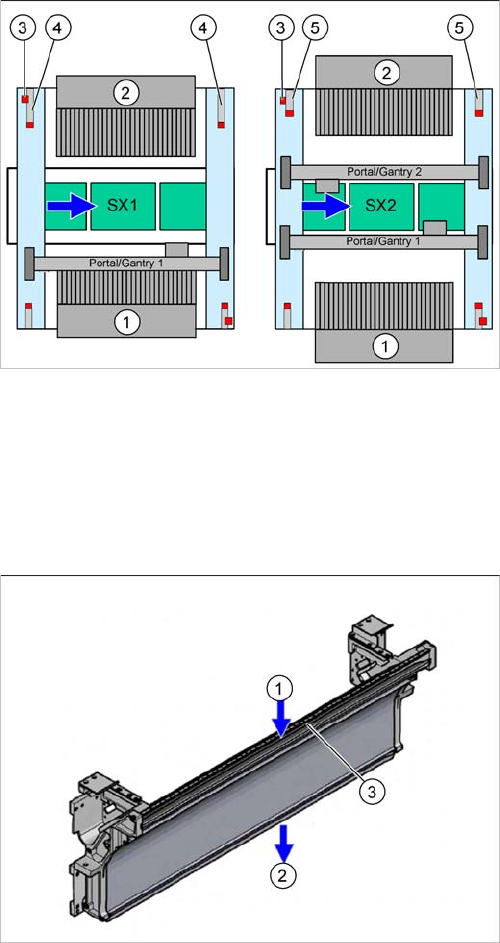
1. Location 1
2. Location 2
3. Safety switch
4. Long buffer on a SX1
5. Short buffer on a SX2
1. Inlet slot for empty tapes
2. Outlet slot for the empty tapes above the pneumatic
tape cutter
3. Dividing plate for tapes < 12 mm (can be removed for
tapes > 12 mm)