00900068-02_SM_ASM_ProcessLens_EN.pdf - 第63页
ASM Proces sLens Single - l ane 03/2020 Edit ion 63 4.2 Cali brations - Machine Zer o Calibration Purpose: R eferenc e the re lative position of the cam era to a f ixed pos ition i n the mac hine. 1. Locate the m ac hine…
ASM ProcessLens Single-lane 03/2020 Edition
62
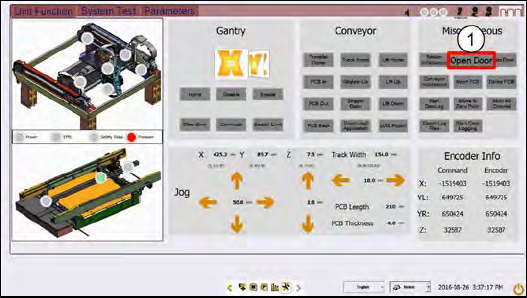
Step 10
1.
At the Miscellaneous, click
Open
Door. The machine unlocks the
cover.
2.
Unplug the lighting cable and
remove the 2D and 3D calibration
target.
If the 2D and 3D calibration fails:
1. Clean the 2D glass target surface with a clean hair brush.
2. Dust off the 3D glass target surface with a clean hair brush.
Dust and fingerprints cause light diffusion and hence calibration failure.
3. Check if the DLP is working properly.
ASM ProcessLens Single-lane 03/2020 Edition
63
4.2 Calibrations - Machine Zero Calibration
Purpose: Reference the relative position of the camera to a fixed position in the machine.
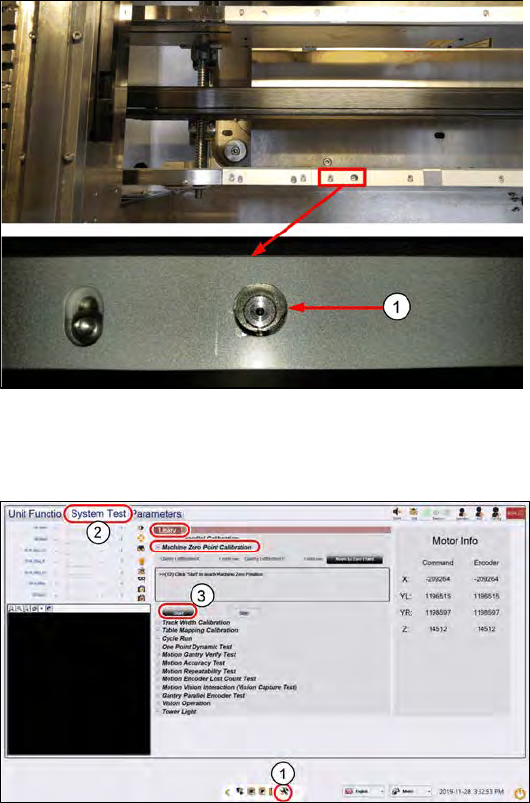
1. Locate the machine´s fixed fiducial on the left side of the front conveyor. Check it is clean and
not obstructed from view.
2. Close and lock the machine cover.
1) Machine Zero Reference
Step 1
1.
Go to the DiagnosticPage.
2.
Click System Test.
3.
At Utility > Machine Zero Point
Calibration, click Start.
The camera moves over to the
machine reference zero fiducial.
ASM ProcessLens Single-lane 03/2020 Edition
64
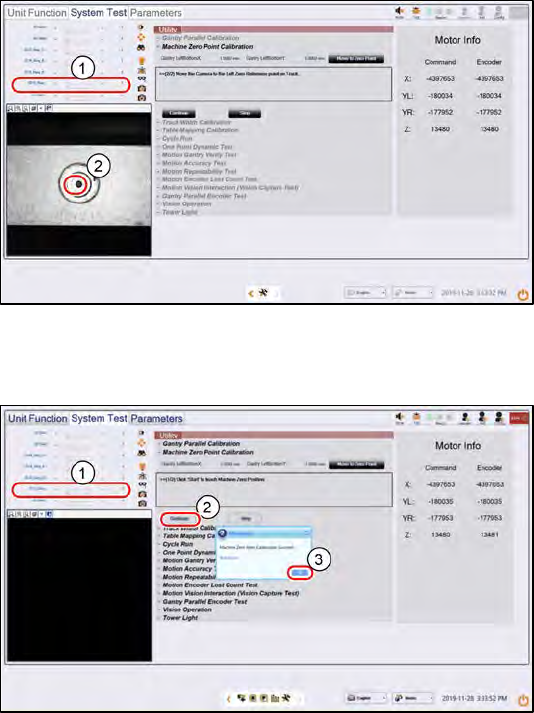
Step 2
1.
Set the 2D H_Ring light to about
15, all other lighting values r
emain
at 0. The fiducial comes into view.
2.
Click on the centre of the fiducial
to centre the camera´s FOV to the
fiducial´s centre.
Step 3
1.
Click on Focus icon.
2.
At Utility > Machine Zero Point
Calibration, click Continue..
The machine zeroes onto the
fiducial.
3.
Click OK.